
VS2017 - Winform 简单托盘小程序
界面比较简单,主要两个button 一个NotifyIcon 和 右键菜单 控件,
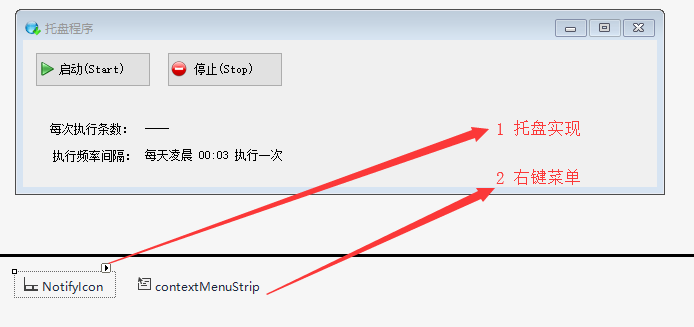
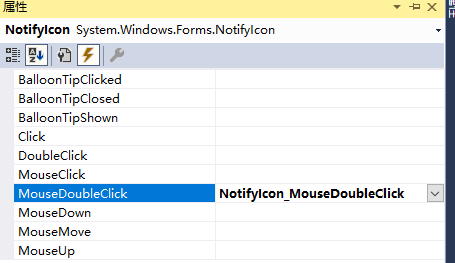
NotifyIcon 属性,如下:

并为NotifyIcon指定了DoubleClick事件:
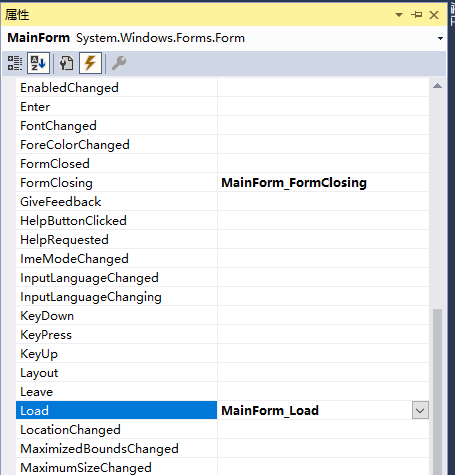
主窗体增加两个事件:
整体代码如下:
using Pallet_Common;

using System;

using System.Collections.Generic;

using System.ComponentModel;

using System.Configuration;

using System.Data;

using System.Diagnostics;

using System.Drawing;

using System.Linq;

using System.Text;

using System.Threading.Tasks;

using System.Windows.Forms;

namespace Pallet_01

{

    public partial class MainForm : Form

    {

        public MainForm()

        {

            InitializeComponent();

            this.btnEnd.Enabled = false;

            this.停止ToolStripMenuItem.Enabled = false;

        }

        private void MainForm_Load(object sender, EventArgs e)

        {

            this.btnEnd.Enabled = false;

            this.Resize += MainForm_Resize;

        }

        //单击窗体最小化时窗体隐藏

        void MainForm_Resize(object sender, EventArgs e)

        {

            if (this.WindowState == FormWindowState.Minimized)

            {

                this.Hide();

            }

        }

        private void NotifyIcon_MouseDoubleClick(object sender, MouseEventArgs e)

        {

            this.Show(); // 窗体显现

            this.WindowState = FormWindowState.Normal; //窗体回复正常大小

        }

        private void btnStart_Click(object sender, EventArgs e)

        {

            Scheduler.StartUp();

            this.btnStart.Enabled = false;

            this.btnEnd.Enabled = true;

            this.启动ToolStripMenuItem.Enabled = false;

            this.停止ToolStripMenuItem.Enabled = true;

            string pageSize = ConfigurationManager.AppSettings["PageSize"];

            this.lblCount.Text = pageSize + " 条";

            this.lblCount.Update();

        }

        private void btnEnd_Click(object sender, EventArgs e)

        {

            Scheduler.Stop();

            this.btnStart.Enabled = true;

            this.btnEnd.Enabled = false;

            this.启动ToolStripMenuItem.Enabled = true;

            this.停止ToolStripMenuItem.Enabled = false;

            this.lblCount.Text = "----";

            this.lblCount.Update();

        }

        private void MainForm_FormClosing(object sender, FormClosingEventArgs e)

        {

            if (MessageBox.Show("是否确认退出程序?", "退出", MessageBoxButtons.OKCancel, MessageBoxIcon.Question) == DialogResult.OK)

            {

                //关闭所有的线程,释放占用内存

                this.Dispose();

                this.Close();

            }

            else

            {

                e.Cancel = true;

            }

        }

        #region 右键菜单事件

        private void 启动ToolStripMenuItem_Click(object sender, EventArgs e)

        {

            Scheduler.StartUp();

            this.btnStart.Enabled = false;

            this.btnEnd.Enabled = true;

            this.启动ToolStripMenuItem.Enabled = false;

            this.停止ToolStripMenuItem.Enabled = true;

        }

        private void 停止ToolStripMenuItem_Click(object sender, EventArgs e)

        {

            Scheduler.Stop();

            this.btnStart.Enabled = true;

            this.btnEnd.Enabled = false;

            this.启动ToolStripMenuItem.Enabled = true;

            this.停止ToolStripMenuItem.Enabled = false;

        }

        private void 退出ToolStripMenuItem_Click(object sender, EventArgs e)

        {

            if (MessageBox.Show("是否确认退出程序?", "退出", MessageBoxButtons.OKCancel, MessageBoxIcon.Question) == DialogResult.OK)

            {

                // 关闭所有的线程,释放占用内存

                this.Dispose();

                this.Close();

            }

        }

        #endregion

    }

}
其中打开一个程序后,不允许再次打开,也就是运行后,只能运行一个,如下:
using System;

using System.Collections.Generic;

using System.Linq;

using System.Threading;

using System.Threading.Tasks;

using System.Windows.Forms;

namespace Pallet_01

{

    static class Program

    {

        /// <summary>

        /// 应用程序的主入口点。

        /// </summary>

        [STAThread]

        static void Main()

        {

            bool bCreateNew;

            Mutex m = new Mutex(false, "Pallent_01", out bCreateNew);

            if (bCreateNew)

            {

                Application.EnableVisualStyles();

                Application.SetCompatibleTextRenderingDefault(false);

                Application.Run(new MainForm());

            }

        }

    }

}
VS2017 - Winform 简单托盘小程序的更多相关文章
- 输出多行字符的一个简单JAVA小程序
public class JAVA { public static void main(String[] args) { System.out.println("-------------- ...
- 简单的小程序实现ATM机操作
简单的小程序实现ATM机操作 代码如下: package Day06; import java.util.Scanner; public class TestAccount { public stat ...
- python -----一个简单的小程序(监控电脑内存,cpu,硬盘)
一个简单的小程序 用函数实现!~~ 实现: cpu 使用率大于百分之50 时 , C 盘容量不足5 G 时, 内存 低于2G 时. 出现以上其中一种情况,发送自动报警邮件! 主要运用 到了两个 模 ...
- 3.2 Lucene实战:一个简单的小程序
在讲解Lucene索引和检索的原理之前,我们先来实战Lucene:一个简单的小程序! 一.索引小程序 首先,new一个java project,名字叫做LuceneIndex. 然后,在project ...
- Python3的tkinter写一个简单的小程序
一.这个学期开始学习python,但是看了python2和python3,最后还是选择了python3 本着熟悉python的原因,并且也想做一些小程序来增加自己对python的熟练度.所以写了一个简 ...
- Python绘制PDF文件~超简单的小程序
Python绘制PDF文件 项目简介 这次项目很简单,本次项目课,代码不超过40行,主要是使用 urllib和reportlab模块,来生成一个pdf文件. reportlab官方文档 http:// ...
- WinForm版图像编辑小程序(实现图像拖动、缩放、旋转、抠图)
闲暇之余,开发一个图片编辑小程序.程序主要特点就是可方便的对多个图像编辑,实现了一些基本的操作.本文主要介绍一下程序的功能.设计思路. 执行程序 下载地址: 百度网盘.https://pan.baid ...
- 用python写个简单的小程序,编译成exe跑在win10上
每天的工作其实很无聊,早知道应该去IT公司闯荡的.最近的工作内容是每逢一个整点,从早7点到晚11点,去查一次客流数据,整理到表格中,上交给素未蒙面的上线,由他呈交领导查阅. 人的精力毕竟是有限的,所以 ...
- .NET WinForm画树叶小程序
看了一片文章(http://keleyi.com/a/bjac/nurox416.htm),是使用分型画树叶,代码是Java的,因为Java很久没弄了,改用C#实现,下载地址: 画树叶小程序下载 核心 ...
随机推荐
- MySQL 一张表中两个字段值互换
update table a, table b set a.filed1= b.field2, a.field2= b.field1where a.id = b.id
- [CF414E]Mashmokh's Designed Problem
题意:给一棵树,有三个操作:①询问两点$(x,y)$之间的距离②把$x$和原来的父亲断开并连到它的$h$级祖先,作为新父亲最右的儿子③询问与根节点距离为$k$的点中最右的点是哪个点 用出栈入栈序$s_ ...
- Spring整合jdbc-jdbc模板api详解
1, package com.songyan.jdbc2; public class User { private int id; private String name; public int ge ...
- awk-使用
http://www.cnblogs.com/ggjucheng/archive/2013/01/13/2858470.html 命令格式: awk [-F field-separator] 'pat ...
- JNI之常用函数大全
要素 :1. 该函数大全是基于C语言方式的,对于C++方式可以直接转换 ,例如,对于生成一个jstring类型的方法转换分别如下: C编程环境中使用方法为:(*env) ->NewString ...
- Android介绍
Android系统的底层建立在Linux系统之上,该平台有操作系统,中间件,用户界面和应用软件4层组成,它采用一种被称为软件叠层(Software Stack)的方式进行构建. 1.应用程序层:And ...
- winform如何保持TreeView节点展开和折叠的状态
转载:http://blog.sina.com.cn/s/blog_6abcacf5010138q5.html private Hashtable NodesStatus = new Hashtabl ...
- jquery获取css颜色值返回RGB应用
我来给大家介绍一下在jquery获取css颜色值返回RGB方法,希望此文章对各位同学会有所帮助哦. 代码如下: 代码如下 复制代码 a, a:link, a:visited { color:#4 ...
- Sublime Text:格式化插件HTML-CSS-JS Prettify
Sublime Text:插件HTML-CSS-JS Prettify可以格式化HMTL/CSS/JS 1.安装Node.js 2.Sublime中ctrl+shift+p,输入ip: 3.点击Ins ...
- iOS 常用的#define合集
1.定义常量 定义常量的时候最好以小写字母k开头,让人见名知意, (1)导航栏高度:我们都知道iPhone竖屏时候导航栏的高度为44,这时候可以定义一个常量来表示该高度, #define kNaivg ...