
常见通用的 JOIN 查询
SQL执行循序:
手写:
SELECT DISTINCT <query_list> FROM <left_table>

<join type> JOIN <right_table> ON <join_condition>

WHERE <wherer_condition>

GROUP BY <group_by_list>

HAVING <having_condition>

ORDER BY <order_by_list>

LIMIT <limit number>
机读:
FROM <left_table>

ON <join_condition>

<join_type> JOIN <right_table>

WHERE <where_condition>

GROUP BY <group_by_list>

HAVING <having_condition>

SELECT

DISTINCT <query_list>

ORDER BY <order_by_condition>

LIMIT <limit_number>
总结:
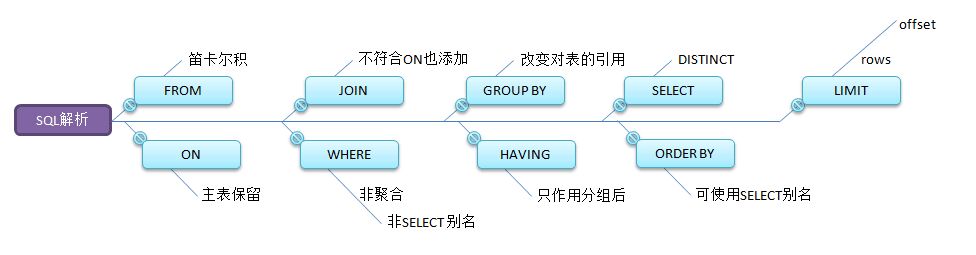
理论图谱:
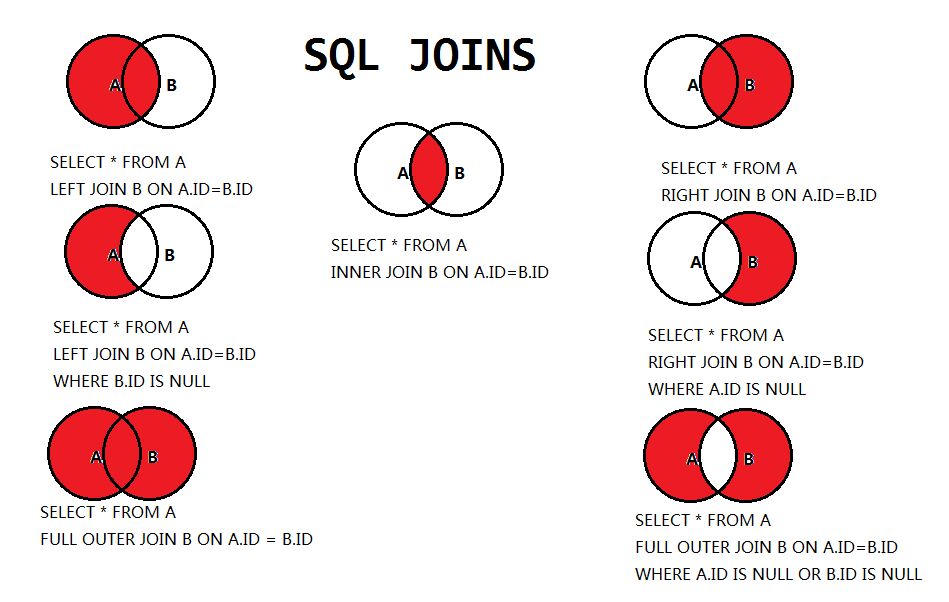
MySQL数据库实例:
1.创建数据库:
mysql> create database db_test;

Query OK, 1 row affected (0.01 sec)
2.使用数据库:
mysql> use db_test;

Database changed
3.创建表、添加数据:
CREATE TABLE `tb_dept` (

  `id` int(11) NOT NULL AUTO_INCREMENT COMMENT '部门主键',

  `deptName` varchar(30) DEFAULT NULL COMMENT '部门名称',

  `locAdd` varchar(40) DEFAULT NULL COMMENT '楼层',

  PRIMARY KEY (`id`)

) ENGINE=InnoDB AUTO_INCREMENT=1 DEFAULT CHARSET=utf8;

CREATE TABLE `tb_emp` (

  `id` int(11) NOT NULL AUTO_INCREMENT COMMENT '员工主键',

  `name` varchar(20) DEFAULT NULL COMMENT '员工姓名',

  `deptId` int(11) DEFAULT NULL COMMENT '部门外键',

  PRIMARY KEY (`id`),

  KEY `fk_dept_id` (`deptId`)

  #CONSTRAINT `fk_dept_id` FOREIGN KEY (`deptId`) REFERENCES `tb_dept` (`id`) COMMENT '部门外键设置, 已经注释掉。'

) ENGINE=InnoDB AUTO_INCREMENT=1 DEFAULT CHARSET=utf8;

INSERT INTO `tb_dept` VALUES ('', 'RD', '');

INSERT INTO `tb_dept` VALUES ('', 'HR', '');

INSERT INTO `tb_dept` VALUES ('', 'MK', '');

INSERT INTO `tb_dept` VALUES ('', 'MIS', '');

INSERT INTO `tb_dept` VALUES ('', 'FD', '');

INSERT INTO `tb_emp` VALUES ('', '张三', '');

INSERT INTO `tb_emp` VALUES ('', '李四', '');

INSERT INTO `tb_emp` VALUES ('', '王二', '');

INSERT INTO `tb_emp` VALUES ('', '麻子', '');

INSERT INTO `tb_emp` VALUES ('', '小马', '');

INSERT INTO `tb_emp` VALUES ('', '马旭', '');

INSERT INTO `tb_emp` VALUES ('', '小丁', '');

INSERT INTO `tb_emp` VALUES ('', '小西', '');
tb_emp表数据:
mysql> select * from tb_emp;

+----+--------+--------+

| id | name   | deptId |

+----+--------+--------+

|  1 | 张三   |      1 |

|  2 | 李四   |      1 |

|  3 | 王二   |      1 |

|  4 | 麻子   |      2 |

|  5 | 小马   |      2 |

|  6 | 马旭   |      3 |

|  7 | 小丁   |      4 |

|  8 | 小西   |     51 |

+----+--------+--------+

8 rows in set (0.01 sec)
tb_dept表数据:
mysql> select * from tb_dept;

+----+----------+--------+

| id | deptName | locAdd |

+----+----------+--------+

|  1 | RD       | 11     |

|  2 | HR       | 12     |

|  3 | MK       | 13     |

|  4 | MIS      | 14     |

|  5 | FD       | 15     |

+----+----------+--------+

5 rows in set (0.01 sec)
笛卡儿积:
mysql> select * from tb_emp, tb_dept;

+----+--------+--------+----+----------+--------+

| id | name   | deptId | id | deptName | locAdd |

+----+--------+--------+----+----------+--------+

|  1 | 张三   |      1 |  1 | RD       | 11     |

|  1 | 张三   |      1 |  2 | HR       | 12     |

|  1 | 张三   |      1 |  3 | MK       | 13     |

|  1 | 张三   |      1 |  4 | MIS      | 14     |

|  1 | 张三   |      1 |  5 | FD       | 15     |

|  2 | 李四   |      1 |  1 | RD       | 11     |

|  2 | 李四   |      1 |  2 | HR       | 12     |

|  2 | 李四   |      1 |  3 | MK       | 13     |

|  2 | 李四   |      1 |  4 | MIS      | 14     |

|  2 | 李四   |      1 |  5 | FD       | 15     |

|  3 | 王二   |      1 |  1 | RD       | 11     |

|  3 | 王二   |      1 |  2 | HR       | 12     |

|  3 | 王二   |      1 |  3 | MK       | 13     |

|  3 | 王二   |      1 |  4 | MIS      | 14     |

|  3 | 王二   |      1 |  5 | FD       | 15     |

|  4 | 麻子   |      2 |  1 | RD       | 11     |

|  4 | 麻子   |      2 |  2 | HR       | 12     |

|  4 | 麻子   |      2 |  3 | MK       | 13     |

|  4 | 麻子   |      2 |  4 | MIS      | 14     |

|  4 | 麻子   |      2 |  5 | FD       | 15     |

|  5 | 小马   |      2 |  1 | RD       | 11     |

|  5 | 小马   |      2 |  2 | HR       | 12     |

|  5 | 小马   |      2 |  3 | MK       | 13     |

|  5 | 小马   |      2 |  4 | MIS      | 14     |

|  5 | 小马   |      2 |  5 | FD       | 15     |

|  6 | 马旭   |      3 |  1 | RD       | 11     |

|  6 | 马旭   |      3 |  2 | HR       | 12     |

|  6 | 马旭   |      3 |  3 | MK       | 13     |

|  6 | 马旭   |      3 |  4 | MIS      | 14     |

|  6 | 马旭   |      3 |  5 | FD       | 15     |

|  7 | 小丁   |      4 |  1 | RD       | 11     |

|  7 | 小丁   |      4 |  2 | HR       | 12     |

|  7 | 小丁   |      4 |  3 | MK       | 13     |

|  7 | 小丁   |      4 |  4 | MIS      | 14     |

|  7 | 小丁   |      4 |  5 | FD       | 15     |

|  8 | 小西   |     51 |  1 | RD       | 11     |

|  8 | 小西   |     51 |  2 | HR       | 12     |

|  8 | 小西   |     51 |  3 | MK       | 13     |

|  8 | 小西   |     51 |  4 | MIS      | 14     |

|  8 | 小西   |     51 |  5 | FD       | 15     |

+----+--------+--------+----+----------+--------+

40 rows in set (0.00 sec)
查询tb_emp表和tb_dept中公共的数据:
mysql> select * from tb_emp e

    -> inner join tb_dept d on e.deptId = d.id;

+----+--------+--------+----+----------+--------+

| id | name   | deptId | id | deptName | locAdd |

+----+--------+--------+----+----------+--------+

|  1 | 张三   |      1 |  1 | RD       | 11     |

|  2 | 李四   |      1 |  1 | RD       | 11     |

|  3 | 王二   |      1 |  1 | RD       | 11     |

|  4 | 麻子   |      2 |  2 | HR       | 12     |

|  5 | 小马   |      2 |  2 | HR       | 12     |

|  6 | 马旭   |      3 |  3 | MK       | 13     |

|  7 | 小丁   |      4 |  4 | MIS      | 14     |

+----+--------+--------+----+----------+--------+

7 rows in set (0.00 sec)
查询tb_emp表中全部的数据:
mysql> select * from tb_emp e

    -> left join tb_dept d on e.deptId = d.id;

+----+--------+--------+------+----------+--------+

| id | name   | deptId | id   | deptName | locAdd |

+----+--------+--------+------+----------+--------+

|  1 | 张三   |      1 |    1 | RD       | 11     |

|  2 | 李四   |      1 |    1 | RD       | 11     |

|  3 | 王二   |      1 |    1 | RD       | 11     |

|  4 | 麻子   |      2 |    2 | HR       | 12     |

|  5 | 小马   |      2 |    2 | HR       | 12     |

|  6 | 马旭   |      3 |    3 | MK       | 13     |

|  7 | 小丁   |      4 |    4 | MIS      | 14     |

|  8 | 小西   |     51 | NULL | NULL     | NULL   |    #该条数据为 tb_emp 表中独有的数据, tb_dept 表中的字段用 null 占位

+----+--------+--------+------+----------+--------+

8 rows in set (0.00 sec)
查询tb_dept表中全部的数据:
mysql> select * from tb_emp e

    -> right join tb_dept d on e.deptId = d.id;

+------+--------+--------+----+----------+--------+

| id   | name   | deptId | id | deptName | locAdd |

+------+--------+--------+----+----------+--------+

|    1 | 张三   |      1 |  1 | RD       | 11     |

|    2 | 李四   |      1 |  1 | RD       | 11     |

|    3 | 王二   |      1 |  1 | RD       | 11     |

|    4 | 麻子   |      2 |  2 | HR       | 12     |

|    5 | 小马   |      2 |  2 | HR       | 12     |

|    6 | 马旭   |      3 |  3 | MK       | 13     |

|    7 | 小丁   |      4 |  4 | MIS      | 14     |

| NULL | NULL   |   NULL |  5 | FD       | 15     |     #该条数据为 tb_dept 表中独有的数据, tb_emp 表中的字段用 null 占位

+------+--------+--------+----+----------+--------+

8 rows in set (0.01 sec)
查询tb_emp表中独有的数据:
mysql> select * from tb_emp e

    -> left join tb_dept d on e.deptId = d.id

    -> where d.id is null;

+----+--------+--------+------+----------+--------+

| id | name   | deptId | id   | deptName | locAdd |

+----+--------+--------+------+----------+--------+

|  8 | 小西   |     51 | NULL | NULL     | NULL   |

+----+--------+--------+------+----------+--------+

1 row in set (0.00 sec)
查询tb_dept表中独有的数据:
mysql> select * from tb_emp e

    -> right join tb_dept d on e.deptId = d.id

    -> where e.deptId is null;

+------+------+--------+----+----------+--------+

| id   | name | deptId | id | deptName | locAdd |

+------+------+--------+----+----------+--------+

| NULL | NULL |   NULL |  5 | FD       | 15     |

+------+------+--------+----+----------+--------+

1 row in set (0.00 sec)
查询tb_emp和tb_dept表中所有的数据:
mysql> select * from tb_emp e

    -> full outer join tb_dept d on e.deptId = d.id;

ERROR 1064 (42000): You have an error in your SQL syntax; check the manual that corresponds to your MySQL server version for the right syntax to use near 'full outer join tb_dept d on e.deptId = d.id' at line 2
出错原因:mysql 中不支持这种连接方式。
解决办法:左连接数据和右连接数据相加,将公共的部分去重。
mysql> select * from tb_emp e

    -> left join tb_dept d on e.deptId = d.id

    -> union     #去重

    -> select * from tb_emp e

    -> right join tb_dept d on e.deptId = d.id;

+------+--------+--------+------+----------+--------+

| id   | name   | deptId | id   | deptName | locAdd |

+------+--------+--------+------+----------+--------+

|    1 | 张三   |      1 |    1 | RD       | 11     |

|    2 | 李四   |      1 |    1 | RD       | 11     |

|    3 | 王二   |      1 |    1 | RD       | 11     |

|    4 | 麻子   |      2 |    2 | HR       | 12     |

|    5 | 小马   |      2 |    2 | HR       | 12     |

|    6 | 马旭   |      3 |    3 | MK       | 13     |

|    7 | 小丁   |      4 |    4 | MIS      | 14     |

|    8 | 小西   |     51 | NULL | NULL     | NULL   |    #该条数据为 tb_emp 表中独有的数据, tb_dept 表中的字段用 null 占位

| NULL | NULL   |   NULL |    5 | FD       | 15     |    #该条数据为 tb_dept 表中独有的数据, tb_emp 表中的字段用 null 占位

+------+--------+--------+------+----------+--------+

9 rows in set (0.00 sec)
查询tb_emp和tb_dept表中独有的数据:
mysql> select * from tb_emp e

    -> left join tb_dept d on e.deptId = d.id

    -> where d.id is null

    -> union

    -> select * from tb_emp e

    -> right join tb_dept d on e.deptId = d.id

    -> where e.deptId is null;

+------+--------+--------+------+----------+--------+

| id   | name   | deptId | id   | deptName | locAdd |

+------+--------+--------+------+----------+--------+

|    8 | 小西   |     51 | NULL | NULL     | NULL   |

| NULL | NULL   |   NULL |    5 | FD       | 15     |

+------+--------+--------+------+----------+--------+

2 rows in set (0.00 sec)
常见通用的 JOIN 查询的更多相关文章
- 4.性能下降原因和常见的Join查询
性能下降 SQL慢,执行时间长,等待时间长 1.查询语句写的烂 2.索引失效 单值索引失效 和 复合索引失效 3.关联查询太多join(设计缺陷或不得已的需求) 4.服务器调优及各个参数设置(缓冲.线 ...
- Mysql 拼接字段查询语句和join查询拼接和时间查询
个人平时记录的,有点乱 1.修改时间字段,如果时间字段的类型是date或者是datetime类型的 update 表名 set 时间字段 = DATE_FORMAT(NOW(),'%Y-%m-%d % ...
- mysql join 查询图
mysql join 查询,特别是对查两个表之间的差集,可以用table字段=null来做. 注意千万不是join on XX!=XX ,这样出来的结果是错误的.
- Map/Reduce中Join查询实现
张表,分别较data.txt和info.txt,字段之间以/t划分. data.txt内容如下: 201001 1003 abc 201002 1005 def 201003 ...
- SQL2-子查询、join查询
SQL常用高级查询包括:Join查询.子查询. 子查询: USE flowershopdb --子查询:在一个select语句使用另一个select 语句作为条件或数据来源. --查询块:一个sele ...
- SQL-29 使用join查询方式找出没有分类的电影id以及名称
题目描述 film表 字段 说明 film_id 电影id title 电影名称 description 电影描述信息 CREATE TABLE IF NOT EXISTS film ( film_i ...
- hive的join查询
hive的join查询 语法 join_table: table_reference [INNER] JOIN table_factor [join_condition] | table_refere ...
- 09—mybatis注解配置join查询
今天来聊mybatis的join查询,怎么说呢,有的时候,join查询确实能提升查询效率,今天举个left join的例子,来看看mybatis的join查询. 就不写的很细了,把主要代码贴出来了. ...
- 一条SQL完成跨数据库实例Join查询
背景 随着业务复杂程度的提高.数据规模的增长,越来越多的公司选择对其在线业务数据库进行垂直或水平拆分,甚至选择不同的数据库类型以满足其业务需求.原本在同一数据库实例里就能实现的SQL查询,现在需要跨多 ...
随机推荐
- 牛客暑假多校第六场I-Team Rocket
一.题意 我们是穿越银河的火箭队....... 给出若干个区间,之后给出若干个点,要求对每个点求出,第一个覆盖点的区间的数量,之后用当前所有点覆盖的区间的序号的乘积结合输入的Y来生成下一位点.最后输出 ...
- 【转】Django添加静态文件设置
STATIC_URL = '/statics/'STATIC_ROOT= os.path.join(BASE_DIR, 'statics')STATICFILES_DIRS = ( os.path.j ...
- 3106: [cqoi2013]棋盘游戏
3106: [cqoi2013]棋盘游戏 链接 分析: 极大极小搜索 + 记忆化. 代码 #include<bits/stdc++.h> using namespace std; type ...
- 安装QC的心(新)路历程 纯记录 无技术
之前就只是看来软件测试原书第二版学习力理论知识,关于书中提到的缺陷管理工具,测试管理工具等也没有亲自去安装使用,感觉太不应该了.于是我就上网了解了一些测试管理工具后,决定先选择QC来学习.说实话,当初 ...
- Jmeter非GUI命令参数说明
查看帮助 -h, --help print usage information and exit 查看版本 -v, --version print the version information an ...
- 用Fluent实现MySQL到ODPS数据集成
安装ruby 首先通过 /etc/issue 命令查看当前使用centos是哪个版本: [hadoop@hadoop03 ~]$ cat /etc/issue 由于centos版本是6.6,安装ru ...
- GraphSAGE 代码解析(三) - aggregators.py
原创文章-转载请注明出处哦.其他部分内容参见以下链接- GraphSAGE 代码解析(一) - unsupervised_train.py GraphSAGE 代码解析(二) - layers.py ...
- [leetcode-644-Maximum Average Subarray II]
Given an array consisting of n integers, find the contiguous subarray whose length is greater than o ...
- Go基础篇【第2篇】: 内置库模块 fmt
fmt官方文档说明:https://studygolang.com/pkgdoc import "fmt" mt包实现了类似C语言printf和scanf的格式化I/O.格式化动作 ...
- 关于react-redux中Provider、connect的解析
Provider 是什么 react-redux 提供的一个 React 组件 作用 把 store 提供给其子组件 //使用 redux 的 createStore 方法创建的一个 store co ...