
[转]Implementing User Authentication in ASP.NET MVC 6
本文转自:http://www.dotnetcurry.com/aspnet-mvc/1229/user-authentication-aspnet-mvc-6-identity
In this article we will be implementing User Authentication in an ASP.NET MVC 6 application. Just like MVC 5, we have an Authentication Action Filter in MVC 6.
The following diagram gives an idea of Authentication when the end-user makes a call to an MVC 6 application.
Download an ASP.NET MVC CMS - Free Trial
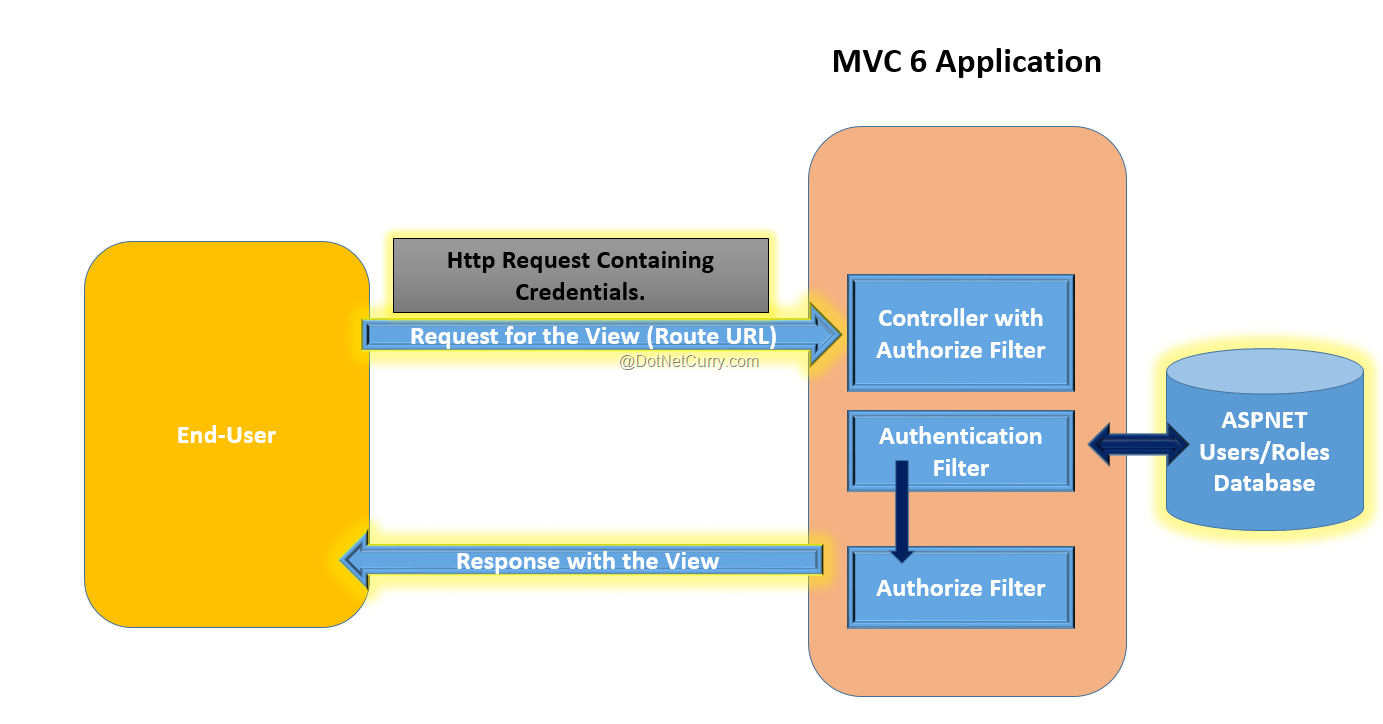
When the end-user makes a call to an MVC 6 application requesting a View, a response in the form of a View is returned when the action is executed. However if the Controller or the Action is applied with the Authorize attribute, then the request processing on the server sends the Login Page response to the client. Once the end-user sends the request with credentials, the Authentication Filter is executed which is responsible for validating Credentials against the Database server where the application users are stored. If the credentials are validated, then the Users will be Logged In and response of the View will be sent back to the user.
Implementing Authentication in ASP.NET MVC
To implement this application, we will be using Visual Studio 2015 Community Edition and ASP.NET 5 RC1. ASP.NET 5 RC 1 can be downloaded from this link.
Step 1: Open Visual Studio 2015 and create a new ASP.NET application of name ASPNET5_Auth as shown in the following Image

Click on OK and from the next window select ASP.NET Empty application from ASP.NET 5 templates as shown in the following image

Step 2: We need to add the following dependencies for using MVC, Identity, EntityFramework, etc. as shown here:
"dependencies": { "EntityFramework.Commands": "7.0.0-rc1-final", "EntityFramework.MicrosoftSqlServer": "7.0.0-rc1-final", "Microsoft.AspNet.Identity": "3.0.0-rc1-final", "Microsoft.AspNet.Identity.EntityFramework": "3.0.0-rc1-final", "Microsoft.AspNet.IISPlatformHandler": "1.0.0-rc1-final", "Microsoft.AspNet.Mvc": "6.0.0-rc1-final", "Microsoft.AspNet.Server.Kestrel": "1.0.0-rc1-final", "Microsoft.Framework.ConfigurationModel.Json": "1.0.0-beta4", "Microsoft.AspNet.Authentication.Cookies": "1.0.0-rc1-final", "Microsoft.AspNet.Mvc.TagHelpers": "6.0.0-rc1-final", "Microsoft.AspNet.StaticFiles": "1.0.0-rc1-final", "Microsoft.Extensions.CodeGenerators.Mvc": "1.0.0-rc1-final", "Microsoft.AspNet.Tooling.Razor": "1.0.0-rc1-final" }, "commands": { "web": "Microsoft.AspNet.Server.Kestrel", "ef": "EntityFramework.Commands" } |
The above dependencies will add necessary assemblies in the project.
Step 3: Since we need to store the Application users information in a SQL Server database, open Sql Server and create database of the name Security.
Step 4: In the project, add a new ASP.NET Configuration file, this will add appSettings.json file in the project. In this file add the following connection string
{ "Data": { "DefaultConnection": { "ConnectionString": "Server=.;Database=Security; Trusted_Connection=True;" } }} |
Step 5: In the project add Models, Views and Controllers folder. In the Models folder add the following class files.
Register.cs
using System.ComponentModel.DataAnnotations;namespace ASPNET5_Auth.Models{ public class Register { [Required] [EmailAddress] [Display(Name = "Email")] public string Email { get; set; } [Required] [StringLength(100, ErrorMessage = "The {0} must be at least {2} characters long.", MinimumLength = 6)] [DataType(DataType.Password)] [Display(Name = "Password")] public string Password { get; set; } [DataType(DataType.Password)] [Display(Name = "Confirm password")] [Compare("Password", ErrorMessage = "The password and confirmation password do not match.")] public string ConfirmPassword { get; set; } }} |
The above class contains properties for registering new user.
Login.cs
using System.ComponentModel.DataAnnotations;namespace ASPNET5_Auth.Models{ public class Login { [Required] [EmailAddress] public string Email { get; set; } [Required] [DataType(DataType.Password)] public string Password { get; set; } }} |
The above class contains properties for User Login.
ApplicationUser.cs
using Microsoft.AspNet.Identity.EntityFramework;namespace ASPNET5_Auth.Models{ public class ApplicationUser :IdentityUser { }} |
The above class is IdentityUser. This is used to manage application users. This class is used to store application user name based on unique email.
AppDbContext.cs
using Microsoft.AspNet.Identity.EntityFramework;using Microsoft.Data.Entity;namespace ASPNET5_Auth.Models{ public class AppDbContext : IdentityDbContext<ApplicationUser> { protected override void OnModelCreating(ModelBuilder builder) { base.OnModelCreating(builder); } }} |
The above class uses the Connection string to connect to database server and generate tables for storing the application user information in it. The IdentityDbContext<T> class uses EntityFramework to connect to database server.
ModelClasses.cs
using System.Collections.Generic;namespace ASPNET5_Auth.Models{ public class Person { public int PersonId { get; set; } public string PersonName { get; set; } } public class PersonDatabase : List<Person> { public PersonDatabase() { Add(new Person() { PersonId=1,PersonName="MS"}); Add(new Person() { PersonId = 2, PersonName = "SA" }); Add(new Person() { PersonId = 3, PersonName = "VP" }); } }} |
The above code is used to define Person entity class and the PersonDatabase class for storing person data.
Step 6: To generate the tables for storing Application users, right-click on the project name and select the Open Folder in File Explorer option. This will open the Explorer window. Right-click on any folder in the explorer window with ctrl+shift > and select option Open Command Window from Here. This will open the command prompt. Run following commands from the command prompt
dnu restorednvm use 1.0.0-rc1-final -pdnx ef migrations add Initialdnx ef database update |
Details for this commands can be read from this link.
This will add the following tables in Sql Server Security database

The command also adds Migration folder in the project containing AppDbContextModelSnapshot class. This contains logic for DB migration. The Initial class contains logic for Creating table using the Migration Command.
Step 7: In the Controllers folder, add a new item of type MVC Controller class of name AccountController. In this class, add the following code
using System.Threading.Tasks;using Microsoft.AspNet.Mvc;using Microsoft.AspNet.Authorization;using ASPNET5_Auth.Models;using Microsoft.AspNet.Identity; namespace ASPNET5_Auth.Controllers{ public class AccountController : Controller { //1 private readonly UserManager<ApplicationUser> _securityManager; private readonly SignInManager<ApplicationUser> _loginManager; //2 public AccountController(UserManager<ApplicationUser> secMgr, SignInManager<ApplicationUser> loginManager) { _securityManager = secMgr; _loginManager = loginManager; } //3 [HttpGet] [AllowAnonymous] public IActionResult Register() { return View(); } //4 [HttpPost] [AllowAnonymous] [ValidateAntiForgeryToken] public async Task<IActionResult> Register(Register model) { if (ModelState.IsValid) { var user = new ApplicationUser { UserName = model.Email, Email = model.Email }; var result = await _securityManager.CreateAsync(user, model.Password); if (result.Succeeded) { await _loginManager.SignInAsync(user, isPersistent: false); return RedirectToAction(nameof(HomeController.Index), "Home"); } } return View(model); } //5 [HttpGet] [AllowAnonymous] public IActionResult Login(string returnUrl = null) { ViewData["ReturnUrl"] = returnUrl; return View(); } //6 [HttpPost] [AllowAnonymous] [ValidateAntiForgeryToken] public async Task<IActionResult> Login(Login model, string returnUrl = null) { ViewData["ReturnUrl"] = returnUrl; if (ModelState.IsValid) { var result = await _loginManager.PasswordSignInAsync(model.Email, model.Password, false, lockoutOnFailure: false); if (result.Succeeded) { return RedirectToReturnUrl(returnUrl); } } return View(model); } //7 [HttpPost] [ValidateAntiForgeryToken] public async Task<IActionResult> LogOff() { await _loginManager.SignOutAsync(); return RedirectToAction(nameof(HomeController.Index), "Home"); } //8 private IActionResult RedirectToReturnUrl(string returnUrl) { if (Url.IsLocalUrl(returnUrl)) { return Redirect(returnUrl); } else { return RedirectToAction(nameof(HomeController.Index), "Home"); } } }} |
This above code has the following specifications:
1. It declares objects of UserManager<T> and SignInManager<T> classes. The UserManager<T> is used to manage users from the persistent store i.e. database and the SignInManager<T> class is used to manager APIs for user Sign In. The T here is the ApplicationUser class which contains user information.
2. The constructor of the controller class is injected with the UserManager and SignInManager dependencies. These dependencies will be registered in future steps.
3. Step for responding with the Register view.
4. HttpPost Register method which accepts the Register model object. This method will create an application method by using CreateAsync() method of the SignInManager class. If the user is registered successfully then the user will be signed using SignAsync() method of the UserManager class.
5. The HttpGet Login() method which responds with a Login View.
6. The Login() HttpPost method is used for the model containing the Email and password. If the Login is successful, then it will redirect to the page from which the request for Login initiated.
7. The LogOff () method.
8. A private method to redirect to the url from where the login request initiated.
Step 8: In the Controllers folder, add the following new controllers
PersonController.cs
using Microsoft.AspNet.Mvc;using ASPNET5_Auth.Models;using Microsoft.AspNet.Authorization;namespace ASPNET5_Auth.Controllers{ [Authorize] public class PersonController : Controller { // GET: /<controller>/ public IActionResult Index() { var persons = new PersonDatabase(); return View(persons); } }} |
The above controller contains the Index method to return Person Collection.
HomeController.cs
using Microsoft.AspNet.Mvc;namespace ASPNET5_Auth.Controllers{ public class HomeController : Controller { // GET: /<controller>/ public IActionResult Index() { return View(); } }} |
The Home Controllers contains Index method.
Step 9: Since we need to use Bootstrap styles in the project for view, in the Project add Bower.json and add the following dependencies in it
"dependencies": { "jQuery": "2.1.4", "bootstrap": "3.3.6" } |
This will install jQuery and Bower dependencies in the wwwroot section of the project.
Step 10: In the View folder, Add Shared folder. In this folder, using Add New Item, add the MVC View Layout Page. This will be _Layout.cshtml page. Add the following Markup and script references in it:
<!DOCTYPE html><html><head> <meta name="viewport" content="width=device-width" /> <link rel="stylesheet" href="~/lib/bootstrap/dist/css/bootstrap.min.css" /> <title>@ViewBag.Title</title></head><body> <div class="navbar-collapse collapse"><ul class="nav navbar-nav"> <li><a target="_blank" rel="nofollow">Home</a></li> <li><a target="_blank" rel="nofollow">Person</a></li> <li><a target="_blank" rel="nofollow">Register</a></li> <li><a target="_blank" rel="nofollow">Login</a></li> </ul></div> <div>@RenderBody()</div> <a href="http://~/lib/jQuery/dist/jquery.js" target="_blank" rel="nofollow">http://~/lib/jQuery/dist/jquery.js</a> <a href="http://~/lib/bootstrap/dist/js/bootstrap.js" target="_blank" rel="nofollow">http://~/lib/bootstrap/dist/js/bootstrap.js</a></body></html> |
We have links for Home, Register, Login, Person controllers.
Step 11: In the Views folder, using add new item, add MVC View Imports Page and in this page add the following imports
@using Microsoft.AspNet.Identity@addTagHelper "*, Microsoft.AspNet.Mvc.TagHelpers" |
This will be used to activate tag helpers from the MVC Views. This will be used in Model binding.
Step 12: In the Views folder, add a new folder of the name Person. In this folder add a new MVC View using add new item. This will add Index.cshtml. Add the following markup in the view:
@model IEnumerable<ASPNET5_Auth.Models.Person>@{ Layout = "_Layout"; ViewData["Title"] = "Index";}<h2>Index</h2> <table class="table"> <tr> <th> @Html.DisplayNameFor(model => model.PersonId) </th> <th> @Html.DisplayNameFor(model => model.PersonName) </th> </tr> @foreach (var item in Model) { <tr> <td> @Html.DisplayFor(modelItem => item.PersonId) </td> <td> @Html.DisplayFor(modelItem => item.PersonName) </td> </tr> }</table> |
Add the Home folder, in the View folder with the Index.cshtml view with markup as per your need.
In the Views folder, add a new MVC View of name Register.cshtml with the following markup code:
@model ASPNET5_Auth.Models.Register@{ Layout = "_Layout"; ViewData["Title"] = "Register";}<h2>@ViewData["Title"].</h2><form asp-controller="Account" asp-action="Register" method="post" class="form-horizontal" role="form"> <h4>Create a new account.</h4> <hr /> <div class="text-danger"> </div> <div class="form-group"><div class="col-md-10"> </div> </div> <div class="form-group"><div class="col-md-10"> </div> </div> <div class="form-group"><div class="col-md-10"> </div> </div> <div class="form-group"><div class="col-md-offset-2 col-md-10">Register</div> </div> </form></div></div></div></div> |
This view contains Textboxes for accepting user registration information. This view uses new MVC 6 tags like asp-controller, asp-action, asp-for etc. These tags will be processed by Microsoft.AspNet.Mvc.TagHelpers.
The same folder will contain Login.cshtml with the following code:
@model ASPNET5_Auth.Models.Login @{ Layout = "_Layout"; ViewData["Title"] = "Log in";}<div class="row"><div class="col-md-8"><section> <h4>Use a local account to log in.</h4> <hr> <div class="text-danger"> </div> <div class="form-group"><div class="col-md-10"> </div> </div> <div class="form-group"><div class="col-md-10"> </div> </div> <div class="form-group"><div class="col-md-offset-2 col-md-10">Log in</div> </div> <p> <a asp-action="Register">Register as a new user?</a> </p> </form> </section> </div> </div></div></div></div></section></div></div> |
All above steps completes the application design. Now we need to complete the Identity registration.
Identity Registration
Step 13: In Startup.cs, add the following code:
Add References in the Class
using Microsoft.AspNet.Builder;using Microsoft.AspNet.Hosting;using Microsoft.Extensions.DependencyInjection;using ASPNET5_Auth.Models;using Microsoft.Data.Entity;using Microsoft.AspNet.Identity.EntityFramework;using Microsoft.Extensions.Configuration; |
The Constructor
public Startup(IHostingEnvironment env){ var builder = new ConfigurationBuilder() .AddJsonFile("appsettings.json") .AddJsonFile($"appsettings.{env.EnvironmentName}.json", optional: true); builder.AddEnvironmentVariables(); Configuration = builder.Build();} |
The above code loads and reads json files in the project.
The rest of the code
public IConfigurationRoot Configuration { get; set; }// This method gets called by the runtime. Use this method to add services to the container.// For more information on how to configure your application, visit http://go.microsoft.com/fwlink/?LinkID=398940public void ConfigureServices(IServiceCollection services){ services.AddEntityFramework() .AddSqlServer() .AddDbContext<AppDbContext>(options => options.UseSqlServer(Configuration["Data:DefaultConnection:ConnectionString"])); services.AddIdentity<ApplicationUser, IdentityRole>() .AddEntityFrameworkStores<AppDbContext>() .AddDefaultTokenProviders(); services.AddMvc();}// This method gets called by the runtime. Use this method to configure the HTTP request pipeline.public void Configure(IApplicationBuilder app){ app.UseIISPlatformHandler(); app.UseStaticFiles(); app.UseIdentity(); // To configure external authentication please see http://go.microsoft.com/fwlink/?LinkID=532715 app.UseMvc(routes => { routes.MapRoute( name: "default", template: "{controller=Home}/{action=Index}/{id?}"); });} |
ConfigureServices() does dependency injection for EntityFramework based on the connection string and the Identity based on the Application User and IdentityRole. This method also adds the MVC service. The Configure() method defines the use of Identity, using UseIdentity() method and defines the routing for MVC using UseMvc() method. UseStaticFiles() method will be used to read the CSS and jQuery files in application.
Run the application. The home page will be displayed as shown in the following image

Click on the Person link, this will redirect to the Login page as shown in the following image

Click on Register as a new user link to show the register page as shown in the following image

Create a new user, once the registration is successful the Person view will be displayed as shown in the following image

Conclusion:
ASP.NET MVC 6 provides an easy approach for implementing Authentication. Using Microsoft.AspNet.Identity, we can create users and roles for the application and integrate them with controllers.
Download the entire source code of this article (Github)
Share on Facebook
Share on Twitter
Share on Google+
-->
Custom Model Binder in ASP.NET MVC
Using MongoDB with Web API and ASP.NET Core
Action Method Selector in ASP.NET MVC
Access same Action Method by Multiple Roles in ASP.NET MVC using Configuration File
Creating Tag Helpers in ASP.NET MVC 6 / ASP.NET Core 1.0

[转]Implementing User Authentication in ASP.NET MVC 6的更多相关文章
- Forms Authentication in ASP.NET MVC 4
原文:Forms Authentication in ASP.NET MVC 4 Contents: Introduction Implement a custom membership provid ...
- Implementing HTTPS Everywhere in ASP.Net MVC application.
Implementing HTTPS Everywhere in ASP.Net MVC application. HTTPS everywhere is a common theme of the ...
- Active Directory Authentication in ASP.NET MVC 5 with Forms Authentication and Group-Based Authorization
I know that blog post title is sure a mouth-full, but it describes the whole problem I was trying to ...
- Demystifying ASP.NET MVC 5 Error Pages and Error Logging
出处:http://dusted.codes/demystifying-aspnet-mvc-5-error-pages-and-error-logging Error pages and error ...
- 【记录】ASP.NET MVC 4/5 Authentication 身份验证无效
在 ASP.NET MVC 4/5 应用程序发布的时候,遇到一个问题,在本应用程序中进行身份验证是可以,但不能和其他"二级域名"共享,在其他应用程序身份验证,不能和本应用程序共享, ...
- ASP.NET MVC 5 Authentication Breakdown
In my previous post, "ASP.NET MVC 5 Authentication Breakdown", I broke down all the parts ...
- ASP.NET MVC:Form Authentication 相关的学习资源
看完此图就懂了 看完下面文章必须精通 Form authentication and authorization in ASP.NET Explained: Forms Authentication ...
- 【ASP.NET MVC 5】第27章 Web API与单页应用程序
注:<精通ASP.NET MVC 3框架>受到了出版社和广大读者的充分肯定,这让本人深感欣慰.目前该书的第4版不日即将出版,现在又已开始第5版的翻译,这里先贴出该书的最后一章译稿,仅供大家 ...
- 【转】ASP.NET MVC 的最佳实践
[This post is based on a document authored by Ben Grover (a senior developer at Microsoft). It is ou ...
随机推荐
- Linux下抓包命令tcpdump
本文内容来源于网络 PS:tcpdump是一个用于截取网络分组,并输出分组内容的工具,简单说就是数据包抓包工具.tcpdump凭借强大的功能和灵活的截取策略,使其成为Linux系统下用于网络分析和问题 ...
- Apple开启双重认证过程
1.准备 1.1 AppleID账号.密码 1.2 打算用于接收开启双重认证的十一位手机号 1.3 AppleID账号密保问题 2.操作步骤: 2.1 打开设置 2.2 点击个人账户头像 注意:当前有 ...
- 3月份GitHub上最热门的Java开源项目
今天,我们来盘点3月份GitHub上最热门的Java项目的时候了,如果你每月都有关注猿妹发布的排行榜,那么本月的Java项目对你来说一定不陌生,这些都是曾经多次出现在榜单中的项目: 1 advance ...
- java学习笔记之位运算符
java的位运算符主要针对二进制数的位进行逻辑运算,主要包括以下几种的位运算符 1.与运算符(&) 与运算符的使用规律是两个操作数中位为1的时候结果为1,否则都是0,例如 3&5=1 ...
- Python3之os模块
一:简介 os模块主要用于提供系统高级别的操作. 二:常用方法 os.access(path, mode) # 检验权限模式 os.chdir(path) # 改变当前工作目录 os.chflags( ...
- Leetcode 931. Minimum falling path sum 最小下降路径和(动态规划)
Leetcode 931. Minimum falling path sum 最小下降路径和(动态规划) 题目描述 已知一个正方形二维数组A,我们想找到一条最小下降路径的和 所谓下降路径是指,从一行到 ...
- python Exception
1.except:用来捕捉异常,如果没有捕捉到,则向上层exception传递 2.finally:用来保证其代码一定会执行,可以做收尾工作,比如关闭文件等等. 3.在with as 中, 4.try ...
- _.each _.map _.filter javascript 语法
1.forEach():没有返回值,只是针对每个元素调用func 简单来说,就是将数组中的每个值,依次进行遍历,执行功能函数 如果只需对数组元素进行操作,不需返回任何值时适用 var ...
- Python和qqbot库开发简单的机器人
from qqbot import QQBotSlot as qqbotslot, RunBot @qqbotslot def onQQMessage(bot, contact, member, co ...
- 创建一个流(Stream)可以让Bitmap或Image保存到流里面
创建一个流(Stream)可以让Bitmap或Image保存到流里面 http://blog.csdn.net/angxiao/article/details/7481465 写文件流 ...