
Android 登录界面调用输入法时让界面自动上移,使输入法不会遮挡到主界面(Activity)
先贴上效果图:
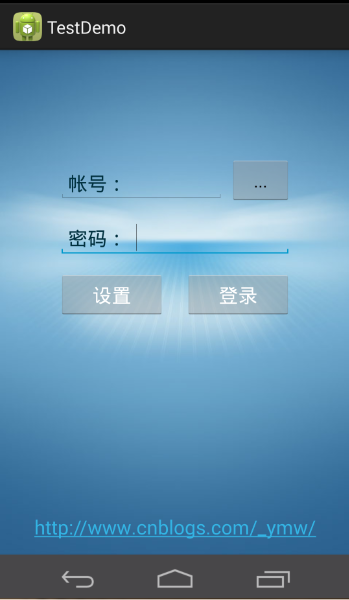
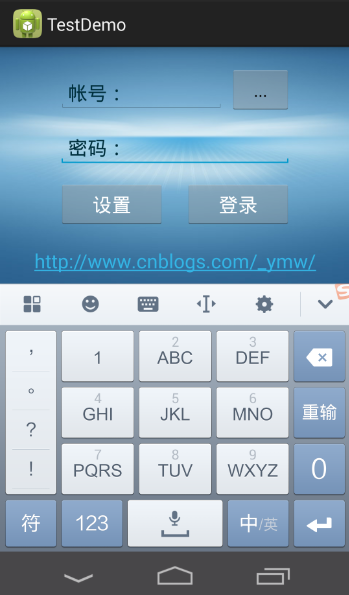
 <?xml version="1.0" encoding="utf-8"?>

 <ScrollView xmlns:android="http://schemas.android.com/apk/res/android"

     android:layout_width="fill_parent"

     android:layout_height="match_parent"

     android:background="@drawable/main_bg"

     android:fillViewport="true" >

     <!-- 设置fillViewport属性表示充满整个ScrollView -->

     <LinearLayout

         android:layout_width="fill_parent"

         android:layout_height="wrap_content"

         android:orientation="vertical" >

         <LinearLayout

             android:id="@+id/logo"

             android:layout_width="fill_parent"

             android:layout_height="wrap_content"

             android:layout_marginTop="20dip"

             android:layout_weight="1"

             android:gravity="bottom|center_horizontal"

             android:orientation="vertical" >

             <ImageView

                 android:id="@+id/imageView1"

                 android:layout_width="wrap_content"

                 android:layout_height="wrap_content" />

             <ImageView

                 android:id="@+id/serviceimg"

                 android:layout_width="wrap_content"

                 android:layout_height="wrap_content" />

         </LinearLayout>

         <LinearLayout

             android:id="@+id/login"

             android:layout_width="fill_parent"

             android:layout_height="wrap_content"

             android:layout_weight="1"

             android:gravity="top|center_horizontal"

             android:orientation="vertical"

             android:visibility="visible" >

             <LinearLayout

                 android:layout_width="fill_parent"

                 android:layout_height="wrap_content"

                 android:layout_marginLeft="60dip"

                 android:layout_marginRight="60dip"

                 android:orientation="vertical" >

                 <LinearLayout

                     android:layout_width="fill_parent"

                     android:layout_height="wrap_content"

                     android:gravity="center"

                     android:orientation="horizontal" >

                     <RelativeLayout

                         android:layout_width="wrap_content"

                         android:layout_height="wrap_content"

                         android:layout_weight="1" >

                         <EditText

                             android:id="@+id/userid"

                             android:layout_width="fill_parent"

                             android:layout_height="wrap_content"

                             android:layout_marginTop="5.0dip"

                             android:maxLength="16"

                             android:maxLines="1"

                             android:paddingBottom="6.0dip"

                             android:paddingLeft="80.0dip"

                             android:paddingTop="6.0dip"

                             android:textColor="#ff333333"

                             android:textSize="20sp" />

                         <TextView

                             android:id="@+id/textView2"

                             android:layout_width="wrap_content"

                             android:layout_height="wrap_content"

                             android:layout_alignBaseline="@id/userid"

                             android:layout_marginTop="15.0dip"

                             android:paddingLeft="10.0dip"

                             android:text="帐号:"

                             android:textColor="#ff00303e"

                             android:textSize="20sp" />

                     </RelativeLayout>

                     <Button

                         android:id="@+id/history"

                         android:layout_width="wrap_content"

                         android:layout_height="wrap_content"

                         android:layout_marginLeft="5dip"

                         android:text="..." />

                 </LinearLayout>

                 <RelativeLayout

                     android:layout_width="fill_parent"

                     android:layout_height="wrap_content"

                     android:layout_marginTop="10dip" >

                     <EditText

                         android:id="@+id/password"

                         android:layout_width="fill_parent"

                         android:layout_height="wrap_content"

                         android:layout_marginTop="5.0dip"

                         android:inputType="textPassword"

                         android:maxLength="16"

                         android:maxLines="1"

                         android:paddingBottom="6.0dip"

                         android:paddingLeft="80.0dip"

                         android:paddingTop="6.0dip"

                         android:textColor="#ff333333"

                         android:textSize="20sp" />

                     <TextView

                         android:layout_width="wrap_content"

                         android:layout_height="wrap_content"

                         android:layout_alignBaseline="@id/password"

                         android:layout_marginTop="15.0dip"

                         android:paddingLeft="10.0dip"

                         android:text="密码:"

                         android:textColor="#ff00303e"

                         android:textSize="20sp" />

                 </RelativeLayout>

                 <LinearLayout

                     android:layout_width="fill_parent"

                     android:layout_height="wrap_content"

                     android:layout_marginTop="15dp"

                     android:gravity="center"

                     android:orientation="horizontal" >

                     <Button

                         android:id="@+id/setbt"

                         android:layout_width="wrap_content"

                         android:layout_height="wrap_content"

                         android:layout_weight="1"

                         android:text="设置"

                         android:textColor="#FFFFFFFF"

                         android:textSize="20sp" />

                     <Button

                         android:id="@+id/loginbt"

                         android:layout_width="wrap_content"

                         android:layout_height="wrap_content"

                         android:layout_marginLeft="20dip"

                         android:layout_weight="1"

                         android:text="登录"

                         android:textColor="#FFFFFFFF"

                         android:textSize="20sp" />

                 </LinearLayout>

             </LinearLayout>

         </LinearLayout>

         <LinearLayout

             android:id="@+id/linearLayout3"

             android:layout_width="fill_parent"

             android:layout_height="wrap_content"

             android:layout_marginTop="20dp"

             android:layout_weight="1"

             android:alwaysDrawnWithCache="true"

             android:gravity="bottom|center_horizontal"

             android:orientation="vertical" >

             <TextView

                 android:id="@+id/info"

                 android:layout_width="fill_parent"

                 android:layout_height="wrap_content"

                 android:layout_marginBottom="15dp"

                 android:autoLink="web"

                 android:gravity="center_horizontal"

                 android:text="http://www.cnblogs.com/_ymw/"

                 android:textColor="#FFFFFF"

                 android:textSize="20sp" />

         </LinearLayout>

     </LinearLayout>

 </ScrollView>
Android 登录界面调用输入法时让界面自动上移,使输入法不会遮挡到主界面(Activity)的更多相关文章
- iOS tableview上textView在编辑状态时,tableview自动上移的功能
在viewcognroller中,添加tableview时, tableview中cell上的textField如果吊起键盘时,tableview时可以自动上移,但是如果是textView吊起键盘,t ...
- Oracle EBS 从Web界面进入责任时,提示不存在可用的有效责任
Oracle EBS 从Web界面进入责任时,提示不存在可用的有效责任 每次在Web界面,点击某一责任的功能时,弹出Form.会提示错误:对不起,不存在可用的有效责任. ...
- 解决VS2008之后平台(如VS2012/VS2013/VS2015)调试模式下不显示主界面窗口的问题
问题描述:win10操作系统下,VS2008工程调试模式下正常显示主界面窗口,使用VS2012/VS2013/VS2015环境打开VS2008工程,调试模式下应用程序转为后台进程,不显示主界面窗口:另 ...
- Android Handler 异步调用修改界面与主线程
在Android编程的过程中,如果在Activity中某个操作会运行比较长的时间,比如:下载文件.这个时候如果在主线程中直接下载文件,会造成Activity卡死的现象:而且如果时间超过5秒,会有ANR ...
- android应用程序第一次启动时显示引导界面
市面上好多优秀的应用(举例新浪微博.UC浏览器)都采用了欢迎页面与使用向导的方式给用户带来了良好的用户体验. 一般来说用户第一次安装应用或者安装了新版本后第一次进入应用都会显示成 欢迎页面-使用向导- ...
- Android AsynTask更新主界面
虽然今天礼拜六还在加班,但是在等接口,所以还是有很多时间来自己学点东西的,所以就接着昨天的来.今天继续学的是不通过主线程来更新主线程的界面的问题. 昨天是用的开启线程调用Handler来更新线程,那个 ...
- Android ActionBar应用实战,高仿微信主界面的设计
转载请注明出处:http://blog.csdn.net/guolin_blog/article/details/26365683 经过前面两篇文章的学习,我想大家对ActionBar都已经有一个相对 ...
- 【Android】13.0 第13章 创建和访问SQLite数据库—本章示例主界面
分类:C#.Android.VS2015: 创建日期:2016-02-26 一.简介 Android 内置了三种数据存取方式:SQLite数据库.文件.SharedPreferences. 这一章我们 ...
- Ionic2 rc2 Events 跨界面调用的使用方法及问题解决
Events:事件注册 在任意一界面注册事件之后可在任意界面根据事件名称进行调用. 首先看一下官方文档的调用方式 import { Events } from 'ionic-angular'; co ...
随机推荐
- 轻量级权限管理系统——MVC基础
Microsoft Web 开发平台
- direct.h头文件(对目录操作)
chdir()改变当前目录的函数原形:int chdir(const char *path)功能:把由path指定的目录改为当前目录.path参数中可以指定驱动器号,如“a:\\ddd”, 但只是改变 ...
- 推荐一个好的Redis GUI 客户端工具
推荐一个好的Redis GUI 客户端工具 Redis Desktop Manager
- 洛谷 P1829 [国家集训队]Crash的数字表格 / JZPTAB 解题报告
[国家集训队]Crash的数字表格 / JZPTAB 题意 求\(\sum\limits_{i=1}^n\sum\limits_{j=1}^mlcm(i,j)\),\(n,m\le 10^7\) 鉴于 ...
- MySQL使用笔记(三)表的操作
By francis_hao Dec 11,2016 表的操作 表的操作有创建表.查看表.删除表和修改表 创建表 创建表之前要在某个数据库中. mysql> create table ta ...
- rman异机恢复,全部恢复和增量恢复
1.首先准备工作:hostname 192.168.222.11 ol7.localdomain ol7建立相关目录:mkdir -p /u01/app/oracle/oradata/DB11G/mk ...
- 设备VMnet0上的网络桥接当前未在运行解决办法
问题: 今天把自己的VM从C盘挪到了D盘,然后再open所有VM都会显示网卡无法桥接了 “vmware 没有未桥接的主机网络适配器” 解决办法: 1.关闭所有VM 2.打开 编辑-虚拟网络编辑器,会发 ...
- java md5加密 不依赖base64包
/** * MD5 加密 */ private String getMD5Str(String str) { MessageDigest messageDigest = null; try { mes ...
- 解析 Array.prototype.slice.call(arguments,0)
Array.prototype.slice.call(arguments,0) 经常会看到这段代码用来处理函数的参数 网上很多复制粘帖说:Array.prototype.slice.call(argu ...
- AngularJs学习——实现列表内容项的增加删除
效果截图: 说明:引入bootstrap.min.css样式库和angular.min.js的静态资源库,实现列表内容的增加和删除操作. AngularJS代码: <script src=&qu ...