
ECharts 雷达图怎么在类目值下面显示数值
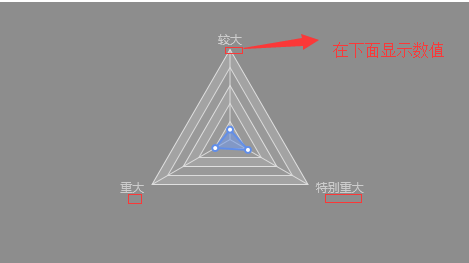
需要实现的效果:
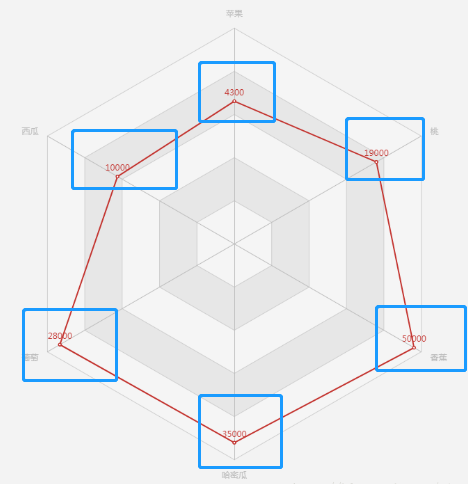
官网里面的demo显示数值,都是在拐点处:
【解决】
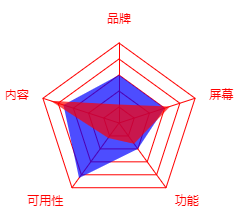
1、只显示类目
     <div id="mychart" style="width:300px;height:300px;margin:0 auto;"></div>

        <script>

            var arr1 = [60,73,85,40,60];

            var arr2 = [23,90,23,32,67];

            var mychart =  echarts.init(document.getElementById('mychart'));

            var option = {

                radar: [

                    {

                        indicator: [

                            {text: '品牌', max: 100},

                            {text: '内容', max: 100},

                            {text: '可用性', max: 100},

                            {text: '功能', max: 100},

                            {text: '屏幕', max: 100}

                        ],

                        center: ['50%','54%'],//调整雷达图的位置

                        radius: 80,//半径,可放大放小雷达图

                        axisLine: {//坐标轴线相关设置

                            show: true,

                            lineStyle: {

                                color: 'red'

                            }

                        },

                        splitLine : {

                            show : true,

                            lineStyle : {

                                width : 1,

                                color : 'red' // 图表背景网格线的颜色

                            }

                        },

                        splitArea: {

                            show: false,

                        },

                        name: {

                            rich: {

                                a: {

                                    color: 'red',

                                    lineHeight:

                                },

                            },

                            formatter: (a)=>{

                                return `{a|${a}}`

                            }

                        }

                    },

                ],

                series: [

                    {

                        type: 'radar',

                        symbol: 'none',//去掉拐点的圈

                        data: [

                            {

                                value: arr1,

                                name: '某软件',

                                areaStyle: {

                                    normal: {

                                        color: 'blue'

                                    }

                                },

                                lineStyle: {

                                    color:"rgba(255,255,255,0)"

                                },

                            },{

                                value: arr2,

                                name:'jja',

                                areaStyle: {

                                    normal: {

                                        color: 'red' // 图表中各个图区域的颜色

                                    }

                                },

                                lineStyle: {

                                    color:"rgba(255,255,255,0)" // 图表中各个图区域的边框线颜色

                                },

                            }

                        ]

                    },

                ]

            };

            mychart.setOption(option);

        </script>
实现效果:
2、实现最简单的数值在类目下
<div id="mychart" style="width:300px;height:300px;margin:0 auto;"></div>

        <script>

            var arr1 = [60,73,85,40,60];

            var arr2 = [23,90,23,32,67];

            var mychart =  echarts.init(document.getElementById('mychart'));

            var option = {

                radar: [

                    {

                        indicator: [

                            {text: '品牌', max: 100},

                            {text: '内容', max: 100},

                            {text: '可用性', max: 100},

                            {text: '功能', max: 100},

                            {text: '屏幕', max: 100}

                        ],

                        center: ['50%','54%'],//调整雷达图的位置

                        radius: 80,//半径,可放大放小雷达图

                        axisLine: {//坐标轴线相关设置

                            show: true,

                            lineStyle: {

                                color: 'red'

                            }

                        },

                        splitLine : {

                            show : true,

                            lineStyle : {

                                width : 1,

                                color : 'red' // 图表背景网格线的颜色

                            }

                        },

                        splitArea: {

                            show: false,

                        },

                        name: {

                            rich: {

                                a: {

                                    color: 'red',

                                    lineHeight:

                                },

                                b: {

                                    color: '#fff',

                                    align: 'center',

                                    backgroundColor: '#666',

                                    padding: ,

                                    borderRadius:

                                }

                            },

                            formatter: (a,b)=>{

                                return `{a|${a}}\n{b|}`

                            }

                        }

                    },

                ],

                series: [

                    {

                        type: 'radar',

                        symbol: 'none',//去掉拐点的圈

                        data: [

                            {

                                value: arr1,

                                name: '某软件',

                                areaStyle: {

                                    normal: {

                                        color: 'blue'

                                    }

                                },

                                lineStyle: {

                                    color:"rgba(255,255,255,0)"

                                },

                            },{

                                value: arr2,

                                name:'jja',

                                areaStyle: {

                                    normal: {

                                        color: 'red' // 图表中各个图区域的颜色

                                    }

                                },

                                lineStyle: {

                                    color:"rgba(255,255,255,0)" // 图表中各个图区域的边框线颜色

                                },

                            }

                        ]

                    },

                ]

            };

            mychart.setOption(option);

        </script>
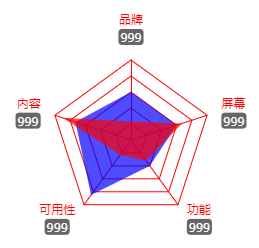
3、实现最终效果
<!DOCTYPE html>

<html>

    <head>

        <meta charset="UTF-8">

        <meta name="viewport" content="width=device-width,initial-scale=1.0">

        <title></title>

        <script src="js/jquery.min.js"></script>

        <script src="js/echarts.js"></script>

    </head>

    <body>

        <div id="mychart" style="width:300px;height:300px;margin:0 auto;"></div>

        <script>

            var arr1 = [,,,,];

            var arr2 = [,,,,];

            var mychart =  echarts.init(document.getElementById('mychart'));

            var option = {

                radar: [

                    {

                        indicator: [

                            {text: '品牌', max: 100},

                            {text: '内容', max: 100},

                            {text: '可用性', max: 100},

                            {text: '功能', max: 100},

                            {text: '屏幕', max: 100}

                        ],

                        center: ['50%','54%'],//调整雷达图的位置

                        radius: 80,//半径,可放大放小雷达图

                        axisLine: {//坐标轴线相关设置

                            show: true,

                            lineStyle: {

                                color: 'red'

                            }

                        },

                        splitLine : {

                            show : true,

                            lineStyle : {

                                width : 1,

                                color : 'red' // 图表背景网格线的颜色

                            }

                        },

                        splitArea: {

                            show: false,

                        },

                    },

                ],

                series: [

                    {

                        type: 'radar',

                        symbol: 'none',//去掉拐点的圈

                        data: [

                            {

                                value: arr1,

                                name: '某软件',

                                areaStyle: {

                                    normal: {

                                        color: 'blue'

                                    }

                                },

                                lineStyle: {

                                    color:"rgba(255,255,255,0)"

                                },

                            },{

                                value: arr2,

                                name:'jja',

                                areaStyle: {

                                    normal: {

                                        color: 'red' // 图表中各个图区域的颜色

                                    }

                                },

                                lineStyle: {

                                    color:"rgba(255,255,255,0)" // 图表中各个图区域的边框线颜色

                                },

                            }

                        ]

                    },

                ]

            };

            mychart.setOption(option);

            var i = -1;

            mychart.setOption({

                  radar: [

                    {

                        name: {

                            rich: {

                                a: {

                                    color: 'red',

                                    lineHeight:

                                },

                                b: {

                                    color: '#fff',

                                    align: 'center',

                                    backgroundColor: '#666',

                                    padding: ,

                                    borderRadius:

                                }

                            },

                            formatter: (a,b)=>{

                                i++;

                                return `{a|${a}}\n{b|${arr1[i]}}`

                            }

                        }

                    }

                ]

            })

        </script>

    </body>

</html>
效果:
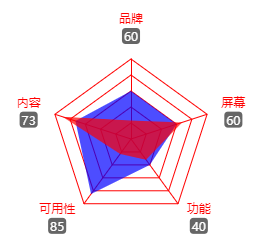
ECharts 雷达图怎么在类目值下面显示数值的更多相关文章
- echarts雷达图
用echarts展现雷达图的定制 <!doctype html> <html> <head> <meta charset="utf-8"& ...
- echarts 雷达图的个性化设置
echarts 雷达图的个性化设置 function test() { let myChart = echarts.init(document.getElementById('levelImage') ...
- echarts雷达图点击事件
最近看见别人问的问题,点击雷达图的拐点,获取点击数据的问题,直接上代码. echarts配置问题:https://www.douban.com/note/509404582/ <!doctype ...
- echarts雷达图点击事件 包含(2.x,3.85,4.02)测试
最近看见别人问的问题,点击雷达图的拐点,获取点击数据的问题,直接上代码. echarts 2x 的点击事件 echarts配置问题:https://www.douban.com/note/509404 ...
- ECharts雷达图详细配置说明
雷达图表配置说明: // 指定图表的配置项和数据 var option = { backgroundColor: 'rgba(204,204,204,0.7 )', // 背景色,默认无背景 rgba ...
- Java生鲜电商平台-生鲜电商中商品类目、属性、品牌、单位架构设计与实战
Java生鲜电商平台-生鲜电商中商品类目.属性.品牌.单位架构设计与实战 说明:Java生鲜电商平台-生鲜电商中商品类目.属性.品牌.单位架构设计与实战经验分享 凡是涉及到购物,必然是建立在商品的基础 ...
- Echarts数据可视化series-radar雷达图,开发全解+完美注释
全栈工程师开发手册 (作者:栾鹏) Echarts数据可视化开发代码注释全解 Echarts数据可视化开发参数配置全解 6大公共组件详解(点击进入): title详解. tooltip详解.toolb ...
- 关于echarts生成雷达图的一些参数介绍
export const industryFactorOption = { title: { text: '雷达图', textStyle: { color: 'rgba(221,221,221,1) ...
- 解决echarts的叠堆折线图数据出现坐标和值对不上的问题
原文:https://blog.csdn.net/qq_36538012/article/details/88889545 ------------------------------- 说一个小bu ...
随机推荐
- R语言的并行运算(CPU多核)
通常R语言运行都是在CPU单个核上的单线程程序.有时我们会有需求对一个向量里的元素应用相同的函数,最终再将结果合并,并行计算可以大幅节约时间. 为了支持R的并行运算, parallel包已经被纳入了R ...
- Nhibernate HQL 匿名类(严格说是map的使用以及构造函数的使用
1.map的使用 var hql=string.Format(@"select new map( tc.LimitIndexType as LimitIndexType, tc.LimitS ...
- Oracle——SQL基础
一.SQL语句分为以下三种类型: DML: Data Manipulation Language 数据操纵语言DDL: Data Definition Language 数据定义语言DCL: Data ...
- 制作3D旋转视频展示区
CSS3 3D变形制作视频展示区 <!doctype html> <html lang="en"> <head> <meta charse ...
- java IO 管道流PipedOutputStream/PipedInputStream
详情:管道流的具体实现 import java.io.IOException; import java.io.PipedInputStream; import java.io.PipedOutputS ...
- Android自动提示控件:AutoCompleteTextView和MultiAutoCompleteTextView
在输入框中输入我们想要输入的信息就会出现其他与其相关的提示信息,这种效果在Android中是用AutoCompleteTextView实现的. 一.AutoCompleteTextView:单一匹配 ...
- [.net 多线程] Interlocked实现CAS操作
Interlocked:为多个线程共享的变量提供原子操作. Interlocked.Increment(ref value) 数值加一(原子性操作) Interlocked.Decrement(ref ...
- shipyard
https://www.ivankrizsan.se/2016/07/10/managing-containers-shipyard/ kubernetes中文社区:https://www.kuber ...
- 51nod1464(trie + dfs)
题目链接: http://www.51nod.com/onlineJudge/questionCode.html#!problemId=1464 题意: 中文题诶~ 思路: 将所有半回文串构建成一棵字 ...
- 图层锁定vlisp函数高版本图元自动淡色显示
(defun c:tt(/ obj) (sk_layerLock (getvar "clayer") nil) (princ) ) ;;;name:sk_layerLock ;;; ...