
C#生成DBF文件
C# 生成DBF,无需注册Microsoft.Jet.OLEDB。
 namespace ConsoleApplication

 {

     class Program

     {

         static void Main(string[] args)

         {

             Test();

             Console.ReadKey();

         }

         private static void Test()

         {

             string testPath = AppDomain.CurrentDomain.BaseDirectory;

             var odbf = new DbfFile(Encoding.GetEncoding());

             odbf.Open(Path.Combine(testPath, "test.dbf"), FileMode.Create);

             //创建列头

             odbf.Header.AddColumn(new DbfColumn("编号", DbfColumn.DbfColumnType.Character, , ));

             odbf.Header.AddColumn(new DbfColumn("名称", DbfColumn.DbfColumnType.Character, , ));

             odbf.Header.AddColumn(new DbfColumn("地址", DbfColumn.DbfColumnType.Character, , ));

             odbf.Header.AddColumn(new DbfColumn("时间", DbfColumn.DbfColumnType.Date));

             odbf.Header.AddColumn(new DbfColumn("余额", DbfColumn.DbfColumnType.Number, , ));

             var orec = new DbfRecord(odbf.Header) { AllowDecimalTruncate = true };

             List<User> list = User.GetList();

             foreach (var item in list)

             {

                 orec[] = item.UserCode;

                 orec[] = item.UserName;

                 orec[] = item.Address;

                 orec[] = item.date.ToString("yyyy-MM-dd HH:mm:ss");

                 orec[] = item.money.ToString();

                 odbf.Write(orec, true);

             }

             odbf.Close();

         }

     }

     public class User

     {

         public string UserCode { get; set; }

         public string UserName { get; set; }

         public string Address { get; set; }

         public DateTime date { get; set; }

         public decimal money { get; set; }

         public static List<User> GetList()

         {

             List<User> list = new List<User>();

             list.Add(new User() { UserCode = "A1", UserName = "张三", Address = "上海杨浦", date = DateTime.Now, money = 1000.12m });

             list.Add(new User() { UserCode = "A2", UserName = "李四", Address = "湖北武汉", date = DateTime.Now, money = 31000.008m });

             list.Add(new User() { UserCode = "A3", UserName = "王子龙", Address = "陕西西安", date = DateTime.Now, money = 2000.12m });

             list.Add(new User() { UserCode = "A4", UserName = "李三", Address = "北京", date = DateTime.Now, money = 3000.12m });

             return list;

         }

     }

 }
生成的文件截图:
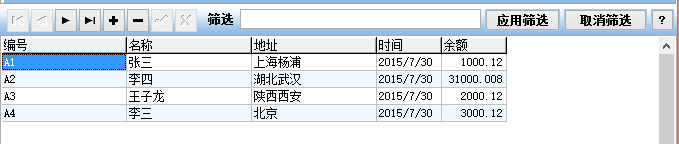
操作DBF文件的部分代码:
///
/// Author: Ahmed Lacevic
/// Date: 12/1/2007
/// Desc:
///
/// Revision History:
/// -----------------------------------
/// Author:
/// Date:
/// Desc: using System;
using System.Collections.Generic;
using System.Text;
using System.IO;
using System.Globalization; namespace SocialExplorer.IO.FastDBF
{ /// <summary>
/// Use this class to create a record and write it to a dbf file. You can use one record object to write all records!!
/// It was designed for this kind of use. You can do this by clearing the record of all data
/// (call Clear() method) or setting values to all fields again, then write to dbf file.
/// This eliminates creating and destroying objects and optimizes memory use.
///
/// Once you create a record the header can no longer be modified, since modifying the header would make a corrupt DBF file.
/// </summary>
public class DbfRecord
{ /// <summary>
/// Header provides information on all field types, sizes, precision and other useful information about the DBF.
/// </summary>
private DbfHeader mHeader = null; /// <summary>
/// Dbf data are a mix of ASCII characters and binary, which neatly fit in a byte array.
/// BinaryWriter would esentially perform the same conversion using the same Encoding class.
/// </summary>
private byte[] mData = null; /// <summary>
/// Zero based record index. -1 when not set, new records for example.
/// </summary>
private int mRecordIndex = -; /// <summary>
/// Empty Record array reference used to clear fields quickly (or entire record).
/// </summary>
private readonly byte[] mEmptyRecord = null; /// <summary>
/// Specifies whether we allow strings to be truncated. If false and string is longer than we can fit in the field, an exception is thrown.
/// </summary>
private bool mAllowStringTruncate = true; /// <summary>
/// Specifies whether we allow the decimal portion of numbers to be truncated.
/// If false and decimal digits overflow the field, an exception is thrown.
/// </summary>
private bool mAllowDecimalTruncate = false; /// <summary>
/// Specifies whether we allow the integer portion of numbers to be truncated.
/// If false and integer digits overflow the field, an exception is thrown.
/// </summary>
private bool mAllowIntegerTruncate = false; //array used to clear decimals, we can clear up to 40 decimals which is much more than is allowed under DBF spec anyway.
//Note: 48 is ASCII code for 0.
private static readonly byte[] mDecimalClear = new byte[] {,,,,,,,,,,,,,,,
,,,,,,,,,,,,,,,
,,,,,,,,,,,,,,}; //Warning: do not make this one static because that would not be thread safe!! The reason I have
//placed this here is to skip small memory allocation/deallocation which fragments memory in .net.
private int[] mTempIntVal = { }; //Ascii Encoder
private readonly Encoding encoding = Encoding.ASCII; /// <summary>
/// Column Name to Column Index map
/// </summary>
private readonly Dictionary<string, int> mColNameToConIdx = new Dictionary<string, int>(StringComparer.InvariantCulture); /// <summary>
///
/// </summary>
/// <param name="oHeader">Dbf Header will be locked once a record is created
/// since the record size is fixed and if the header was modified it would corrupt the DBF file.</param>
public DbfRecord(DbfHeader oHeader)
{
mHeader = oHeader;
mHeader.Locked = true; //create a buffer to hold all record data. We will reuse this buffer to write all data to the file.
mData = new byte[mHeader.RecordLength];
mEmptyRecord = mHeader.EmptyDataRecord;
encoding = oHeader.encoding; for (int i = ; i < oHeader.mFields.Count; i++)
mColNameToConIdx[oHeader.mFields[i].Name] = i;
} /// <summary>
/// Set string data to a column, if the string is longer than specified column length it will be truncated!
/// If dbf column type is not a string, input will be treated as dbf column
/// type and if longer than length an exception will be thrown.
/// </summary>
/// <param name="nColIndex"></param>
/// <returns></returns>
public string this[int nColIndex]
{ set
{ DbfColumn ocol = mHeader[nColIndex];
DbfColumn.DbfColumnType ocolType = ocol.ColumnType; //
//if an empty value is passed, we just clear the data, and leave it blank.
//note: test have shown that testing for null and checking length is faster than comparing to "" empty str :)
//------------------------------------------------------------------------------------------------------------
if (string.IsNullOrEmpty(value))
{
//this is like NULL data, set it to empty. i looked at SAS DBF output when a null value exists
//and empty data are output. we get the same result, so this looks good.
Buffer.BlockCopy(mEmptyRecord, ocol.DataAddress, mData, ocol.DataAddress, ocol.Length); }
else
{ //set values according to data type:
//-------------------------------------------------------------
if (ocolType == DbfColumn.DbfColumnType.Character)
{
if (!mAllowStringTruncate && value.Length > ocol.Length)
throw new DbfDataTruncateException("Value not set. String truncation would occur and AllowStringTruncate flag is set to false. To supress this exception change AllowStringTruncate to true."); //BlockCopy copies bytes. First clear the previous value, then set the new one.
Buffer.BlockCopy(mEmptyRecord, ocol.DataAddress, mData, ocol.DataAddress, ocol.Length);
encoding.GetBytes(value, , value.Length > ocol.Length ? ocol.Length : value.Length, mData, ocol.DataAddress); }
else if (ocolType == DbfColumn.DbfColumnType.Number)
{ if (ocol.DecimalCount == )
{ //integers
//---------------------------------- //throw an exception if integer overflow would occur
if (!mAllowIntegerTruncate && value.Length > ocol.Length)
throw new DbfDataTruncateException("Value not set. Integer does not fit and would be truncated. AllowIntegerTruncate is set to false. To supress this exception set AllowIntegerTruncate to true, although that is not recomended."); //clear all numbers, set to [space].
//-----------------------------------------------------
Buffer.BlockCopy(mEmptyRecord, , mData, ocol.DataAddress, ocol.Length); //set integer part, CAREFUL not to overflow buffer! (truncate instead)
//-----------------------------------------------------------------------
int nNumLen = value.Length > ocol.Length ? ocol.Length : value.Length;
encoding.GetBytes(value, , nNumLen, mData, (ocol.DataAddress + ocol.Length - nNumLen)); }
else
{ ///TODO: we can improve perfomance here by not using temp char arrays cDec and cNum,
///simply direcly copy from source string using encoding! //break value down into integer and decimal portions
//--------------------------------------------------------------------------
int nidxDecimal = value.IndexOf('.'); //index where the decimal point occurs
char[] cDec = null; //decimal portion of the number
char[] cNum = null; //integer portion if (nidxDecimal > -)
{
cDec = value.Substring(nidxDecimal + ).Trim().ToCharArray();
cNum = value.Substring(, nidxDecimal).ToCharArray(); //throw an exception if decimal overflow would occur
if (!mAllowDecimalTruncate && cDec.Length > ocol.DecimalCount)
throw new DbfDataTruncateException("Value not set. Decimal does not fit and would be truncated. AllowDecimalTruncate is set to false. To supress this exception set AllowDecimalTruncate to true."); }
else
cNum = value.ToCharArray(); //throw an exception if integer overflow would occur
if (!mAllowIntegerTruncate && cNum.Length > ocol.Length - ocol.DecimalCount - )
throw new DbfDataTruncateException("Value not set. Integer does not fit and would be truncated. AllowIntegerTruncate is set to false. To supress this exception set AllowIntegerTruncate to true, although that is not recomended."); //clear all decimals, set to 0.
//-----------------------------------------------------
Buffer.BlockCopy(mDecimalClear, , mData, (ocol.DataAddress + ocol.Length - ocol.DecimalCount), ocol.DecimalCount); //clear all numbers, set to [space].
Buffer.BlockCopy(mEmptyRecord, , mData, ocol.DataAddress, (ocol.Length - ocol.DecimalCount)); //set decimal numbers, CAREFUL not to overflow buffer! (truncate instead)
//-----------------------------------------------------------------------
if (nidxDecimal > -)
{
int nLen = cDec.Length > ocol.DecimalCount ? ocol.DecimalCount : cDec.Length;
encoding.GetBytes(cDec, , nLen, mData, (ocol.DataAddress + ocol.Length - ocol.DecimalCount));
} //set integer part, CAREFUL not to overflow buffer! (truncate instead)
//-----------------------------------------------------------------------
int nNumLen = cNum.Length > ocol.Length - ocol.DecimalCount - ? (ocol.Length - ocol.DecimalCount - ) : cNum.Length;
encoding.GetBytes(cNum, , nNumLen, mData, ocol.DataAddress + ocol.Length - ocol.DecimalCount - nNumLen - ); //set decimal point
//-----------------------------------------------------------------------
mData[ocol.DataAddress + ocol.Length - ocol.DecimalCount - ] = (byte)'.'; } }
else if (ocolType == DbfColumn.DbfColumnType.Integer)
{
//note this is a binary Integer type!
//---------------------------------------------- ///TODO: maybe there is a better way to copy 4 bytes from int to byte array. Some memory function or something.
mTempIntVal[] = Convert.ToInt32(value);
Buffer.BlockCopy(mTempIntVal, , mData, ocol.DataAddress, ); }
else if (ocolType == DbfColumn.DbfColumnType.Memo)
{
//copy 10 digits...
///TODO: implement MEMO throw new NotImplementedException("Memo data type functionality not implemented yet!"); }
else if (ocolType == DbfColumn.DbfColumnType.Boolean)
{
if (String.Compare(value, "true", true) == || String.Compare(value, "", true) == ||
String.Compare(value, "T", true) == || String.Compare(value, "yes", true) == ||
String.Compare(value, "Y", true) == )
mData[ocol.DataAddress] = (byte)'T';
else if (value == " " || value == "?")
mData[ocol.DataAddress] = (byte)'?';
else
mData[ocol.DataAddress] = (byte)'F'; }
else if (ocolType == DbfColumn.DbfColumnType.Date)
{
//try to parse out date value using Date.Parse() function, then set the value
DateTime dateval;
if (DateTime.TryParse(value, out dateval))
{
SetDateValue(nColIndex, dateval);
}
else
throw new InvalidOperationException("Date could not be parsed from source string! Please parse the Date and set the value (you can try using DateTime.Parse() or DateTime.TryParse() functions)."); }
else if (ocolType == DbfColumn.DbfColumnType.Binary)
throw new InvalidOperationException("Can not use string source to set binary data. Use SetBinaryValue() and GetBinaryValue() functions instead."); else
throw new InvalidDataException("Unrecognized data type: " + ocolType.ToString()); } } get
{
DbfColumn ocol = mHeader[nColIndex];
return new string(encoding.GetChars(mData, ocol.DataAddress, ocol.Length)); }
} /// <summary>
/// Set string data to a column, if the string is longer than specified column length it will be truncated!
/// If dbf column type is not a string, input will be treated as dbf column
/// type and if longer than length an exception will be thrown.
/// </summary>
/// <param name="nColName"></param>
/// <returns></returns>
public string this[string nColName]
{
get
{
if (mColNameToConIdx.ContainsKey(nColName))
return this[mColNameToConIdx[nColName]];
throw new InvalidOperationException(string.Format("There's no column with name '{0}'", nColName));
}
set
{
if (mColNameToConIdx.ContainsKey(nColName))
this[mColNameToConIdx[nColName]] = value;
else
throw new InvalidOperationException(string.Format("There's no column with name '{0}'", nColName));
}
} /// <summary>
/// Get date value.
/// </summary>
/// <param name="nColIndex"></param>
/// <returns></returns>
public DateTime GetDateValue(int nColIndex)
{
DbfColumn ocol = mHeader[nColIndex]; if (ocol.ColumnType == DbfColumn.DbfColumnType.Date)
{
string sDateVal = encoding.GetString(mData, ocol.DataAddress, ocol.Length);
return DateTime.ParseExact(sDateVal, "yyyyMMdd", CultureInfo.InvariantCulture); }
else
throw new Exception("Invalid data type. Column '" + ocol.Name + "' is not a date column."); } /// <summary>
/// Get date value.
/// </summary>
/// <param name="nColIndex"></param>
/// <returns></returns>
public void SetDateValue(int nColIndex, DateTime value)
{ DbfColumn ocol = mHeader[nColIndex];
DbfColumn.DbfColumnType ocolType = ocol.ColumnType; if (ocolType == DbfColumn.DbfColumnType.Date)
{ //Format date and set value, date format is like this: yyyyMMdd
//-------------------------------------------------------------
encoding.GetBytes(value.ToString("yyyyMMdd"), , ocol.Length, mData, ocol.DataAddress); }
else
throw new Exception("Invalid data type. Column is of '" + ocol.ColumnType.ToString() + "' type, not date."); } /// <summary>
/// Clears all data in the record.
/// </summary>
public void Clear()
{
Buffer.BlockCopy(mEmptyRecord, , mData, , mEmptyRecord.Length);
mRecordIndex = -; } /// <summary>
/// returns a string representation of this record.
/// </summary>
/// <returns></returns>
public override string ToString()
{
return new string(encoding.GetChars(mData));
} /// <summary>
/// Gets/sets a zero based record index. This information is not directly stored in DBF.
/// It is the location of this record within the DBF.
/// </summary>
/// <remarks>
/// This property is managed from outside this object,
/// CDbfFile object updates it when records are read. The reason we don't set it in the Read()
/// function within this object is that the stream can be forward-only so the Position property
/// is not available and there is no way to figure out what index the record was unless you
/// count how many records were read, and that's exactly what CDbfFile does.
/// </remarks>
public int RecordIndex
{
get
{
return mRecordIndex;
}
set
{
mRecordIndex = value;
}
} /// <summary>
/// Returns/sets flag indicating whether this record was tagged deleted.
/// </summary>
/// <remarks>Use CDbf4File.Compress() function to rewrite dbf removing records flagged as deleted.</remarks>
/// <seealso cref="CDbf4File.Compress() function"/>
public bool IsDeleted
{
get { return mData[] == '*'; }
set { mData[] = value ? (byte)'*' : (byte)' '; }
} /// <summary>
/// Specifies whether strings can be truncated. If false and string is longer than can fit in the field, an exception is thrown.
/// Default is True.
/// </summary>
public bool AllowStringTurncate
{
get { return mAllowStringTruncate; }
set { mAllowStringTruncate = value; }
} /// <summary>
/// Specifies whether to allow the decimal portion of numbers to be truncated.
/// If false and decimal digits overflow the field, an exception is thrown. Default is false.
/// </summary>
public bool AllowDecimalTruncate
{
get { return mAllowDecimalTruncate; }
set { mAllowDecimalTruncate = value; }
} /// <summary>
/// Specifies whether integer portion of numbers can be truncated.
/// If false and integer digits overflow the field, an exception is thrown.
/// Default is False.
/// </summary>
public bool AllowIntegerTruncate
{
get { return mAllowIntegerTruncate; }
set { mAllowIntegerTruncate = value; }
} /// <summary>
/// Returns header object associated with this record.
/// </summary>
public DbfHeader Header
{
get
{
return mHeader;
}
} /// <summary>
/// Get column by index.
/// </summary>
/// <param name="index"></param>
/// <returns></returns>
public DbfColumn Column(int index)
{
return mHeader[index];
} /// <summary>
/// Get column by name.
/// </summary>
/// <param name="index"></param>
/// <returns></returns>
public DbfColumn Column(string sName)
{
return mHeader[sName];
} /// <summary>
/// Gets column count from header.
/// </summary>
public int ColumnCount
{
get
{
return mHeader.ColumnCount;
}
} /// <summary>
/// Finds a column index by searching sequentially through the list. Case is ignored. Returns -1 if not found.
/// </summary>
/// <param name="sName">Column name.</param>
/// <returns>Column index (0 based) or -1 if not found.</returns>
public int FindColumn(string sName)
{
return mHeader.FindColumn(sName);
} /// <summary>
/// Writes data to stream. Make sure stream is positioned correctly because we simply write out the data to it.
/// </summary>
/// <param name="osw"></param>
protected internal void Write(Stream osw)
{
osw.Write(mData, , mData.Length); } /// <summary>
/// Writes data to stream. Make sure stream is positioned correctly because we simply write out data to it, and clear the record.
/// </summary>
/// <param name="osw"></param>
protected internal void Write(Stream obw, bool bClearRecordAfterWrite)
{
obw.Write(mData, , mData.Length); if (bClearRecordAfterWrite)
Clear(); } /// <summary>
/// Read record from stream. Returns true if record read completely, otherwise returns false.
/// </summary>
/// <param name="obr"></param>
/// <returns></returns>
protected internal bool Read(Stream obr)
{
return obr.Read(mData, , mData.Length) >= mData.Length;
} protected internal string ReadValue(Stream obr, int colIndex)
{
DbfColumn ocol = mHeader[colIndex];
return new string(encoding.GetChars(mData, ocol.DataAddress, ocol.Length)); } }
}
完整代码下载(含FastDBF源代码):下载
C#生成DBF文件的更多相关文章
- PB导出规定格式DBF文件
最近在做一个给卫计委做数据上报的数据接口,接口要求使用奇葩的dBase 3数据库存储上报数据,忙活了几天总算搞好了,使用开发工具为powerbuild 12,222个字段的上报数据表生成DBF文件,写 ...
- PB导出规定格式DBF文件 dBase 3 格式 222个字段
最近在做一个给卫计委做数据上报的数据接口,接口要求使用奇葩的dBase 3数据库存储上报数据,忙活了几天总算搞好了,使用开发工具为powerbuild 12,222个字段的上报数据表生成DBF文件,写 ...
- xls/csv文件转换成dbf文件
转至:https://blog.csdn.net/linhai1028/article/details/80211252 编写的一个小脚本,主要是利用python中的pandas,xlrd,dbfpy ...
- [转载]在SQL Server 中,如何实现DBF文件和SQL Server表之间的导入或者导出?
原来使用SQL Server 2000数据库,通过DTS工具很方便地在SQL Server和DBF文件之间进行数据的导入和导出,现在安装了SQL Server2005之后,发现其提供的“SQL Ser ...
- 将DBF文件导入Sqlserver数据库
项目中的问题:用户选择N个dbf文件导入sql2005数据库,由于每年dbf表结构都在变化,所以在sql2005中根本就不存在,需要每年根据dbf的结构自动建表.(文章来自http://blog.cs ...
- C# 将DataTable存储到DBF文件中
(准备)生成一个DataTable /// <summary> /// 生成一个数据表 /// </summary> /// <returns></retur ...
- 使用wcf编写坐标字符串生成shapefile文件,在iis发布供前端调用
项目有一需求,需要由坐标字符串(格式:x,y,点名)生成shapefile,由于在前台开发类似功能比较麻烦而且也不适用,最终决定使用WCF来实现,不借助现有GIS软件,基于GDAL实现. 实现过程如下 ...
- Oracle安装盘空间不足,对.DBF文件进行迁移
一. select * from dba_data_files 使用该条语句可以查看当前库中有多少表空间并且DBF文件的存储位置 二. 找到对应的dbf文件,将该文件复制到你需要移动的位置 三. 开始 ...
- Dbf文件操作
package cn.com.szhtkj.util; import java.io.File; import java.io.IOException; import java.lang.reflec ...
随机推荐
- redis缓存数据表
直观上看,数据库中的数据都是按表存储的:更微观地看,这些表都是按行存储的.每执行一 次select查询,数据库都会返回一个结果集,这个结果集由若干行组成.所以,一个自然而然 的想法就是在Redis中找 ...
- inputs
inputs.bind({ keyup:function(){$(this).val($(this).val().replace(/\D/g,''));}, focus:function(){if($ ...
- hdoj 5391 Zball in Tina Town
题目链接:http://acm.hdu.edu.cn/showproblem.php?pid=5391 相关数论结论: 威尔逊定理——当且仅当p为素数时:( p -1 )! ≡ p-1 ( mod p ...
- 从scanf的学习接口设计
对大多数程序员来说scanf可以能是最熟悉,也是陌生的工具.在学习C语言时,大家一定没少用它,但是对它也知道不多.比如说,它有哪些可能的返回值?又比如怎么样才能跳过回车,读一个字符?我们可以一起来研究 ...
- js 数组去重 的5种方法
一万数组,4个重复项,先贴上成绩. 1.3毫秒 2.115毫秒 3.71毫秒 4.6毫秒 1.哈希表 2.JQuery (最快的方法是用JQuery 这句话是截图带的... 实际上Jq是最慢的) 3. ...
- Python学习入门基础教程(learning Python)--5.1 Python下文件处理基本过程
Python下的文件读写操作过程和其他高级语言如C语言的操作过程基本一致,都要经历以下几个基本过程. 1. 打开文件 首先是要打开文件,打开文件的主要目的是为了建立程序和文件之间的联系.按程序访问文件 ...
- 分布式服务框架 Zookeeper -- 管理分布式环境中的数据(转载)
本文转载自:http://www.ibm.com/developerworks/cn/opensource/os-cn-zookeeper/ Zookeeper 分布式服务框架是 Apache Had ...
- USB DATA Toggle
For bulk and interrupt transfers, the data toggle resets <0> only on Set Configuration, Set In ...
- Lazy Loading Images
Use a blank.gif as the src of images, and include the width and height of the final image. HTML: < ...
- 解决从内部存储设备安装apk提示Permission Denied
做应用商店,下载apk,考虑一种情况,如果没有sd卡的情况下就将apk下载到 Internal Cache目录下. 下载都正常,但是在安装的时候提示Permission Denied /data/da ...