
1.Getting Started with ASP.NET MVC 5
Getting Started
Start by installing and running Visual Studio Express 2013 for Web or Visual Studio 2013.
Visual Studio is an IDE, or integrated development environment. Just like you use Microsoft Word to write documents, you'll use an IDE to create applications. In Visual Studio there's a toolbar along the top showing various options available to you. There's also a menu that provides another way to perform tasks in the IDE. (For example, instead of selecting New Project from the Start page, you can use the menu and select File > New Project.)

Creating Your First Application
Click New Project, then select Visual C# on the left, then Web and then select ASP.NET Web Application. Name your project "MvcMovie" and then click OK.
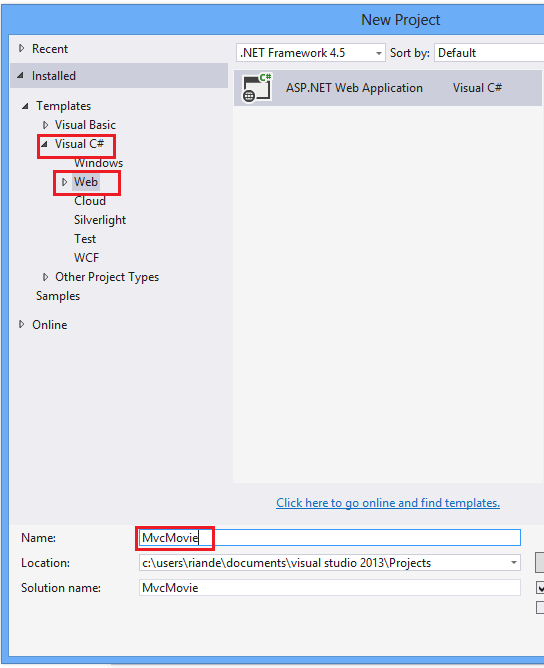
In the New ASP.NET Project dialog, click MVC and then click OK.

Visual Studio used a default template for the ASP.NET MVC project you just created, so you have a working application right now without doing anything! This is a simple "Hello World!" project, and it's a good place to start your application.

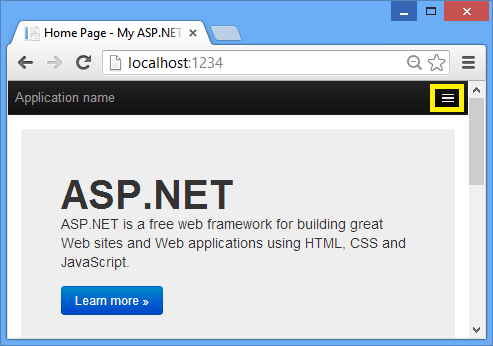
Click F5 to start debugging. F5 causes Visual Studio to start IIS Express and run your web app. Visual Studio then launches a browser and opens the application's home page. Notice that the address bar of the browser says localhost:port# and not something likeexample.com. That's because localhost always points to your own local computer, which in this case is running the application you just built. When Visual Studio runs a web project, a random port is used for the web server. In the image below, the port number is 1234. When you run the application, you'll see a different port number.

Right out of the box this default template gives you Home, Contact and About pages. The image above doesn't show the Home, Aboutand Contact links. Depending on the size of your browser window, you might need to click the navigation icon to see these links.

The application also provides support to register and log in. The next step is to change how this application works and learn a little bit about ASP.NET MVC. Close the ASP.NET MVC application and let's change some code.
For a list of current tutorials, see MVC recommended articles.
See this App Running on Azure
Would you like to see the finished site running as a live web app? You can deploy a complete version of the app to your Azure account by simply clicking the following button.

You need an Azure account to deploy this solution to Azure. If you do not already have an account, you have the following options:
- Open an Azure account for free - You get credits you can use to try out paid Azure services, and even after they're used up you can keep the account and use free Azure services.
- Activate MSDN subscriber benefits - Your MSDN subscription gives you credits every month that you can use for paid Azure services.
1.Getting Started with ASP.NET MVC 5的更多相关文章
- ASP.NET MVC with Entity Framework and CSS一书翻译系列文章之第二章:利用模型类创建视图、控制器和数据库
在这一章中,我们将直接进入项目,并且为产品和分类添加一些基本的模型类.我们将在Entity Framework的代码优先模式下,利用这些模型类创建一个数据库.我们还将学习如何在代码中创建数据库上下文类 ...
- 使用Visual Studio 2015 开发ASP.NET MVC 5 项目部署到Mono/Jexus
最新的Mono 4.4已经支持运行asp.net mvc5项目,有的同学听了这句话就兴高采烈的拿起Visual Studio 2015创建了一个mvc 5的项目,然后部署到Mono上,浏览下发现一堆错 ...
- 一百元的智能家居——Asp.Net Mvc Api+讯飞语音+Android+Arduino
大半夜的,先说些废话提提神 如今智能家居已经不再停留在概念阶段,高大上的科技公司都已经推出了自己的部分或全套的智能家居解决方案,不过就目前的现状而言,大多还停留在展厅阶段,还没有广泛的推广起来,有人说 ...
- Asp.net MVC 传递数据 从前台到后台,包括单个对象,多个对象,集合
今天为大家分享下 Asp.net MVC 将数据从前台传递到后台的几种方式. 环境:VS2013,MVC5.0框架 1.基本数据类型 我们常见有传递 int, string, bool, double ...
- ASP.NET MVC with Entity Framework and CSS一书翻译系列文章之第一章:创建基本的MVC Web站点
在这一章中,我们将学习如何使用基架快速搭建和运行一个简单的Microsoft ASP.NET MVC Web站点.在我们马上投入学习和编码之前,我们首先了解一些有关ASP.NET MVC和Entity ...
- ASP.NET MVC with Entity Framework and CSS一书翻译系列文章之目录导航
ASP.NET MVC with Entity Framework and CSS是2016年出版的一本比较新的.关于ASP.NET MVC.EF以及CSS技术的图书,我将尝试着翻译本书以供日后查阅. ...
- ASP.NET MVC开发:Web项目开发必备知识点
最近加班加点完成一个Web项目,使用Asp.net MVC开发.很久以前接触的Asp.net开发还是Aspx形式,什么Razor引擎,什么MVC还是这次开发才明白,可以算是新手. 对新手而言,那进行A ...
- ASP.NET MVC原理
仅此一文让你明白ASP.NET MVC原理 ASP.NET MVC由以下两个核心组成部分构成: 一个名为UrlRoutingModule的自定义HttpModule,用来解析Controller与 ...
- ASP.NET MVC——模型绑定
这篇文章我们来讲讲模型绑定(Model Binding),其实在初步了解ASP.NET MVC之后,大家可能都会产生一个疑问,为什么URL片段最后会转换为例如int型或者其他类型的参数呢?这里就不得不 ...
- ASP.NET MVC 5 系列 学习笔记 目录 (持续更新...)
前言: 记得当初培训的时候,学习的还是ASP.NET,现在回想一下,图片水印.统计人数.过滤器....HttpHandler是多么的经典! 不过后来接触到了MVC,便立马爱上了它.Model-View ...
随机推荐
- OC6_复合类的类存管理
// // Person.h // OC6_复合类的类存管理 // // Created by zhangxueming on 15/6/18. // Copyright (c) 2015年 zhan ...
- 关于内存的5个函数(malloc,VirtualAlloc,GlobalAlloc,LocalAlloc,HeapAlloc)
VirtualAlloc 该函数的功能是在调用进程的虚地址空间,预定或者提交一部分页,如果用于内存分配的话,并且分配类型未指定MEM_RESET,则系统将自动设置为0 一次分配 1PAGE 以上的 R ...
- 3月3日(3) Binary Tree Preorder Traversal
原题 Binary Tree Preorder Traversal 没什么好说的... 二叉树的前序遍历,当然如果我一样忘记了什么是前序遍历的.. 啊啊.. 总之,前序.中序.后序,是按照根的位置来 ...
- L1范式和L2范式的区别
L1 and L2 regularization add a cost to high valued weights to prevent overfitting. L1 regularization ...
- 【转】JS函数的定义与调用方法
JS函数调用的四种方法:方法调用模式,函数调用模式,构造器调用模式,apply,call调用模式 1.方法调用模式:先定义一个对象,然后在对象的属性中定义方法,通过myobject.property来 ...
- Winform DataGridView添加列头checkbox
using System; using System.Data; using System.Drawing; using System.Windows.Forms; using Yanwen.Logi ...
- 以a为变量名,给出下列描述的定义
a)一个整型数(An integer) b) 一个指向整型数的指针(A pointer to an integer) c) 一个指向指针的的指针,它指向的指针是指向一个整型数(A pointer to ...
- WPF 中 TreeListView 的使用
前段时间在项目开发中需要用 TreeListView 的功能,于是在网上狂搜一通,倒也找到了几个小例子,但还是满足不了我简单的要求,由于时间紧也只能折中凑合着用了.最近时间比较充裕,把其中的例子整理一 ...
- Teradata基础教程中的数据库试验环境脚本
Teradata基础教程中的数据库表: Customer: 客户信息表 Location: 位置信息表 Employee: 雇员信息表 Job: 工作信息表 Department: 部门表 ...
- PHP内置函数
1 变量函数 a.is_xxx函数用来判断变量类型 is_int.is_integer.is_long,判断变量是否是整型 is_float.is_double.is_real ...