
Android:利用SharedPreferences实现自动登录
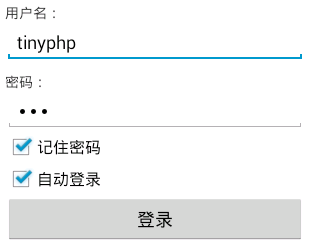
主要代码:
public class LoginActivity extends Activity {

    private EditText username;

    private EditText userpassword;

    private CheckBox remember;

    private CheckBox autologin;

    private Button login;

    private SharedPreferences sp;

    private String userNameValue,passwordValue;

    @Override

    protected void onCreate(Bundle savedInstanceState) {

        // TODO Auto-generated method stub

        super.onCreate(savedInstanceState);

        setContentView(R.layout.login);

        // 初始化用户名、密码、记住密码、自动登录、登录按钮

        username = (EditText) findViewById(R.id.username);

        userpassword = (EditText) findViewById(R.id.userpassword);

        remember = (CheckBox) findViewById(R.id.remember);

        autologin = (CheckBox) findViewById(R.id.autologin);

        login = (Button) findViewById(R.id.login);

        sp = getSharedPreferences("userInfo", );

        String name=sp.getString("USER_NAME", "");

        String pass =sp.getString("PASSWORD", "");

        boolean choseRemember =sp.getBoolean("remember", false);

        boolean choseAutoLogin =sp.getBoolean("autologin", false);

  //      Toast.makeText(this, name, Toast.LENGTH_SHORT).show();

        //如果上次选了记住密码,那进入登录页面也自动勾选记住密码,并填上用户名和密码

        if(choseRemember){

            username.setText(name);

            userpassword.setText(pass);

            remember.setChecked(true);

        }

        //如果上次登录选了自动登录,那进入登录页面也自动勾选自动登录

        if(choseAutoLogin){

            autologin.setChecked(true);

        }

        login.setOnClickListener(new OnClickListener() {

            // 默认可登录帐号tinyphp,密码123

            @Override

            public void onClick(View arg0) {

                userNameValue = username.getText().toString();

                passwordValue = userpassword.getText().toString();

                SharedPreferences.Editor editor =sp.edit();

                // TODO Auto-generated method stub

                if (userNameValue.equals("tinyphp")

                        && passwordValue.equals("")) {

                    Toast.makeText(LoginActivity.this, "登录成功",

                            Toast.LENGTH_SHORT).show();

                    //保存用户名和密码

                    editor.putString("USER_NAME", userNameValue);

                    editor.putString("PASSWORD", passwordValue);

                    //是否记住密码

                    if(remember.isChecked()){

                        editor.putBoolean("remember", true);

                    }else{

                        editor.putBoolean("remember", false);

                    }

                    //是否自动登录

                        if(autologin.isChecked()){

                            editor.putBoolean("autologin", true);

                        }else{

                            editor.putBoolean("autologin", false);

                        }

                    editor.commit();

                    //跳转

                    Intent intent =new Intent(LoginActivity.this,SuccessActivity.class);

                    startActivity(intent);

                } else {

                    Toast.makeText(LoginActivity.this, "用户名或密码错误,请重新登录!",

                            Toast.LENGTH_SHORT).show();

                }

            }

        });

    }

}
<?xml version="1.0" encoding="utf-8"?>

<LinearLayout xmlns:android="http://schemas.android.com/apk/res/android"

    android:layout_width="match_parent"

    android:layout_height="match_parent"

    android:orientation="vertical"

    android:padding="10dp" >

    <TextView

        android:layout_width="wrap_content"

        android:layout_height="wrap_content"

        android:text="用户名:" />

    <EditText

        android:id="@+id/username"

        android:layout_width="match_parent"

        android:layout_height="wrap_content"

        android:ems="10"

        android:inputType="textPersonName" >

    </EditText>

    <TextView

        android:layout_width="wrap_content"

        android:layout_height="wrap_content"

        android:layout_marginTop="10dp"

        android:text="密码:" />

    <EditText

        android:id="@+id/userpassword"

        android:layout_width="match_parent"

        android:layout_height="wrap_content"

        android:ems="10"

        android:inputType="textPassword" >

    </EditText>

    <CheckBox

        android:id="@+id/remember"

        android:layout_width="wrap_content"

        android:layout_height="wrap_content"

        android:text="记住密码" />

    <CheckBox

        android:id="@+id/autologin"

        android:layout_width="wrap_content"

        android:layout_height="wrap_content"

        android:text="自动登录" />

    <Button

        android:id="@+id/login"

        android:layout_width="match_parent"

        android:layout_height="wrap_content"

        android:text="登录" />

</LinearLayout>
Android:利用SharedPreferences实现自动登录的更多相关文章
- SharedPreferences实现自动登录记住用户名密码
最近Android项目需要一个自动登录功能,完成之后,特总结一下,此功能依靠SharedPreferences进行实现. SharedPreferences简介 SharedPreferences ...
- [技术博客] 利用SharedPreferences来实现登录状态的记忆功能
[技术博客] 利用SharedPreferences来实现登录状态的记忆功能 一.SharedPreferences简介 SharedPreferences是Android平台上一个轻量级的存储辅助类 ...
- Android 记住密码和自动登录界面的实现(SharedPreferences 的用法)
原文:http://blog.csdn.net/liuyiming_/article/details/7704923 SharedPreferences介绍: SharedPreferences是An ...
- Android 利用SharedPreferences保存与删除 用户登录数据
创建SharedPreferences对象: SharedPreferences sharedPreferences = context.getSharedPreferences("user ...
- Android利用HttpURLConnection实现模拟登录
最近在做一个APP,需要模拟登录教务处,之前曾经用HttpClient做过,点这里,但是发现最新的Android SDK已经不支持Httpclient了,所以只好在琢磨一下HttpURLConnect ...
- 利用jquery实现自动登录
前提是需要引入jquery和jquery.cookie html 用户名:<input type="text" id="name"/><br ...
- Android --------- 利用SharedPreferences存取数据
//向SharedPreferences中存放数据 //1.定义SharedPreferences对象,通过getSharedPreferences方法得到 SharedPreferences sp ...
- shell中嵌套执行expect命令实例(利用expect实现自动登录)
expect是 #!/bin/bashpasswd='123456'/usr/bin/expect <<EOFset time 30spawn ssh root@192.168.76.10 ...
- Android记住密码自动登录的实现
我采用的是SharedPreferences来存取数据的,所以先简单的介绍一下SharedPreferences SharedPreferences是Android平台上一个轻量级的存储类,主要是保存 ...
随机推荐
- cookie文件在电脑的保存位置
在Windows系统上(这里以Win7为例)浏览器的Cookie IE浏览器Cookie数据位于:%APPDATA%\Microsoft\Windows\Cookies\ 目录中的xxx.txt文件 ...
- TextView文字排版问题:
本文转载自:http://blog.sina.com.cn/s/blog_821e2bb101011803.html textview自动换行导致混乱的原因----半角字符与全角字符混乱所致!一般情况 ...
- Hiberante+jpa,注解生成32字符的Id
@Id @GenericGenerator(name = "id-generator", strategy = "uuid") @GeneratedValue( ...
- 不逃离WIndows,Asp.Net就只能写写进销存管理系统
那个丹麦人把C#语言弄的再好,但是如果程序放进Windows+IIS这个容器,就有问题了. 我在I5+8G内存的机子上测试Windows2008+IIs,直接ab 2000并发压默认的HTML主页,还 ...
- ubuntu 下dbus的环境搭建和使用
从https://launchpad.net/ubuntu/+source/dbus/1.10.6-1ubuntu2下载需要的dbus包,然后解压,./configure make && ...
- QQ群里收集的外企iOS开发的笔试题
一组外企iOS开发的笔试题,您能回答出来吗?从群里收集来的. 1 why can't NSArray contain NSInteger Instance? with which extra step ...
- C#的winform小合集
C#的winform小合集 博主很懒,又想记录一下自己的所做所为,仅此而已,供自己日后所看.这个是博主自主学习C#所写的一些小程序,有好玩的,也有一些无聊闲得蛋疼所作的. 内容介绍 C#入门窗口输出h ...
- SQL日语词汇
データベース 数据库 DATABASE インスタンス (数据库)实例 INSTANCE ユーザー 用戶 USER ログイン・ログアウト ログオン・ログオフ 登录 LOGIN/LOGOUT LOGNO/ ...
- ASP.NET Web – 状态管理
状态类型 客户端或服务器资源 有效时间 ViewState 客户端 只在一个页面中 Cookie 客户端 关闭浏览器时会删除临时cookie,永久cookie存储在客户系统的磁盘上 Session 服 ...
- Using self-defined Parcelable objects during an Android AIDL RPC / IPC call
Using self-defined Parcelable objects during an Android AIDL RPC / IPC call In my previous post “Usi ...