
SharePoint 优化显示WebParts
在开发sharepoint中,经常遇到需要自定义显示列表中的一部分作为导航的内容, 如公告栏,新闻链接,最新动态等....
我们通常需要显示一个列表的标题,并且限制字符长度, 外加一些条件,如按创建的时间倒序这样来显示最新的动态, 显示的时间也需要转换格式等...
那我们来看看原始的列表如下图:
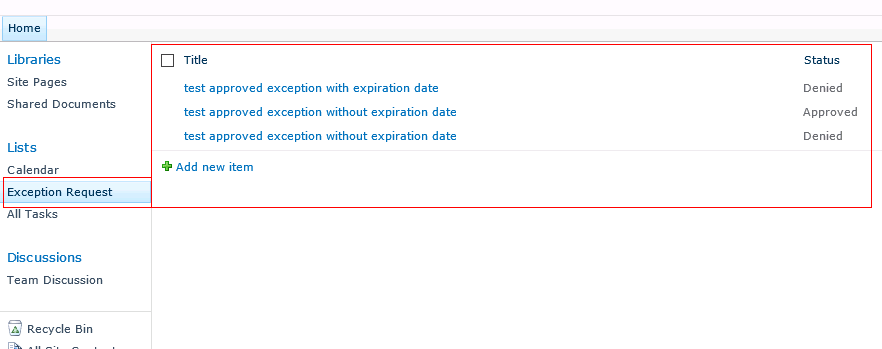
修改后的效果: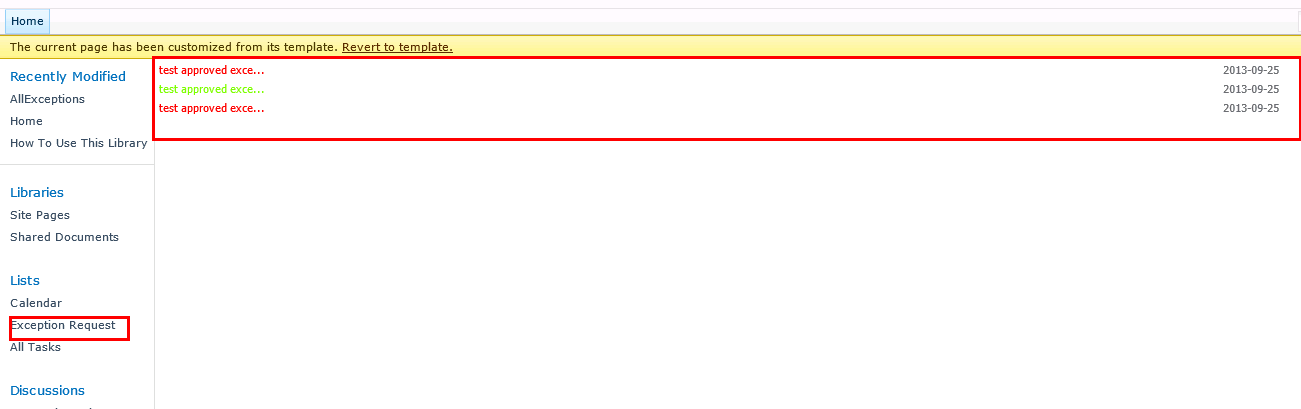
接下来我们用SPD打开这个站点,在sitepages里面新建一个页面, 命名为allexception, 这是个空白的页面, 然后点击插入显示表单
我们需要显示显示多少行,找到<asp:Parameter Name="MaximumRows" DefaultValue="5"/> 这样我们就让行数限制在5行,另外我们在<xsl:variable name="RowLimit" select="5" />也修改成5
我们还需要显示根据标题的长度 比喻小于18个字符的全部显示,大于18个字符的显示其中的一部分外加省略号..
另外根据条件,如Status的Approved显示绿色,Denied显示为红色.
如下是代码:
<table border="" cellspacing="" width="100%">
<tr>
<td width="75%" class="ms-vb">
<a target="_blank" title="{@Title}">
<xsl:attribute name="href">http://liangji27/sites/charlie/Lists/Excemption%20Request/DispForm.aspx?ID=<xsl:value-of select="@ID"></xsl:value-of></xsl:attribute>
<xsl:if test="string-length(@Title)<=18">
<xsl:if test="@Status='Approved'">
<font color="#7FFF00"><xsl:value-of select="@Title" /></font>
</xsl:if>
<xsl:if test="not(@Status='Approved')">
<font color="#FF0000"><xsl:value-of select="@Title" /></font>
</xsl:if>
</xsl:if>
<xsl:if test="string-length(@Title)>18">
<xsl:if test="@Status='Approved'">
<font color="#7FFF00"><xsl:value-of select="substring(string(@Title),1,18)" />...</font>
</xsl:if>
<xsl:if test="not(@Status='Approved')">
<font color="#FF0000"><xsl:value-of select="substring(string(@Title),1,18)" />...</font>
</xsl:if>
</xsl:if>
</a>
</td>
<td width="25%" class="ms-vb">
<xsl:value-of select="substring(string(@Created_x0020_Date),4,10)"></xsl:value-of>
</td>
</tr>
</table>
此处是将创建时间格式截取年月日:
<xsl:value-of select="substring(string(@Created_x0020_Date),4,10)"></xsl:value-of>
以上是全部代码:
<WebPartPages:DataFormWebPart runat="server" IsIncluded="True" AsyncRefresh="True" FrameType="None" NoDefaultStyle="TRUE" ViewFlag="8" Title="Exception Request" PageType="PAGE_NORMALVIEW" ListName="{93CF56B6-AD1C-43EB-A007-0EB087CBBD27}" Default="FALSE" DisplayName="Exception Request" __markuptype="vsattributemarkup" __WebPartId="{8516696D-C2F0-4A7A-944E-15C0553F2767}" id="g_8516696d_c2f0_4a7a_944e_15c0553f2767" pagesize="1" __AllowXSLTEditing="true" WebPart="true" Height="" Width="">
<DataSources>
<SharePoint:SPDataSource runat="server" DataSourceMode="List" UseInternalName="true" UseServerDataFormat="true" selectcommand="<View></View>" id="Exception_x0020_Request2"><SelectParameters><WebPartPages:DataFormParameter Name="ListID" ParameterKey="ListID" PropertyName="ParameterValues" DefaultValue="{93CF56B6-AD1C-43EB-A007-0EB087CBBD27}"/><asp:Parameter Name="StartRowIndex" DefaultValue="0"/><asp:Parameter Name="nextpagedata" DefaultValue="0"/><asp:Parameter Name="MaximumRows" DefaultValue="5"/>
</SelectParameters><DeleteParameters><WebPartPages:DataFormParameter Name="ListID" ParameterKey="ListID" PropertyName="ParameterValues" DefaultValue="{93CF56B6-AD1C-43EB-A007-0EB087CBBD27}"/>
</DeleteParameters><UpdateParameters><WebPartPages:DataFormParameter Name="ListID" ParameterKey="ListID" PropertyName="ParameterValues" DefaultValue="{93CF56B6-AD1C-43EB-A007-0EB087CBBD27}"/>
</UpdateParameters><InsertParameters><WebPartPages:DataFormParameter Name="ListID" ParameterKey="ListID" PropertyName="ParameterValues" DefaultValue="{93CF56B6-AD1C-43EB-A007-0EB087CBBD27}"/></InsertParameters>
</SharePoint:SPDataSource>
</DataSources>
<ParameterBindings>
<ParameterBinding Name="ListID" Location="None" DefaultValue="{93CF56B6-AD1C-43EB-A007-0EB087CBBD27}"/>
<ParameterBinding Name="dvt_apos" Location="Postback;Connection"/>
<ParameterBinding Name="ManualRefresh" Location="WPProperty[ManualRefresh]"/>
<ParameterBinding Name="UserID" Location="CAMLVariable" DefaultValue="CurrentUserName"/>
<ParameterBinding Name="Today" Location="CAMLVariable" DefaultValue="CurrentDate"/>
<ParameterBinding Name="dvt_startposition" Location="Postback" DefaultValue=""/>
<ParameterBinding Name="dvt_firstrow" Location="Postback;Connection"/>
<ParameterBinding Name="dvt_nextpagedata" Location="Postback;Connection"/>
<ParameterBinding Name="dvt_1_form_editkey" Location="Postback;Connection"/>
</ParameterBindings>
<datafields>@Title,Title;@Approved,Approved;@Status,Status;@ID,ID;@ContentType,Content Type;@Modified,Modified;@Created,Created;@Author,Created By;@Editor,Modified By;@_UIVersionString,Version;@Attachments,Attachments;@File_x0020_Type,File Type;@FileLeafRef,Name (for use in forms);@FileDirRef,Path;@FSObjType,Item Type;@_HasCopyDestinations,Has Copy Destinations;@_CopySource,Copy Source;@ContentTypeId,Content Type ID;@_ModerationStatus,Approval Status;@_UIVersion,UI Version;@Created_x0020_Date,Created;@FileRef,URL Path;@ItemChildCount,Item Child Count;@FolderChildCount,Folder Child Count;</datafields>
<XSL>
<xsl:stylesheet xmlns:x="http://www.w3.org/2001/XMLSchema" xmlns:d="http://schemas.microsoft.com/sharepoint/dsp" version="1.0" exclude-result-prefixes="xsl msxsl ddwrt" xmlns:ddwrt="http://schemas.microsoft.com/WebParts/v2/DataView/runtime" xmlns:asp="http://schemas.microsoft.com/ASPNET/20" xmlns:__designer="http://schemas.microsoft.com/WebParts/v2/DataView/designer" xmlns:xsl="http://www.w3.org/1999/XSL/Transform" xmlns:msxsl="urn:schemas-microsoft-com:xslt" xmlns:SharePoint="Microsoft.SharePoint.WebControls" xmlns:ddwrt2="urn:frontpage:internal">
<xsl:output method="html" indent="no"/>
<xsl:decimal-format NaN=""/>
<xsl:param name="dvt_apos">'</xsl:param>
<xsl:param name="ManualRefresh"></xsl:param>
<xsl:param name="dvt_firstrow">1</xsl:param>
<xsl:param name="dvt_nextpagedata" />
<xsl:param name="dvt_1_form_editkey" />
<xsl:variable name="dvt_1_automode">1</xsl:variable>
<xsl:template match="/" xmlns:x="http://www.w3.org/2001/XMLSchema" xmlns:d="http://schemas.microsoft.com/sharepoint/dsp" xmlns:asp="http://schemas.microsoft.com/ASPNET/20" xmlns:__designer="http://schemas.microsoft.com/WebParts/v2/DataView/designer" xmlns:SharePoint="Microsoft.SharePoint.WebControls">
<xsl:choose>
<xsl:when test="($ManualRefresh = 'True')">
<table width="100%" border="0" cellpadding="0" cellspacing="0">
<tr>
<td valign="top">
<xsl:call-template name="dvt_1"/>
</td>
<td width="1%" class="ms-vb" valign="top">
<img src="/_layouts/images/staticrefresh.gif" id="ManualRefresh" border="0" onclick="javascript: {ddwrt:GenFireServerEvent('__cancel')}" alt="Click here to refresh the dataview."/>
</td>
</tr>
</table>
</xsl:when>
<xsl:otherwise>
<xsl:call-template name="dvt_1"/>
</xsl:otherwise>
</xsl:choose>
</xsl:template>
<xsl:template name="dvt_1">
<xsl:variable name="dvt_StyleName">Table</xsl:variable>
<xsl:variable name="Rows" select="/dsQueryResponse/Rows/Row"/>
<xsl:variable name="dvt_RowCount" select="count($Rows)"/>
<xsl:variable name="RowLimit" select="5" />
<xsl:variable name="FirstRow" select="$dvt_firstrow" />
<xsl:variable name="LastRow" select="$FirstRow + $dvt_RowCount - 1" />
<xsl:variable name="IsEmpty" select="$dvt_RowCount = 0" />
<xsl:variable name="dvt_IsEmpty" select="$dvt_RowCount = 0"/>
<xsl:choose>
<xsl:when test="$dvt_IsEmpty">
<xsl:call-template name="dvt_1.empty"/>
</xsl:when>
<xsl:otherwise>
<table border="0" width="100%">
<xsl:call-template name="dvt_1.body">
<xsl:with-param name="Rows" select="$Rows"/>
<xsl:with-param name="FirstRow" select="1" />
<xsl:with-param name="LastRow" select="$LastRow - $FirstRow + 1" />
</xsl:call-template>
</table>
</xsl:otherwise>
</xsl:choose>
<xsl:call-template name="dvt_1.commandfooter">
<xsl:with-param name="FirstRow" select="$FirstRow" />
<xsl:with-param name="LastRow" select="$LastRow" />
<xsl:with-param name="RowLimit" select="$RowLimit" />
<xsl:with-param name="dvt_RowCount" select="$dvt_RowCount" />
<xsl:with-param name="RealLastRow" select="number(ddwrt:NameChanged('',-100))" />
</xsl:call-template>
</xsl:template>
<xsl:template name="dvt_1.body">
<xsl:param name="Rows"/>
<xsl:param name="FirstRow" />
<xsl:param name="LastRow" />
<xsl:for-each select="$Rows">
<xsl:variable name="dvt_KeepItemsTogether" select="false()" />
<xsl:variable name="dvt_HideGroupDetail" select="false()" />
<xsl:if test="(position() >= $FirstRow and position() <= $LastRow) or $dvt_KeepItemsTogether">
<xsl:if test="not($dvt_HideGroupDetail)" ddwrt:cf_ignore="1">
<xsl:call-template name="dvt_1.rowview" />
<!--
<xsl:choose>
<xsl:when test="$dvt_1_form_editkey = ddwrt:EscapeDelims(string(@ID))">
</xsl:when>
<xsl:otherwise>
</xsl:otherwise>
</xsl:choose>
-->
</xsl:if>
</xsl:if>
</xsl:for-each>
</xsl:template>
<xsl:template name="dvt_1.rowview">
<tr>
<td>
<table border="0" cellspacing="0" width="100%">
<tr>
<td width="75%" class="ms-vb">
<a target="_blank" title="{@Title}">
<xsl:attribute name="href">http://liangji27/sites/charlie/Lists/Excemption%20Request/DispForm.aspx?ID=<xsl:value-of select="@ID"></xsl:value-of></xsl:attribute>
<xsl:if test="string-length(@Title)<=18">
<xsl:if test="@Status='Approved'">
<font color="#7FFF00"><xsl:value-of select="@Title" /></font>
</xsl:if>
<xsl:if test="not(@Status='Approved')">
<font color="#FF0000"><xsl:value-of select="@Title" /></font>
</xsl:if>
</xsl:if>
<xsl:if test="string-length(@Title)>18">
<xsl:if test="@Status='Approved'">
<font color="#7FFF00"><xsl:value-of select="substring(string(@Title),1,18)" />...</font>
</xsl:if>
<xsl:if test="not(@Status='Approved')">
<font color="#FF0000"><xsl:value-of select="substring(string(@Title),1,18)" />...</font>
</xsl:if>
</xsl:if>
</a>
</td>
<td width="25%" class="ms-vb">
<xsl:value-of select="substring(string(@Created_x0020_Date),4,10)"></xsl:value-of>
</td>
</tr>
</table>
</td>
</tr>
</xsl:template>
<xsl:template name="dvt_1.empty">
<xsl:variable name="dvt_ViewEmptyText">There are no items to show in this view.</xsl:variable>
<table border="0" width="100%">
<tr>
<td class="ms-vb">
<xsl:value-of select="$dvt_ViewEmptyText"/>
</td>
</tr>
</table>
</xsl:template>
<xsl:template name="dvt_1.commandfooter">
<xsl:param name="FirstRow" />
<xsl:param name="LastRow" />
<xsl:param name="RowLimit" />
<xsl:param name="dvt_RowCount" />
<xsl:param name="RealLastRow" />
</xsl:template>
</xsl:stylesheet> </XSL>
</WebPartPages:DataFormWebPart>
SharePoint 优化显示WebParts的更多相关文章
- 2022-09-11-Typecho_RSS优化显示全文
layout: post cid: 26 title: Typecho RSS优化显示全文 slug: 26 date: 2022/09/11 15:53:38 updated: 2022/09/11 ...
- sharepoint 2010 显示和隐藏Ribbon区域条
在sharepoint 2010的页面中,我们在页面的最上方,有一条深灰色的Ribbon工具栏,如下图,这里可以通过下面的脚本,做一些脚本,来控制它的隐藏和显示. 最后把这些脚本,放在v4.maste ...
- 前端性能优化之优化图片 && 优化显示图片
前端图片优化一直以来都是热门话题,从需求上来看,很多站点往往是图片体积大于代码体积, 图片请求多余代码文件请求, 给前端的性能带来了很大的困扰,那么应该如何解决呢? 零. 认识图片 我们通常使用的图片 ...
- sql server 数据库优化--显示执行计划
刚开始用SQL Server的时候,我没有用显示执行计划来对查询进行分析.我曾经一直认为我递交的SQL查询都是最优的,而忽略了查询性能究竟如何,从而对“执行计划”重视不够.在我职业初期,我只要能获 ...
- SharePoint 2013 显示“以其他用户身份登录”菜单项
最近在SharePoint 2013的网站上发现,没有看到有切换不同用户登录的入口,在SharePoint 2010中是存在这样的菜单项能够很方便的进行用户切换的,不知道为什么,SharePoint ...
- php时间区间,优化显示
<?php /** * 类似微信的时间显示 * 规则是:今天的,显示几秒前,几分钟前,几小时前,昨天的显示昨天 上午 XX:XX * 再往前,本周的,显示周几+时间,再往前,本年的,显示月日+时 ...
- 2016/3/26 weixin 头像 昵称 网页优化显示 缺表中数据 只有代码 无显示效果
weixin.php <!DOCTYPE html> <html lang="en"> <head> <meta charset=&quo ...
- 优化移动设备上SharePoint 2013网站
优化移动设备上SharePoint 2013网站 本文由SPFarmer翻译自Waldek Mastykarz的文章 移动市场在持续的增长.在不远的将来,使用移动设备浏览站点将会超过电脑.为了保证用户 ...
- SharePoint 2013技巧分享系列 - Active Directory同步显示用户照片
为了保持通讯信息的一致性,需要设置SharePoint,Exchange, Lync等信息同步更新显示,例如,员工头像信息. 本文介绍如何在SharePoint 2013中同步显示Active Dir ...
随机推荐
- html背景自动移动
<!DOCTYPE HTML PUBLIC "-//W3C//DTD HTML 4.01 Transitional//EN" "http://www.w3.org/ ...
- Centos下LAMP环境搭建
CentOs下环境搭建.2015.04.15.0001 Author:周凯 Time: 2015.04.15 版本号:2015.04.15.0001 安装过程 安装apache yum install ...
- CSS制作一个简单网页的下拉导航栏
网页下拉导航栏的制作 网页下拉导航栏的制作很简单,只需要运用好CSS中伪选择器. 首先说明几个简单的伪选择器(比较常用的): link:连接平常的状态 visited:连接被访问过之后 hover:鼠 ...
- disucz!NT 3.5.0 验证码点击不能变化只是样式变化
来博客园这么久了,第一次写博客啊!公司有个论坛10年没动了,是discuz!NT 3.5.0版本的,由于验证码不能变化老是被人刷.网上找了很多资料根本没有.可能有同行下次也会遇到这样的问题,我就把我的 ...
- Android开发的十项注意
随着移动平台的发展及其应用的不断改善,质量成为决定成败的关键.用户要求他们安装的应用响应快.性能好,如果某个应用不能提供卓越的功能和稳定的用户体验,那注定会被很快卸载: 尽管现在Android智能手机 ...
- 继承Animation
package cativity.cyq.alphaanimal; import android.view.animation.Animation; import android.view.anima ...
- php学习笔记6--php中的文件包含 include,require,include_once,require_once
php中的文件包含 include,require,include_once,require_once 文件包含:是指将一个文件的内容包含进另外一个文件,有利于代码的复用等.php中文件包含指令有4个 ...
- 各种LICENSE的作用--GET
许 多开发者和设计者希望把他们的作品作为开源项目共享,他们希望其他人能够利用和共享他们的代码. 而各种开源社区就是因为这个原因而充满活力.开源软件可以用于你能想象得到的任何应用程序,许多web设计人员 ...
- jQuery之选择器
jQuery元素选择器和属性选择器允许您通过标签名.属性名或内容对 HTML 元素进行选择和操作,而在 HTML DOM中,选择器可以对DOM元素组或单个DOM 节点进行操作.通俗点说,选择器的作用就 ...
- Objective-C 【protocol-协议 的了解使用】
------------------------------------------- protocol(协议) (1)引文:OC中的protocol和Java中的接口(interface)比较类似, ...