
CAF(C++ actor framework)使用随笔(延迟发送,消息转发,消息优先级)(四)
e). 消息延迟发送(和前面没太大区别直接上代码)
#include <iostream>

#include "caf/all.hpp"

#include "caf/io/all.hpp"

#include <string>

#include <chrono>

using namespace std;

using namespace caf;

behavior fun(event_based_actor* self){

    return {

        [self](const string& str){

            aout(self)<<str<<endl;

            auto t2 = std::chrono::system_clock::to_time_t(std::chrono::system_clock::now());

            cout<<"dalay time :"<<t2<<endl;

            self->quit();

            }

    };

}

void fun1(event_based_actor* self, actor buddy){

    self->delayed_send(buddy, std::chrono::seconds(), "hi!");

}

int main(){

    auto actor1 = spawn(fun);

    auto t1 = std::chrono::system_clock::to_time_t(std::chrono::system_clock::now());

    cout<<"before delayed_send :"<<t1<<endl;

    auto actor2 = spawn(fun1,actor1);

    caf::await_all_actors_done();

    shutdown();

    return ;

}
结果为

f). 消息前转(消息转发)forward.
贴上代码
#include <iostream>

#include "caf/all.hpp"

#include "caf/io/all.hpp"

#include <string>

#include <chrono>

using namespace std;

using namespace caf;

behavior fun2(event_based_actor* self){

    return {

        [self](const string& str){

            aout(self)<<"C get message return to A"<<endl;

            aout(self)<<"C's address is :"<<self->address()<<endl;

            return "hello, A";

            self->quit();

         }

    };

}

behavior fun1(event_based_actor* self, const actor &buddy){

    return {

        [=](const string& str){

            aout(self)<<"B get message forward to C"<<endl;

            self->forward_to(buddy);

            self->quit();

         }

    };

}

void fun(event_based_actor* self, const actor &buddy){

    self->sync_send(buddy,"hi!").then(

         [=](const string& str) {

             aout(self)<<str<<endl;

             aout(self)<<"A think last_sender is :"<<self->last_sender()<<endl;

         }

    );

    aout(self)<<"A send to B!"<<endl;

}

int main(){

    auto actorC = spawn(fun2);

    auto actorB = spawn(fun1,actorC);

    auto actorA = spawn(fun,actorB);

    caf::await_all_actors_done();

    shutdown();

    return ;

}
结果为

使用了消息优先级,去caf代码里看了发现只有两种级别就是(hige 和normal)
 然后在用户手册上给出的示例代码是
using a_atom = atom_constant<atom("a")>;

using b_atom = atom_constant<atom("b")>;

behavior testee(event_based_actor* self) {

  // send 'b' with normal priority

  self->send(self, b_atom::value);

  // send 'a' with high priority

  self->send(message_priority::high, self, a_atom::value);

  // terminate after receiving a 'b'

  return {

    [=](b_atom) {

      aout(self) << "received 'b' => quit" << endl;

      self->quit();

    },

    [=](a_atom) {

      aout(self) << "received 'a'" << endl;

    },

  };

}

int main() {

  // will print "received 'b' => quit"

  spawn(testee);

  await_all_actors_done();

  // will print "received 'a'" and then "received 'b' => quit"

  spawn<priority_aware>(testee);

  await_all_actors_done();

  shutdown();

}
结果是
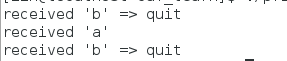 很好理解,因为第一个actor是不认识具有优先级的message的,只受到b消息,第二个就先收到a再收到b,这里有个细节就是当B本来因该是先收到的,但却变成了后收到,和发送的次序无关了。我甚至在两个发送语句之间加usleep(1000000) 都会先收到A后再输出B,这个Actor 感觉自己知道要收到priority 消息。
我还是不罢休,把代码改了改变成

结果为
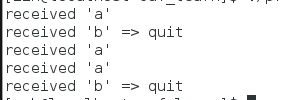
我彻底服了CAF 太牛了把,当Actor不识别优先级时,它会把所有消息当成normal(正常的),当它知道时,就会把所有的优先级消息都接受完了再接受normal的。后来我改写了一些奇怪的语句,这CAF还是要我挺佩服得。
到这里消息都讲完了,之后开始CAF序列化之路。。。
CAF(C++ actor framework)使用随笔(延迟发送,消息转发,消息优先级)(四)的更多相关文章
- Runtime-消息发送和消息转发
消息发送 消息发送举例:下面这个OC代码 [person read:book]; 会被编译成: objc_msgSend(person, @selector(read:), book); objc_m ...
- CAF(C++ actor framework)使用随笔(使用类去构建actor和使用的一些思路)
Class-based actorsA class-based actor is a subtype of event_based_actor and must implement the pure ...
- Android 手机卫士--解析json与消息机制发送不同类型消息
本文地址:http://www.cnblogs.com/wuyudong/p/5900800.html,转载请注明源地址. 1.解析json数据 解析json的代码很简单 JSONObject jso ...
- 【转】C# 重写WndProc 拦截 发送 系统消息 + windows消息常量值(1)
C# 重写WndProc 拦截 发送 系统消息 + windows消息常量值(1) #region 截获消息 /// 截获消息 处理XP不能关机问题 protected ...
- SendMessage发送自定义消息及消息响应
控件向父窗体发送自定义消息,父窗体定义处理此消息的函数 效果描述: 指定哪个类添加自定义消息:(当然这个类必须是CmdTarget的子类,不然不能处理消息) 添加消息 实现消息函数:(wParam ...
- iOS 消息发送与转发详解
Objective-C 是一门动态语言,它将很多静态语言在编译和链接时期做的事情,放到了运行时来处理.之所以能具备这种特性,离不开 Runtime 这个库.Runtime 很好的解决了如何在运行时期找 ...
- ROS_Kinetic_26 使用rosserial_windows实现windows与ROS master发送与接收消息
使用rosserial_windows实现windows与ROS master发送与接收消息(适用版本hydro,indigo,jade,kinetic) 官方wiki地址汇总请参考:http://b ...
- [3] MQTT,mosquitto,Eclipse Paho---怎样使用 Eclipse Paho MQTT工具来发送订阅MQTT消息?
在上两节,笔者主要介绍了 MQTT,mosquitto,Eclipse Paho的基本概念已经怎样安装mosquitto. 在这个章节我们就来看看怎样用 Eclipse Paho MQTT工具来发送接 ...
- C++ Custom Control控件 向父窗体发送对应的消息
向父窗体发送消息 ,这里只讲发送 WM_NOTIFY 消息, 其它消息是相同的 在 控件中的某个函数中 设置发送消息的程序 首先定义一个WM_NOTIFY消息的专用结构. NMHDR nm; nm. ...
随机推荐
- Codeforces Round #330 (Div. 1) C. Edo and Magnets 暴力
C. Edo and Magnets Time Limit: 20 Sec Memory Limit: 256 MB 题目连接 http://codeforces.com/contest/594/pr ...
- Linux设备模型分析之kset(基于3.10.1内核)
作者:刘昊昱 博客:http://blog.csdn.net/liuhaoyutz 内核版本:3.10.1 一.kset结构定义 kset结构体定义在include/linux/kobject.h ...
- 密码强度应用(js)
<!-- 密码强度div --> <div id="tips" class="help-block"> <b class=&quo ...
- ListView 文件重命名
unit Unit1; interface uses Windows, Messages, SysUtils, Variants, Classes, Graphics, Control ...
- java 覆盖hashCode()深入探讨 代码演示样例
java 翻盖hashCode()深入探讨 代码演示样例 package org.rui.collection2.hashcode; /** * 覆盖hashcode * 设计HashCode时最重要 ...
- iOS开发技巧系列---详解KVC(我告诉你KVC的一切)
KVC(Key-value coding)键值编码,单看这个名字可能不太好理解.其实翻译一下就很简单了,就是指iOS的开发中,可以允许开发者通过Key名直接访问对象的属性,或者给对象的属性赋值.而不需 ...
- K.Bro Sorting
Time Limit: 2000/2000 MS (Java/Others) Memory Limit: 512000/512000 K (Java/Others)Total Submissio ...
- Scala的基本语法总结
Scala的函数: 目前博客园中的代码编辑器中还不支持Scala语言....用的Java代码的存储方式 object TestScala { def main(args: Array[String]) ...
- BZOJ 3505
3505: [Cqoi2014]数三角形 Time Limit: 10 Sec Memory Limit: 128 MBSubmit: 1171 Solved: 703[Submit][Statu ...
- Rust 学习 0
安装Rust 后,本地有文档: file:///usr/local/share/doc/rust/html/index.html file:///usr/local/share/doc/rust/ht ...