
Spark记录-Scala shell命令
1.scala shell命令
scala> :help

All commands can be abbreviated, e.g., :he instead of :help.

:edit <id>|<line>        edit history

:help [command]          print this summary or command-specific help

:history [num]           show the history (optional num is commands to show)

:h? <string>             search the history

:imports [name name ...] show import history, identifying sources of names

:implicits [-v]          show the implicits in scope

:javap <path|class>      disassemble a file or class name

:line <id>|<line>        place line(s) at the end of history

:load <path>             interpret lines in a file

:paste [-raw] [path]     enter paste mode or paste a file

:power                   enable power user mode

:quit                    exit the interpreter

:replay [options]        reset the repl and replay all previous commands

:require <path>          add a jar to the classpath

:reset [options]         reset the repl to its initial state, forgetting all session entries

:save <path>             save replayable session to a file

:sh <command line>       run a shell command (result is implicitly => List[String])

:settings <options>      update compiler options, if possible; see reset

:silent                  disable/enable automatic printing of results

:type [-v] <expr>        display the type of an expression without evaluating it

:kind [-v] <expr>        display the kind of expression's type

:warnings                show the suppressed warnings from the most recent line which had any
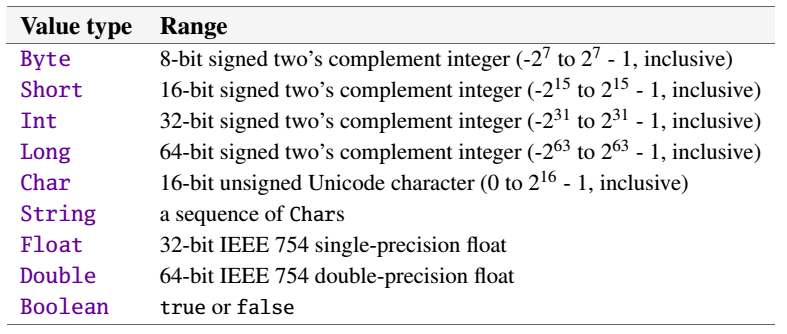
2.scala基本类型
3.常用特殊字符
\n 换行符,其Unicode编码为 (\u000A)
\b 回退符,其Unicode编码为 (\u0008)
\t tab制表符 ,其Unicode编码(\u0009)
\” 双引号,其Unicode编码为 (\u0022)
\’ 单引号,其Unicode编码为 (\u0027)
\ 反斜杆,其Unicode编码为(\u005C)
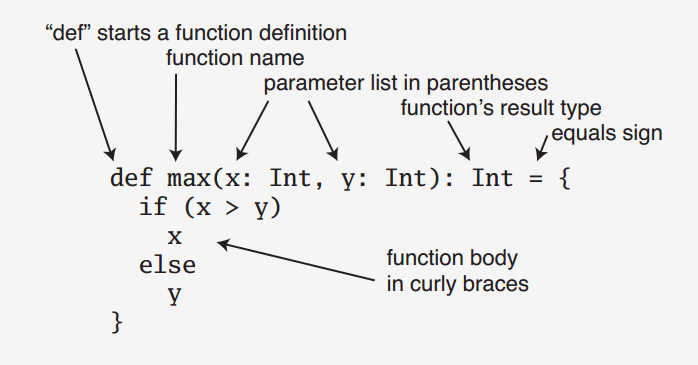
4.函数
5.类
//采用关键字class定义
class Person {
//类成员必须初始化,否则会报错
//这里定义的是一个公有成员
var name:String=null
}
附录:
import java.sql.{ Connection, DriverManager }

import java.util.{Date, Locale}

import java.text.DateFormat

import java.text.DateFormat._

object Mysql extends App {

 // def main(args: Array[String]): Unit = {

    // 访问本地MySQL服务器,通过3306端口访问mysql数据库

    val url = "jdbc:mysql://localhost:3306/mysql"

    //驱动名称

    val driver = "com.mysql.jdbc.Driver"

    //用户名

    val username = "root"

    //密码

    val password = "1"

    //初始化数据连接

    var connection: Connection = _

    try {

      //注册Driver

      Class.forName(driver)

      //得到连接

      connection = DriverManager.getConnection(url, username, password)

      val statement = connection.createStatement

      //执行查询语句,并返回结果

      val rs = statement.executeQuery("SELECT host, user FROM user")

      //打印返回结果

      while (rs.next) {

        val host = rs.getString("host")

        val user = rs.getString("user")

        println("host = %s, user = %s".format(host, user))

      }

    } catch {

      case e: Exception => e.printStackTrace

    }

    //关闭连接,释放资源

    connection.close

    //for循环

    var myArray: Array[String] = new Array[String](10);

    for (i <- 0 until myArray.length) {

      myArray(i) = "value is: " + i;

    }

    for (value: String <- myArray) {

      println(value);

    }

    for (value: String <- myArray if value.endsWith("5")) {

      println(value);

    }

  val now = new Date

  val df = getDateInstance(LONG, Locale.FRANCE)

  println(df format now)

  //}

  val greetStrings =new Array[String](3)

  greetStrings(0)="Hello"

  greetStrings(1)=","

  greetStrings(2)="world!\n"

  greetStrings.update(0,"Hello")

  greetStrings.update(1,",")

  greetStrings.update(2,"world!\n")

  for(i <- 0 to 2)

    print(greetStrings(i))

  val oneTwo = List(1,2)

  val threeFour = List(3,4)

  val oneTwoThreeFour=oneTwo ::: threeFour

  println (oneTwo + " and " + threeFour + " were not mutated.")

  println ("Thus, " + oneTwoThreeFour + " is a new list")

  //几种循环

  def printArgs ( args: Array[String]) : Unit ={

    var i=0

    while (i < args.length) {

      println (args(i))

      i+=1

    }

  }

  def printArgs1 ( args: Array[String]) : Unit ={

    for( arg <- args)

      println(arg)

  }

  def printArgs2 ( args: Array[String]) : Unit ={

    args.foreach(println)

  }

  //类与对象

  class ChecksumAccumulator{

    private var sum=0

    def add(b:Byte) :Unit = sum +=b

    def checksum() : Int = ~ (sum & 0xFF) +1

  }

  def gcdLoop (x: Long, y:Long) : Long ={

    var a=x

    var b=y

    while( a!=0) {

      var temp=a

      a=b % a

      b = temp

    }

    b

  }

}
Spark记录-Scala shell命令的更多相关文章
- Spark记录-Scala异常处理与文件I/O
Scala的异常处理类似许多其他语言(如Java).它不是以正常方式返回值,方法可以通过抛出异常来终止. 但是,Scala实际上并没有检查异常. 当您想要处理异常时,要像Java一样使用try {.. ...
- Linux记录用户shell命令
在/etc/profile中添加下面内容: export LC_ALL=C TMOUT=3600 HISTFILESIZE=2000 HISTSIZE=2000 HISTTIMEFORMAT=&quo ...
- Spark记录-Scala集合
Scala列表 Scala列表与数组非常相似,列表的所有元素都具有相同的类型,但有两个重要的区别. 首先,列表是不可变的,列表的元素不能通过赋值来更改. 其次,列表表示一个链表,而数组是平的. 具有类 ...
- Spark记录-Scala多线程
Scala多线程 多线程是同时执行多个线程的过程. 它允许您独立执行多个操作.可以通过使用多线程来实现多任务.线程是轻量级的子进程,占用较少的内存.多线程用于在Scala中开发并发应用程序. Scal ...
- Spark记录-Scala异常与处理
Scala try-catch语句 Scala提供try和catch块来处理异常.try块用于包含可疑代码.catch块用于处理try块中发生的异常.可以根据需要在程序中有任意数量的try...cat ...
- Spark记录-Scala类和对象
本章将介绍如何在Scala编程中使用类和对象.类是对象的蓝图(或叫模板).定义一个类后,可以使用关键字new来创建一个类的对象. 通过对象可以使用定义的类的所有功能. 下面的图通过一个包含成员变量(n ...
- Spark记录-Scala模式匹配
Scala模式匹配 模式匹配是Scala函数值和闭包后第二大应用功能.Scala为模式匹配提供了极大的支持,处理消息. 模式匹配包括一系列备选项,每个替代项以关键字大小写为单位.每个替代方案包括一个模 ...
- Spark记录-Scala数组
Scala提供了一种数据结构叫作数组,数组是一种存储了相同类型元素的固定大小顺序集合.数组用于存储数据集合,但将数组视为相同类型变量的集合通常更为有用. 可以声明一个数组变量,例如:numbers,使 ...
- Spark记录-Scala字符串
Scala字符串 在Scala中的字符串和Java中的一样,字符串是一个不可变的对象,也就是一个不能修改的对象.可以修改的对象,如数组,称为可变对象.字符串是非常有用的对象,在本节的最后部分,我们将介 ...
随机推荐
- jqGrid 列内容超过一定长度省略表示
jqgrid初始化方法中的,对应列添加formatter方法 colNames : [ "描述" ], colModel : [ { name : 'description', i ...
- 算法(JAVA)----两道小小课后题
LZ最近翻了翻JAVA版的数据结构与算法,无聊之下将书中的课后题一一给做了一遍,在此给出书中课后题的答案(非标准答案,是LZ的答案,猿友们可以贡献出自己更快的算法). 1.编写一个程序解决选择问题.令 ...
- HTTP2初探
背景 本文是对Google博客上文章的翻译和笔记.以及一些待解决的问题记录. Google 博客上这篇文章的中文版有很多翻译错误. 概述 HTTP/2 仍是对之前 HTTP 标准的扩展,而非替代.HT ...
- error: Build input file cannot be found: '*******/node_modules/react-native/Libraries/WebSocket/libfishhook.a' 问题解决记录
解决了刚才的'config.h' file not found问题,本以为就可以顺畅的跑起来,谁知道又被恶心到了,Build input file cannot be found!!! 问题: err ...
- BugPhobia开发篇章:Beta阶段第VI次Scrum Meeting
0x01 :Scrum Meeting基本摘要 Beta阶段第六次Scrum Meeting 敏捷开发起始时间 2015/12/18 00:00 A.M. 敏捷开发终止时间 2015/12/18 23 ...
- 第二个Sprint冲刺第三天(燃尽图)
- 作业C#程序分析
阅读下面程序,请回答如下问题: 问题1:这个程序要找的是符合什么条件的数? 问题2:这样的数存在么?符合这一条件的最小的数是什么? 问题3:在电脑上运行这一程序,你估计多长时间才能输出第一个结果?时间 ...
- PAT 甲级 1110 Complete Binary Tree
https://pintia.cn/problem-sets/994805342720868352/problems/994805359372255232 Given a tree, you are ...
- 打包spring项目遇到的坑 Unable to locate Spring NamespaceHandler for XML schema ……shcema/context 产生的原因及解决方法
图1 图2 问题原因:导致该问题的原因就是打包的时候,同时将 spring-context 和 spring-aop包提取到了我们的程序应用的包中,在package过程中,这2个依赖包的 XML sc ...
- BZOJ2561 最小生成树(最小割)
考虑kruskal的过程:按边权从小到大考虑,如果这条边的两端点当前不连通则将其加入最小生成树.由此可以发现,某条边可以在最小生成树上的充要条件是其两端点无法通过边权均小于它的边连接. 那么现在我们需 ...