
Google Chrome Native Messaging开发实录(二)Chrome Extension扩展
接上一篇《Google Chrome Native Messaging开发实录(一)背景介绍》的项目背景,话不多说,有关Chrome Extension介绍和文档就不展开了,直接上代码。
首先准备一个测试效果的页面demo.html
<!DOCTYPE html>

<head>

    <meta charset="utf-8">

    <title>Printer Demo</title>

</head>

<html>

    <body>

        <input id="cardno" type="text" />

        <input id="mybutton" type="button" value="打卡" />

    </body>

</html>
chrome extension部分,manifest.json
{

  "name": "My Printer",

  "version": "1.0.0",

  "manifest_version": 2,

  "content_scripts": [

    {

      "matches": ["http://localhost:5103/*"],

      "js": ["contentscript.js"]

    }

  ],

  "background": {

      "scripts": ["background.js"]

  },

  "permissions": [

    "nativeMessaging"

  ]

}
contentscript.js
var button = document.getElementById("mybutton");

var cardno = document.getElementById("cardno");

button.addEventListener("click", function () {

    chrome.extension.sendMessage("some message", function (response) {

        //alert(response);

    });

}, false);

chrome.runtime.onMessage.addListener(function (data) {

    alert(data.cardno);

    cardno.value = data.cardno;

});
background.js
var host_name = "com.my.printer";

var port = null;

var tab = null;

function connectToNative() {

    console.log('Connecting to native host: ' + host_name);

    port = chrome.runtime.connectNative(host_name);

    port.onMessage.addListener(onNativeMessage);

    port.onDisconnect.addListener(onDisconnected);

}

function sendNativeMessage(msg) {

    message = { "text": msg };

    console.log('Sending message to native app: ' + JSON.stringify(message));

    port.postMessage(message);

    console.log('Sent message to native app: ' + msg);

}

function onNativeMessage(message) {

    console.log('recieved message from native app: ' + JSON.stringify(message));

    chrome.tabs.sendMessage(tab, message);

}

function onDisconnected() {

    //console.log(chrome.runtime.lastError);

    console.log('disconnected from native app.');

    port = null;

    res = null;

}

chrome.extension.onMessage.addListener(function (data, sender, response) {

    tab = sender.tab.id;

    connectToNative();

    sendNativeMessage(data);

    return true;

});
针对代码细节,提请大家必须要注意的有:
1.native messaging相关api在chrome.runtime包中,只能在background中调用(可以是html或script)。
2.content script虽然不能直接调用native messaging api,但需要它起到中转消息改变页面元素的作用。chrome.extension.sendRequest方法已过期,它向background传递消息使用chrome.runtime.sendMessage替代。
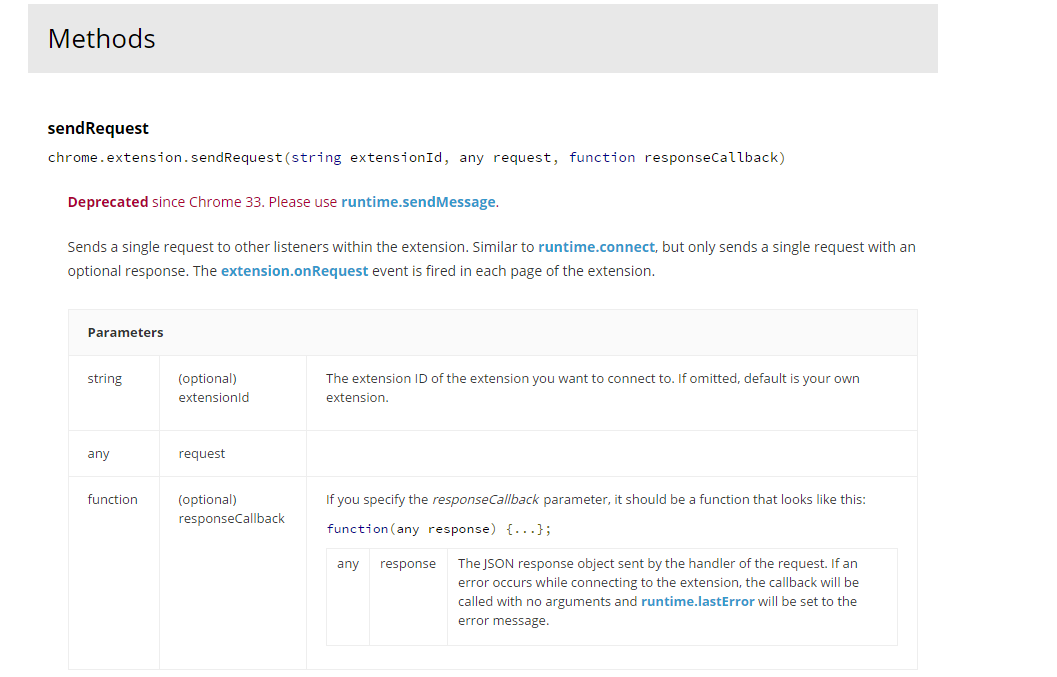
3.在background中监听来自tab的消息chrome.extension.onRequest在官方文档中建议是用chrome.runtime.onMessage替代,但其实可以用chrome.extension.onMessage的,截止到写本文时官方的chrome extension api列表中并没有给出这样的写法,不要怀疑它的可用性。


Google Chrome Native Messaging开发实录(二)Chrome Extension扩展的更多相关文章
- Google Chrome Native Messaging开发实录(一)背景介绍
最近接手了一个针对Google Chrome的需求,最终是使用Native Messaging来实现的.通过这个连载,将把本次开发从方案选定到编码的全部过程进行完整的回顾,并记录开发过程中踩过的各种坑 ...
- Chrome扩展开发之二——Chrome扩展中脚本的运行机制和通信方式
目录: 0.Chrome扩展开发(Gmail附件管理助手)系列之〇——概述 1.Chrome扩展开发之一——Chrome扩展的文件结构 2.Chrome扩展开发之二——Chrome扩展中脚本的运行机制 ...
- Chrome Native Messaging 与本地程序之间的通信
最近项目上出现了web打印不稳定的问题,师父决定web调用本地打印程序,在查阅了相关资料和加了几个相关群咨询后得知新版的chrome不支持NNAPI了,最好用Native Messaging来处理,经 ...
- BizTalk开发系列(二十一) Mapping 扩展开发
BizTalk Map编辑器提供了常用的功能块,比如数据库,字符串,数字计算等功能.可在设计Map时直接使用这些功能块进行扩展.除此之外对于进行复杂的Map处 理,Map 编辑器提供了扩展XSLT,扩 ...
- Chrome浏览器扩展开发系列之十四:本地消息机制Native messaging
通过将浏览器所在客户端的本地应用注册为Chrome浏览器扩展的“本地消息主机(native messaging host)”,Chrome浏览器扩展还可以与客户端本地应用之间收发消息. 客户端的本地应 ...
- Chrome 小工具: 启动本地应用 (Native messaging)
最近遇到一个新的问题.需要使用Chrome 插件, 从我们对我们当地的一个网站之一启动C#应用,同时通过本申请值执行不同的操作. 在这里记录下解决的过程.以便以后查找 首先我们须要新建一个google ...
- Chrome 插件: 起动本地应用 (Native messaging)
Chrome 插件: 起动本地应用 (Native messaging) www.MyException.Cn 网友分享于:2014-08-01 浏览:3次 Chrome 插件: 启动本地应用 ...
- 安卓手机移动端Web开发调试之Chrome远程调试(Remote Debugging)
一.让安卓打debug模式的apk包 二.将电脑中的chrome升级到最新版本,在chrome浏览器地址栏中输入chrome://inspect/#devices: 在智能手机还未普及时,移动设备的调 ...
- 前端开发必备之Chrome开发者工具(下篇)
本文介绍的 Chrome 开发者工具基于 Chrome 65版本,如果你的 Chrome 开发者工具没有下文提到的那些内容,请检查下 Chrome 的版本 本文是 前端开发必备之Chrome开发者工具 ...
随机推荐
- 诡异的 ERROR 1045 (28000): Access denied for user 错误
问题描述: 用户已建,权限已赋予.long long ago这个用户是可以正常访问的,但是今天它就不能访问了.报错如下: ERROR 1045 (28000): Access denied for u ...
- css基本图形绘制(基本的矩形、圆形、椭圆、三角形、多边形,也包括稍微复杂一点的爱心、钻石、阴阳八卦等)
正方形: 代码: <style> .square { width: 100px; height: 100px; background-color: cornflowerblue; } &l ...
- redis-server进程CPU百分百问题
结论:待确认是否为redis的BUG,原因是进程实际占用的内存远小于配置的最大内存,所以不会是内存不够需要淘汰.CPU百分百redis-server进程集群状态:slave临时解决办法:使用gdb将d ...
- STL其他--<tuple>用法【C11】
tuple 库 tuple 库 是能够将不同类型的对象组合起来形成一个对象.和pair 对象一样,但是可以组织多种不同类型的元素. tuple中的元素类型是在编译时期决定的.与<utility ...
- java中三种注释
//单行注释 /* 多行注释 */ /** * 文档注释 * version 2018.10.25 * authou GMY */
- 12.DataGrid的columns的特性
- Objective-C 对象和消息模型
Objective-C 对象模型 首先要了解一下Objective-C中关于类和对象的定义,Cocoa中大部分对象都是NSObject的子类(NSProxy是一个例外),继承了NSObject的方法. ...
- EBS 定义显示总帐快码设置
自定义一个功能如下,挂到菜单上就可以了功能 用户功能名 表单 参数GL_GLXDQMLK(自定义) 总帐代码列表 定义代码 VIEW_APPLICATION="SQLGL" HEL ...
- Sql递归关联情况,With作为开头条件。
with Test_Recursion(Id,ParentId)AS(select Id,ParentId from [V_KPI_DetailsActivities] where ParentId ...
- 在.net中使用ETW事件的方法
直到.net4.5,才有了比较便利的操作ETW的方法. 本文介绍的方法主要来源于Microsoft.Diagnostics.Tracing.TraceEvent官方资料库. 准备 (1)需要用到类:M ...