
Delphi: 圆形进度(环形进度)
起源:
重回DC5项目,资源下载美工提供圆形进度条,复习Delphi,为实现其颇觉有趣,遂研究其。
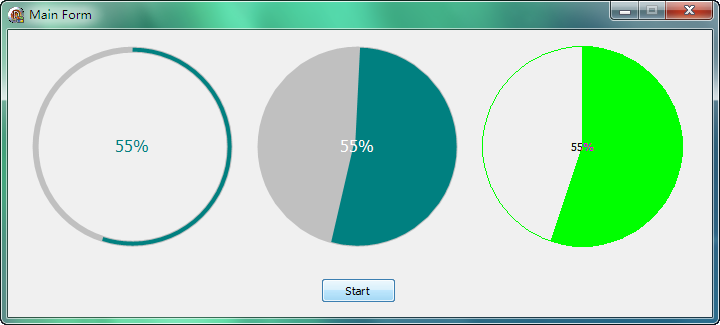
最终效果图如下:
实现:
制作TCircleProgress控件,实现方法参照系统之TGauge控件,CSDN上tp机器猫一个源码,结合GDI+绘制技术实现以消除锯齿,以Bitmap Copy技术以避免闪烁。
设计控件图标时,Delphi7自带之Image Editor在之后版本中没了,重装其取出来用。水平问题,设计亦十分粗糙。
直贴源码吧,源码及Demo可在下面下载。
{*******************************************************}

{                                                       }

{       圆形进度条,使用到GDIPlus技术                      }

{                                                       }

{              刘景威 2018                               }

{                                                       }

{*******************************************************}

unit CircleProgress;

interface

uses

  Windows, Messages, SysUtils, Classes, Graphics, Controls, Forms;

const

  FORE_COLOR = clTeal;

  BACK_COLOR = clSilver;

  PEN_WIDTH  = ;

type

  TCircleProgress = class(TGraphicControl)

  private

    { Private declarations }

    FMinValue: Longint;

    FMaxValue: Longint;

    FCurValue: Longint;

    FPenWidth: Integer;

    FShowText: Boolean;

    FForeColor: TColor;

    FBackColor: TColor;

    FFullCover: Boolean;

    procedure SetShowText(const Value: Boolean);

    procedure SetForeColor(const Value: TColor);

    procedure SetBackColor(const Value: TColor);

    procedure SetFullCover(const Value: Boolean);

    procedure SetMinValue(const Value: Longint);

    procedure SetMaxValue(const Value: Longint);

    procedure SetProgress(const Value: Longint);

    procedure SetPenWidth(const Value: Integer);

    //绘制

    procedure DrawBackground(const ACanvas: TCanvas);

    procedure DrawProgress(const ACanvas: TCanvas);

  protected

    { Protected declarations }

    procedure Paint; override;

    procedure Resize; override;

  public

    { Public declarations }

    constructor Create(AOwner: TComponent); override;

  published

    property Align;

    property Anchors;

    property BackColor: TColor read FBackColor write SetBackColor default BACK_COLOR;

    property FullCover: Boolean read FFullCover write SetFullCover default False;

    property Color;

    property Constraints;

    property Enabled;

    property ForeColor: TColor read FForeColor write SetForeColor default FORE_COLOR;

    property Font;

    property MinValue: Longint read FMinValue write SetMinValue default ;

    property MaxValue: Longint read FMaxValue write SetMaxValue default ;

    property ParentColor;

    property ParentFont;

    property ParentShowHint;

    property PenWidth: Integer read FPenWidth write SetPenWidth;

    property PopupMenu;

    property Progress: Longint read FCurValue write SetProgress;

    property ShowHint;

    property ShowText: Boolean read FShowText write SetShowText default True;

    property Visible;

  end;

procedure Register;

implementation

uses

  Math, Consts, GDIPOBJ, GDIPAPI;

procedure Register;

begin

  RegisterComponents('Samples', [TCircleProgress]);

end;

{ TCircleProgress }

constructor TCircleProgress.Create(AOwner: TComponent);

begin

  inherited Create(AOwner);

  ControlStyle := ControlStyle + [csFramed, csOpaque];

  { default values }

  FMinValue := ;

  FMaxValue := ;

  FCurValue := ;

  FShowText := True;

  FForeColor := FORE_COLOR;

  FBackColor := BACK_COLOR;

  FPenWidth := PEN_WIDTH;

  Width := ;

  Height := ;

end;

procedure TCircleProgress.DrawBackground(const ACanvas: TCanvas);

var

  g: TGPGraphics;

  p: TGPPen;

  r: TGPRectF;

  pw: Integer;

begin

  //背景

  ACanvas.Brush.Color := Self.Color;

  ACanvas.FillRect(Self.ClientRect);

  //轨道

  g := TGPGraphics.Create(ACanvas.Handle);

  pw := FPenWidth;

  if not FFullCover then

  Inc(pw, );

  p := TGPPen.Create(ColorRefToARGB(FBackColor), pw);

  try

    r := MakeRect(pw / , pw / , Self.Width - pw - , Self.Height - pw - );

    g.SetSmoothingMode(SmoothingModeAntiAlias);

    g.DrawEllipse(p, r);

  finally

    p.Free;

    g.Free;

  end;

end;

procedure TCircleProgress.DrawProgress(const ACanvas: TCanvas);

  procedure DrawPercent(g: TGPGraphics);

  var

    percent: Integer;

    sb: TGPSolidBrush;

    fm: TGPFontFamily;

    f: TGPFont;

    sf: TGPStringFormat;

  begin

    percent := Round(FCurValue *  / (FMaxValue - FMinValue));

    sb := TGPSolidBrush.Create(ColorRefToARGB(Font.Color));

    fm := TGPFontFamily.Create(Self.Font.Name);

    f := TGPFont.Create(fm, Self.Font.Size, FontStyleRegular, UnitPoint);

    sf := TGPStringFormat.Create();

    sf.SetAlignment(StringAlignmentCenter);

    sf.SetLineAlignment(StringAlignmentCenter);

    g.DrawString(Format('%d%%', [percent]), -, f, MakeRect(0.0, 0.0, Self.Width, Self.Height), sf, sb);

  end;

var

  g: TGPGraphics;

  p: TGPPen;

  pw: Integer;

  r: TGPRectF;

  angle: Single;

begin

  g := TGPGraphics.Create(ACanvas.Handle);

  p := TGPPen.Create(ColorRefToARGB(FForeColor), FPenWidth);

  try

    pw := FPenWidth;

    if not FFullCover then

      pw := pw + ;

    r := MakeRect(pw / , pw / , Self.Width - pw - , Self.Height - pw - );

    g.SetSmoothingMode(SmoothingModeHighQuality);

    angle := (FCurValue - FMinValue) *  / FMaxValue;

    g.DrawArc(p, r, -, angle);

    //画百分比

    if FShowText then

      DrawPercent(g);

  finally

    p.Free;

    g.Free;

  end;

end;

procedure TCircleProgress.Paint;

var

  bmp: TBitmap;

begin

  inherited;

  bmp := TBitmap.Create;

  try

    bmp.Height := Height;

    bmp.Width := Width;

    DrawBackground(bmp.Canvas);

    DrawProgress(bmp.Canvas);

    Canvas.CopyMode := cmSrcCopy;

    Canvas.Draw(, , bmp)

  finally

    bmp.Free;

  end;

end;

procedure TCircleProgress.ReSize;

begin

  inherited;

  if FPenWidth > Self.Width div  -  then

  begin

    FPenWidth := Self.Width div  - ;

    Invalidate;

  end;

end;

procedure TCircleProgress.SetBackColor(const Value: TColor);

begin

  if FBackColor <> Value then

  begin

    FBackColor := Value;

    Invalidate;

  end;

end;

procedure TCircleProgress.SetForeColor(const Value: TColor);

begin

  if FForeColor <> Value then

  begin

    FForeColor := Value;

    Invalidate;

  end;

end;

procedure TCircleProgress.SetFullCover(const Value: Boolean);

begin

  if FFullCover <> Value then

  begin

    FFullCover := Value;

    Invalidate;

  end;

end;

procedure TCircleProgress.SetMaxValue(const Value: Integer);

begin

  if FMaxValue <> Value then

  begin

    if Value < FMinValue then

      if not (csLoading in ComponentState) then

        raise EInvalidOperation.CreateFmt(SOutOfRange, [FMinValue + , MaxInt]);

    FMaxValue := Value;

    if FCurValue > Value then FCurValue := Value;

    Invalidate;

  end;

end;

procedure TCircleProgress.SetMinValue(const Value: Integer);

begin

  if FMinValue <> Value then

  begin

    if Value > FMaxValue then

      if not (csLoading in ComponentState) then

        raise EInvalidOperation.CreateFmt(SOutOfRange, [-MaxInt, FMaxValue - ]);

    FMinValue := Value;

    if FCurValue < Value then FCurValue := Value;

    Invalidate;

  end;

end;

procedure TCircleProgress.SetPenWidth(const Value: Integer);

begin

  if FPenWidth <> Value then

  begin

    FPenWidth := Value;

    if FPenWidth <  then

      FPenWidth :=

    else if FPenWidth > Self.Width div  -  then

      FPenWidth := Self.Width div  - ;

    Invalidate;

  end;

end;

procedure TCircleProgress.SetProgress(const Value: Integer);

begin

  iF FCurValue <> Value then

  begin

    FCurValue := Value;

    if FCurValue < FMinValue then

      FCurValue := FMinValue

    else if FCurValue > FMaxValue then

      FCurValue := FMaxValue;

    Invalidate;

  end;

end;

procedure TCircleProgress.SetShowText(const Value: Boolean);

begin

  if FShowText <> Value then

  begin

    FShowText := Value;

    Invalidate;

  end;

end;

end.
定时器调用:
procedure TfrmMain.tmrStartTimer(Sender: TObject);

begin

  cp.Progress := cp.Progress + ;

  if cp.Progress >= cp.MaxValue then

    tmrStart.Enabled := False;

end;
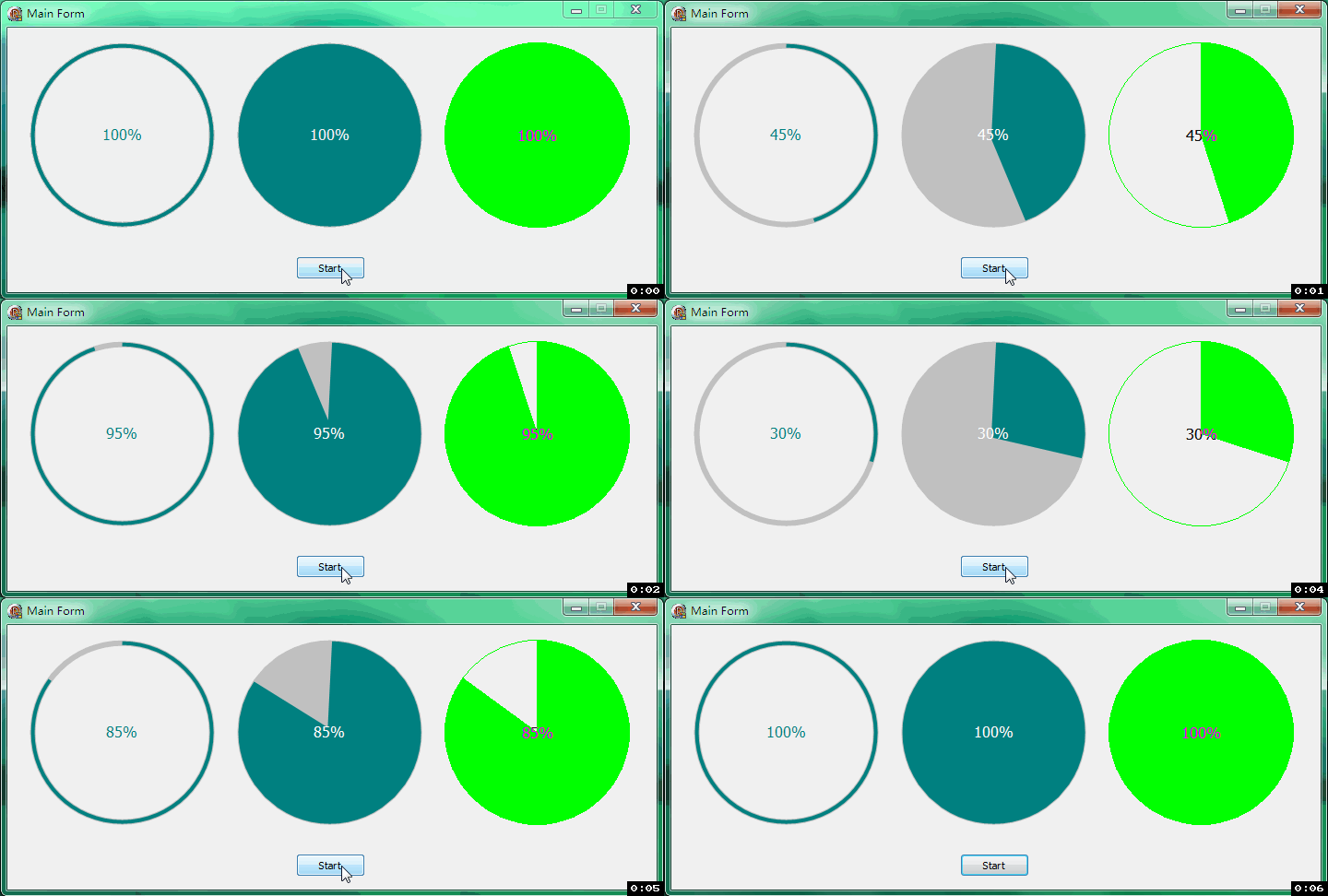
效果:
源码:
https://files.cnblogs.com/files/crwy/cp.rar
Delphi: 圆形进度(环形进度)的更多相关文章
- 图解CSS3制作圆环形进度条的实例教程
圆环形进度条制作的基本思想还是画出基本的弧线图形,然后CSS3中我们可以控制其旋转来串联基本图形,制造出部分消失的效果,下面就来带大家学习图解CSS3制作圆环形进度条的实例教程 首先,当有人说你能不能 ...
- iOS 开发技巧-制作环形进度条
有几篇博客写到了怎么实现环形进度条,大多是使用Core Graph来实现,实现比较麻烦且效率略低,只是一个小小的进度条而已,我们当然是用最简单而且效率高的方式来实现. 先看一下这篇博客,博客地址:ht ...
- iOS-swift环形进度指示器+图片加载动画
demo.gif 如图,这个动画的是如何做的呢? 分析: 1.环形进度指示器,根据下载进度来更新它 2.扩展环,向内向外扩展这个环,中间扩展的时候,去掉这个遮盖 一.环形进度指示器 1.自定义View ...
- iOS一分钟学会环形进度条
有几篇博客写到了怎么实现环形进度条,大多是使用Core Graph来实现,实现比较麻烦且效率略低,只是一个小小的进度条而已,我们当然是用最简单而且效率高的方式来实现.先看一下这篇博客,博客地址:htt ...
- canvas绘制环形进度条
<!DOCTYPE html> <html > <head> <meta http-equiv="content-type" conten ...
- 【CSS】环形进度条
效果图 原理剖析 1.先完成这样一个半圆(这个很简单吧) 2.overflow: hidden; 3.在中间定位一个白色的圆形做遮挡 4.完成另一半 5.使用animate配合时间完成衔接 源码 &l ...
- canvas环形进度条
<style> canvas { border: 1px solid red; margin: 100px; }</style> <canvas id="rin ...
- canvas实现半圆环形进度条
html部分 <canvas id="canvas" width="150" height="150"> <p>抱歉 ...
- 仿MIUI音量变化环形进度条实现
Android中使用环形进度条的业务场景事实上蛮多的,比方下载文件的时候使用环形进度条.会给用户眼前一亮的感觉:再比方我大爱的MIUI系统,它的音量进度条就是使用环形进度条,尽显小米"为发烧 ...
随机推荐
- day02-格式化输出
python格式化字符串有%和{}两种 字符串格式控制符. 字符串输入数据格式类型(%格式操作符号) %%百分号标记%c字符及其ASCII码%s字符串%d有符号整数(十进制)%u无符号整数(十进制)% ...
- innosetup 安装前、卸载前判断是否有进程正在运行<转>
[Code] //安装前判断是否有进程正在运行,istask.dll文件与打包的exe文件一起 function RunTask(FileName: string; bFullpath: Boolea ...
- C++11之for循环的新用法《转》
相关资料:https://legacy.gitbook.com/book/changkun/cpp1x-tutorial/details C++11之for循环的新用法 C++使用如下方法遍历一个容器 ...
- easyui datagrid取消点击行的选中事件
http://www.jeasyui.com/demo/main/index.php?plugin=DataGrid&theme=material&dir=ltr&pitem= ...
- Oracle保留两位小数的函数
1.最终保存成字符串类型 使用to_char()函数 // 其9代表:如果存在数字则显示数字,不存在则显示空格 // 其0代表:如果存在数字则显示数字,不存在则显示0,即占位符 // 其FM代表:删除 ...
- uml用例关系
关联关系 关联关系是指执行者与用例之间的关系,又称为通信关系,如果某个执行者可以对某个用例进行操作,它们之间就具有关联关系,如下图所示,“经理”有一个功能为“查看库存报表”,因此可以在执行者“经理”和 ...
- PostgresQL 中有没有rownum这样的,显示结果集的序号
select * from (select row_number() over() as rownum,tablename from pg_tables) t where rownum<10;
- zatree的安装
zatree的安装有2种 一种是支持2.x的用以下方法安装 zabbix安装zatree 实现图形树状化 官网:https://github.com/spide4k/zatree [root@SERV ...
- vmware搭建lnmp环境配置域名
找到nginx配置文件,修改server_name 然后找到/etc/hosts文件 修改成如下 之后在Windows本地的C盘的hosts文件中添加解析 好了,这样就可以访问了 通往牛逼的路上,在意 ...
- python实现查找算法:二分查找法
二分查找算法也称折半查找,基本思想就是折半,和平时猜数字游戏一样,比如猜的数字时67,猜测范围是0-100,则会先猜测中间值50,结果小了,所以就会从50-100猜测,中间值为75,结果大了,又从50 ...