
ABP微服务学习系列-修复System.Text.Json不支持序列化Exception
前面我们已经把服务都启动了,然后我们试试请求API。
发现请求出现500
返回错误
System.NotSupportedException: Serialization and deserialization of 'System.Reflection.MethodBase' instances are not supported. Path: $.Exceptions.TargetSite.

 ---> System.NotSupportedException: Serialization and deserialization of 'System.Reflection.MethodBase' instances are not supported.

   at System.Text.Json.Serialization.Converters.UnsupportedTypeConverter`1.Write(Utf8JsonWriter writer, T value, JsonSerializerOptions options)

   at System.Text.Json.Serialization.JsonConverter`1.TryWrite(Utf8JsonWriter writer, T& value, JsonSerializerOptions options, WriteStack& state)

   at System.Text.Json.Serialization.Metadata.JsonPropertyInfo`1.GetMemberAndWriteJson(Object obj, WriteStack& state, Utf8JsonWriter writer)

   at System.Text.Json.Serialization.Converters.ObjectDefaultConverter`1.OnTryWrite(Utf8JsonWriter writer, T value, JsonSerializerOptions options, WriteStack& state)

   at System.Text.Json.Serialization.JsonConverter`1.TryWrite(Utf8JsonWriter writer, T& value, JsonSerializerOptions options, WriteStack& state)

   at System.Text.Json.Serialization.Converters.ListOfTConverter`2.OnWriteResume(Utf8JsonWriter writer, TCollection value, JsonSerializerOptions options, WriteStack& state)

   at System.Text.Json.Serialization.JsonCollectionConverter`2.OnTryWrite(Utf8JsonWriter writer, TCollection value, JsonSerializerOptions options, WriteStack& state)

   at System.Text.Json.Serialization.JsonConverter`1.TryWrite(Utf8JsonWriter writer, T& value, JsonSerializerOptions options, WriteStack& state)

   at System.Text.Json.Serialization.Metadata.JsonPropertyInfo`1.GetMemberAndWriteJson(Object obj, WriteStack& state, Utf8JsonWriter writer)

   at System.Text.Json.Serialization.Converters.ObjectDefaultConverter`1.OnTryWrite(Utf8JsonWriter writer, T value, JsonSerializerOptions options, WriteStack& state)

   at System.Text.Json.Serialization.JsonConverter`1.TryWrite(Utf8JsonWriter writer, T& value, JsonSerializerOptions options, WriteStack& state)

   at System.Text.Json.Serialization.JsonConverter`1.WriteCore(Utf8JsonWriter writer, T& value, JsonSerializerOptions options, WriteStack& state)

   --- End of inner exception stack trace ---

   at System.Text.Json.ThrowHelper.ThrowNotSupportedException(WriteStack& state, NotSupportedException ex)

   at System.Text.Json.Serialization.JsonConverter`1.WriteCore(Utf8JsonWriter writer, T& value, JsonSerializerOptions options, WriteStack& state)

   at System.Text.Json.Serialization.JsonConverter`1.WriteCoreAsObject(Utf8JsonWriter writer, Object value, JsonSerializerOptions options, WriteStack& state)

   at System.Text.Json.JsonSerializer.WriteCoreAsObject(Utf8JsonWriter writer, Object value, JsonTypeInfo jsonTypeInfo)

   at System.Text.Json.Serialization.JsonConverter`1.TryWrite(Utf8JsonWriter writer, T& value, JsonSerializerOptions options, WriteStack& state)

   at System.Text.Json.Serialization.JsonConverter`1.WriteCore(Utf8JsonWriter writer, T& value, JsonSerializerOptions options, WriteStack& state)

   at System.Text.Json.JsonSerializer.WriteCore[TValue](Utf8JsonWriter writer, TValue& value, JsonTypeInfo`1 jsonTypeInfo)

   at System.Text.Json.JsonSerializer.WriteString[TValue](TValue& value, JsonTypeInfo`1 jsonTypeInfo)

   at Volo.Abp.Json.SystemTextJson.AbpSystemTextJsonSerializer.Serialize(Object obj, Boolean camelCase, Boolean indented)

   at Volo.Abp.RabbitMQ.Utf8JsonRabbitMqSerializer.Serialize(Object obj)

   at Volo.Abp.EventBus.RabbitMq.RabbitMqDistributedEventBus.PublishAsync(Type eventType, Object eventData, IBasicProperties properties, Dictionary`2 headersArguments)

   at Volo.Abp.EventBus.RabbitMq.RabbitMqDistributedEventBus.PublishToEventBusAsync(Type eventType, Object eventData)

   at Volo.Abp.EventBus.Distributed.DistributedEventBusBase.PublishAsync(Type eventType, Object eventData, Boolean onUnitOfWorkComplete, Boolean useOutbox)

   at Volo.Abp.EventBus.UnitOfWorkEventPublisher.PublishDistributedEventsAsync(IEnumerable`1 distributedEvents)

   at Volo.Abp.Uow.UnitOfWork.CompleteAsync(CancellationToken cancellationToken)

   at Volo.Abp.Uow.UnitOfWorkInterceptor.InterceptAsync(IAbpMethodInvocation invocation)

   at Volo.Abp.Castle.DynamicProxy.CastleAsyncAbpInterceptorAdapter`1.InterceptAsync(IInvocation invocation, IInvocationProceedInfo proceedInfo, Func`3 proceed)

   at Volo.Abp.Auditing.AuditingManager.SaveAsync(DisposableSaveHandle saveHandle)

   at Volo.Abp.Auditing.AuditingManager.DisposableSaveHandle.SaveAsync()

   at Volo.Abp.AspNetCore.Auditing.AbpAuditingMiddleware.InvokeAsync(HttpContext context, RequestDelegate next)

   at Microsoft.AspNetCore.Builder.UseMiddlewareExtensions.<>c__DisplayClass6_1.<<UseMiddlewareInterface>b__1>d.MoveNext()

--- End of stack trace from previous location ---

   at Volo.Abp.AspNetCore.Serilog.AbpSerilogMiddleware.InvokeAsync(HttpContext context, RequestDelegate next)

   at Microsoft.AspNetCore.Builder.UseMiddlewareExtensions.<>c__DisplayClass6_1.<<UseMiddlewareInterface>b__1>d.MoveNext()

--- End of stack trace from previous location ---

   at Swashbuckle.AspNetCore.SwaggerUI.SwaggerUIMiddleware.Invoke(HttpContext httpContext)

   at Swashbuckle.AspNetCore.Swagger.SwaggerMiddleware.Invoke(HttpContext httpContext, ISwaggerProvider swaggerProvider)

   at Microsoft.AspNetCore.Authorization.AuthorizationMiddleware.Invoke(HttpContext context)

   at Volo.Abp.AspNetCore.Security.Claims.AbpClaimsMapMiddleware.InvokeAsync(HttpContext context, RequestDelegate next)

   at Microsoft.AspNetCore.Builder.UseMiddlewareExtensions.<>c__DisplayClass6_1.<<UseMiddlewareInterface>b__1>d.MoveNext()

--- End of stack trace from previous location ---

   at Microsoft.AspNetCore.Authentication.AuthenticationMiddleware.Invoke(HttpContext context)

   at Volo.Abp.AspNetCore.Security.AbpSecurityHeadersMiddleware.InvokeAsync(HttpContext context, RequestDelegate next)

   at Microsoft.AspNetCore.Builder.UseMiddlewareExtensions.<>c__DisplayClass6_1.<<UseMiddlewareInterface>b__1>d.MoveNext()

--- End of stack trace from previous location ---

   at Microsoft.AspNetCore.Localization.RequestLocalizationMiddleware.Invoke(HttpContext context)

   at Microsoft.AspNetCore.RequestLocalization.AbpRequestLocalizationMiddleware.InvokeAsync(HttpContext context, RequestDelegate next)

   at Microsoft.AspNetCore.Builder.UseMiddlewareExtensions.<>c__DisplayClass6_1.<<UseMiddlewareInterface>b__1>d.MoveNext()

--- End of stack trace from previous location ---

   at Volo.Abp.AspNetCore.Tracing.AbpCorrelationIdMiddleware.InvokeAsync(HttpContext context, RequestDelegate next)

   at Microsoft.AspNetCore.Builder.UseMiddlewareExtensions.<>c__DisplayClass6_1.<<UseMiddlewareInterface>b__1>d.MoveNext()

--- End of stack trace from previous location ---

   at Microsoft.AspNetCore.Diagnostics.DeveloperExceptionPageMiddlewareImpl.Invoke(HttpContext context)
这是由于接口抛出异常,但是System.Text.Json不支持序列化Exception导致的。
如何解决呢,这里我们需要自己自定义一个ExceptionJsonConverter
在Shared.Hosting.AspNetCore添加JsonConverters目录,新建一个ExceptionJsonConverter类。
类继承JsonConverter泛型接口,并重写他的方法。
完整converter代码如下:
using System;

using System.Linq;

using System.Text.Json;

using System.Text.Json.Serialization;

namespace FunShow.Shared.Hosting.AspNetCore.JsonConverters

{

    public class ExceptionJsonConverter<TExceptionType>: JsonConverter<TExceptionType> where TExceptionType : Exception

    {

        public override bool CanConvert(Type typeToConvert)

        {

            return typeof(Exception).IsAssignableFrom(typeToConvert);

        }

        public override TExceptionType Read(ref Utf8JsonReader reader, Type typeToConvert, JsonSerializerOptions options)

        {

            throw new NotSupportedException("Deserializing exceptions is not allowed");

        }

        public override void Write(Utf8JsonWriter writer, TExceptionType value, JsonSerializerOptions options)

        {

            var serializableProperties = value.GetType()

                .GetProperties()

                .Select(uu => new { uu.Name, Value = uu.GetValue(value) })

                .Where(uu => uu.Name != nameof(Exception.TargetSite));

            if (options?.DefaultIgnoreCondition == System.Text.Json.Serialization.JsonIgnoreCondition.WhenWritingNull)

            {

                serializableProperties = serializableProperties.Where(uu => uu.Value != null);

            }

            var propList = serializableProperties.ToList();

            if (propList.Count == 0)

            {

                // Nothing to write

                return;

            }

            writer.WriteStartObject();

            foreach (var prop in propList)

            {

                writer.WritePropertyName(prop.Name);

                JsonSerializer.Serialize(writer, prop.Value, options);

            }

            writer.WriteEndObject();

        }

    }

}
然后在FunShowSharedHostingAspNetCoreModule中添加如下代码:
    public override void ConfigureServices(ServiceConfigurationContext context)

    {

        Configure<AbpSystemTextJsonSerializerOptions>(options => options.JsonSerializerOptions.Converters.Add(new ExceptionJsonConverter<Exception>()));

    }
再次请求,我们发现接口HTTP状态码变成了401,没有再次出现序列化不支持的异常了。
我们通过swagger的Authorize获取token之后随便输入再次发出请求,请求再次500,但是500返回内容正常,没有再次出现序列化不支持的异常。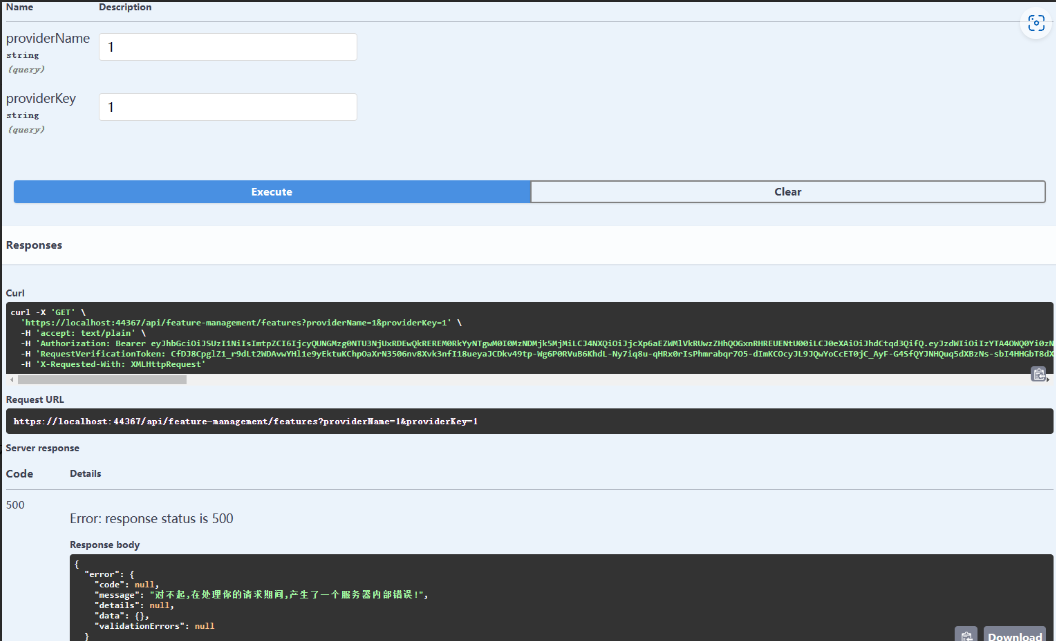
到这我们就解决了System.Text.Json不支持序列化Exception的一个问题。
ABP微服务学习系列-修复System.Text.Json不支持序列化Exception的更多相关文章
- [译]试用新的System.Text.Json API
译注 可能有的小伙伴已经知道了,在.NET Core 3.0中微软加入了对JSON的内置支持. 一直以来.NET开发者们已经习惯使用Json.NET这个强大的库来处理JSON. 那么.NET为什么要增 ...
- 在.Net Core 3.0中尝试新的System.Text.Json API
.NET Core 3.0提供了一个名为System.Text.Json的全新命名空间,它支持reader/writer,文档对象模型(DOM)和序列化程序.在此博客文章中,我将介绍它如何工作以及如何 ...
- .NET Core 微服务学习与实践系列文章目录索引(2019版)
参考网址: https://archy.blog.csdn.net/article/details/103659692 2018年,我开始学习和实践.NET Core,并开始了微服务的学习,以及通过各 ...
- 《基于.NET Core构建微服务》系列文章(更新至第6篇,最新第7篇,已发布主页候选区)
原文:Building Microservices On .NET Core – Part 1 The Plan 时间:2019年1月14日 作者:Wojciech Suwała, Head Arch ...
- SpringCloud微服务学习笔记
SpringCloud微服务学习笔记 项目地址: https://github.com/taoweidong/Micro-service-learning 单体架构(Monolithic架构) Mon ...
- 微服务学习笔记(1)——使用MagicOnion实现gRPC
原文:微服务学习笔记(1)--使用MagicOnion实现gRPC 1.什么是gRPC 官方文档:https://grpc.io/docs/guides/index.html 2.什么是MagicOn ...
- 微服务学习笔记(2)——使用Consul 实现 MagicOnion(GRpc) 服务注册和发现
原文:微服务学习笔记(2)--使用Consul 实现 MagicOnion(GRpc) 服务注册和发现 1.下载打开Consul 笔者是windows下面开发的(也可以使用Docker). 官网下载w ...
- .Net Core 微服务容器系列基础目录篇
1.开场白 HI,各位老铁,大家端午好,之前写了些关于.net core商城系列的文章,有点乱,今天心血来潮想着整理一下(今天只是先把目录列出来,后面的每篇文章这两天会进行重新修改的,目前先将就看下) ...
- 微服务Consul系列之服务注册与服务发现
在进行服务注册之前先确认集群是否建立,关于服务注册可以看上篇微服务Consul系列之集群搭建的介绍,两种注册方式:一种是注册HTTP API.另一种是通过配置文件定义,下面讲解的是基于后者配置文件定义 ...
- Spring Cloud微服务学习笔记
Spring Cloud微服务学习笔记 SOA->Dubbo 微服务架构->Spring Cloud提供了一个一站式的微服务解决方案 第一部分 微服务架构 1 互联网应用架构发展 那些迫使 ...
随机推荐
- 使用PyLint分析评估代码质量
什么是PyLint PyLint是一款用于评估Python代码质量的分析工具,它诞生于2003年,其最初十年的主要作者和维护者是Sylvain Thénault.PyLint可以用来检查代码是否错误. ...
- Spark详解(04) - Spark项目开发环境搭建
类别 [随笔分类]Spark Spark详解(04) - Spark项目开发环境搭建 Spark Shell仅在测试和验证程序时使用的较多,在生产环境中,通常会在IDEA中编制程序,然后打成Ja ...
- dotnet 代码优化 聊聊逻辑圈复杂度
本文属于 dotnet 代码优化系列博客.相信大家都对圈复杂度这个概念很是熟悉,本文来和大家聊聊逻辑的圈复杂度.代码优化里面,一个关注的重点在于代码的逻辑复杂度.一段代码的逻辑复杂度越高,那么维护起来 ...
- 区块链特辑——solidity语言基础(三)
Solidity语法基础学习 五.映射类型: 映射型态 Mapping Type 映射钥匙Key → 真实资料 Value mapping(KeyType → ValueType) VariableN ...
- [超详细] [效能工具]Typora+PicGo+Github免费图床快速搭建,提升技术文档输出效率
一.前言 在我们日常的学习和工作中,我们经常需要进行写作.尤其对于我们程序技术人员而言,工作中的技术方案文档或者接口文档等,都是经常需要用上的. 那么如果没有一个高效的工具,去帮助我们记录和创作,这将 ...
- MySQL 字符串长度 char_length、length
一.方法分类 二.具体方法 函数 描述 区别 char_length(str)或character_length(str) 返回字符串 str 的字符 1.单位为字符2.不管汉字还是数字或者是字母都算 ...
- 腾讯出品小程序自动化测试框架【Minium】系列(二)项目配置及测试套件使用说明
一.写在前面 真的人这一散漫惯了,收心就很难了,上午把小程序开发环境启动后,在QQ游戏里,杀了三把象棋,5把2D桌球,一上午没了,还是没法心静下来去学点东西. 那就老样子,逼着自己开始,找到 &quo ...
- (23)go-micro微服务客户端开发(使用负载均衡)
目录 一 main.go开发 二 客户端代码开发: 三 客户端测试功能 1.发送注册邮件 2.实现注册功能 3.查询用户功能 四 运行项目 五 最后 一 main.go开发 至此,咱们的项目服务端代码 ...
- CSS-@规则(At-rules)常用语法使用总结
At-rules规则是目前CSS中一种常见的语法规则,它使用一个"@"符号加一个关键词定义,后面跟上语法区块,如果没有则以分号结束即可. 这种规则一般用于标识文档.引入外部样式.条 ...
- 插入排序(CSP-J 2021 T2)
题目:(由于题干过长直接上链接:P7910 [CSP-J 2021] 插入排序 - 洛谷 | 计算机科学教育新生态 (luogu.com.cn)) 不是打广告 又有一个新思路: 我们可以再开一个b数组 ...