
Teambition企业内部应用开发指南
Teambition企业内部应用Python开发指南
注意:此文章并非搬运,一小部分仅为借鉴。
Teambition提供了API接口,我们可以注册成为开发者,然后通过接口获取Teambition的数据,按照需求的格式保存和分析.
一、准备阶段
1.登录Teambition企业账号,要有管理员的权限,点击左上角的菜单按钮,然后点击进入企业的“全部应用”.最后点击“应用商店”


2.点击“开放平台”,此页面有后期需用的API文档,可以先收藏。点击“立即创建”

3.创建企业内部应用:填写名称和描述
4.打开应用凭证和基本信息,获取ID和Secret(F12在代码中可以直接复制)
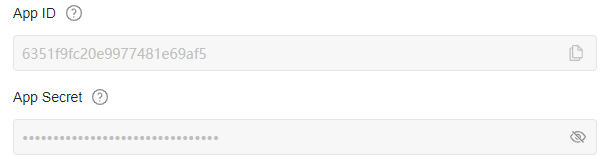
5.打开左侧栏中的“应用开发”--“应用权限”,根据需要勾选
6.打开“应用发布”,填写信息,发布。
二、Python脚本编写
1.找到对应的jwt包,https://jwt.io/libraries,下载安装(推荐PyJWT:至少我用没有问题)
2.appAccessToken的获取(最重要的一步)
- 因为文档中没有Python实现的任何描述,这里只提供个人写法
from datetime import datetime, timedelta

import jwt

import requests

import time

from Config import getConfig

 class GetTeamBitionEvents(object):

         def __init__(self):

 		self.app_id = getConfig('config', 'Get_TB_Data', 'app_id')

        self.app_secret = getConfig('config', 'Get_TB_Data', 'app_secret')

    def get_aptoken(self):

        now_time = int(time.time())

        expire_time = now_time + 36000  # 1 小时后超时

        token_dict = {'iat': now_time,

                      '_appId': '%s' % self.app_id,

                      'exp': expire_time,

                      }

        headers = {

            'typ': 'jwt',

            'alg': 'HS256'

            # 声明所使用的算法

        }

        encoded = jwt.encode(payload=token_dict, key=self.app_secret, headers=headers,

                             algorithm='HS256')  # .decode('ascii')

        return encoded
- 个人习惯将固定的重要数据存放在config文件中,你也可以直接写入字符串
3.获取Token后就可以开始调用API了,我这里将“创建项目任务类型”作为示例
- 文档链接:开放平台文档中心 (teambition.com)
- 主要看六点
- URL:
https://open.teambition.com/api/v3/sfc/create - Method:POST
- 权限:tb-core:sfc:create
- 请求头
- 查询参数
- 请求体
- URL:
- 有了这些信息,就可以直接上代码了
from __future__ import absolute_import, unicode_literals

import requests, time, jwt

class GetTeamBitionEvents(object):

    def __init__(self):

        self.app_id = ''			# 必填

        self.app_secret = ''		# 必填

        self.company_url = 'https://www.teambition.com/organization/'	# 固定

        self.company_id = ''  # 一些API会用到公司ID

        self.callback_url = self.company_url + self.company_id		# 固定

        self.user_id=''		# 一些API会用到个人ID

        self.auth_url = 'https://account.teambition.com/oauth2/authorize?client_id=' + self.app_id + '&redirect_uri=' + self.callback_url		# 固定

    def get_aptoken(self):

        now_time = int(time.time())

        expire_time = now_time + 36000  # 1 小时后超时

        token_dict = {'iat': now_time,

                      '_appId': '%s' % self.app_id,

                      'exp': expire_time,

                      }

        headers = {

            'typ': 'jwt',

            'alg': 'HS256'

            # 声明所使用的算法

        }

        encoded = jwt.encode(payload=token_dict, key=self.app_secret, headers=headers,

                             algorithm='HS256')  # .decode('ascii')

        return encoded

    def post_proj_type(self,params,object):

        url = f'https://open.teambition.com/api/v3/sfc/create'

        app_token = (self.get_aptoken()).replace("\n", "").replace('\r', '')

        headers = {

            'Authorization': 'Bearer %s' % app_token,

            'X-Tenant-Id': '%s' % self.company_id,

            'X-Tenant-Type': 'organization',

            'X-Operator-Id': self.user_id

        }

        return requests.post(url,json=object,params=params, headers=headers)

if __name__ == '__main__':

    tb = GetTeamBitionEvents()

    projectId=tb.company_id       #测试企业-项目管理副本

    roleId=tb.user_id           # 测试角色

    object={

        'name':'测试类型'

    }

    params={

        'projectId':projectId

    }

    result = tb.post_proj_type(params,object)

    print(result.json()["result"])
- 其中
params为查询参数,json为请求体。根据具体API要求- 'params'和'object'中参数用
,分隔 - requests的方法有
get/post/del/put根据需要使用 - 参数后有勾选必填的,必须要有,不然会报错
- 'params'和'object'中参数用
- 记得打开相应权限
三、一些辅助脚本
Config.py
import configparser

import os

# 读取配置文件

def getConfig(filename, section, option):

    """

    :param filename 文件名称

    :param section: 服务

    :param option: 配置参数

    :return:返回配置信息

    """# 获取当前目录路径

    proDir = os.path.split(os.path.realpath(__file__))[0]

    # print(proDir)

    # 拼接路径获取完整路径

    configPath = os.path.join(proDir, filename)

    # print(configPath)

    # 创建ConfigParser对象

    conf = configparser.ConfigParser()

    # 读取文件内容

    conf.read(configPath)

    config = conf.get(section, option)

    return config
config文件格式
[Get_TB_Data]

app_id=XXXXXXXX

app_secret=XXXXXXXX
- 中括号内为Section,条目为option
其他
这方面可以自己拓展
我个人是写了专门的:数据筛选脚本(根据条件),数据处理脚本(生成json,txt,csv,将国际时间转为北京时间),邮件发送脚本
主要是我自己懒得把代码搬上来了,因为逻辑全是连在一起的,不太好动。如果有需求,可以发送评论,如果方便,我会找机会放上来。
如果追求搜索任务时的自由度的话,可以尝试在历史版本中的TQL查询:https://open.teambition.com/docs/apis/6321c6d4912d20d3b5a4b0b0
四、一些问题
Teambition的维护并不好,文档和API中有许多错漏,我已经在10月13向阿里的相关开发者提交了一下报告,不知道何时能修好。这报告也不全面,是后面才想起来写的。仅供参考。
服务器问题(大概)
企业
获取企业信息(X)
from __future__ import absolute_import, unicode_literals

import requests, time, jwt

class GetTeamBitionEvents(object):

    def __init__(self):

        self.app_id = 'XXXXXXXXXXXXXXXXXXX'

        self.app_secret = 'XXXXXXXXXXXXXXXXXXX'

        self.company_url = 'https://www.teambition.com/organization/'

        self.company_id = 'XXXXXXXXXXXXXXXXXXX'

        self.callback_url = self.company_url + self.company_id

        self.user_code = ''

        self.auth_url = 'https://account.teambition.com/oauth2/authorize?client_id=' + self.app_id + '&redirect_uri=' + self.callback_url

    def get_aptoken(self):

        now_time = int(time.time())

        expire_time = now_time + 36000  # 1 小时后超时

        token_dict = {'iat': now_time,

                      '_appId': '%s' % self.app_id,

                      'exp': expire_time,

                      }

        headers = {

            'typ': 'jwt',

            'alg': 'HS256'

            # 声明所使用的算法

        }

        encoded = jwt.encode(payload=token_dict, key=self.app_secret, headers=headers,

                             algorithm='HS256')  # .decode('ascii')

        return encoded

    def post_userapp_visible(self):

        url = 'https://open.teambition.com/api/org/info'

        app_token = (self.get_aptoken()).replace("\n", "").replace('\r', '')

        headers = {

            "Authorization": 'Bearer %s' % app_token,

        }

        params = {

            "orgId": '%s' % self.company_id

        }

        return requests.get(url, params=params, headers=headers)

if __name__ == '__main__':

    tb = GetTeamBitionEvents()

    result = tb.post_userapp_visible()

    print(result.json())

    print(result.json()["result"])
有问题
{'code': 403, 'errorMessage': 'Forbidden: authbase.Verify failed: Forbidden: no permission to access resource, appID(6332aa802cd25c2c2880e56b) serviceID(5d4ce50b900cea004806c15a) tenant() resource(organization) action(1)', 'result': None}

None
任务
更新自由任务标题(X)
from __future__ import absolute_import, unicode_literals

import requests, time, jwt

class GetTeamBitionEvents(object):

    def __init__(self):

        self.app_id = 'XXXXXXXXXXXXXXXXXXX'

        self.app_secret = 'XXXXXXXXXXXXXXXXXXX'

        self.company_url = 'https://www.teambition.com/organization/'

        self.company_id = 'XXXXXXXXXXXXXXXXXXX'  # 测试用公司

        self.callback_url = self.company_url + self.company_id

        self.user_id='XXXXXXXXXXXXXXXXXXX'

        self.user_code = ''

        self.auth_url = 'https://account.teambition.com/oauth2/authorize?client_id=' + self.app_id + '&redirect_uri=' + self.callback_url

    def get_aptoken(self):

        now_time = int(time.time())

        expire_time = now_time + 36000  # 1 小时后超时

        token_dict = {'iat': now_time,

                      '_appId': '%s' % self.app_id,

                      'exp': expire_time,

                      }

        headers = {

            'typ': 'jwt',

            'alg': 'HS256'

            # 声明所使用的算法

        }

        encoded = jwt.encode(payload=token_dict, key=self.app_secret, headers=headers,

                             algorithm='HS256')  # .decode('ascii')

        return encoded

    def post_create_freetask(self,xoperatorid,content):

        url = f'https://open.teambition.com/api/organization-task/create'

        app_token = (self.get_aptoken()).replace("\n", "").replace('\r', '')

        headers = {

            'x-operator-id': xoperatorid,

            'Authorization': 'Bearer %s' % app_token,

            'X-Tenant-Id': '%s' % self.company_id,

            'X-Tenant-Type': 'organization',

        }

        params={

            'content':content

        }

        return requests.post(url,json=params, headers=headers)

if __name__ == '__main__':

    tb = GetTeamBitionEvents()

    xoperatorid='63310bc0b2b7b2cf2ca8a3b2'

    content='all right'

    result = tb.post_create_freetask(xoperatorid,content)

    print(result.json())

    print(result.json()["result"])
有问题
{'code': 403, 'errorMessage': '系统错误', 'result': None}
创建自由任务(X)
同上报错
查询自由任务详情(X)
同上
更新自由任务截止时间(X)
同上
更新自由任务执行者(?)
更新自由任务参与者(?)
更新自由任务完成态(?)
更新自由任务备注(?)
这几个都没测了,感觉会是一样的结果
获取任务关联信息(X)
{'code': 403, 'errorMessage': '应用的接口访问权限受限', 'result': None}
创建任务关联(?)
删除任务关联(?)
更新自由任务优先级(?)
这几个也都没测了
更新任务自定义字段值(弃用?)
{'code': 404, 'errorMessage': '访问的资源不存在', 'result': None}
我估计这是被弃用的,因为后面有一条简介一模一样的接口
而且object中的参数缺失
项目
查询企业优先级(X)
{'code': 403, 'errorMessage': '系统错误', 'result': None}
修改项目角色的权限项(X)
{'code': 500, 'errorMessage': 'internal server error', 'result': None}
恢复归档项目(功能问题)
{'updated': '2022-10-13T06:56:39.469Z'}
运行完毕后,并未让已归档项目回复
查询项目分组(怀疑是被弃用的)
项目中有一个搜索项目分组,不会报错
{'code': 403, 'errorMessage': '系统错误', 'result': None}
文档问题
文档部分,只记录了在项目条目下的错误
项目
查询企业优先级(X)
查询参数organizationId是必填字段
安装项目应用
请求体object缺少参数说明,或者说可能不需要
删除项目应用
文档请求头描述中缺少X-Operator-Id
复制项目
请求体object中name是必填项
从模版创建项目
请求体object中name、templateId是必填项
创建项目
请求体object中name是必填项
创建项目分组关联关系(没有在网页端找到相应信息)(X)
{'code': 400, 'errorMessage': '参数有误: 应当有必需属性 projectRoleIds', 'result': None}
在文档里找不到projectRoleIds
创建项目成员
文档缺少:X-Operator-Id必填
修改项目成员的角色
userIds、roleIds为必填参数
更新项目的项目分组(X)
x-operator-id必填
{'code': 400, 'errorMessage': '参数有误: required: $add or $del', 'result': None}
文档内没有$add or $del相关解释
创建项目角色
x-operator-id必填
移除项目角色
x-operator-id必填
创建项目任务类型
x-operator-id必填
修改项目任务类型
其实应该放在任务一栏下面
x-operator-id必填,projectId 也是必须的
删除项目任务类型
x-operator-id必填,projectId 是必须的,文档里写了object但没有任何参数,我觉得也用不上
更新任务字段信息(怀疑与任务中一接口重复)
没有路径参数,文档中却给了两个
Teambition企业内部应用开发指南的更多相关文章
- 转:Yelp开发团队发布内部网站设计指南
原文来自于:http://www.infoq.com/cn/news/2014/02/yelp-style-guide 近日,Yelp开发团队在博客发布消息:Yelp公开了内部网站设计指南.这份文档此 ...
- 钉钉企业内部H5微应用开发
企业内部H5微应用开发 分为 服务端API和前端API的开发,主要涉及到进入应用免登流程和JSAPI鉴权. JSAPI鉴权开发步骤: 1.创建H5微应用 登入钉钉开放平台(https://open-d ...
- WebAPI 权限控制解决方案——Phenix.NET企业应用软件快速开发平台.使用指南.21.WebAPI服务(三)
21.1 数据服务 21.1.1基本操作功能 Phenixヾ的数据服务,提供了如下的基本操作: 功能 Type URI 参数 完整获取实体集合对象 GET api/Data 分页获取实体集合对象 ...
- JVM 平台上的各种语言的开发指南
JVM 平台上的各种语言的开发指南 为什么我们需要如此多的JVM语言? 在2013年你可以有50中JVM语言的选择来用于你的下一个项目.尽管你可以说出一大打的名字,你会准备为你的下一个项目选择一种新的 ...
- 企业门户(Portal)项目实施方略与开发指南
<企业门户(Portal)项目实施方略与开发指南> 基本信息 作者: 郑文平 丛书名: 企业大型应用集成丛书 出版社:电子工业出版社 ISBN:9787121211843 上架时间: ...
- 精益创业之父Steve Blank: 怎样让企业内部创新获得50倍增速
编者注:本文英文版来自创新大师Steve Blank的个人博客,中文版由天地会珠海分舵进行编译.应用在初创企业打造上面的精益创业相信我们已经耳熟能详,可是假设我们面对的是一个已经发展起来的企业.或者是 ...
- 基于Asterisk的VoIP开发指南——Asterisk 模块编写指南(1)
原文:基于Asterisk的VoIP开发指南--Asterisk 模块编写指南(1) 1 开源项目概述 Asterisk是一个开源的软件包,通常运行在Linux操作系统平台上.Asterisk可以用三 ...
- 基于Asterisk的VoIP开发指南——(1)实现基本呼叫功能
原文:基于Asterisk的VoIP开发指南--(1)实现基本呼叫功能 说明: 1.本文档探讨基于Asterisk如何实现VoIP的一些基本功能,包括基本呼叫功能的方案选取.主叫号码透传.如何编写As ...
- 腾讯云安全:开发者必看|Android 8.0 新特性及开发指南
欢迎大家关注腾讯云技术社区-博客园官方主页,我们将持续在博客园为大家推荐技术精品文章哦~ 背景介绍 谷歌2017 I/O开发者大会今年将于5月17-19日在美国加州举办.大会将跟往年一样发布最新的 A ...
随机推荐
- 高效能团队的Java研发规范(进阶版)
目前大部分团队是使用的阿里巴巴Java开发规范,不过在日常开发中难免遇到覆盖不到的场景,本文在阿里巴巴Java开发规范基础上,补充一些常用的规范,用于提升代码质量及增强代码可读性. 编程规约 1.基础 ...
- thinkphp 5 及一下或php项目里实现模糊查询
想在thinkPHP或者PHP项目实现模糊查询怎么实现呢? 今天在网上搜了一下用 mysql里的 like 就可以实现 怎么用呢? 看代码: 错误用法: where('title','like',$s ...
- docker hung住问题排查
背景:这个是之前遇到的老问题. # systemctl status lxcfs● lxcfs.service - FUSE filesystem for LXC Loaded: loaded (/u ...
- C#基础_VS常用快捷键
Shift+End,Shift+Home,跳转到当前代码的行尾和行首. 1.窗口快捷键 记忆诀窍: 凡跟窗口挂上钩的快捷键必有一个W(Windows): Ctrl+W,W: 浏览器窗口 (浏览橱窗用 ...
- 【MySQL】从入门到精通5-一对多-外键
上期:[MySQL]从入门到掌握4-主键与Unique 第一章:创建角色表 啥是一对多啊? 一个账号可以有多个角色,但是一个角色只能属于一个账号. 举个例子,我们之前创建的是玩家的账号数据库. 但是一 ...
- DIN 66025标准下G Code基础代码释义
基础/前提 XYZ指示常规的三个轴号,PQUVW为可以增加的五个轴,ABC为可以增加的旋转轴 实例 G0 快速定位(点位运动) G1 直线运动(插补) G2 顺时针圆弧运动(插补) G3 逆时针圆弧运 ...
- Qt编程选择QtCreator还是Qt+VS
结论:推荐QtCreator 对于一个新手而言,基本体会如下: Qt Creator Qt Creator优势 可以实现Ui和代码无缝切换.(VS不行) 对于汉字的支持更好 提示功能做的更好. 比如: ...
- 小技巧:webpack中@的配置和用法
好家伙, 当我们要各种两个文件去引用别的文件时,一般这么写 import msg from '../../msg.js' 那么如果文件藏得很深,'../'会变得很多,不美观,也不直观 所以我们又又又可 ...
- Kingbase V8R6集群安装部署案例---脚本在线一键扩容
案例说明: KingbaseES V8R6支持图形化方式在线扩容,但是在一些生产环境,在服务器不支持图形化界面的情况下 ,只能通过脚本命令行的方式执行集群的部署或在线扩容. Tips: Kingbas ...
- 企业运维实践-丢弃手中的 docker build , 使用Kaniko直接在Kubernetes集群或Containerd环境中快速进行构建推送容器镜像
关注「WeiyiGeek」公众号 设为「特别关注」每天带你玩转网络安全运维.应用开发.物联网IOT学习! 希望各位看友[关注.点赞.评论.收藏.投币],助力每一个梦想. 本章目录 目录 首发地址: h ...