
利用context组件数据传递
react的数据传递 是从父级向子级传递的。通过props。如果是很多组件需要的数据,通过props传递会非常麻烦。这个时候可以使用context。
context需要可以类似于store但是也不能滥用。
context适用场景:地区偏好,UI主题
传统实现:


class App extends React.Component {

  render() {

    return <Toolbar theme="dark" />;

  }

}

function Toolbar(props) {

  // Toolbar 组件接受一个额外的“theme”属性,然后传递给 ThemedButton 组件。

  // 如果应用中每一个单独的按钮都需要知道 theme 的值,这会是件很麻烦的事,

  // 因为必须将这个值层层传递所有组件。

  return (

    <div>

      <ThemedButton theme={props.theme} />

    </div>

  );

}

class ThemedButton extends React.Component {

  render() {

    return <Button theme={this.props.theme} />;

  }

}
创建context对象
const MyContext = React.createContext(defaultValue);

创建一个context对象。设置默认值。
当 React 渲染一个订阅了这个 Context 对象的组件,这个组件会从组件树中离自身最近的那个匹配的 Provider 中读取到当前的 context 值。如果没有Provider就会取默认值。
context.Provider
<MyContext.Provider value={默认值}>
每个context对象都返回一个provider组件
一个provider组件可以和多个消费组件对应关系。
<ThemeContext.Provider value="dark">

     <Toolbar />

     <ContextTypePage /> //多个组件

</ThemeContext.Provider>
多个provider也可以嵌套,里层会覆盖外层。
import {ThemeContext, UserContext} from "../Context";

export default function UseContextPage(props) {

  const themeContext = useContext(ThemeContext);

  const { themeColor } = themeContext;

  const userContext = useContext(UserContext);

  return (

    <div className="border">

      <h3 className={themeColor}>UseContextPage</h3>

      <p>{userContext.name}</p>

    </div>

  );

}
provider值变化 里面所有的消费组件都会渲染。
组件的contextType属性
挂载在 class 上的 contextType 属性会被重赋值为一个 Context 对象。这能让你使用 this.context 来消费最近 Context 上的那个值。你可以在任何生命周期中访问到它。
import {ThemesContext} from './theme-context'

export class ThemedButton extends React.Component{

  render(){

    let props =this.props;

    let theme =this.context;

    console.log(theme)

    return (

      <button

      {...props}

      style={{backgroundColor:theme.background,color:theme.foreground,width:"200px"}}

      />

    )

  }

}

ThemedButton.contextType=ThemesContext;//这个一定要有
简单的例子:
context实现:
// Context 可以让我们无须明确地传遍每一个组件,就能将值深入传递进组件树。

// 为当前的 theme 创建一个 context(“light”为默认值)。

const ThemeContext = React.createContext('light');

class App extends React.Component {

  render() {

    // 使用一个 Provider 来将当前的 theme 传递给以下的组件树。

    // 无论多深,任何组件都能读取这个值。

    // 在这个例子中,我们将 “dark” 作为当前的值传递下去。

    return (

      <ThemeContext.Provider value="dark">

        <Toolbar />
      </ThemeContext.Provider>

    );

  }

}

// 中间的组件不必指明往下传递 theme 。

function Toolbar() {

  return (

    <div>

      <ThemedButton />

    </div>

  );

}

class ThemedButton extends React.Component {

  // 指定 contextType 读取当前的 theme context。

  // React 会往上找到最近的 theme Provider,然后使用它的值。

  // 在这个例子中,当前的 theme 值为 “dark”。

  static contextType = ThemeContext;

  render() {

    return <Button theme={this.context} />;

  }

}
实际应用:
theme-context.js
import React from 'react';

export const themes={

  light:{

    foreground: '#ffffff',

    background:"#4DB8C6"

  },

  dark:{

    foreground: '#ffffff',

    background:"#222222"

  }

}

export const ThemesContext =React.createContext(themes.dark)
themed-button.js
import React from 'react';

import {ThemesContext} from './theme-context'

export class ThemedButton extends React.Component{

  render(){

    let props =this.props;

    let theme =this.context;

    console.log(theme)

    return (

      <button

      {...props}

      style={{backgroundColor:theme.background,color:theme.foreground,width:"200px"}}

      />

    )

  }

}

ThemedButton.contextType=ThemesContext;
app.js
function ToolBar1(props){

  return (

    <ThemedButton onClick={props.changeTheme}>

     主题按钮

    </ThemedButton>

  )

}

class App extends React.Component{

  constructor(props){

    super(props);

    this.state={

      theme:themes.light

    }

    this.toggleTheme = () => {

      this.setState(state => ({

        theme:

          state.theme === themes.dark

            ? themes.light

            : themes.dark,

      }));

      console.log(this.state.theme)

    };

  }

  render (){

    return (

      <ThemesContext.Provider value={this.state.theme}>

      <ToolBar1 changeTheme={this.toggleTheme} />

    </ThemesContext.Provider>

    )

  }

}
效果图
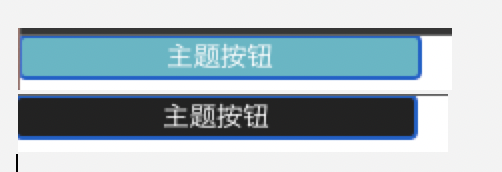
最好实现主题变动的是 改变类名
写两套css样式 根据不同的类名 进行处理。
react官网 https://react.docschina.org/docs/context.html#when-to-use-context
利用context组件数据传递的更多相关文章
- vue教程3-05 vue组件数据传递、父子组件数据获取,slot,router路由
vue教程3-05 vue组件数据传递 一.vue默认情况下,子组件也没法访问父组件数据 <!DOCTYPE html> <html lang="en"> ...
- React中父子组件数据传递
Vue.js中父子组件数据传递:Props Down , Events Up Angular中父子组件数据传递:Props Down, Events Up React中父子组件数据传递:Prop ...
- 利用 postMessage 进行数据传递 (iframe 及web worker)及问题
一 postMessage应用于主页面和iframe之间进行数据的传递 1 子iframe页面向主页面进行数据传递: // 多个子iframe需要将自己的计数统计到主页面进行数据上报 window. ...
- vue 组件数据传递
vue组件化开发 主要为了把一个大功能拆分成若干个小的功能,解决高耦合问题,同时也方便开发人员维护. 从功能上组件可以分为木偶组件和功能组件. 木偶组件(为了接收数据,渲染数据,基本上是没有逻辑的 ...
- Android开发探秘之四:利用Intent实现数据传递
在Android开发过程中,很多人都熟悉Intent,这是个用于在多个View之间共享数据的类.本节主要是继承上节,通过点选ListView中的文本,把文本中的URL加载到一个新的页面上,并且打印出来 ...
- Vue2.x中的父组件数据传递至子组件
父组件结构 template <template> <div> <v-girl-group :girls="aGirls"></v-gir ...
- vue2.0 父子组件数据传递prop
vue的一个核心概念就是组件,而组件实例的作用域是孤立的,所以组件之间是不能直接引用其他组件的数据的.极端点举例来说,就是可以在同一个项目中,每一个组件内都可以定义相同名称的数据. data () { ...
- Vue2.x之父子组件数据传递
父传子,并且通过fatherEvent接收子组件传过来的值 <template> <div class='father'> <Son :fatherData=" ...
- react父子组件数据传递
子传父 1.首先父组件设定一个自定义函数 getChildDatas = (values) => { //...业务代码 } 2.将该函数暴露在子组件的引用上 <Child getChil ...
- 关于vue.js父子组件数据传递
vue.js中使用props down,events up的原则进行父子组件间的通信,先来记录下props down,看个例子: <div id="app2"> < ...
随机推荐
- CSS-@规则(At-rules)常用语法使用总结
At-rules规则是目前CSS中一种常见的语法规则,它使用一个"@"符号加一个关键词定义,后面跟上语法区块,如果没有则以分号结束即可. 这种规则一般用于标识文档.引入外部样式.条 ...
- postman的安装与使用
一.在浏览器搜索postman找到官网 二.选择自己电脑的操作系统 三.点击下载按钮 完成下载之后双击安装程序即可完成安装操作自动下载到C盘,无法自定义安装 四.安装完成之后自动跳出该页面 我们在学习 ...
- 【Android 4.4】内存文件系统(tmpfs)的创建与使用
前言说明 某些情况下,需要缓存一些文件到磁盘中,我们可以借助 tmpfs 文件系统,来提升读写缓存文件的速度,并且也可以避免频繁读写缓存文件所带来的对 flash 的寿命影响. 使用方法 通过 mkd ...
- Node.js学习笔记----day01
认真学习,认真记录,每天都要有进步呀!!! 加油叭!!! 一.Node.js的简介 Node.js是什么 (1)Node.js不是一门语言 (2) Node.js也不是库,也不是框架 (3)Node. ...
- 函数式编程:Flutter&Dart中的组合
本文翻译自: Composition in Flutter & Dart 在 Flutter & Dart 中使用组合创建模块化应用程序. 什么是组合? 在dictionary.com ...
- SpringMVC返回值类型及响应数据类型
1.SpringMVC 和 Struts2 的优略分析 共同点: 它们都是表现层框架,都是基于 MVC 模型编写的. 它们的底层都离不开原始 ServletAPI. 它们处理请求的机制都是一个核心控制 ...
- NETAPP 设备 C模式开关机顺序
设备正常开关机顺序开机顺序: 1.开启所有磁盘柜的电源,大概20秒后再开启存储控制器: 2.开启接有FAS2750存储的以太网交换机或者光纤交换机: 3.开启有挂载FAS2750存储空间的服务器或者磁 ...
- JZOJ 3232. 【佛山市选2013】排列
题目 解析 很神奇的一道题 显然,对于一种排列,相当于给出了数字 \(1..n\) 的对应关系,且不重复不遗漏,刚好把 \(1\) 到 \(n\) 又包含了一遍. 对,连边! 每个数向它对应的数连边, ...
- LeetCode算法训练-贪心算法 455.分发饼干 376. 摆动序列 53. 最大子序和
欢迎关注个人公众号:爱喝可可牛奶 LeetCode算法训练-贪心算法 455.分发饼干 376. 摆动序列 53. 最大子序和 前置知识 贪心算法核心是找局部最优解,通过局部最优推导出全局最优 Lee ...
- IDEA 上传项目到 Gitee 小记
此方式可直接将 IDEA 中项目上传到 Gitee 仓库,无需打开 Gitee 手动创建空仓库. 前提环境 安装好 Git,并在 IDEA 中成功配置: 注册有 Gitee 账号,并记得账号密码: I ...