
Linux系统时间的设定以及自带的timesync时间同步
1.三个阶段的系统时间设定
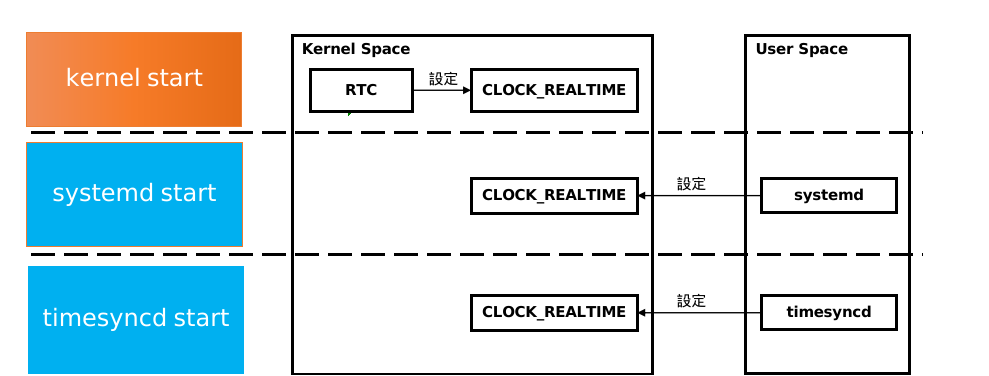

1.1 内核启动阶段
这里是在menuconfig文件配置RTC设定系统时间选项。
int clock_apply_epoch(ClockChangeDirection *ret_attempted_change) {

        struct stat st;

        struct timespec ts;

        usec_t epoch_usec, now_usec;

        /* NB: we update *ret_attempted_change in *all* cases, both

         * on success and failure, to indicate what we intended to do! */

        assert(ret_attempted_change);

        if (stat(EPOCH_FILE, &st) < 0) {

                if (errno != ENOENT)

                        log_warning_errno(errno, "Cannot stat " EPOCH_FILE ": %m");

                epoch_usec = (usec_t) TIME_EPOCH * USEC_PER_SEC;

        } else

                epoch_usec = timespec_load(&st.st_mtim);

        now_usec = now(CLOCK_REALTIME);

        if (now_usec < epoch_usec)

                *ret_attempted_change = CLOCK_CHANGE_FORWARD;

        else if (now_usec > usec_add(epoch_usec, CLOCK_VALID_RANGE_USEC_MAX))

                *ret_attempted_change = CLOCK_CHANGE_BACKWARD;

        else {

                *ret_attempted_change = CLOCK_CHANGE_NOOP;

                return 0;

        }

        if (clock_settime(CLOCK_REALTIME, timespec_store(&ts, epoch_usec)) < 0)

                return -errno;

        return 1;

}
static int load_clock_timestamp(uid_t uid, gid_t gid) {

        _cleanup_close_ int fd = -1;

        usec_t min = TIME_EPOCH * USEC_PER_SEC;

        usec_t ct;

        int r;

        /* Let's try to make sure that the clock is always

         * monotonically increasing, by saving the clock whenever we

         * have a new NTP time, or when we shut down, and restoring it

         * when we start again. This is particularly helpful on

         * systems lacking a battery backed RTC. We also will adjust

         * the time to at least the build time of systemd. */

        fd = open(CLOCK_FILE, O_RDWR|O_CLOEXEC, 0644);

        if (fd >= 0) {

                struct stat st;

                usec_t stamp;

                /* check if the recorded time is later than the compiled-in one */

                r = fstat(fd, &st);

                if (r >= 0) {

                        stamp = timespec_load(&st.st_mtim);

                        if (stamp > min)

                                min = stamp;

                }

                if (geteuid() == 0) {

                        /* Try to fix the access mode, so that we can still

                           touch the file after dropping privileges */

                        r = fchmod_and_chown(fd, 0644, uid, gid);

                        if (r < 0)

                                log_warning_errno(r, "Failed to chmod or chown %s, ignoring: %m", CLOCK_FILE);

                }

        } else {

                r = mkdir_safe_label(STATE_DIR, 0755, uid, gid,

                                     MKDIR_FOLLOW_SYMLINK | MKDIR_WARN_MODE);

                if (r < 0) {

                        log_debug_errno(r, "Failed to create state directory, ignoring: %m");

                        goto settime;

                }

                /* create stamp file with the compiled-in date */

                r = touch_file(CLOCK_FILE, false, min, uid, gid, 0644);

                if (r < 0)

                        log_debug_errno(r, "Failed to create %s, ignoring: %m", CLOCK_FILE);

        }

settime:

        ct = now(CLOCK_REALTIME);

        if (ct < min) {

                struct timespec ts;

                char date[FORMAT_TIMESTAMP_MAX];

                log_info("System clock time unset or jumped backwards, restoring from recorded timestamp: %s",

                         format_timestamp(date, sizeof(date), min));

                if (clock_settime(CLOCK_REALTIME, timespec_store(&ts, min)) < 0)

                        log_error_errno(errno, "Failed to restore system clock, ignoring: %m");

        }

        return 0;

}
Linux系统时间的设定以及自带的timesync时间同步的更多相关文章
- Linux的硬件时间、校正Linux系统时间及系统时间调用流程
第一部分: 一)概述: 事实上在Linux中有两个时钟系统,分别是系统时间和硬件时间 UTC是协调世界时(Universal Time Coordinated)英文缩写,它比北京时间早8个小时. ...
- Linux_自动调整linux系统时间和时区与Internet时间同步
调整linux系统时间和时区与Internet时间同步 一.修改时区:# cp /usr/share/zoneinfo/Asia/Shanghai /etc/localtime修改为中国的东八区# v ...
- Linux系统时间同步方法小结
在Windwos中,系统时间的设置很简单,界面操作,通俗易懂,而且设置后,重启,关机都没关系.系统时间会自动保存在BIOS时钟里面,启动计算机的时候,系统会自动在BIOS里面取硬件时间,以保证时间的不 ...
- 自动调整linux系统时间和时区与Internet时间同步
调整linux系统时间和时区与Internet时间同步 一.修改时区:# cp /usr/share/zoneinfo/Asia/Shanghai /etc/localtime修改为中国的东八区# v ...
- Linux学习之十-Linux系统时间
Linux系统时间 1.date命令用于查看以及修改Linux系统的时间,关于date命令的详细帮助文档如下 [root@localhost ~]# date --help Usage: date [ ...
- linux 系统时间 硬件时间
Linux时钟分为系统时钟(System Clock)和硬件时钟(Real Time Clock,简称RTC).系统时钟是指当前Linux Kernel中的时钟:而硬件时钟则是主板上由电池供电的时钟, ...
- Linux系统时间同步方法
在Windwos中,系统时间的设置很简单,界面操作,通俗易懂,而且设置后,重启,关机都没关系.系统时间会自动保存在BIOS时钟里面,启动计算机的时候,系统会自动在BIOS里面取硬件时间,以保证时间的不 ...
- 修改linux系统时间的方法(date命令)
修改linux系统时间的方法(date命令) 来源:互联网 作者:佚名 时间:11-18 23:22:27 [大 中 小] date命令不仅可以显示系统当前时间,还可以用它来修改系统时间,下面简单的介 ...
- Linux系统时间的设置
1. Linux系统时间的设置 在Linux中设置系统时间,可以用date命令: //查看时间[root@node1 ~]# dateTue Feb 25 20:15:18 CST 2014//修改时 ...
- 时间篇之linux系统时间和RTC时间
一.linux系统下包含两个时间:系统时间(刚启动时读取的是rtc时间)和RTC时间. 一般情况下都会选择芯片上最高精度的定时器作为系统时间的定时基准,以避免在系统运行较长时间后出现大的时间偏移.特点 ...
随机推荐
- 软件教程 | Jupyter&stata之stata_kernel攻略
 目录: 目录 一.什么是stata_kernel 1. stata_kernel简介 2. 为什么要使用sta ...
- Vulhub 漏洞学习之:Docker
Vulhub 漏洞学习之:Docker 目录 Vulhub 漏洞学习之:Docker 1 docker daemon api 未授权访问漏洞 1.1 漏洞利用过程 1 docker daemon ap ...
- Art of Illusion 一款**的开源 3D 建模和渲染软件
原文地址:https://www.mvrlink.com/artofillusion/ Art of Illusion 是一个免费的开源 3D 建模和渲染工作室.它的许多功能可与商业程序中的功能相媲美 ...
- Docker安装配置Oracle详细教程(以作持久化处理)
Docker安装Oracle 1,拉取Oracle镜像,拉取成功后查看 docker pull registry.cn-hangzhou.aliyuncs.com/helowin/oracle_11 ...
- location.search
问号 ? 之后的部分 location.search
- php连接Access数据库
最近想把一个asp的网站改成php的,无奈空间不支持mysql数据库,只好用access数据库了,但以前都是用的php+mysql,php+access数据库编程还真没有做过.感谢党,感谢cctv,感 ...
- js 获取和回填form表格数据
//将form里面的内容序列化成json数据 $.fn.serializeJson = function (otherString) { var serializeObj = {}, array = ...
- mysql8.0.30主从配置
安装包下载地址: https://downloads.mysql.com/archives/community/ 1. 解压介质包: # tar xf mysql-8.0.30-linux-glibc ...
- Django models.py 表的参数选择
from django.db import models # Create your models here. class Department(models.Model): # 以后可以新增, ...
- 计算机存储内部数据的原理,编程语言的发展史和分类,python解释器的下载和安装,计算机cmd窗口的使用,环境变量和解释器多版本共存方法
计算机内部存储数据的原理 计算机内部只认识01二进制. 存储单位:0和1分别代表一个比特位(bit).8bit=1bytes(字节) 1024kb=1MB 1024MB=1GB 1024GB=1TB ...