
微信小程序—标题栏
<template>

    <view :style="{paddingTop: statusBarHeight + 'px',background:bg}" class="box">

        <view :style="{width: titleBarWidth + 'px', height: titleBarHeight + 'px'}">

            <slot name="parent" :menuButtonHeight="menuButtonHeight" :titleBarHeight="titleBarHeight"></slot>

        </view>

    </view>

</template>

<script>

    export default {

        name: "titleBar",

        data() {

            return {

                statusBarHeight: 0,

                menuButtonHeight: 0,

                titleBarWidth: 0,

                titleBarHeight: 0,

            }

        },

        props: ['bg'],

        created() {

            this.statusBarHeight = uni.getStorageSync("statusBarHeight");

            this.menuButtonHeight = uni.getStorageSync("menuButtonHeight");

            this.titleBarWidth = uni.getStorageSync("titleBarWidth");

            this.titleBarHeight = uni.getStorageSync("titleBarHeight");

        },

        onReady() {

            uni.setStorageSync('statusBarHeight', uni.getSystemInfoSync().statusBarHeight);

            uni.setStorageSync('menuButtonHeight', uni.getMenuButtonBoundingClientRect().height);

            uni.setStorageSync('titleBarWidth', uni.getSystemInfoSync().windowWidth - uni.getMenuButtonBoundingClientRect()

                .width -

                (uni.getSystemInfoSync().windowWidth - uni.getMenuButtonBoundingClientRect().right) * 2);

            uni.setStorageSync('titleBarHeight', (uni.getMenuButtonBoundingClientRect().top - uni.getStorageSync(

                "statusBarHeight")) * 2 + uni.getStorageSync("menuButtonHeight"));

            if (!this.menuButtonHeight) {

                this.statusBarHeight = uni.getStorageSync("statusBarHeight");

                this.menuButtonHeight = uni.getStorageSync("menuButtonHeight");

                this.titleBarWidth = uni.getStorageSync("titleBarWidth");

                this.titleBarHeight = uni.getStorageSync("titleBarHeight");

            }

        }

    }

</script>

<style>

    .box {

        position: sticky;

        top: 0rpx;

        z-index: 999;

    }

</style>
效果:
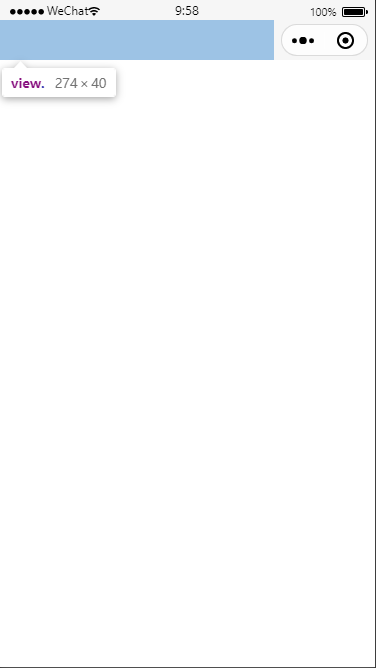
<titleBar bg="#f6f6f6">

     <template v-slot:parent>

          <view class="xbox">

             服务内容

          </view>

      </template>

</titleBar>
.xbox{

        height: 100%;

        display: flex;

        align-items: center;

        justify-content: center;

    }
微信小程序—标题栏的更多相关文章
- 微信小程序教程系列
微信小程序教程系列 来源: https://blog.csdn.net/michael_ouyang/article/details/56846185 相关连接:http://blog.c ...
- [转]微信小程序之购物车 —— 微信小程序实战商城系列(5)
本文转自:http://blog.csdn.net/michael_ouyang/article/details/70755892 续上一篇的文章:微信小程序之商品属性分类 —— 微信小程序实战商城 ...
- [转]微信小程序之购物数量加减 —— 微信小程序实战商城系列(3)
本文转自:http://blog.csdn.net/michael_ouyang/article/details/70194144 我们在购买宝贝的时候,购物的数量,经常是我们需要使用的,如下所示: ...
- [转]微信小程序之加载更多(分页加载)实例 —— 微信小程序实战系列(2)
本文转自;http://blog.csdn.net/michael_ouyang/article/details/56846185 loadmore 加载更多(分页加载) 当用户打开一个页面时,假设后 ...
- 微信小程序导航:官方工具+精品教程+DEMO集合(1月7更新)
1:官方工具:https://mp.weixin.qq.com/debug/w ... tml?t=14764346784612:简易教程:https://mp.weixin.qq.com/debug ...
- 《微信小程序七日谈》- 第四天:页面路径最多五层?导航可以这么玩
<微信小程序七日谈>系列文章: 第一天:人生若只如初见: 第二天:你可能要抛弃原来的响应式开发思维: 第三天:玩转Page组件的生命周期: 第四天:页面路径最多五层?导航可以这么玩 微信小 ...
- 微信小程序开发常见问题分析
距离微信小程序内测版发布已经有十几天的时间了,网上对微信小程序的讨论也异常火爆,从发布到现在微信小程序一直占领着各种技术论坛的头条,当然各种平台也对微信小程序有新闻报道,毕竟腾讯在国内影响力还是很大的 ...
- 官方问答--微信小程序常见FAQ (17.8.21-17.8.27)
给提问的开发者的建议:提问之前先查询 文档.通过社区右上角搜索搜索已经存在的问题. 写一个简明扼要的标题,并且正文描述清楚你的问题. 提交 BUG:需要带上基础库版本号,设备信息(iOS, Andro ...
- 微信小程序之下拉加载和上拉刷新
微信小程序下拉加载和上拉刷新两种实现方法 方法一:onPullDownRefresh和onReachBottom方法实现小程序下拉加载和上拉刷新 首先要在json文件里设置window属性 ...
- 微信小程序对接串口摄像头
串口摄像头由树莓派控制,代码如下: # _*_ coding:utf-8 import serial import time import traceback import pycurl import ...
随机推荐
- 在windows 7下构建 FTP 服务器
首先我们在C盘建立两个文件夹,用于发ftp的上传和下载 其次我们找到控制面板>程序>打开或关闭windows功能 进入后找到Internet 信息服务>FTP服务器>确定! 选 ...
- 关闭内核Debug_log打印!
echo 0 > /proc/sys/kernel/printk \r
- 编译内核出现错误cc1: error: code model kernel does not support PIC mode
删除该模块目录下的 .cache.mk 文件就好了,重新 make 即可
- zabbix如何修改web字体
1.拷贝一个你喜欢的字体到zabbix-server的/usr/share/zabbix/assets/fonts目录下 2.cd /usr/share/zabbix vim include/def ...
- GOF23种设计模式是哪些
设计模式实践里面提供了许多经久不衰的解决方案和最佳方案.这里,GOF 设计模式主要分为三大类:创建模式.结构模式和行为模式.创建模式对于创建对象实例非常有用.结构模式通过处理类或对象的组合来作用于企业 ...
- jmeter非GUI模式运行-单节点
jmeter有自己的GUI页面,但是当线程数很多或者现在有很多的测试场景都是基于linux下进行压测,这时我们可以使用jmeter的命令行方式来执行测试,该篇文章介绍jmeter单节点命令运行方式. ...
- 进程间通信测试-signal
截图 代码 #include <stdio.h> #include <unistd.h> #include <signal.h> #include <stri ...
- 12种SQL注入报错方式
1.通过floor报错,注入语句如下: and select 1 from (select count(*),concat(version(),floor(rand(0)*2))x from info ...
- Pytest之参数化
在unittest测试中,有参数化的概念,那么在pytest中也有. 如何理解参数化: 当对一个测试函数进行测试时,通常会给函数传递多组参数.比如测试账号登陆,我们需要模拟各种千奇百怪的账号密码.可以 ...
- js检测邮箱格式,正则检测邮箱格式
网上搜了关于邮箱格式的检测,发现很多不太适用,我自己写了一个,可以检测有开头和没开头的,又可以检测@,@qq. 后的格式 var myReg=/^(\w|(\.\w+))+@([a-zA-Z0-9_- ...