
微信小程序—标题栏
<template>

    <view :style="{paddingTop: statusBarHeight + 'px',background:bg}" class="box">

        <view :style="{width: titleBarWidth + 'px', height: titleBarHeight + 'px'}">

            <slot name="parent" :menuButtonHeight="menuButtonHeight" :titleBarHeight="titleBarHeight"></slot>

        </view>

    </view>

</template>

<script>

    export default {

        name: "titleBar",

        data() {

            return {

                statusBarHeight: 0,

                menuButtonHeight: 0,

                titleBarWidth: 0,

                titleBarHeight: 0,

            }

        },

        props: ['bg'],

        created() {

            this.statusBarHeight = uni.getStorageSync("statusBarHeight");

            this.menuButtonHeight = uni.getStorageSync("menuButtonHeight");

            this.titleBarWidth = uni.getStorageSync("titleBarWidth");

            this.titleBarHeight = uni.getStorageSync("titleBarHeight");

        },

        onReady() {

            uni.setStorageSync('statusBarHeight', uni.getSystemInfoSync().statusBarHeight);

            uni.setStorageSync('menuButtonHeight', uni.getMenuButtonBoundingClientRect().height);

            uni.setStorageSync('titleBarWidth', uni.getSystemInfoSync().windowWidth - uni.getMenuButtonBoundingClientRect()

                .width -

                (uni.getSystemInfoSync().windowWidth - uni.getMenuButtonBoundingClientRect().right) * 2);

            uni.setStorageSync('titleBarHeight', (uni.getMenuButtonBoundingClientRect().top - uni.getStorageSync(

                "statusBarHeight")) * 2 + uni.getStorageSync("menuButtonHeight"));

            if (!this.menuButtonHeight) {

                this.statusBarHeight = uni.getStorageSync("statusBarHeight");

                this.menuButtonHeight = uni.getStorageSync("menuButtonHeight");

                this.titleBarWidth = uni.getStorageSync("titleBarWidth");

                this.titleBarHeight = uni.getStorageSync("titleBarHeight");

            }

        }

    }

</script>

<style>

    .box {

        position: sticky;

        top: 0rpx;

        z-index: 999;

    }

</style>
效果:
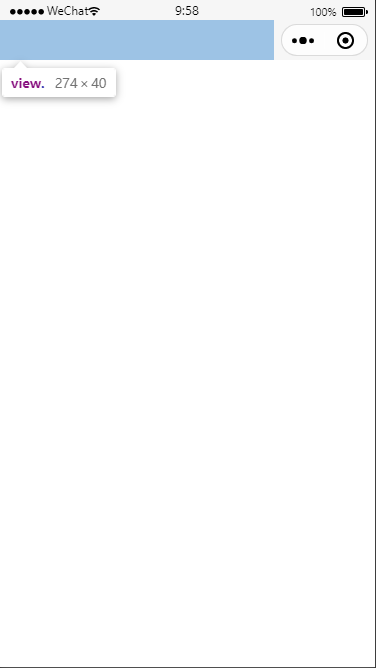
<titleBar bg="#f6f6f6">

     <template v-slot:parent>

          <view class="xbox">

             服务内容

          </view>

      </template>

</titleBar>
.xbox{

        height: 100%;

        display: flex;

        align-items: center;

        justify-content: center;

    }
微信小程序—标题栏的更多相关文章
- 微信小程序教程系列
微信小程序教程系列 来源: https://blog.csdn.net/michael_ouyang/article/details/56846185 相关连接:http://blog.c ...
- [转]微信小程序之购物车 —— 微信小程序实战商城系列(5)
本文转自:http://blog.csdn.net/michael_ouyang/article/details/70755892 续上一篇的文章:微信小程序之商品属性分类 —— 微信小程序实战商城 ...
- [转]微信小程序之购物数量加减 —— 微信小程序实战商城系列(3)
本文转自:http://blog.csdn.net/michael_ouyang/article/details/70194144 我们在购买宝贝的时候,购物的数量,经常是我们需要使用的,如下所示: ...
- [转]微信小程序之加载更多(分页加载)实例 —— 微信小程序实战系列(2)
本文转自;http://blog.csdn.net/michael_ouyang/article/details/56846185 loadmore 加载更多(分页加载) 当用户打开一个页面时,假设后 ...
- 微信小程序导航:官方工具+精品教程+DEMO集合(1月7更新)
1:官方工具:https://mp.weixin.qq.com/debug/w ... tml?t=14764346784612:简易教程:https://mp.weixin.qq.com/debug ...
- 《微信小程序七日谈》- 第四天:页面路径最多五层?导航可以这么玩
<微信小程序七日谈>系列文章: 第一天:人生若只如初见: 第二天:你可能要抛弃原来的响应式开发思维: 第三天:玩转Page组件的生命周期: 第四天:页面路径最多五层?导航可以这么玩 微信小 ...
- 微信小程序开发常见问题分析
距离微信小程序内测版发布已经有十几天的时间了,网上对微信小程序的讨论也异常火爆,从发布到现在微信小程序一直占领着各种技术论坛的头条,当然各种平台也对微信小程序有新闻报道,毕竟腾讯在国内影响力还是很大的 ...
- 官方问答--微信小程序常见FAQ (17.8.21-17.8.27)
给提问的开发者的建议:提问之前先查询 文档.通过社区右上角搜索搜索已经存在的问题. 写一个简明扼要的标题,并且正文描述清楚你的问题. 提交 BUG:需要带上基础库版本号,设备信息(iOS, Andro ...
- 微信小程序之下拉加载和上拉刷新
微信小程序下拉加载和上拉刷新两种实现方法 方法一:onPullDownRefresh和onReachBottom方法实现小程序下拉加载和上拉刷新 首先要在json文件里设置window属性 ...
- 微信小程序对接串口摄像头
串口摄像头由树莓派控制,代码如下: # _*_ coding:utf-8 import serial import time import traceback import pycurl import ...
随机推荐
- OpenLayer——绘制带箭头的线
绘制带箭头的线,计算相对复杂,多少是有点影响性能了.更简单的做法:初始.目标点用不同的点进行强调即可. <!DOCTYPE html> <html lang="en&quo ...
- oss上传,阿里云上传oss,带缩略图
https://mp.weixin.qq.com/s/obL9JmzDYdkREEJIj_hVIQ 借用工具类 <dependency> <groupId>cn.xuyanwu ...
- go interface nil 比较
package main import "fmt" type MyselfError struct{} func (m *MyselfError) Error() string { ...
- 实时搜索引擎Elasticsearch
Elasticsearch(简称ES)是一个基于Apache Lucene(TM)的开源搜索引擎,无论在开源还是专有领域,Lucene可以被认为是迄今为止最先进.性能最好的.功能最全的搜索引擎库. E ...
- window java 字节码修改
前提: win10 安装包: 1. JDK10.0.1.msi (包含jre环境), JDK的安装路径 2. jclasslib 6.0.3 用于编辑常量 3.JBE 用于编辑 ...
- js时间转化为几天前,几小时前,几分钟前
在前面一篇文章中,我们学习到了如何获取时间和怎么算出两者之间的时间差 今天看看怎么将时间戳转换为几个月前,几周前,几天前,几分钟前的形式.与上面类似通过JavaScript计算当前时间与定义的时间的对 ...
- 常见DOS命令及应用
常见DOS命令使用 CMD打开方式 开始 + 系统 + 命令提示符 WIN键 + R 输入cmd + Enter WIN键 + R 输入cmd + Ctrl + Shift + Enter (管理员模 ...
- Burp Suite入门
Burpsuite Burp Suite是一个Web应用程序集成攻击平台,它包含了一系列burp工具,这些工具之间有大量接口可以互相通信,这样设计的目的是为了促进和提高整个攻击的效率.平台中所有工具共 ...
- pytorch学习笔记(9)--损失函数
1.损失函数的作用: (1)计算实际输出和目标输出之间的差距: (2)为我们更新输出提供一定的依据(也就是反向传播) 官网链接:https://pytorch.org/docs/1.8.1/nn.ht ...
- js模块化 CommonJS和AMD/CMD ES6模块化
ES6之前已经出现了js模块方案,有CommonJS和AMD规范.commonjs实现同步加载应用于服务器,如nodejs.AMD为异步加载应用于浏览器,如requirejs. ES6在语言层面上模块 ...