
Find out your Java heap memory size
In this article, we will show you how to use the -XX:+PrintFlagsFinal to find out your heap size detail. In Java, the default and maximum heap size are allocated based on this – ergonomics algorithm.
Heap sizes
Initial heap size of 1/64 of physical memory up to 1Gbyte
Maximum heap size of 1/4 of physical memory up to 1Gbyte
However, above algorithms are just for reference, it may vary in different VM.
1. Java Memory Overview
A quick review of Java memory structure :
1. Java Heap Size
Place to store objects created by your Java application, this is where Garbage Collection takes place, the memory used by your Java application. For a heavy Java process, insufficient Heap size will cause the popularjava.lang.OutOfMemoryError: Java heap space.
-Xms<size> - Set initial Java heap size

-Xmx<size> - Set maximum Java heap size

$ java -Xms512m -Xmx1024m JavaApp
2. Perm Gen Size
Place to store your loaded class definition and metadata. If a large code-base project is loaded, the insufficient Perm Gen size will cause the popular Java.Lang.OutOfMemoryError: PermGen.
-XX:PermSize<size> - Set initial PermGen Size.

-XX:MaxPermSize<size> - Set the maximum PermGen Size.

$ java -XX:PermSize=64m -XX:MaxPermSize=128m JavaApp
3. Java Stack Size
Size of a Java thread. If a project has a lot of threads processing, try reduce this stack size to avoid running out of memory.
-Xss = set java thread stack size
$ java -Xss512k JavaAppThe default value for heap size, perm gen, or stack size is differ from different JVMs. The best practice is always defining your own value.
2. Ubuntu
This is the testing environment :
OS  : Ubuntu 13 (64 bits) (Under VirtualBox)

RAM : 4G

CPU : 1 x Processors

JDK : 1.7.0_51
$ java -XX:+PrintFlagsFinal -version | grep -iE 'HeapSize|PermSize|ThreadStackSize'
uintx InitialHeapSize := 64781184 {product}
uintx MaxHeapSize := 1038090240 {product}
uintx PermSize = 21757952 {pd product}
uintx MaxPermSize = 174063616 {pd product}
intx ThreadStackSize = 1024 {pd product}
java version "1.7.0_51"
OpenJDK Runtime Environment (IcedTea 2.4.4) (7u51-2.4.4-0ubuntu0.13.10.1)
OpenJDK 64-Bit Server VM (build 24.45-b08, mixed mode)In above environment, JVM allocated following default values :
- Java heap size
InitialHeapSize = 64781184 bytes (61.7M) and MaxHeapSize = 1038090240 bytes (990M). - PermGen Size
PermSize = 21757952 bytes (20.75M), MaxPermSize = 174063616 bytes (166M) - Thread Stack Size
ThreadStackSize = 1024 kilobytes (1M)
The allocated heap memory size is quite close to the ergonomics result.
#ergonomics algorithm

Initial heap size = 4096M/64 = 64M

Maximum heap size = 4096M/4 = 1024M
3. Mac OSX
This is the testing environment :
OS  : Mac OSX 10.9

RAM : 8G

CPU : 4 x Processors

JDK : 1.7.0_05
$ java -XX:+PrintFlagsFinal -version | grep -iE 'heapsize|permsize|threadstacksize'
uintx InitialHeapSize := 20655360 {product}
uintx MaxHeapSize := 331350016 {product}
uintx PermSize = 21757952 {pd product}
uintx MaxPermSize = 85983232 {pd product}
intx ThreadStackSize = 1024 {pd product}
java version "1.7.0_05"
Java(TM) SE Runtime Environment (build 1.7.0_05-b05)
Java HotSpot(TM) 64-Bit Server VM (build 23.1-b03, mixed mode)- Java heap size
InitialHeapSize = 20655360 bytes (19.69M) and MaxHeapSize = 331350016 bytes (316M). - PermGen Size
PermSize = 21757952 bytes (20.75M), MaxPermSize = 85983232 bytes (82M). - Java Stack Size
ThreadStackSize = 1024 kilobytes (1M)
The allocated heap memory size is totally irrelevant if compare to the following ergonomics result.
#ergonomics algorithm

Initial heap size = 8192M/64 = 128M

Maximum heap size = 8192M/4 = 2048M
4. Windows
There is no grep in Windows, instead, we use findstr.
This is the testing environment :
OS  : Windows 8

RAM : 16G

CPU : 8 x Processors

JDK : 1.7.0_40
C:\>java -XX:+PrintFlagsFinal -version | findstr /i "HeapSize PermSize ThreadStackSize"
uintx InitialHeapSize := 266634176 {product}
uintx MaxHeapSize := 4267704320 {product}
uintx PermSize = 21757952 {pd product}
uintx MaxPermSize = 85983232 {pd product}
intx ThreadStackSize = 0 {pd product}
java version "1.7.0_40"
Java(TM) SE Runtime Environment (build 1.7.0_40-b43)
Java HotSpot(TM) 64-Bit Server VM (build 24.0-b56, mixed mode)- Java heap size
InitialHeapSize = 266634176 bytes (256M) and MaxHeapSize = 4266146816 bytes (4068M). - PermGen Size
PermSize = 21757952 bytes (20.75M), MaxPermSize = 85983232 bytes (823. M). - Java Stack Size
ThreadStackSize = 0 kilobytes. (weird…)
The allocated heap memory size is almost same with the ergonomics result :
#ergonomics algorithm

Initial heap size = 16384/64 = 256M

Maximum heap size = 16384/4 = 4096M
5. Suggested Java Memory
Below is my suggested value for a small to medium Java application :)
- Heap = -Xms512m -Xmx1024m
- PermGen = -XX:PermSize=64m -XX:MaxPermSize=128m
- Thread = -Xss512k
P.S For most Java projects, 512k for a thread is sufficient.
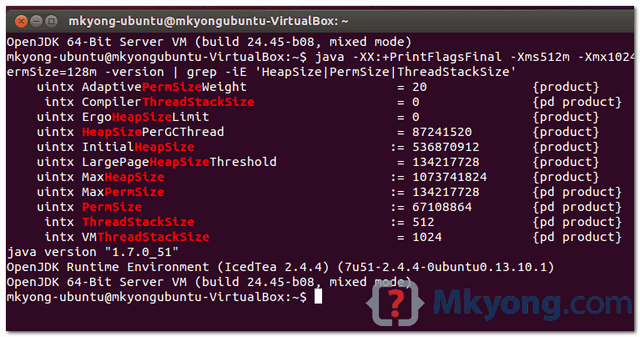
$ java -XX:+PrintFlagsFinal -Xms512m -Xmx1024m -Xss512k -XX:PermSize=64m -XX:MaxPermSize=128m

	-version | grep -iE 'HeapSize|PermSize|ThreadStackSize'

    uintx InitialHeapSize                          := 536870912       {product}

    uintx MaxHeapSize                              := 1073741824      {product}

    uintx PermSize                                 := 67108864        {pd product}

    uintx MaxPermSize                              := 134217728       {pd product}

     intx ThreadStackSize                          := 512             {pd product}
6. FAQs
Q. What is -version?
A. Avoid the complaints from Java compiler, replace the “-version” with your Java application name.
$ java -XX:+PrintFlagsFinal {your-java-program} | grep HeapSizeQ. What is -XX:+PrintCommandLineFlags?
A. This -XX:+PrintCommandLineFlags is used to print out the values that modified by VM only (indicated by this :=symbol).
7. Conclusion
Finally, the default values of heap memory, perm gem and stack size is different from each JVMs, do not expect JVM will assign the optimal values for your Java application. The best practice is found out your memory detail, then fine tune the values accordingly.
Just some find out and sharing, do let me know your comment.
Find out your Java heap memory size的更多相关文章
- Java 堆内存与栈内存异同(Java Heap Memory vs Stack Memory Difference)
--reference Java Heap Memory vs Stack Memory Difference 在数据结构中,堆和栈可以说是两种最基础的数据结构,而Java中的栈内存空间和堆内存空间有 ...
- Java (JVM) Memory Model – Memory Management in Java
原文地址:http://www.journaldev.com/2856/java-jvm-memory-model-memory-management-in-java Understanding JV ...
- DTrace to Troubleshoot Java Native Memory Problems
How to Use DTrace to Troubleshoot Java Native Memory Problems on Oracle Solaris 11 Hands-On Labs of ...
- 报错:out of memory java heap space
PermGen space的全称是Permanent Generation space,是指内存的永久保存区域OutOfMemoryError: PermGen space从表面上看就是内存益出,解决 ...
- Java heap size
今天在性能诊断工作中遇到 Java heap size, 下面是它的相关的概念. 什么是Java heap size ? Java heap size 堆栈大小, 指Java 虚拟机的内存大小.我的理 ...
- netbean out of memory java heap space
When run test file in netbean. all dependency and resource are right, but it raise up java.lang.OutO ...
- Memory Analyzer Tool定位Java heap space内存泄漏
java heap space是一个很蛋疼的问题,如果开发调试时遇到还好,如果是在项目上线后运行一段时间后,才抛出该异常,那真的很悲剧(那你得找代码中到底是哪里内存泄露了),这真是一个悲伤的故事. 1 ...
- JVM--你常见的jvm 异常有哪些? 代码演示:StackOverflowError , utOfMemoryError: Java heap space , OutOfMemoryError: GC overhead limit exceeded, Direct buffer memory, Unable_to_create_new_native_Thread, Metaspace
直接上代码: public class Test001 { public static void main(String[] args) { //java.lang.StackOverflowErro ...
- java.util.jar.JarFile cause native heap memory leak
最近项目中使用了JarFile 这个类 来load jar包中的 configuration,大致的情况如下 public void processJarEntries(JarFile paramJa ...
随机推荐
- 我编辑的JAVA日历程序
class calendar { public static void main(String[]args) { int yearIn ; yearIn = Integer.parseInt(args ...
- CentOS7.6安装PM2(Npm方式全局安装)
安装前提: 1. node环境 2. npm 安装开始: 第一步:全局安装,npm install -g pm2 第二步: 保存当前进程状态,pm2 save 第三步: 生成开机自启动服务,pm2 s ...
- JAVA实现汉字转换为拼音 pinyin4j/JPinyin
在项目中经常会遇到需求用户输入汉字后转换为拼音的场景,比如说通讯录,就会要求按名字首字符发音排序,如果自己写实现这方面的功能是个很好大的工程,还好网上有公开的第三方jar支持转换,结合网上很多前辈的代 ...
- mysql 挑选列导入
insert into boleht_development.`htprojects`(id,pname,`general`,imgsrc,whatwedo,howwedo,bp) select ci ...
- 迷你MVVM框架 avalonjs 组件编写指南
avalon经过半年的宣传,已经有不少公司在使用avalon应用于它们内外网应用或移动项目,比较大牌的客户有百度,搜狐,金山,边缘,去哪儿--最近成为去哪儿的前端架构师后,掌握更多资源,可以随使抓个人 ...
- 配置python的豆瓣source
sunny@sunny-ThinkPad-T450:~$ mkdir ~/.pip sunny@sunny-ThinkPad-T450:~$ gedit ~/.pip/pip.conf [global ...
- HttpServletResponse返回页面弹窗
下载方法: @RequestMapping(value = "/download.htm") public void downLoadFile(String id,HttpServ ...
- python要点之III
[python要点之III] 1.实现交换. 在C/C++中,交换两个变量,需要2个变量,tmp=x;x=y;y=tmp;. 在python中,交换两个变量可以这么写:x,y=y,x. 2.is&am ...
- SQLSERVER2012误删数据恢复过程
由于长时间从事企业应用系统开发,前往用户现场升级.调试系统是比较常做的事情,但是就在周一,由于同事的失误在毫无知觉的情况下误删了生产数据库几乎所有的数据.当我发现的那一刻,感觉头发都立起来了,心想这他 ...
- 高性能Web服务器Nginx的配置与部署研究(10)核心模块之HTTP模块Location相关指令
一.基本语法 语法:location [= | ~ | ~* | ^~] </uri/> {...} 缺省:N/A 作用域:server 二.匹配规则 1. 四种匹配方式 = 精确匹配 ~ ...