
::before ::after CSS3中的伪类和伪元素
::before和::after伪元素的用法
一、介绍
css3为了区分伪类和伪元素,伪元素采用双冒号写法。
常见伪类——:hover,:link,:active,:target,:not(),:focus。
常见伪元素——::first-letter,::first-line,::before,::after,::selection。
::before和::after下特有的content,用于在css渲染中向元素逻辑上的头部或尾部添加内容。
这些添加不会出现在DOM中,不会改变文档内容,不可复制,仅仅是在css渲染层加入。
所以不要用:before或:after展示有实际意义的内容,尽量使用它们显示修饰性内容,例如图标。
举例:网站有些联系电话,希望在它们前加一个icon☎,就可以使用:before伪元素,如下:
 <!DOCTYPE html>

 <meta charset="utf-8" />

 <style type="text/css">

     .phoneNumber::before {

     content:'\260E';

     font-size: 15px;

 }

 </style>

 <p class="phoneNumber">12345645654</p>

Note:这些特殊字符的html,js和css的写法是不同的,具体可查看html特殊字符的html,js,css写法汇总。
二、content属性
::before和::after必须配合content属性来使用,content用来定义插入的内容,content必须有值,至少是空。默认情况下,伪类元素的display是默认值inline,可以通过设置display:block来改变其显示。
content可取以下值。
1、string
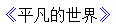
使用引号包一段字符串,将会向元素内容中添加字符串。如:a:after{content:""}
举例:
 <!DOCTYPE html>

 <meta charset="utf-8" />

 <style type="text/css">

 p::before{

     content: "《";

     color: blue;

 }

 p::after{

     content: "》";

     color: blue;

 }

 </style>

 <p>平凡的世界</p>
2、attr()
通过attr()调用当前元素的属性,比如将图片alt提示文字或者链接的href地址显示出来。
 <style type="text/css">

 a::after{

     content: "(" attr(href) ")";

 }

 </style>

 <a href="http://www.cnblogs.com/guanghe">guanghe</a>
guanghe(http://www.cnblogs.com/guanghe)
3、url()/uri()
用于引用媒体文件。
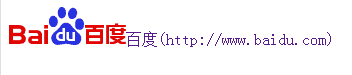
举例:“百度”前面给出一张图片,后面给出href属性。
 <style>

 a::before{

     content: url("https://www.baidu.com/img/baidu_jgylogo3.gif");

 }

 a::after{

     content:"("attr(href)")";

 }

 a{

     text-decoration: none;

 }

 </style>

 ---------------------------

 <body>

 <a href="http://www.baidu.com">百度</a>

 </body>
4、counter()
调用计数器,可以不使用列表元素实现序号功能。
配合counter-increment和counter-reset属性使用:
h2:before { counter-increment: chapter; content: "Chapter " counter(chapter) ". " }
代码:
 <style>

 body{

     counter-reset: section;

 }

 h1{

     counter-reset: subsection;

 }

 h1:before{

     counter-increment:section;

     content:counter(section) "、";

 }

 h2:before{

     counter-increment:subsection;

     content: counter(section) "." counter(subsection) "、";

 }

 </style>

 ------------------------------------------------

 <body>

 <h1>HTML tutorials</h1>

 <h2>HTML Tutorial</h2>

 <h2>XHTML Tutorial</h2>

 <h2>CSS Tutorial</h2>

 <h1>Scripting tutorials</h1>

 <h2>JavaScript</h2>

 <h2>VBScript</h2>

 <h1>XML tutorials</h1>

 <h2>XML</h2>

 <h2>XSL</h2>

 </body>

三、使用
1、清除浮动
清除浮动方法有多种,现在最常用的就是下面这种方法,仅需要以下样式即可在元素尾部自动清除浮动
 .cf:before,

 .cf:after {

     content: " ";

     display: table;

 }

 .cf:after {

     clear: both;

 }

 .cf {

     *zoom: 1;

 }
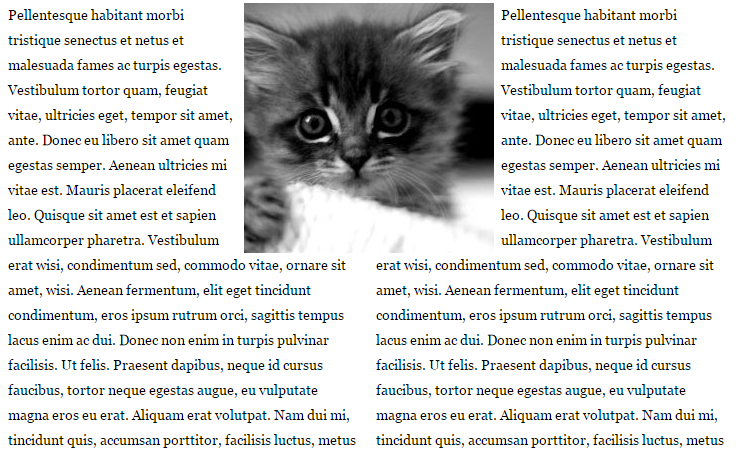
2、模拟float:center的效果
float没有center这个取值,但是可以通过伪类来模拟实现。
这个效果实现很有意思,左右通过::before float各自留出一半图片的位置,再把图片绝对定位上去。
核心css如下:
 #page-wrap { width: 60%; margin: 40px auto; position: relative; }

 #logo { position: absolute; top: 0; left: 50%; margin-left: -125px; }

 #l, #r { width: 49%; }

 #l { float: left; }

 #r { float: right; }

 #l:before, #r:before { content: ""; width: 125px; height: 250px; }

 #l:before { float: right; }

 #r:before { float: left; }
3、做出各种图形效果
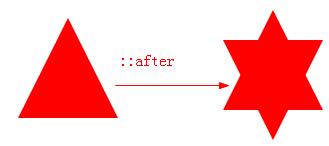
举例:一个六角星
 <style>

 #star-six {

   width: 0;

   height: 0;

   border-left: 50px solid transparent;

   border-right: 50px solid transparent;

   border-bottom: 100px solid red;

   position: relative;

 }

 #star-six::after {

   width: 0;

   height: 0;

   border-left: 50px solid transparent;

   border-right: 50px solid transparent;

   border-top: 100px solid red;

   position: absolute;

   content: "";

   top: 30px;

   left: -50px;

 }

 </style>

 <body>

 <div id="star-six"></div>

 </body>
#star-six的div是一个正三角行,#star-six::after是一个倒三角形,通过绝对定位,调整其位置即可实现六角星的效果。
4、不使用图片创建小图标
举例:比如一个电话
很巧妙的应用一个div左border加圆角当机身,::before和::after配合圆角当听筒。
 <style type="text/css">

     #phone{width:50px;height:50px;border-left:6px solid #EEB422;border-radius:20%;transform:rotate(-30deg);-webkit-transform:rotate(-30deg);margin:20px;margin-right:0px;position:relative;display: inline-block;top: -5px;}

     #phone:before{width:15px;height:15px;background:#EEB422;border-radius: 20%;content: "";position: absolute;left:-2px;top: 1px;}

     #phone:after{width:15px;height:15px;background:#EEB422;border-radius: 20%;content: "";position: absolute;left:-3px;top: 34px;}

 </style>

 <div id="wraper">

     <div id="phone"></div>

 </div>

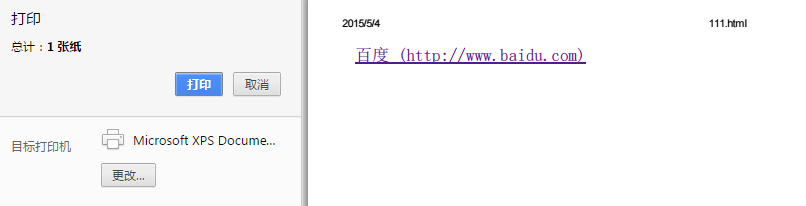
 <style>

 @media print {

   a[href]:after {

     content: " (" attr(href) ") ";

   }

 }

 </style><body>

 <a href="http://www.baidu.com">百度</a>

 </body>
6、给blockquote添加引号
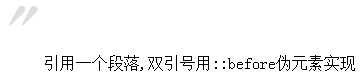
经常用到给blockquote 引用段添加巨大的引号作为背景,可以用 ::before 来代替 background 。好处是即可以给背景留下空间,还可以直接使用文字而非图片:
 <meta charset="utf-8"/>

 <style type="text/css">

     blockquote::before {

     content: open-quote;

     color: #ddd;

     z-index: -1;

     font-size:80px;

 }

 </style>

 <blockquote>引用一个段落,双引号用::before伪元素实现</blockquote>
7、超链接特效
举例:配合 CSS定位实现一个鼠标移上去,超链接出现方括号的效果
 <meta charset="utf-8" />

 <style type="text/css">

 body{

     background-color: #425a6c;

 }

     a {

     position: relative;

     display: inline-block;

     outline: none;

     color: #fff;

     text-decoration: none;

     font-size: 32px;

     padding: 5px 20px;

 }

 a:hover::before, a:hover::after { position: absolute; }

 a:hover::before { content: "\5B"; left: -10px; }

 a:hover::after { content: "\5D"; right:  -10px; }

 </style>

 <a>鼠标移上去出现方括号</a>

更多创意链接特效可参考: Creative Link Effects 。
8、::before和::after实现多背景图片
举例:一个标签应用5张背景图

::before ::after CSS3中的伪类和伪元素的更多相关文章
- 妙味css3课程---1-2、css3中新增的伪类和伪元素有哪些
妙味css3课程---1-2.css3中新增的伪类和伪元素有哪些 一.总结 一句话总结: 1.div:target{}是什么意思? 比如a标签的锚点链接到div,div:target{}就可以找到这个 ...
- CSS3 动态生成内容(在Web中插入内容)====CSS的伪类或者伪元素
# css3 .类:伪类::伪元素 /* CSS3伪元素/伪类 :https://www.w3.org/TR/css3-selectors/#selectors ::selection 伪元素(F12 ...
- css3 -- 伪类与伪元素
伪类: 1.结构伪类 A:E : first-child{} E : nth-*(n){} E : first-*(even){} E : first-*(odd){} B:nth-child 是根 ...
- CSS3伪类和伪元素的特性和区别
前端er们大都或多或少地接触过CSS伪类和伪元素,比如最常见的:focus,:hover以及<a>标签的:link.visited等,伪元素较常见的比如:before.:after等. 其 ...
- 关于css中伪类及伪元素的总结
css中的伪类和伪元素总是混淆,今天参考了很多资料,也查看了部分文档,现将伪类及伪元素总结如下: 一.由来: 伪类和伪元素的引入都是因为在文档树里有些信息无法被充分描述,比如CSS没有"段落 ...
- CSS中的伪类与伪元素
在前端开发中,大家或多或少的有接触过CSS伪类和伪元素,使用伪元素的时候,总感觉和伪类很相似,但又不能详细的说出两者的区别和联系,那么两者到底有什么区别和联系呢? 在 W3C 中定义: 伪类:用于向某 ...
- CSS3伪类和伪元素
作为一个CSS3初学不久者来说,很容易混淆单冒号(:)和双冒号(::)的用法,以为两者可以互换着来使用.我自己之前也混淆过他们,因为两者看起来太相像了,就像孪生兄弟.但实际上,他们的区别还是挺大的,最 ...
- css中伪类与伪元素的区别
一:伪类:1:定义:css伪类用于向某些选择器添加特殊效果. 伪类其实与普通的css类相类似,可以为已有的元素添加样式,但是他只有处于dom无法描述的状态下才能为文档树中的元素添加样式,所以将其称为伪 ...
- CSS3伪类和伪元素的特性和区别尤其是 ::after和::before
伪类和伪元素的理解 官方解释: 伪类一开始单单只是用来表示一些元素的动态状态,典型的就是链接的各个状态(LVHA).随后CSS2标准扩展了其概念范围,使其成为了所有逻辑上存在但在文档树中却无须标识的“ ...
随机推荐
- @Override错误
导入一个项目,项目所有类报 @Override 有错误,去掉就不报错了,原因?在 Java Compiler 将 Enable project specific setting 选中 然后再选择1 ...
- 工作表(Worksheet)基本操作应用示例
在编写代码时,经常要引用工作表的名字.知道工作表在工作簿中的位置.增加工作表.删除工作表.复制工作表.移动工作表.重命名工作表,等等.下面介绍与此有关及相关的一些属性和方法示例. [示例04-01]增 ...
- Zabbix的API的使用
上一篇:Zabbix低级主动发现之MySQL多实例 登录请求(返回一个token,在后面的api中需要用到) curl -s -X POST -H 'Content-Type:application/ ...
- However, a general purpose protocol or its implementation sometimes does not scale very well.
https://netty.io/wiki/user-guide-for-4.x.html The Problem Nowadays we use general purpose applicatio ...
- matrix---简单dp,边界边界-_-
题目链接:http://acm.hdu.edu.cn/showproblem.php?pid=5569 简单dp,恶心的边界处理,无语: if((i+j)%2==1) dp[i][j]=a[i-1][ ...
- httprunner上传文件multipart/form-data
Content-Type = multipart/form-data#上传文件 Rquest Payload ------WebKitFormBoundarymAyGmnyhpf3UBdec C ...
- iOS版微信6.5.21发布 适配iPhone X
昨日,iOS版微信迎来v6.5.21正式版发布,本次升级主要适配iPhone X,在聊天中查找聊天内容时,可以查找交易消息.可以给聊天中的消息设置日期提醒.上一个正式版v6.5.16发布于9月13日, ...
- Linux环境下NodeJS的安装配置(HelloWorld)
Linux环境下NodeJS的安装配置(HelloWorld) 最简单的环境安装,测试helloworld.给初学者!! 安装脚本,请仔细阅读逐行执行: #!/bin/bash #检查是否已经安装 r ...
- 009-mac下记事本工具 sublime text3
1.subline text3 下载:https://download.sublimetext.com/Sublime%20Text%20Build%203143.dmg 序列号:[来源与互联网,如有 ...
- python web中的文件上传与下载
django 框架下 实现服务端的文件上传与下载: import jsonimport osimport uuid def attachment_upload(request): "&quo ...