
3_python之路之商城购物车
python之路之商城购物车
1.程序说明:Readme.txt
1.程序文件:storeapp_new.py userinfo.py

2.程序文件说明:storeapp_new.py-主程序    userinfo.py-存放字典数据

3.python版本:python-3.5.3

4.程序使用:将storeapp_new.py和userinfo.py放到同一目录下, python storeapp_new.py

5.程序解析:

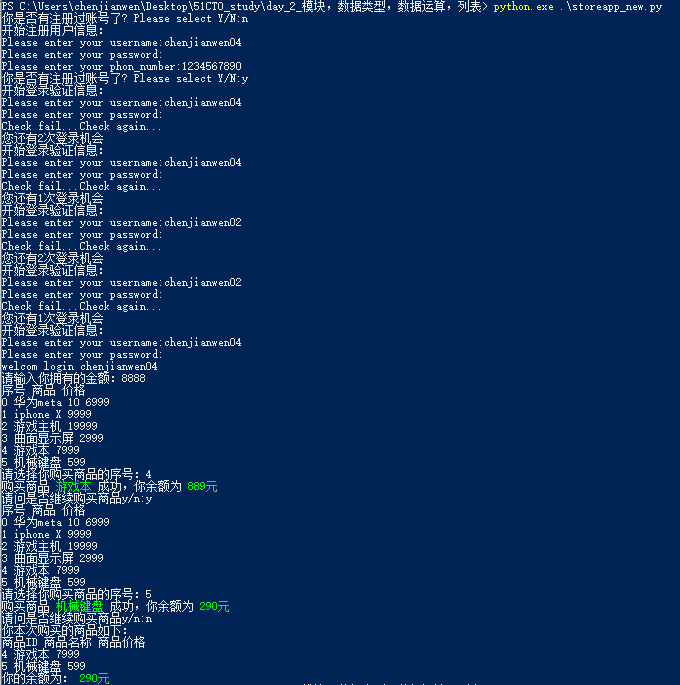
    (1)允许用户注册登陆认证

    (2)允许用户初始化自己拥有的金钱

    (3)允许用户使用序号购买商品

    (4)用户结束购买时自动结算余额及打印这次购买的商品列表

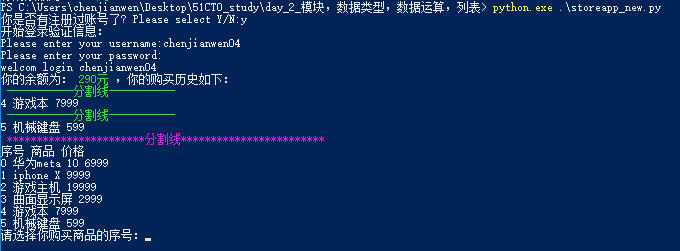
    (5)允许用户再次登陆并打印历史购买商品列表及余额

    (6)允许用户再次购买商品,直到余额小于选择的商品价格

    (7)不允许退货,购买前请三思和掂量一下自己的钱包

6.程序执行结果:请亲自动手执行或者查看我的博客

7.程序博客地址:http://www.cnblogs.com/chenjw-note/p/7724580.html

8.优化打印输出效果
2.程序代码:storeapp_new.py
#!/usr/bin/env python

# _*_ coding: utf-8 _*_

# author:chenjianwen

# email:1071179133@qq.com

# update_time:2017-10-17 19:47

# blog_address:www.cnblogs.com/chenjw-note

# If this runs wrong, don't ask me, I don't know why;

# If this runs right, thank god, and I don't know why.

# Maybe the answer, my friend, is blowing in the wind.

def print_red(messages):

    print('\033[1;35m %s \033[0m' %messages)

##绿色

def print_green(messages):

    print('\033[1;32m %s \033[0m' %messages)

##黄色

def print_yellow(messages):

    print('\033[1;33m %s \033[0m' %messages)

import os,sys,time,json,getpass

#import Login_api_new as LA

import userinfo as UF

commodity_list = [

    ['华为meta 10',6999],

    ['iphone X',9999],

    ['游戏主机',19999],

    ['曲面显示屏',2999],

    ['游戏本',7999],

    ['机械键盘',599]

]

##定义写入文件函数,下面函数2次调用

def write_into():

    f = open('./userinfo.py', 'w', encoding='utf-8')

    f.write('UserInfo = ')

    json.dump(UF.UserInfo, f)

    f.close()

    '''如果字典是汉字,存到文本就是二进制字符,这种字符计算机认识就可以了

       如果字典是英文,存到文件就是英文了

    '''

##登陆程序函数

def LoginApi():

    count = 0

    while True:

        select_info = input("你是否有注册过账号了? Please select Y/N:")

        ##用户注册信息

        if select_info == 'N' or select_info == 'n':

            print("开始注册用户信息:")

            username = input("Please enter your username:")

            password = input("Please enter your password:")  ##此处暂时用明文密码,方便在pycharm调试

            phone_number = input("Please enter your phon_number:")

            UF.UserInfo[username] = {

                    "info":[

                        {

                            "username":"%s" %username,

                            "password":"%s" %password,

                            "phon_number":"%s" %phone_number,

                            "login_count":0

                        }

                    ],

                    "money":[

                        {}

                    ],

                    "already_get_commodity":[

                        {}

                    ],

            }

            #print(UF.UserInfo)

            write_into()

        ##用户登陆验证信息

        elif select_info == 'Y' or select_info == 'y':

            #count = 0

            while True:

                #print(userinfo)

                print("开始登录验证信息:")

                username = input("Please enter your username:")

                password = input("Please enter your password:")

                ##第一次判断输入用户是否存在

                if not username in UF.UserInfo:

                    print("没有该用户,请确认你的用户名!")

                    continue

                #判断用户登陆失败的次数是否小于3

                if UF.UserInfo[username]['info'][0]['login_count'] < 3:

                    ##判断用户账号密码是否吻合

                    if username in UF.UserInfo and password == UF.UserInfo[username]['info'][0]['password']:       ##【优化2次】用户及密码已经一一对应

                        print("welcom login {_username}".format(_username=username))

                        ##登陆成功后将失败次数清零,便于下一次统计

                        UF.UserInfo[username]['info'][0]['login_count'] = 0

                        ##返回username给后面函数调用

                        return username

                        #break

                    else:

                        #count += 1

                        ##修改用户登陆失败的次数

                        UF.UserInfo[username]['info'][0]['login_count'] = UF.UserInfo[username]['info'][0]['login_count'] + 1

                        print('Check fail...Check again...')

                        print("您还有%s次登录机会" % (3 - UF.UserInfo[username]['info'][0]['login_count']))

                        continue

                else:

                    print("重复登陆多次失败,请15分钟后再尝试登陆...")

                    time.sleep(15)

                    count = 0

                    continue

        else:

            print("您输入的内容错误! Please enter again...")

            continue

##商城购物函数

def Get_commodity(username):

    already_get_commodity = []

    if UF.UserInfo[username]['money'][0]:

        print("你的余额为:\033[1;32m %s元 \033[0m,你的购买历史如下:" % UF.UserInfo[username]['money'][0]['money'])

        for i in UF.UserInfo[username]['already_get_commodity']:

            if i:

                print('#   ',i['ID'], i['商品'], i['价格'])

        print_yellow('购物历史清单End'.center(25,'#'))

    while True:

        if not UF.UserInfo[username]['money'][0]:

            money = input("请输入你拥有的金额:")

            if money.isdigit():

                money = int(money)

                UF.UserInfo[username]['money'][0]['money'] = '%s' % money

                break

            else:

                print("请输入数字金额!")

                continue

        else:

            break

    while True:

        while True:

            print(' ')

            print_red('商品列表'.center(25,'#'))

            print("#   序号 商品  价格")

            ##获取商品列表

            for key,commodity in enumerate(commodity_list):

                print('#   ',key,commodity[0],commodity[1])

            print(' ')

            get_commodity = input("\033[1;35m请选择你购买商品的序号:\033[0m")

            ##得到商品序号

            if get_commodity.isdigit() and int(get_commodity) < len(commodity_list):

                get_commodity = int(get_commodity)

                ##判断商品价格是否大于用户金钱数

                if commodity_list[get_commodity][1] <= int(UF.UserInfo[username]['money'][0]['money']):

                    ##计算用户金钱数

                    real_money = int(UF.UserInfo[username]['money'][0]['money']) - int(commodity_list[get_commodity][1])

                    money = real_money

                    ##把当前购买的商品信息写到已购买商品的信息字典

                    already_get_commodity.append(['%s' %get_commodity,'%s' %commodity_list[get_commodity][0],'%s' %commodity_list[get_commodity][1]])

                    #print(already_get_commodity)

                    print("购买商品\033[1;32m %s \033[0m成功,你余额为\033[1;32m %s元 \033[0m" %(commodity_list[get_commodity][0],money))

                    ##追加总商品信息到字典

                    UF.UserInfo[username]['already_get_commodity'].append({"ID": "%s" %get_commodity, "商品": "%s" %commodity_list[get_commodity][0], "价格": "%s" %commodity_list[get_commodity][1]})

                    ##修改用户信息剩余金钱

                    UF.UserInfo[username]['money'][0]['money'] = '%s' %money

                    #print(UF.UserInfo)

                else:

                    print("你没有足够的金钱去购买\033[1;35m %s \033[0m,它的价格为\033[1;35m %s元 \033[0m,而你的余额为\033[1;35m %s元 \033[0m" %(commodity_list[get_commodity][0],commodity_list[get_commodity][1],UF.UserInfo[username]['money'][0]['money']))

                print(' ')

                per_select = input("请问是否继续购买商品\033[1;35my/n\033[0m:")

                if per_select.startswith('y'):

                    continue

                elif per_select.startswith('n'):

                    print(' ')

                    print("\033[1;32m你本次购买的商品如下:\033[0m")

                    print_red('商品列表'.center(25, '#'))

                    print("#   序号 商品  价格")

                    for already_getp in already_get_commodity:

                        print('#   ',already_getp[0],already_getp[1],already_getp[2])

                    print("你的余额为:\033[1;32m %s元 \033[0m" %UF.UserInfo[username]['money'][0]['money'])

                    print_red('结算结束'.center(25, '#'))

                    ##退出程序前,把所有信息写进json信息记录文件,以便下一次登陆提取

                    write_into()

                    return

            else:

                print("输入有错,请重新输入!")

                continue

if __name__ == '__main__':

    username = LoginApi()

    if True:

        Get_commodity(username)
3.程序附件-数据库:userinfo.py
UserInfo = {"chenjianwen01": {"info": [{"phon_number": "", "password": "", "login_count": 0, "username": "chenjianwen01"}], "money": [{"money": ""}], "already_get_commodity": [{}, {"\u5546\u54c1": "iphone X", "\u4ef7\u683c": "", "ID": ""}, {"\u5546\u54c1": "\u6e38\u620f\u4e3b\u673a", "\u4ef7\u683c": "", "ID": ""}, {"\u5546\u54c1": "\u534e\u4e3ameta 10", "\u4ef7\u683c": "", "ID": ""}, {"\u5546\u54c1": "\u66f2\u9762\u663e\u793a\u5c4f", "\u4ef7\u683c": "", "ID": ""}]}, "chenjianwen03": {"info": [{"phon_number": "", "password": "root123456.", "login_count": 0, "username": "chenjianwen03"}], "money": [{"money": ""}], "already_get_commodity": [{}, {"ID": "", "\u4ef7\u683c": "", "\u5546\u54c1": "\u66f2\u9762\u663e\u793a\u5c4f"}, {"ID": "", "\u4ef7\u683c": "", "\u5546\u54c1": "\u6e38\u620f\u4e3b\u673a"}]}, "chenjianwen02": {"info": [{"phon_number": "", "password": "", "login_count": 0, "username": "chenjianwen02"}], "money": [{}], "already_get_commodity": [{}]}}
4.程序执行输出
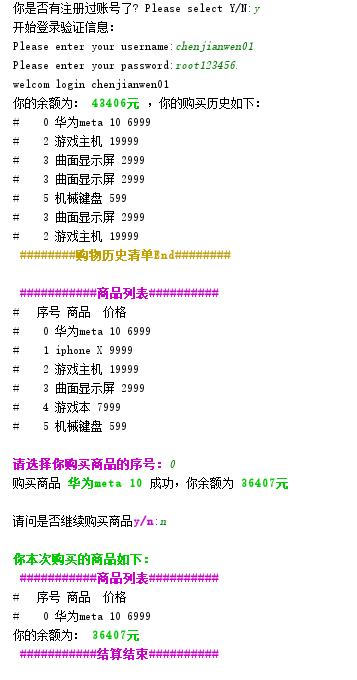
old:
3_python之路之商城购物车的更多相关文章
- Mvp快速搭建商城购物车模块
代码地址如下:http://www.demodashi.com/demo/12834.html 前言: 说到MVP的时候其实大家都不陌生,但是涉及到实际项目中使用,还是有些无从下手.因此这里小编带着大 ...
- 基于vue2.0打造移动商城页面实践 vue实现商城购物车功能 基于Vue、Vuex、Vue-router实现的购物商城(原生切换动画)效果
基于vue2.0打造移动商城页面实践 地址:https://www.jianshu.com/p/2129bc4d40e9 vue实现商城购物车功能 地址:http://www.jb51.net/art ...
- python学习(8)实例:写一个简单商城购物车的代码
要求: 1.写一段商城程购物车序的代码2.用列表把商城的商品清单存储下来,存到列表 shopping_mail3.购物车的列表为shopping_cart4.用户首先输入工资金额,判断输入为数字5.用 ...
- session讲解(二)——商城购物车练习
网上商城中“添加商品到购物车”是主要功能之一,所添加的商品都存到了session中,主要以二维数组的形式存储在session中,在这里我们将以买水果为例 第一:整个水果商品列表 <body> ...
- 用JSP实现的商城购物车模块
这两天,在学习JSP,正好找个小模块来练练手: 下面就是实现购物车模块的页面效果截图: 图1. 产品显示页面 通过此页面进行产品选择,增加到购物车 图2 .购物车页面 图3 . 商品数量设置 好了,先 ...
- 使用session技术来实现网上商城购物车的功能
首先.简单的了解session和cookie的区别: 一.session和cookie的区别: session是把用户的首写到用户独占的session中(服务器端) cookie是把用户的数据写给用户 ...
- PHP商城购物车类
<?php /* 购物车类 */ // session_start(); class Cart { //定义一个数组来保存购物车商品 private $iteams; private stati ...
- Vue node.js商城-购物车模块
一.渲染购物车列表页面 新建src/views/Cart.vue获取cartList购物车列表数据就可以在页面中渲染出该用户的购物车列表数据 data(){ return { car ...
- mmall商城购物车模块总结
购物车模块的设计思想 购物车的实现方式有很多,但是最常见的就三种:Cookie,Session,数据库.三种方法各有优劣,适合的场景各不相同.Cookie方法:通过把购物车中的商品数据写入Cookie ...
随机推荐
- Gradle 1.12用户指南翻译——第六十五章. Maven 发布(新)
其他章节的翻译请参见:http://blog.csdn.net/column/details/gradle-translation.html翻译项目请关注Github上的地址:https://gith ...
- Andriod4.2 Camera 架构与实现
1.Camera架构包括客户端和服务端,他们之间的通信采用Binder机制实现. Camera的实现主要包括本地代码和Java代码两个层次: Camera本地框架: frameworks/native ...
- Android Studio单独生成apk
/********************************************************************* * Android Studio单独生成apk * 说明: ...
- 【剑指offer】和为s的两个数字
原创博文,转载请注明出处! # 题目 # 思路 首先定义两个指针,第一个指针p指向数组的第一个数字,第二个指针q指向数组的最后一个数字.如果p+q=s,则找到要找的数字:如果p+q<s,则p向后 ...
- LARAVEL 路由原理分析
<?php class App { protected $routes = []; protected $responseStatus = '200 OK'; protecte ...
- [转] Hiredis: redis c client使用注记
编译 使用 初始化 连接redis数据库 redisContext * pConn = redisConnect(redisIp.c_str(), redisPort);if (m_cLocal == ...
- C#-StructLayoutAttribute(结构体布局)
struct实例字段的内存布局(Layout)和大小(Size) 在C/C++中,struct类型中的成员的一旦声明,则实例中成员在内存中的布局(Layout)顺序就定下来了,即与成员声明的顺序相同, ...
- LG1155 双栈排序
题意 Tom最近在研究一个有趣的排序问题.如图所示,通过2个栈\(S_1\)和\(S_2\),Tom希望借助以下4种操作实现将输入序列升序排序. 操作a 如果输入序列不为空,将第一个元素压入栈\(S_ ...
- 用vs2010编译vs2013建的工程
第一步,用文本打开,修改.sln文件 原始: Microsoft Visual Studio Solution File, Format Version 12.00 # Visual Studio 2 ...
- RK3288 制作内核开机logo
安装工具 sudo apt-get install netpbm 1.制作图片 (1).图片为bmp格式 $ convert logo.bmp logo.png $ pngtopnm logo.png ...