
JSON还原为结构体
JSON还原为结构体
1)JSON字符串还原为结构体;
2)访问结构体的字段值;
本例运行效果图:
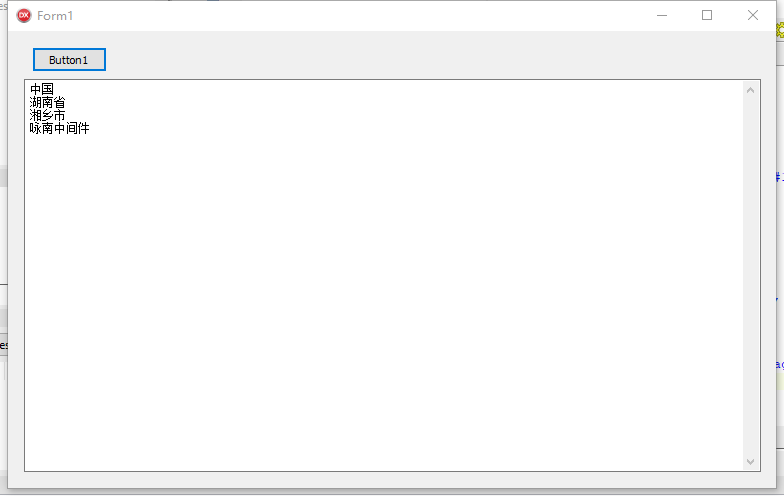
uses
SynCommons;
const // JSON字符串
JSON1 =
'{' + #13#10 + '"glossary": {' + #13#10 + '"title": "中国",' + #13#10
+ ' "GlossDiv": {' + #13#10
+ '"title": "湖南省",' + #13#10
+ ' "GlossList": {' + #13#10
+ '"GlossEntry": {' + #13#10
+ '"ID": "湘乡市",' + #13#10
+ ' "SortAs": "SGML",' + #13#10
+ ' "GlossTerm": "Standard Generalized Markup Language",' + #13#10
+ ' "Acronym": "SGML",' + #13#10
+ ' "Abbrev": "ISO 8879:1986",' + #13#10
+ ' "GlossDef": {' + #13#10
+ '"para": "A meta-markup language, used to create markup languages such as DocBook.",' + #13#10
+ ' "GlossSeeAlso": ["咏南中间件", "XML"]' + #13#10
+ '},' + #13#10
+ ' "GlossSee": "markup"' + #13#10 + '}'
+ #13#10 + '}' + #13#10
+ '}' + #13#10
+ '}' + #13#10
+ '}';
type // 记录
TGlossary = record
glossary: record
title: string;
GlossDiv: record
title: string;
GlossList: record
GlossEntry: record
ID, SortAs, GlossTerm, Acronym, Abbrev: string;
GlossDef: record
para: string;
GlossSeeAlso: array of string;
end;
GlossSee: string;
end;
end;
end;
end;
end;
procedure TForm1.Button1Click(Sender: TObject);
var
gloss: TGlossary;
json: RawUTF8;
begin
json := JSON1;
RecordLoadJSON(gloss, @json[1], TypeInfo(TGlossary));
Memo1.Clear;
Memo1.Lines.Add(gloss.glossary.title); // 中国
Memo1.Lines.Add(gloss.glossary.GlossDiv.title); // 湖南省
Memo1.Lines.Add(gloss.glossary.GlossDiv.GlossList.GlossEntry.ID); // 湘乡市
Memo1.Lines.Add(gloss.glossary.GlossDiv.GlossList.GlossEntry.GlossDef.GlossSeeAlso[0]); // 咏南中间件
end;
JSON还原为结构体的更多相关文章
- XmlRpc.net 出参字符串还原为结构体
上一篇随笔写的是入参结构体转字符串,现在需要把保存到服务器的字符串还原为结构体,这里记录一下操作步骤: 1. 格式化字符串. XmlRpcDeserializer 支持反序列化<struct&g ...
- go语言之进阶篇json解析到结构体
1.json解析到结构体 示例: package main import ( "encoding/json" "fmt" ) type IT struct { ...
- [GO]json解析到结构体
package main import ( "encoding/json" "fmt" ) type IT struct { Company string `j ...
- Delphi 10.2 JSON与对象/结构体序列化性能提高100多倍
今天在盒子闲逛,无意中看到有人说XE7自带的Json对象序列化很慢,帖子在这里:http://bbs.2ccc.com/topic.asp?topicid=464378;经过测试的确如此. 但 ...
- go get请求 json字符串转为结构体
package main import ( "io/ioutil" "fmt" "net/http" "encoding/json ...
- json数据转换成结构体
package main import ( "encoding/json" "fmt" ) type IT1 struct { Company string ` ...
- 在线JSON转Go 结构体,在线JSON转Go Struct
在线转换https://oktools.net/json2go
- 结构体序列为JSON
结构体序列为JSON 本例运行效果图: uses SynCommons; const /// JSON字符串 JSON1 = '{' + #13#10 + '"glossary": ...
- Golang操作结构体、Map转化为JSON
结构体生成Json package main import ( "encoding/json" "fmt" ) type IT struct { Company ...
随机推荐
- mysql建立自增主键的插入,及自动插入当前时间
MYSQL里用这两个字段,几乎都是必须的. 以前都是自动建立的,现在手把手建立的时候,就要找资料来搞定了. 参考URL: http://blog.csdn.net/Weicleer/article/d ...
- log4net 写日志配置
1. nuget install package log4net 2.站点跟目录新建配置文件 LogWriterConfig.xml <?xml version="1.0" ...
- python快速教程-vamei
2016年10月26日 12:00:53 今天开始着手python的学习,希望能高效快速的学完! Python基础(上)... 7 实验简介... 7 一.实验说明... 8 1. 环境登录... 8 ...
- touch命令的用法
touchtouch 文件,如果文件不存在,则创建一个新文件:如果文件存在,则将该存在的文件的修改时间或创建时间改为当前时间touch -t 时间戳 文件,则把该文件的时间改了
- jquery validate表单验证插件的基本使用方法及功能拓展
1 表单验证的准备工作 在开启长篇大论之前,首先将表单验证的效果展示给大家. 1.点击表单项,显示帮助提示 2.鼠标离开表单项时,开始校验元素 3.鼠标离开后的正确.错误提示及鼠标移入时的帮助提 ...
- 第二章:监控属性(Observables)
关于Knockout的3个重要概念(Observables,DependentObservables,ObservableArray),本人无法准确表达它的准确含义,所以暂定翻译为(监控属性.依赖监控 ...
- NoSql数据库 设计上面的一些心得
NoSql数据库这个概念听闻许久了,也陆续看到很多公司和产品都在使用,优缺点似乎都被分析的清清楚楚.但我心里一直存有一个疑惑,它的出现究竟是为了解决什么问题? 用户信息表,书籍信息表,用户为书籍打分信 ...
- 基于Ubuntu系统搭建以太坊go-ethereum源码的开发环境
第一.先安装geth的CLI环境sudo apt-get install geth,这个很重要 第二.下载源代码 git clone https://github.com/ethereum/go-et ...
- Python编程举例-自定义日期格式
#自定义格式 x = '{0}{0}{0}'.format('dog') print(x) class Date: def __init__(self,year, mon,day): self.yea ...
- svm常用核函数介绍
这里有一篇博文介绍了,每个核函数的用途: https://blog.csdn.net/batuwuhanpei/article/details/52354822 在吴恩达的课上,也曾经给出过一系列的选 ...