
angular8 集成swiper, 并将swiper封装成公共组件
安装Swiper
npm install swiper --save
或者
yarn add swiper --save
在angular.json文件添加swiper.js和swiper.css
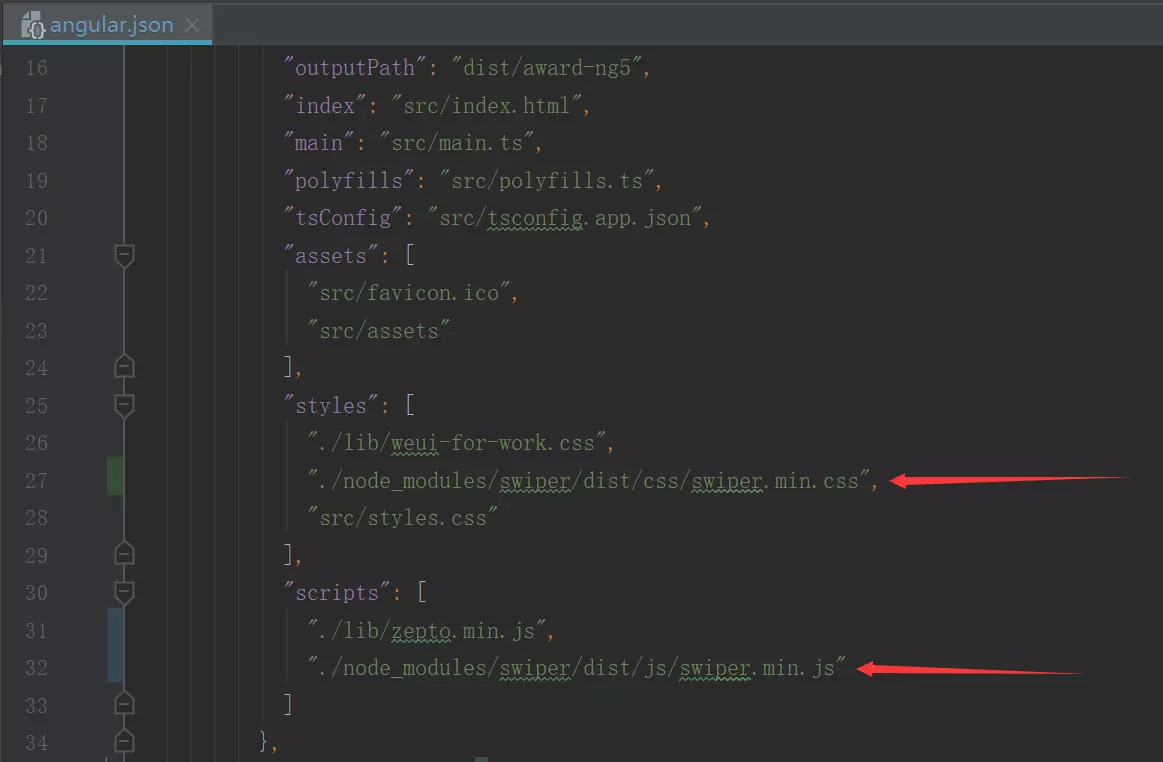
安装模组定义档
npm install @types/swiper --save
或者
yarn add @types/swiper --save
配置tsconfig文件


按照上面的配置完成后,angular里就可以用swiper。
ts
import { AfterViewInit, Component, ElementRef, EventEmitter, Input, OnInit, Output, ViewChild } from '@angular/core';

import {

  A11yOptions,

  AutoplayOptions,

  CoverflowEffectOptions,

  CubeEffectOptions,

  FadeEffectOptions,

  FlipEffectOptions,

  HashNavigationOptions,

  HistoryNavigationOptions,

  KeyboardOptions,

  LazyOptions,

  MousewheelOptions,

  NavigationOptions,

  PaginationOptions,

  ScrollbarOptions,

  SelectableElement,

  SwiperOptions,

  VirtualOptions,

  ZoomOptions

} from 'swiper';

declare let Swiper: any;

@Component({

  selector: 'cat-swiper-slide',

  templateUrl: './swiper-slide.component.html',

  styleUrls: ['./swiper-slide.component.scss']

})

export class SwiperSlideComponent implements OnInit, AfterViewInit {

  mySwiper: any;

  @ViewChild('paginationEl', {static: true}) paginationEl: ElementRef;

  @ViewChild('prevButtonEl', {static: true}) prevButtonEl: ElementRef;

  @ViewChild('nextButtonEl', {static: true}) nextButtonEl: ElementRef;

  @Input() containerClass: string;

  @Input() wrapperClass: string;

  @Input() sliderClass: string;

  @Input() paginationClass: string;

  @Input() buttonClass: string;

  @Input() scrollbarClass: string;

  @Input() items: any[] = [];

  /**

   * Index number of initial slide.

   */

  @Input() initialSlide: number;

  /**

   * Could be 'horizontal' or 'vertical' (for vertical slider).

   */

  @Input() direction: 'horizontal' | 'vertical';

  /**

   * Duration of transition between slides (in ms)

   */

  @Input() speed: number;

  /**

   * Enabled this option and plugin will set width/height on swiper wrapper equal to total size of all slides.

   * Mostly should be used as compatibility fallback option for browser that don't support flexbox layout well

   */

  @Input() setWrapperSize: boolean;

  /**

   * Enabled this option and swiper will be operated as usual except it will not move,

   * real translate values on wrapper will not be set.

   *

   * Useful when you may need to create custom slide transition

   */

  @Input() virtualTranslate: boolean;

  /**

   * Swiper width (in px).

   *

   * Parameter allows to force Swiper width. Useful only if you initialize Swiper when it is hidden.

   *

   * Setting this parameter will make Swiper not responsive

   */

  @Input() width: number;

  /**

   * Swiper height (in px).

   *

   * Parameter allows to force Swiper height. Useful only if you initialize Swiper when it is hidden.

   *

   * Setting this parameter will make Swiper not responsive

   */

  @Input() height: number;

  /**

   * Set to true and slider wrapper will adopt its height to the height of the currently active slide

   */

  @Input() autoHeight: boolean;

  /**

   * Set to true to round values of slides width and height to prevent blurry texts on usual resolution screens (if you have such)

   */

  @Input() roundLengths: boolean;

  /**

   * Set to true on nested Swiper for correct touch events interception.

   * Use only on nested swipers that use same direction as the parent one

   */

  @Input() nested: boolean;

  /**

   * If enabled (by default) and navigation elements' parameters passed as a string (like ".pagination")

   * then Swiper will look for such elements through child elements first.

   *

   * Applies for pagination, prev/next buttons and scrollbar elements

   */

  @Input() uniqueNavElements: boolean;

  /**

   * Tranisition effect. Could be "slide", "fade", "cube", "coverflow" or "flip"

   */

  @Input() effect: 'slide' | 'fade' | 'cube' | 'coverflow' | 'flip';

  /**

   * Fire [Transition/SlideChange][Start/End] events on swiper initialization.

   * Such events will be fired on initialization in case of your initialSlide is not 0, or you use loop mode

   */

  @Input() runCallbacksOnInit: boolean;

  /**

   * When enabled Swiper will be disabled and hide navigation buttons on case there are not enough slides for sliding

   */

  @Input() watchOverflow: boolean;

  /**

   * Distance between slides in px.

   */

  @Input() spaceBetween: number;

  /**

   *  Number of slides per view (slides visible at the same time on slider's container).

   *  If you use it with "auto" value and along with loop: true

   *  then you need to specify loopedSlides parameter with amount of slides to loop (duplicate)

   */

  @Input() slidesPerView: number | 'auto';

  /**

   * Number of slides per column, for multirow layout

   */

  @Input() slidesPerColumn: number;

  /**

   * Could be 'column' or 'row'. Defines how slides should fill rows, by column or by row

   */

  @Input() slidesPerColumnFill: 'column' | 'row';

  /**

   * Set numbers of slides to define and enable group sliding. Useful to use with slidesPerView > 1

   */

  @Input() slidesPerGroup: number;

  /**

   * If true, then active slide will be centered, not always on the left side.

   */

  @Input() centeredSlides = false;

  /**

   *  Add (in px) additional slide offset in the beginning of the container (before all slides)

   */

  @Input() slidesOffsetBefore: number;

  /**

   * Add (in px) additional slide offset in the end of the container (after all slides)

   */

  @Input() slidesOffsetAfter: number;

  /**

   * Normalize slide index. See #1766

   */

  @Input() normalizeSlideIndex: boolean;

  /**

   *  When enabled it center slides if the amount of slides less than `slidesPerView`.

   *  Not intended to be used loop mode and slidesPerColumn

   */

  @Input() centerInsufficientSlides: boolean;

  /**

   * This option may a little improve desktop usability.

   * If true, user will see the "grab" cursor when hover on Swiper

   */

  @Input() grabCursor: boolean;

  /**

   * Target element to listen touch events on.

   *

   * Can be 'container' (to listen for touch events on swiper-container)

   * or 'wrapper' (to listen for touch events on swiper-wrapper)

   */

  @Input() touchEventsTarget: 'container' | 'wrapper';

  /**

   *  Touch ratio

   */

  @Input() touchRatio: number;

  /**

   *

   */

  @Input() touchAngle: number;

  /**

   *  If true, Swiper will accept mouse events like touch events (click and drag to change slides)

   */

  @Input() simulateTouch: boolean;

  /**

   *  Set to false if you want to disable short swipes

   */

  @Input() shortSwipes: boolean;

  /**

   *  Set to false if you want to disable long swipes

   */

  @Input() longSwipes: boolean;

  /**

   *  Ratio to trigger swipe to next/previous slide during long swipes

   */

  @Input() longSwipesRatio: number;

  /**

   *  Minimal duration (in ms) to trigger swipe to next/previous slide during long swipes

   */

  @Input() longSwipesMs: number;

  /**

   * If disabled, then slider will be animated only when you release it,

   * it will not move while you hold your finger on it

   */

  @Input() followFinger: boolean;

  /**

   *  If false, then the only way to switch the slide is use of external API functions like slidePrev or slideNext

   */

  @Input() allowTouchMove: boolean;

  /**

   *  Threshold value in px. If "touch distance" will be lower than this value then swiper will not move

   */

  @Input() threshold: number;

  /**

   *  If disabled, `touchstart` (`mousedown`) event won't be prevented

   */

  @Input() touchStartPreventDefault: boolean;

  /**

   *  Force to always prevent default for `touchstart` (`mousedown`) event

   */

  @Input() touchStartForcePreventDefault: boolean;

  /**

   * If enabled, then propagation of "touchmove" will be stopped

   */

  @Input() touchMoveStopPropagation: boolean;

  /**

   * Enable to release Swiper events for swipe-to-go-back work in iOS UIWebView

   */

  @Input() iOSEdgeSwipeDetection: boolean;

  /**

   *  Area (in px) from left edge of the screen to release touch events for swipe-to-go-back in iOS UIWebView

   */

  @Input() iOSEdgeSwipeThreshold: number;

  /**

   *  Enable to release touch events on slider edge position (beginning, end) to allow for further page scrolling

   */

  @Input() touchReleaseOnEdges: boolean;

  /**

   *  Passive event listeners will be used by default where possible to improve scrolling performance on

   *  mobile devices.

   *

   *  But if you need to use `e.preventDefault` and you have conflict with it,

   *  then you should disable this parameter

   */

  @Input() passiveListeners: boolean;

  /**

   * Set to false if you want to disable resistant bounds

   */

  @Input() resistance: boolean;

  /**

   * This option allows you to control resistance ratio

   */

  @Input() resistanceRatio: number;

  // Swiping / No swiping

  @Input() preventInteractionOnTransition: boolean;

  @Input() allowSlidePrev: boolean;

  @Input() allowSlideNext: boolean;

  @Input() noSwiping: boolean;

  @Input() noSwipingClass: string;

  @Input() noSwipingSelector: string;

  @Input() swipeHandler: SelectableElement;

  // Clicks

  @Input() preventClicks: boolean;

  @Input() preventClicksPropagation: boolean;

  @Input() slideToClickedSlide: boolean;

  // Freemode

  @Input() freeMode: boolean;

  @Input() freeModeMomentum: boolean;

  @Input() freeModeMomentumRatio: number;

  @Input() freeModeMomentumVelocityRatio: number;

  @Input() freeModeMomentumBounce: boolean;

  @Input() freeModeMomentumBounceRatio: number;

  @Input() freeModeMinimumVelocity: number;

  @Input() freeModeSticky: boolean;

  // Progress

  @Input() watchSlidesProgress: boolean;

  @Input() watchSlidesVisibility: boolean;

  // Images

  @Input() preloadImages: boolean;

  @Input() updateOnImagesReady: boolean;

  // Loop

  @Input() loop: boolean;

  @Input() loopAdditionalSlides: number;

  @Input() loopedSlides: number;

  @Input() loopFillGroupWithBlank: boolean;

  // Breakpoints

  @Input() breakpoints: {

    [index: number]: SwiperOptions;

  };

  @Input() breakpointsInverse: boolean;

  // Observer

  @Input() observer: boolean;

  @Input() observeParents: boolean;

  // Namespace

  @Input() containerModifierClass: string;

  @Input() slideActiveClass: string;

  @Input() slideDuplicateActiveClass: string;

  @Input() slideVisibleClass: string;

  @Input() slideDuplicateClass: string;

  @Input() slideNextClass: string;

  @Input() slideDuplicateNextClass: string;

  @Input() slidePrevClass: string;

  @Input() slideDuplicatePrevClass: string;

  // Components

  @Input() navigation: NavigationOptions | boolean;

  @Input() pagination: PaginationOptions | boolean;

  @Input() scrollbar: ScrollbarOptions;

  @Input() autoplay: AutoplayOptions | boolean;

  @Input() parallax: boolean;

  @Input() lazy: LazyOptions | boolean;

  @Input() fadeEffect: FadeEffectOptions;

  @Input() coverflowEffect: CoverflowEffectOptions;

  @Input() flipEffect: FlipEffectOptions;

  @Input() cubeEffect: CubeEffectOptions;

  @Input() zoom: ZoomOptions | boolean;

  @Input() keyboard: KeyboardOptions | boolean;

  @Input() mousewheel: MousewheelOptions | boolean;

  @Input() virtual: VirtualOptions | boolean;

  @Input() hashNavigation: HashNavigationOptions | boolean;

  @Input() history: HistoryNavigationOptions | boolean;

  @Input() a11y: A11yOptions | boolean;

  // Event will be fired when currently active slide is changed

  @Output() swiperSlideChange: EventEmitter<any> = new EventEmitter<any>();

  // Event will be fired in the beginning of animation to other slide (next or previous).

  @Output() swiperSlideChangeTransitionStart: EventEmitter<any> = new EventEmitter<any>();

  // Event will be fired after animation to other slide (next or previous).

  @Output() swiperSlideChangeTransitionEnd: EventEmitter<any> = new EventEmitter<any>();

  // Same as "slideChangeTransitionStart" but for "forward" direction only

  @Output() swiperSlideNextTransitionStart: EventEmitter<any> = new EventEmitter<any>();

  // Same as "slideChangeTransitionEnd" but for "forward" direction only

  @Output() swiperSlideNextTransitionEnd: EventEmitter<any> = new EventEmitter<any>();

  // Same as "slideChangeTransitionStart" but for "backward" direction only

  @Output() swiperSlidePrevTransitionStart: EventEmitter<any> = new EventEmitter<any>();

  // Same as "slideChangeTransitionEnd" but for "backward" direction only

  @Output() swiperSlidePrevTransitionEnd: EventEmitter<any> = new EventEmitter<any>();

  // Event will be fired in the beginning of transition.

  @Output() swiperTransitionStart: EventEmitter<any> = new EventEmitter<any>();

  // Event will be fired after transition.

  @Output() swiperTransitionEnd: EventEmitter<any> = new EventEmitter<any>();

  // Event will be fired when user touch Swiper. Receives 'touchstart' event as an arguments.

  @Output() swiperTouchStart: EventEmitter<any> = new EventEmitter<any>();

  // Event will be fired when user touch and move finger over Swiper in direction opposite to direction parameter.

  // Receives 'touchmove' event as an arguments.

  @Output() swiperTouchMoveOpposite: EventEmitter<any> = new EventEmitter<any>();

  // Event will be fired when user touch and move finger over Swiper and move it. Receives 'touchmove' event as an arguments.

  @Output() swiperSliderMove: EventEmitter<any> = new EventEmitter<any>();

  // Event will be fired when user touch and move finger over Swiper. Receives 'touchmove' event as an arguments.

  @Output() swiperTouchMove: EventEmitter<any> = new EventEmitter<any>();

  // Event will be fired when user release Swiper. Receives 'touchend' event as an arguments.

  @Output() swiperTouchEnd: EventEmitter<any> = new EventEmitter<any>();

  // Event will be fired when user click/tap on Swiper after 300ms delay. Receives 'touchend' event as an arguments.

  @Output() swiperClick: EventEmitter<any> = new EventEmitter<any>();

  // Event will be fired when user click/tap on Swiper. Receives 'touchend' event as an arguments.

  @Output() swiperTap: EventEmitter<any> = new EventEmitter<any>();

  // Event will be fired when user double tap on Swiper's container. Receives 'touchend' event as an arguments

  @Output() swiperDoubleTap: EventEmitter<any> = new EventEmitter<any>();

  // Event will be fired right after all inner images are loaded. updateOnImagesReady should be also enabled

  @Output() swiperImagesReady: EventEmitter<any> = new EventEmitter<any>();

  // Event will be fired when Swiper progress is changed, as an arguments it receives progress that is always from 0 to 1

  @Output() swiperProgress: EventEmitter<any> = new EventEmitter<any>();

  // Event will be fired when Swiper reach its beginning (initial position)

  @Output() swiperReachBeginning: EventEmitter<any> = new EventEmitter<any>();

  // Event will be fired when Swiper reach its beginning (initial position)

  @Output() swiperReachEnd: EventEmitter<any> = new EventEmitter<any>();

  // Event will be fired when Swiper reach last slide

  // Event will be fired when Swiper goes from beginning or end position

  @Output() swiperFromEdge: EventEmitter<any> = new EventEmitter<any>();

  constructor(

    private elementRef: ElementRef,

  ) {

  }

  ngOnInit() {

    setTimeout(() => {

      this.initSwiper();

    }, 20);

  }

  ngAfterViewInit() {

  }

  initSwiper() {

    // this.mySwiper = new Swiper('.swiper-container', {

    //   slidesPerView: 'auto',

    //   freeMode: true,

    //   loop: true,

    //   autoplayDisableOnInteraction: false,

    //   observer: true, // 修改swiper自己或子元素时,自动初始化swiper

    //   observeParents: true, // 修改swiper的父元素时,自动初始化swiper

    //

    // });

    let container: HTMLElement = this.elementRef.nativeElement.querySelector('.swiper-container');

    this.mySwiper = new Swiper(container, this.buildOption());

  }

  private buildOption(): SwiperOptions {

    let opt: SwiperOptions = {

      initialSlide: this.initialSlide,

      direction: this.direction,

      speed: this.speed,

      setWrapperSize: this.setWrapperSize,

      virtualTranslate: this.virtualTranslate,

      width: this.width,

      height: this.height,

      autoHeight: this.autoHeight,

      roundLengths: this.roundLengths,

      nested: this.nested,

      uniqueNavElements: this.uniqueNavElements,

      effect: this.effect,

      runCallbacksOnInit: this.runCallbacksOnInit,

      watchOverflow: this.watchOverflow,

      spaceBetween: this.spaceBetween,

      slidesPerView: this.slidesPerView,

      slidesPerColumn: this.slidesPerColumn,

      slidesPerColumnFill: this.slidesPerColumnFill,

      slidesPerGroup: this.slidesPerGroup,

      centeredSlides: this.centeredSlides,

      slidesOffsetBefore: this.slidesOffsetBefore,

      slidesOffsetAfter: this.slidesOffsetAfter,

      normalizeSlideIndex: this.normalizeSlideIndex,

      centerInsufficientSlides: this.centerInsufficientSlides,

      grabCursor: this.grabCursor,

      touchEventsTarget: this.touchEventsTarget,

      touchRatio: this.touchRatio,

      touchAngle: this.touchAngle,

      simulateTouch: this.simulateTouch,

      shortSwipes: this.shortSwipes,

      longSwipes: this.longSwipes,

      longSwipesRatio: this.longSwipesRatio,

      longSwipesMs: this.longSwipesMs,

      followFinger: this.followFinger,

      allowTouchMove: this.allowTouchMove,

      threshold: this.threshold,

      touchStartPreventDefault: this.touchStartPreventDefault,

      touchStartForcePreventDefault: this.touchStartForcePreventDefault,

      touchMoveStopPropagation: this.touchMoveStopPropagation,

      iOSEdgeSwipeDetection: this.iOSEdgeSwipeDetection,

      iOSEdgeSwipeThreshold: this.iOSEdgeSwipeThreshold,

      touchReleaseOnEdges: this.touchReleaseOnEdges,

      passiveListeners: this.passiveListeners,

      resistance: this.resistance,

      resistanceRatio: this.resistanceRatio,

      preventInteractionOnTransition: this.preventInteractionOnTransition,

      allowSlidePrev: this.allowSlidePrev,

      allowSlideNext: this.allowSlideNext,

      noSwiping: this.noSwiping,

      noSwipingClass: this.noSwipingClass,

      noSwipingSelector: this.noSwipingSelector,

      swipeHandler: this.swipeHandler,

      preventClicks: this.preventClicks,

      preventClicksPropagation: this.preventClicksPropagation,

      slideToClickedSlide: this.slideToClickedSlide,

      freeMode: this.freeMode,

      freeModeMomentum: this.freeModeMomentum,

      freeModeMomentumRatio: this.freeModeMomentumRatio,

      freeModeMomentumVelocityRatio: this.freeModeMomentumVelocityRatio,

      freeModeMomentumBounce: this.freeModeMomentumBounce,

      freeModeMomentumBounceRatio: this.freeModeMomentumBounceRatio,

      freeModeMinimumVelocity: this.freeModeMinimumVelocity,

      freeModeSticky: this.freeModeSticky,

      watchSlidesProgress: this.watchSlidesProgress,

      watchSlidesVisibility: this.watchSlidesVisibility,

      preloadImages: this.preloadImages,

      updateOnImagesReady: this.updateOnImagesReady,

      loop: this.loop, // 是否是无缝轮播

      loopAdditionalSlides: this.loopAdditionalSlides,

      loopedSlides: this.loopedSlides,

      loopFillGroupWithBlank: this.loopFillGroupWithBlank,

      breakpoints: this.breakpoints,

      breakpointsInverse: this.breakpointsInverse,

      observer: this.observer, // 修改swiper自己或子元素时,自动初始化swiper

      observeParents: this.observeParents, // 修改swiper的父元素时,自动初始化swiper

      containerModifierClass: this.containerModifierClass,

      slideActiveClass: this.slideActiveClass,

      slideDuplicateActiveClass: this.slideDuplicateActiveClass,

      slideVisibleClass: this.slideVisibleClass,

      slideDuplicateClass: this.slideDuplicateClass,

      slideNextClass: this.slideNextClass,

      slideDuplicateNextClass: this.slideDuplicateNextClass,

      slidePrevClass: this.slidePrevClass,

      slideDuplicatePrevClass: this.slideDuplicatePrevClass,

      wrapperClass: this.wrapperClass,

      // Components

      // navigation: this.navigation,

      // pagination: this.pagination,

      scrollbar: this.scrollbar,

      autoplay: this.autoplay,

      parallax: this.parallax,

      lazy: this.lazy,

      fadeEffect: this.fadeEffect,

      coverflowEffect: this.coverflowEffect,

      flipEffect: this.flipEffect,

      cubeEffect: this.cubeEffect,

      zoom: this.zoom,

      keyboard: this.keyboard,

      mousewheel: this.mousewheel,

      virtual: this.virtual,

      hashNavigation: this.hashNavigation,

      history: this.history,

      a11y: this.a11y,

    };

    if (this.pagination === true) {

      opt.pagination = {

        el: this.paginationEl.nativeElement, // 分页器,就是小点的位置

        type: 'bullets',

        clickable: true,

      };

    }

    if (this.loop === true) {

      let slidesPerView: number = Number(this.slidesPerView);

      if (slidesPerView) {

        opt.loopAdditionalSlides = slidesPerView + 1;

      }

    }

    if (this.autoplay === true) {

      opt.autoplay = {

        delay: 2000, // 2秒切换一次

        disableOnInteraction: false, // 鼠标滑动后继续停止播放

      };

    }

    if (this.navigation === true) {

      opt.navigation = {

        nextEl: this.nextButtonEl.nativeElement, // 下一张箭头位置

        prevEl: this.prevButtonEl.nativeElement, // 上一张箭头位置

      };

    }

    // if (this.scrollbar === true) {

    //   opt.scrollbar = {

    //     el: this.scrollbarEl.nativeElement, // 滚动条位置

    //   };

    // }

    Object.keys(opt)

      .forEach(key => {

        if (opt[key] === void 0) {

          delete opt[key];

        }

      });

    console.log(opt);

    return opt;

  }

}
html
<!-- Slider main container -->

<div class="swiper-container" [ngClass]="containerClass">

  <!-- Additional required wrapper -->

  <div class="swiper-wrapper" [ngClass]="wrapperClass">

    <ng-content></ng-content>

  </div>

  <!-- If we need pagination -->

  <div class="swiper-pagination" [ngClass]="paginationClass" [hidden]="!pagination" #paginationEl></div>

  <!-- If we need navigation buttons -->

  <div class="swiper-button-prev" [ngClass]="buttonClass" [hidden]="!navigation" #prevButtonEl></div>

  <div class="swiper-button-next" [ngClass]="buttonClass" [hidden]="!navigation" #nextButtonEl></div>

  <!-- If we need scrollbar -->

  <div class="swiper-scrollbar" [ngClass]="scrollbarClass" *ngIf="scrollbar"></div>

</div>
css
:host {

  display: block;

  height: 100%;

}

.swiper-container {

  height: 100%;

}
使用:
<cat-swiper-slide direction="horizontal" [navigation]="true" [pagination]="false"

                  [loop]="true" [autoplay]="true" [speed]="450"

                  [grabCursor]="true" [spaceBetween]="20"

                  [observer]="true" [observeParents]="true" [slidesPerView]="2.5"

                  *ngIf="projects.length">

  <div *ngFor="let item of photoNews" class="swiper-slide self-slide">

        // 滑动块内的内容

    <div class="image-bg h-100" [nsBackgroundImage]="item.photo"></div>

    <div class="pos-absolute b-0 pd-b-30 w-100 text-center tx-white bg-black-4">

      {{item.subject}}

    </div>

  </div>

</cat-swiper-slide>
angular8 集成swiper, 并将swiper封装成公共组件的更多相关文章
- echart——vue封装成公共组件
<!-- 自定义Echarts * options: Object,//数据 * theme: String,//主题 * initOptions: Object,//初始化 * group: ...
- Asp.net Core中使用NLog,并封装成公共的日志方法
1.安装NLog "NLog.Extensions.Logging": "1.0.0-rtm-alpha4" 2.配置NLog public void Conf ...
- 【小程序】---- 封装Echarts公共组件,遍历图表实现多个饼图
一.问题描述: 在小程序的项目中,封装公共的饼图组件,并在需要的页面引入使用.要求一个页面中有多个饼图,动态渲染不同的数据. 二.效果实现: 1. 查看——小程序使用Echarts的方式 2. 封装饼 ...
- html5音频audio对象封装成vue组件的方式调用以及setTimeout如何在vue2生效 (vue2正在熟悉中,ajax还是用jQuery来写舒服些,里面含有一些php写法可略过) 此网页应用在PC不考虑手机端
// vue2 组件封装如下: <template> <div> <div><!--vue element 组件的引用 Switch 开关 不懂请自行百度(重 ...
- element-dialog封装成子组件
1.父组件 <template> <card-layout :title="L('Users')" :actions="actions" @c ...
- vue引入swiper vue使用swiper vue脚手架使用swiper /引入js文件/引入css文件
vue引入swiper vue使用swiper vue脚手架使用swiper /引入js文件/引入css文件 ------------------------------------------- ...
- .NET 同步与异步之封装成Task(五)
本随笔续接:.NET 实现并行的几种方式(四) 前篇随笔已经介绍了几种可以实现并发的方式,其中异步方法.是最简便的方式.而 异步方式是基于 Task 和 async修饰符和await运算符实现的. 换 ...
- 将HTML5封装成android应用APK文件的几种方法
越来越多的开发者热衷于使用html5+JavaScript开发移动Web App.不过,HTML5 Web APP的出现能否在未来取代移动应用,就目前来说,还是个未知数.一方面,用户在使用习惯上,不喜 ...
- 将HTML5封装成android应用APK文件的几种方法(转载)
越来越多的开发者热衷于使用html5+JavaScript开发移动Web App.不过,HTML5 Web APP的出现能否在未来取代移动应用,就目前来说,还是个未知数.一方面,用户在使用习惯上,不喜 ...
随机推荐
- 请求头出现Provisional headers are shown
provisional headers are shown 知多少:https://juejin.im/post/5c00980751882518805add83 请求头出现Provisional h ...
- 今盒子里有n个小球,A、B两人轮流从盒中取球,每个人都可以看到另一个人取了多少个
/* 题目描述 今盒子里有n个小球,A.B两人轮流从盒中取球,每个人都可以看到另一个人取了多少个,也可以看到盒中还剩下多少个,并且两人都很聪明,不会做出错误的判断. 我们约定: 每个人从盒子中取出的球 ...
- Linux特殊权限位suid、sgid深度详细及实践
特殊权限位基本说明: Linux系统基本权限位为9位权限,但还有额外3位权限位,共12位权限: suid s(有x) S 4 用户对应的权限位(用户对应的3位上) sgid ...
- Linux三剑客之sed深度实践讲解(下)
2.3.4分组替换 \( \) 和\1的使用说明 echo I am dongdaxia yingxiong. |sed 's#^.*am \([a-z].*\) yin.*$#\1#g' echo ...
- 【转】nosql的分类
1 键值数据库 相关产品:Redis.Riak.SimpleDB.Chordless.Scalaris.Memcached 形式:Key 指向 Value 的键值对,通常用hash table来实现 ...
- 洛谷P2622 关灯问题II (二进制枚举+bfs
题目描述 现有n盏灯,以及m个按钮.每个按钮可以同时控制这n盏灯——按下了第i个按钮,对于所有的灯都有一个效果.按下i按钮对于第j盏灯,是下面3中效果之一:如果a[i][j]为1,那么当这盏灯开了的时 ...
- 洛谷 P2018 消息传递 题解
题面 总体来说是一道从下往上的DP+贪心: 设f[i]表示将消息传给i,i的子树全部接收到所能消耗的最小时间: 那么对于i的所有亲儿子节点j,我们会贪心地先给f[j]大的人传递,然后次大..... 可 ...
- G.Colorful String(The Preliminary Contest for ICPC Asia Xuzhou 2019)
https://nanti.jisuanke.com/t/4 #include <bits/stdc++.h> using namespace std; ,; typedef unsign ...
- tr、od命令
一.tr:替换或删除字符 语法: tr [OPTION] ... SET1 [SET2] 描述 翻译,压缩和/或删除标准输入中的字符,可写吗? 到标准输出. -c, ...
- 网站QQ客服链接代码
个人QQ客服代码 <a href="tencent://message/?uin=QQ号码">在线咨询</a> 企业QQ客服代码 <a href=&q ...