
python之scrapy模拟登陆人人网
1、settings.py主要配置信息,包括USER_AGENT等
# -*- coding: utf-8 -*-

# Scrapy settings for renren project

#

# For simplicity, this file contains only settings considered important or

# commonly used. You can find more settings consulting the documentation:

#

#     https://doc.scrapy.org/en/latest/topics/settings.html

#     https://doc.scrapy.org/en/latest/topics/downloader-middleware.html

#     https://doc.scrapy.org/en/latest/topics/spider-middleware.html

BOT_NAME = 'renren'

SPIDER_MODULES = ['renren.spiders']

NEWSPIDER_MODULE = 'renren.spiders'

# Crawl responsibly by identifying yourself (and your website) on the user-agent

USER_AGENT = 'Mozilla/5.0 (Windows NT 10.0; Win64; x64) AppleWebKit/537.36 (KHTML, like Gecko) Chrome/74.0.3729.131 Safari/537.36'

# Obey robots.txt rules

ROBOTSTXT_OBEY = False

# Configure maximum concurrent requests performed by Scrapy (default: 16)

#CONCURRENT_REQUESTS = 32

# Configure a delay for requests for the same website (default: 0)

# See https://doc.scrapy.org/en/latest/topics/settings.html#download-delay

# See also autothrottle settings and docs

#DOWNLOAD_DELAY = 3

# The download delay setting will honor only one of:

#CONCURRENT_REQUESTS_PER_DOMAIN = 16

#CONCURRENT_REQUESTS_PER_IP = 16

# Disable cookies (enabled by default)

#COOKIES_ENABLED = False

# Disable Telnet Console (enabled by default)

#TELNETCONSOLE_ENABLED = False

# Override the default request headers:

#DEFAULT_REQUEST_HEADERS = {

#   'Accept': 'text/html,application/xhtml+xml,application/xml;q=0.9,*/*;q=0.8',

#   'Accept-Language': 'en',

#}

# Enable or disable spider middlewares

# See https://doc.scrapy.org/en/latest/topics/spider-middleware.html

#SPIDER_MIDDLEWARES = {

#    'renren.middlewares.RenrenSpiderMiddleware': 543,

#}

# Enable or disable downloader middlewares

# See https://doc.scrapy.org/en/latest/topics/downloader-middleware.html

#DOWNLOADER_MIDDLEWARES = {

#    'renren.middlewares.RenrenDownloaderMiddleware': 543,

#}

# Enable or disable extensions

# See https://doc.scrapy.org/en/latest/topics/extensions.html

#EXTENSIONS = {

#    'scrapy.extensions.telnet.TelnetConsole': None,

#}

# Configure item pipelines

# See https://doc.scrapy.org/en/latest/topics/item-pipeline.html

#ITEM_PIPELINES = {

#    'renren.pipelines.RenrenPipeline': 300,

#}

# Enable and configure the AutoThrottle extension (disabled by default)

# See https://doc.scrapy.org/en/latest/topics/autothrottle.html

#AUTOTHROTTLE_ENABLED = True

# The initial download delay

#AUTOTHROTTLE_START_DELAY = 5

# The maximum download delay to be set in case of high latencies

#AUTOTHROTTLE_MAX_DELAY = 60

# The average number of requests Scrapy should be sending in parallel to

# each remote server

#AUTOTHROTTLE_TARGET_CONCURRENCY = 1.0

# Enable showing throttling stats for every response received:

#AUTOTHROTTLE_DEBUG = False

# Enable and configure HTTP caching (disabled by default)

# See https://doc.scrapy.org/en/latest/topics/downloader-middleware.html#httpcache-middleware-settings

#HTTPCACHE_ENABLED = True

#HTTPCACHE_EXPIRATION_SECS = 0

#HTTPCACHE_DIR = 'httpcache'

#HTTPCACHE_IGNORE_HTTP_CODES = []

#HTTPCACHE_STORAGE = 'scrapy.extensions.httpcache.FilesystemCacheStorage'
2、rr.py,主要模拟登陆
# -*- coding: utf-8 -*-

import scrapy

import time

import re

class RrSpider(scrapy.Spider):

    name = 'rr'

    allowed_domains = ['renren.com']

    start_urls = ['http://www.renren.com/ajaxLogin/login?1=1&uniqueTimestamp=201961933877']

    def start_requests(self):

        base_url = 'http://www.renren.com/ajaxLogin/login?1=1&uniqueTimestamp='

        s = time.strftime("%S")

        ms = int(round(time.time() % (int(time.time())), 3) * 1000)

        date_time = '' + str(s) + str(ms)

        login_url = base_url + date_time

        data = {'email': '',

                'icode': '',

                'origURL': 'http://www.renren.com/home',

                'domain': 'renren.com',

                'key_id': '',

                'captcha_type': 'web_login',

                'password': '41980c8f91e2c872910598a9e0a147d05934506893ef022c5b42357a67e0a3be',

                'rkey': 'fc9dfa5a27bed56e61f122d80f2f401d',

                'f':'http%3A%2F%2Fwww.renren.com%2FLogin.do%3Frf%3Dr%26origURL%3Dhttp%253A%252F%252Fwww.renren.com%252F971298880%252Fprofile'

                   }

        yield scrapy.FormRequest(url=login_url, formdata=data, callback=self.parse_login, dont_filter=True)

    def parse_login(self, response):

        yield scrapy.Request(url='http://www.renren.com/971298880/profile', callback=self.parse_text, dont_filter=True)

    def parse_text(self, response):

        print(response.body.decode())
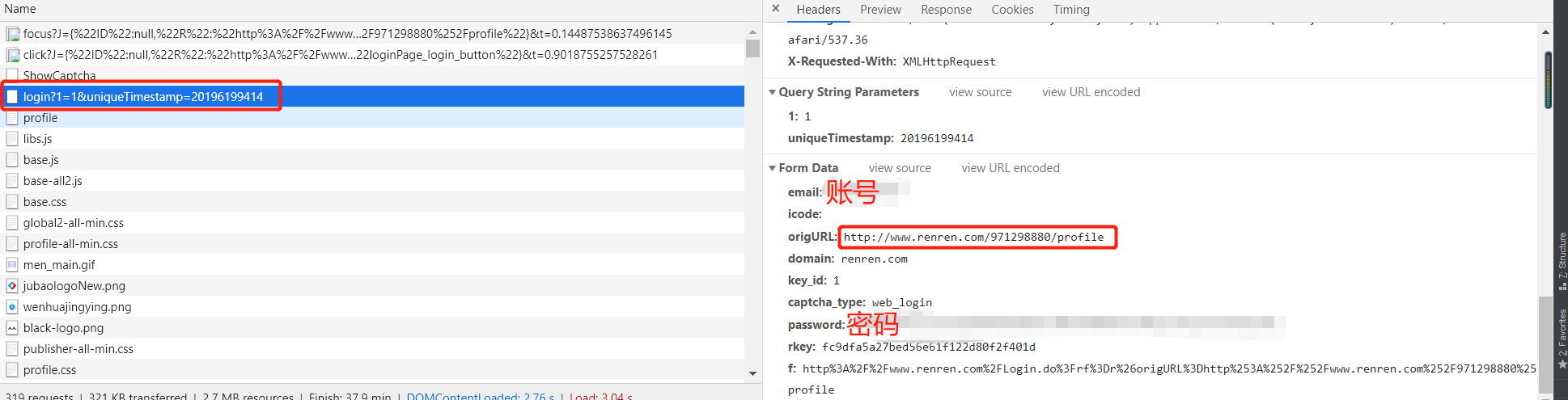
3、登陆信息
python之scrapy模拟登陆人人网的更多相关文章
- 第三百四十三节,Python分布式爬虫打造搜索引擎Scrapy精讲—scrapy模拟登陆和知乎倒立文字验证码识别
第三百四十三节,Python分布式爬虫打造搜索引擎Scrapy精讲—scrapy模拟登陆和知乎倒立文字验证码识别 第一步.首先下载,大神者也的倒立文字验证码识别程序 下载地址:https://gith ...
- 【python爬虫】用requests库模拟登陆人人网
说明:以前是selenium登陆取cookie的方法比较复杂,改用这个 """ 用requests库模拟登陆人人网 """ import r ...
- Python实现网站模拟登陆
一.实验简介 1.1 基本介绍 本实验中我们将通过分析登陆流程并使用 Python 实现模拟登陆到一个实验提供的网站,在实验过程中将学习并实践 Python 的网络编程,Python 实现模拟登陆的方 ...
- Scrapy模拟登陆
1. 为什么需要模拟登陆? #获取cookie,能够爬取登陆后的页面 2. 回顾: requests是如何模拟登陆的? #1.直接携带cookies请求页面 #2.找接口发送post请求存储cooki ...
- Scrapy 模拟登陆知乎--抓取热点话题
工具准备 在开始之前,请确保 scrpay 正确安装,手头有一款简洁而强大的浏览器, 若是你有使用 postman 那就更好了. Python 1 scrapy genspid ...
- Scrapy模拟登陆豆瓣抓取数据
scrapy startproject douban 其中douban是我们的项目名称 2创建爬虫文件 进入到douban 然后创建爬虫文件 scrapy genspider dou douban. ...
- python用scrapy模拟用户登录
scrapy模拟登录 关注公众号"轻松学编程"了解更多. 注意:模拟登陆时,必须保证settings.py里的COOKIES_ENABLED(Cookies中间件) 处于开启状态 ...
- scrapy实战--登陆人人网爬取个人信息
今天把scrapy的文档研究了一下,感觉有点手痒,就写点东西留点念想吧,也做为备忘录.随意写写,看到的朋友觉得不好,不要喷我哈. 创建scrapy工程 cd C:\Spider_dev\app\scr ...
- 爬虫入门之scrapy模拟登陆(十四)
注意:模拟登陆时,必须保证settings.py里的COOKIES_ENABLED(Cookies中间件) 处于开启状态 COOKIES_ENABLED = True或# COOKIES_ENABLE ...
随机推荐
- Hdu 6598 Harmonious Army 最小割
N个人 每个人可以是战士/法师 M个组合 每个组合两个人 同是战士+a 同是法师+c 否则+b 对于每一个u,v,a,b,c 建(S,u,a) (u,v,a+c-2*b) (v,T,c) (S,v, ...
- Cloneable注解使用
使用 clone()方法的类必须 implement Cloneable 如果没有继承,clone()方法会报错 java.lang.CloneNotSupportedException异常
- 《深入理解Java虚拟机》之(三、虚拟机性能监控与故障处理工具)
一.JDK的命令行工具 1.jps:虚拟机进程状况工具 功能:可以列出正在运行的虚拟机进程,并显示虚拟机执行朱磊名称以及这些进程的本地虚拟机唯一ID. 2.jstat:虚拟机统计信息监控工具 Jsta ...
- zxy
ZXY标准瓦片 发送反馈 SuperMap iServer .iEdge支持读取ZXY规范的地图瓦片,可对接 OpenStreetMap 等互联网的瓦地图服务.ZXY规范的地图瓦片规则如下:将地图全幅 ...
- setTimeout设置为0 为啥不能立马执行
setTimeout(function(){}, timer) 是指延时执行.第一个参数是回调函数,第二个参数是指延时多久执行回调函数. setTimeout(function(){console.l ...
- Vue 事件监听实现导航栏吸顶效果(页面滚动后定位)
Vue 事件监听实现导航栏吸顶效果(页面滚动后定位) Howie126313 关注 2017.11.19 15:05* 字数 100 阅读 3154评论 0喜欢 0 所说的吸顶效果就是在页面没有滑动之 ...
- mysql日常优化细节
# sql语句优化> 1)使用limit限制一次性查询出的数据量2)链接查询代替子查询3)尽量不要使用select * ,将需要查找的字段列出来4)如果数据量特别大的话尽量将一条复杂的sql拆分 ...
- C#+Entity Frame work+MVC+Mysql+Apicloud共享汽车管理系统【论文】+Apicloud开发实例
摘要: 共享汽车管理系统主要分为后台管理PC端和手机App端,后台管理可以对指定停车点.车辆基本信息.用户注册信息.用户订单信息.推送消息进行管理和维护,而手机app用户可以通过手机号进行短信注册,根 ...
- 云栖社区 Tensorflow快餐教程
云栖社区 Tensorflow快餐教程(1) - 30行代码搞定手写识别:https://yq.aliyun.com/articles/582122云栖社区 Tensorflow快餐教程(2) - 标 ...
- FatMouse's Speed
J - FatMouse's Speed DP的题写得多了慢慢也有了思路,虽然也还只是很简单的DP. 因为需要输出所有选择的老鼠,所以刚开始的时候想利用状态压缩来储存所选择的老鼠,后面才发现n太大1& ...