
python之scrapy模拟登陆人人网
1、settings.py主要配置信息,包括USER_AGENT等
# -*- coding: utf-8 -*-

# Scrapy settings for renren project

#

# For simplicity, this file contains only settings considered important or

# commonly used. You can find more settings consulting the documentation:

#

#     https://doc.scrapy.org/en/latest/topics/settings.html

#     https://doc.scrapy.org/en/latest/topics/downloader-middleware.html

#     https://doc.scrapy.org/en/latest/topics/spider-middleware.html

BOT_NAME = 'renren'

SPIDER_MODULES = ['renren.spiders']

NEWSPIDER_MODULE = 'renren.spiders'

# Crawl responsibly by identifying yourself (and your website) on the user-agent

USER_AGENT = 'Mozilla/5.0 (Windows NT 10.0; Win64; x64) AppleWebKit/537.36 (KHTML, like Gecko) Chrome/74.0.3729.131 Safari/537.36'

# Obey robots.txt rules

ROBOTSTXT_OBEY = False

# Configure maximum concurrent requests performed by Scrapy (default: 16)

#CONCURRENT_REQUESTS = 32

# Configure a delay for requests for the same website (default: 0)

# See https://doc.scrapy.org/en/latest/topics/settings.html#download-delay

# See also autothrottle settings and docs

#DOWNLOAD_DELAY = 3

# The download delay setting will honor only one of:

#CONCURRENT_REQUESTS_PER_DOMAIN = 16

#CONCURRENT_REQUESTS_PER_IP = 16

# Disable cookies (enabled by default)

#COOKIES_ENABLED = False

# Disable Telnet Console (enabled by default)

#TELNETCONSOLE_ENABLED = False

# Override the default request headers:

#DEFAULT_REQUEST_HEADERS = {

#   'Accept': 'text/html,application/xhtml+xml,application/xml;q=0.9,*/*;q=0.8',

#   'Accept-Language': 'en',

#}

# Enable or disable spider middlewares

# See https://doc.scrapy.org/en/latest/topics/spider-middleware.html

#SPIDER_MIDDLEWARES = {

#    'renren.middlewares.RenrenSpiderMiddleware': 543,

#}

# Enable or disable downloader middlewares

# See https://doc.scrapy.org/en/latest/topics/downloader-middleware.html

#DOWNLOADER_MIDDLEWARES = {

#    'renren.middlewares.RenrenDownloaderMiddleware': 543,

#}

# Enable or disable extensions

# See https://doc.scrapy.org/en/latest/topics/extensions.html

#EXTENSIONS = {

#    'scrapy.extensions.telnet.TelnetConsole': None,

#}

# Configure item pipelines

# See https://doc.scrapy.org/en/latest/topics/item-pipeline.html

#ITEM_PIPELINES = {

#    'renren.pipelines.RenrenPipeline': 300,

#}

# Enable and configure the AutoThrottle extension (disabled by default)

# See https://doc.scrapy.org/en/latest/topics/autothrottle.html

#AUTOTHROTTLE_ENABLED = True

# The initial download delay

#AUTOTHROTTLE_START_DELAY = 5

# The maximum download delay to be set in case of high latencies

#AUTOTHROTTLE_MAX_DELAY = 60

# The average number of requests Scrapy should be sending in parallel to

# each remote server

#AUTOTHROTTLE_TARGET_CONCURRENCY = 1.0

# Enable showing throttling stats for every response received:

#AUTOTHROTTLE_DEBUG = False

# Enable and configure HTTP caching (disabled by default)

# See https://doc.scrapy.org/en/latest/topics/downloader-middleware.html#httpcache-middleware-settings

#HTTPCACHE_ENABLED = True

#HTTPCACHE_EXPIRATION_SECS = 0

#HTTPCACHE_DIR = 'httpcache'

#HTTPCACHE_IGNORE_HTTP_CODES = []

#HTTPCACHE_STORAGE = 'scrapy.extensions.httpcache.FilesystemCacheStorage'
2、rr.py,主要模拟登陆
# -*- coding: utf-8 -*-

import scrapy

import time

import re

class RrSpider(scrapy.Spider):

    name = 'rr'

    allowed_domains = ['renren.com']

    start_urls = ['http://www.renren.com/ajaxLogin/login?1=1&uniqueTimestamp=201961933877']

    def start_requests(self):

        base_url = 'http://www.renren.com/ajaxLogin/login?1=1&uniqueTimestamp='

        s = time.strftime("%S")

        ms = int(round(time.time() % (int(time.time())), 3) * 1000)

        date_time = '' + str(s) + str(ms)

        login_url = base_url + date_time

        data = {'email': '',

                'icode': '',

                'origURL': 'http://www.renren.com/home',

                'domain': 'renren.com',

                'key_id': '',

                'captcha_type': 'web_login',

                'password': '41980c8f91e2c872910598a9e0a147d05934506893ef022c5b42357a67e0a3be',

                'rkey': 'fc9dfa5a27bed56e61f122d80f2f401d',

                'f':'http%3A%2F%2Fwww.renren.com%2FLogin.do%3Frf%3Dr%26origURL%3Dhttp%253A%252F%252Fwww.renren.com%252F971298880%252Fprofile'

                   }

        yield scrapy.FormRequest(url=login_url, formdata=data, callback=self.parse_login, dont_filter=True)

    def parse_login(self, response):

        yield scrapy.Request(url='http://www.renren.com/971298880/profile', callback=self.parse_text, dont_filter=True)

    def parse_text(self, response):

        print(response.body.decode())
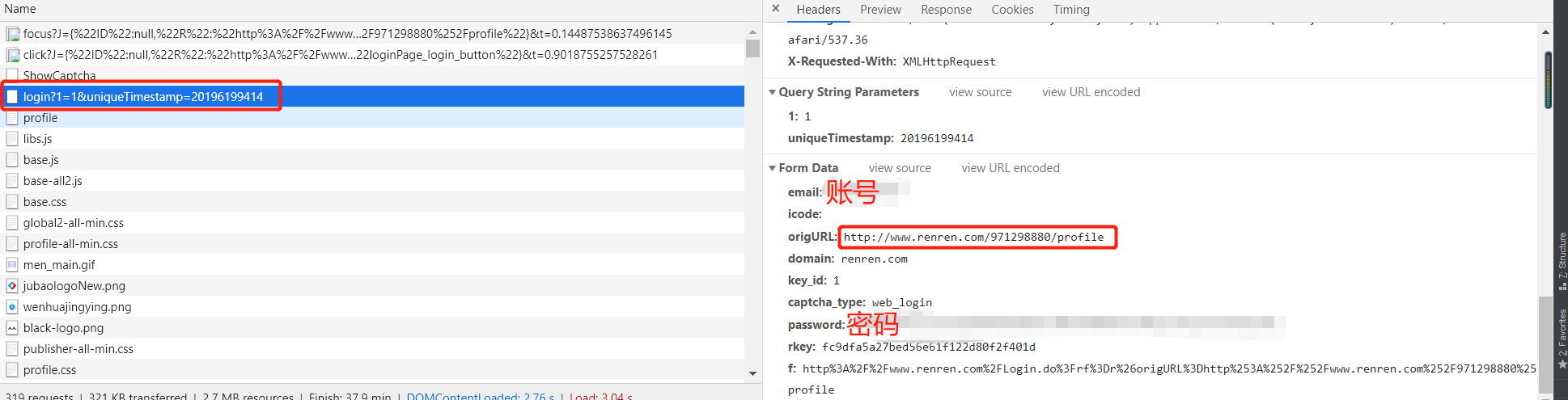
3、登陆信息
python之scrapy模拟登陆人人网的更多相关文章
- 第三百四十三节,Python分布式爬虫打造搜索引擎Scrapy精讲—scrapy模拟登陆和知乎倒立文字验证码识别
第三百四十三节,Python分布式爬虫打造搜索引擎Scrapy精讲—scrapy模拟登陆和知乎倒立文字验证码识别 第一步.首先下载,大神者也的倒立文字验证码识别程序 下载地址:https://gith ...
- 【python爬虫】用requests库模拟登陆人人网
说明:以前是selenium登陆取cookie的方法比较复杂,改用这个 """ 用requests库模拟登陆人人网 """ import r ...
- Python实现网站模拟登陆
一.实验简介 1.1 基本介绍 本实验中我们将通过分析登陆流程并使用 Python 实现模拟登陆到一个实验提供的网站,在实验过程中将学习并实践 Python 的网络编程,Python 实现模拟登陆的方 ...
- Scrapy模拟登陆
1. 为什么需要模拟登陆? #获取cookie,能够爬取登陆后的页面 2. 回顾: requests是如何模拟登陆的? #1.直接携带cookies请求页面 #2.找接口发送post请求存储cooki ...
- Scrapy 模拟登陆知乎--抓取热点话题
工具准备 在开始之前,请确保 scrpay 正确安装,手头有一款简洁而强大的浏览器, 若是你有使用 postman 那就更好了. Python 1 scrapy genspid ...
- Scrapy模拟登陆豆瓣抓取数据
scrapy startproject douban 其中douban是我们的项目名称 2创建爬虫文件 进入到douban 然后创建爬虫文件 scrapy genspider dou douban. ...
- python用scrapy模拟用户登录
scrapy模拟登录 关注公众号"轻松学编程"了解更多. 注意:模拟登陆时,必须保证settings.py里的COOKIES_ENABLED(Cookies中间件) 处于开启状态 ...
- scrapy实战--登陆人人网爬取个人信息
今天把scrapy的文档研究了一下,感觉有点手痒,就写点东西留点念想吧,也做为备忘录.随意写写,看到的朋友觉得不好,不要喷我哈. 创建scrapy工程 cd C:\Spider_dev\app\scr ...
- 爬虫入门之scrapy模拟登陆(十四)
注意:模拟登陆时,必须保证settings.py里的COOKIES_ENABLED(Cookies中间件) 处于开启状态 COOKIES_ENABLED = True或# COOKIES_ENABLE ...
随机推荐
- OpenCV入门学习资料汇总
OpenCV学习文档资料 OpenCV学习:1)OpenCV中文网站——http://wiki.opencv.org.cn/index.php/%E9%A6%96%E9%A1%B5 2)python实 ...
- STM32L1xx——ADC(中断/DMA)样例代码
此代码欲实现的功能是:使用中断或者DMA的方式采集滑动变阻器采集到的电压值,使用单ADC单通道采样! (由于不是直接需要电压,所以转换函数我就没列出来,可根据自身需要去网上查到转换的函数.) 代码结构 ...
- 十八,helm的原理及基础使用
目录 helm介绍 核心术语 helm安装 helm安装 Tiller安装 创建tiller相关的rbac helm使用 添加chart源 helm常用命令: 基础命令 自定义chart 一.char ...
- 一 :了解MVC
介绍 1. ASP.NET WebForm和ASP.NET MVC是并行的关系.都是属于.NET框架下的子框架. 2. MVC项目常用模板 空模板 : 不包含MVC目录结构,需要自己添加. 基本模 ...
- GOLANG的继承+接口语法练习
继承与接口同时存在 在Golang语言中,可以这么说:接口是继承的功能补充! 武当派有一个徒弟结构体,它继承WuDangMaster结构体的字段及方法 武林之中还有一个泰山北斗,名约少林派,少林入门神 ...
- subs函数
matlab中subs()是符号计算函数,表示将符号表达式中的某些符号变量替换为指定的新的变量,常用调用方式为: subs(S,OLD,NEW) 表示将符号表达式S中的符号变量OLD替换为新的值NEW ...
- ThreadPoolExecutor源码分析二
接上文,这里继续分析源码 private static final int COUNT_BITS = Integer.SIZE - 3; private static final int CAPA ...
- webpack Uncaught ReferenceError: Swiper is not defined
一.报错原因:Swiper的JS文件没有加载成功,或者说swiper丢失了依赖(正常操作是:加载后再初始化Swiper) 二.解决方法:在初始化 Swiper 的js文件中导入 Swiper impo ...
- vuex直接修改state 与 用commit提交mutation来修改state的差异
一. 使用vuex修改state时,有两种方式: 1)可以直接使用 this.$store.state.变量 = xxx; 2)this.$store.dispatch(actionType, pa ...
- HDU 6093 - Rikka with Number | 2017 Multi-University Training Contest 5
JAVA+大数搞了一遍- - 不是很麻烦- - /* HDU 6093 - Rikka with Number [ 进制转换,康托展开,大数 ] | 2017 Multi-University Tra ...