
部署Dashboard,监控应用
部署web UI(dashboard)用于监控node资源
参见文档:https://blog.csdn.net/networken/article/details/85607593
官网:https://kubernetes.io/docs/tasks/access-application-cluster/web-ui-dashboard/
github:https://github.com/kubernetes/dashboard/wiki/Creating-sample-user
都可以去参考这些资料。
需要这个kubernetes-dashboard.yaml文件,直接去官网下载即可
kubectl apply -f https://raw.githubusercontent.com/kubernetes/dashboard/v2.0.0-beta4/aio/deploy/recommended.yaml
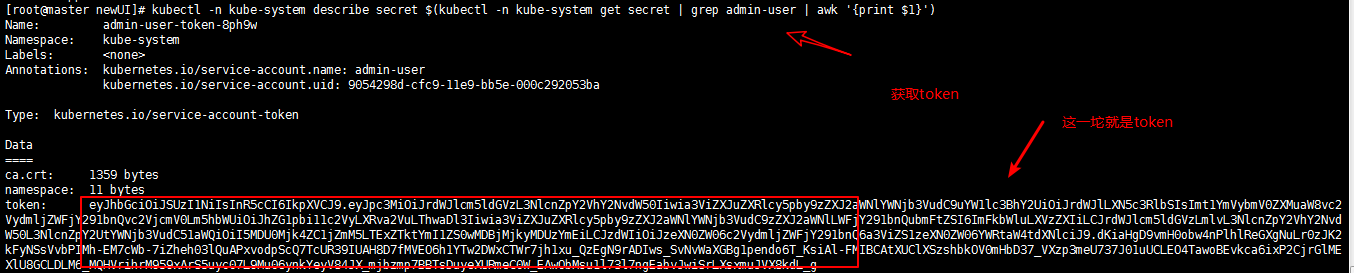
创建好了,需要token秘钥,
kubectl -n kube-system describe secret $(kubectl -n kube-system get secret | grep admin-user | awk '{print $1}')
[root@master newUI]# cat kubernetes-dashboard.yaml

# Copyright 2017 The Kubernetes Authors.

#

# Licensed under the Apache License, Version 2.0 (the "License");

# you may not use this file except in compliance with the License.

# You may obtain a copy of the License at

#

#     http://www.apache.org/licenses/LICENSE-2.0

#

# Unless required by applicable law or agreed to in writing, software

# distributed under the License is distributed on an "AS IS" BASIS,

# WITHOUT WARRANTIES OR CONDITIONS OF ANY KIND, either express or implied.

# See the License for the specific language governing permissions and

# limitations under the License.

# ------------------- Dashboard Secret ------------------- #

apiVersion: v1

kind: Secret

metadata:

  labels:

    k8s-app: kubernetes-dashboard

  name: kubernetes-dashboard-certs

  namespace: kube-system

type: Opaque

---

# ------------------- Dashboard Service Account ------------------- #

apiVersion: v1

kind: ServiceAccount

metadata:

  labels:

    k8s-app: kubernetes-dashboard

  name: kubernetes-dashboard

  namespace: kube-system

---

# ------------------- Dashboard Role & Role Binding ------------------- #

kind: Role

apiVersion: rbac.authorization.k8s.io/v1

metadata:

  name: kubernetes-dashboard-minimal

  namespace: kube-system

rules:

  # Allow Dashboard to create 'kubernetes-dashboard-key-holder' secret.

- apiGroups: [""]

  resources: ["secrets"]

  verbs: ["create"]

  # Allow Dashboard to create 'kubernetes-dashboard-settings' config map.

- apiGroups: [""]

  resources: ["configmaps"]

  verbs: ["create", "list"]

  # Allow Dashboard to get, update and delete Dashboard exclusive secrets.

- apiGroups: [""]

  resources: ["secrets"]

  resourceNames: ["kubernetes-dashboard-key-holder", "kubernetes-dashboard-certs"]

  verbs: ["get", "update", "delete"]

  # Allow Dashboard to get and update 'kubernetes-dashboard-settings' config map.

- apiGroups: [""]

  resources: ["configmaps"]

  resourceNames: ["kubernetes-dashboard-settings"]

  verbs: ["get", "update"]

  # Allow Dashboard to get metrics from heapster.

- apiGroups: [""]

  resources: ["services"]

  resourceNames: ["heapster"]

  verbs: ["proxy"]

- apiGroups: [""]

  resources: ["services/proxy"]

  resourceNames: ["heapster", "http:heapster:", "https:heapster:"]

  verbs: ["get"]

---

apiVersion: rbac.authorization.k8s.io/v1

kind: RoleBinding

metadata:

  name: kubernetes-dashboard-minimal

  namespace: kube-system

roleRef:

  apiGroup: rbac.authorization.k8s.io

  kind: Role

  name: kubernetes-dashboard-minimal

subjects:

- kind: ServiceAccount

  name: kubernetes-dashboard

  namespace: kube-system

---

# ------------------- Dashboard Deployment ------------------- #

kind: Deployment

apiVersion: apps/v1

metadata:

  labels:

    k8s-app: kubernetes-dashboard

  name: kubernetes-dashboard

  namespace: kube-system

spec:

  replicas: 1

  revisionHistoryLimit: 10

  selector:

    matchLabels:

      k8s-app: kubernetes-dashboard

  template:

    metadata:

      labels:

        k8s-app: kubernetes-dashboard

    spec:

      containers:

      - name: kubernetes-dashboard

        image: registry.cn-hangzhou.aliyuncs.com/google_containers/kubernetes-dashboard-amd64:v1.10.1

        ports:

        - containerPort: 8443

          protocol: TCP

        args:

          - --auto-generate-certificates

          # Uncomment the following line to manually specify Kubernetes API server Host

          # If not specified, Dashboard will attempt to auto discover the API server and connect

          # to it. Uncomment only if the default does not work.

          # - --apiserver-host=http://my-address:port

        volumeMounts:

        - name: kubernetes-dashboard-certs

          mountPath: /certs

          # Create on-disk volume to store exec logs

        - mountPath: /tmp

          name: tmp-volume

        livenessProbe:

          httpGet:

            scheme: HTTPS

            path: /

            port: 8443

          initialDelaySeconds: 30

          timeoutSeconds: 30

      volumes:

      - name: kubernetes-dashboard-certs

        secret:

          secretName: kubernetes-dashboard-certs

      - name: tmp-volume

        emptyDir: {}

      serviceAccountName: kubernetes-dashboard

      # Comment the following tolerations if Dashboard must not be deployed on master

      tolerations:

      - key: node-role.kubernetes.io/master

        effect: NoSchedule

---

# ------------------- Dashboard Service ------------------- #

kind: Service

apiVersion: v1

metadata:

  labels:

    k8s-app: kubernetes-dashboard

  name: kubernetes-dashboard

  namespace: kube-system

spec:

  type: NodePort   # 这里修改为NodePort,就可以去外部访问了

  ports:

    - port: 443

      targetPort: 8443

  selector:

    k8s-app: kubernetes-dashboard
如果在这过程中出现无法登陆的情况:
# 查看secret

kubectl get secret -n kube-system

# 查看token

kubectl describe secret -n kube-system admin-user-token-8ph9w
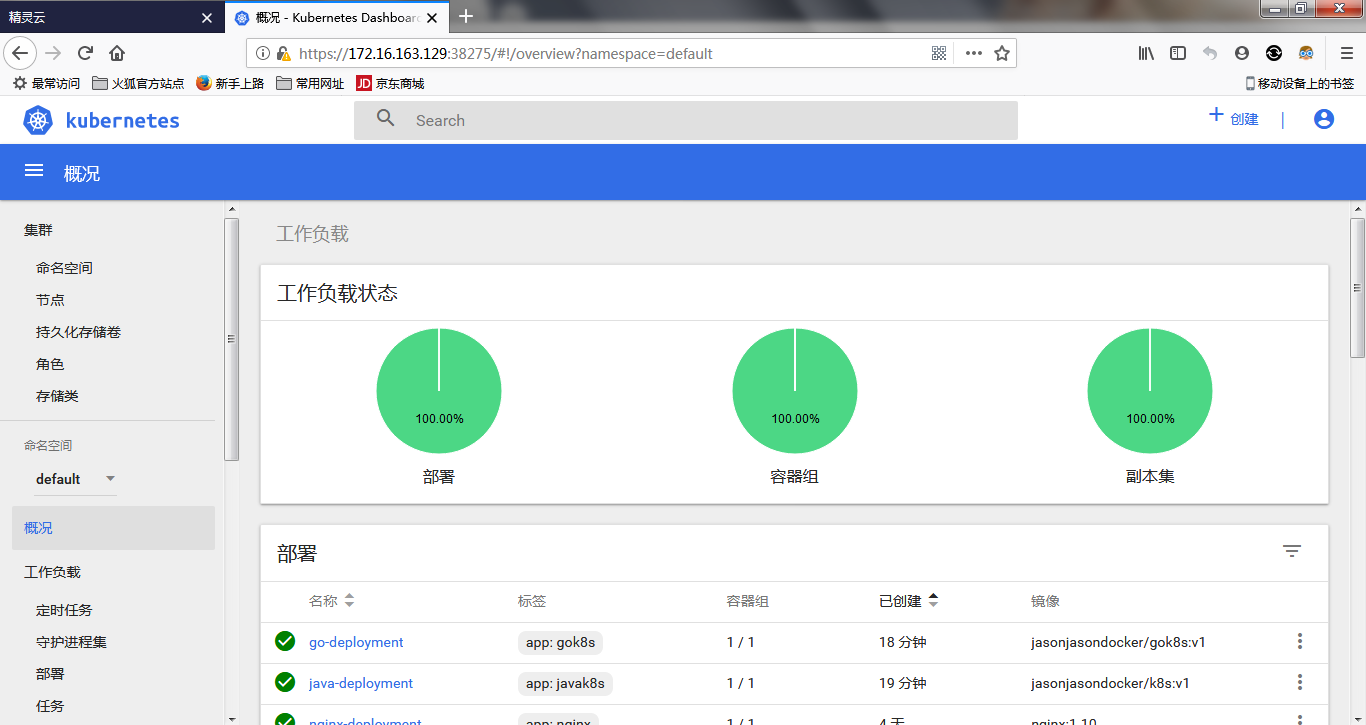
最终结果:
部署Dashboard,监控应用的更多相关文章
- 基于k8s集群部署prometheus监控etcd
目录 基于k8s集群部署prometheus监控etcd 1.背景和环境概述 2.修改prometheus配置 3.检查是否生效 4.配置grafana图形 基于k8s集群部署prometheus监控 ...
- CentOS 6.5安装部署Zabbix监控系统
CentOS 6.5安装部署Zabbix监控系统 先说一点废话,我没有用centos7做实验,讲真,centos 7我也不常用,喜欢新版本的同学其实可以尝试下,注意一点的就是centos 6.5只支持 ...
- kubernetes1.9中部署dashboard
在1.9k8s中 dashboard可以有两种访问方式 kubeconfig(HTTPS)和token(http) 2018-03-18 一.基于token的访问1.下载官方的dashboardwge ...
- prometheus + grafana部署RabbitMQ监控
prometheus + grafana部署RabbitMQ监控 1.grafana导入dashboards https://grafana.com/dashboards/2121 2.expor ...
- linux基础 -nginx和nfs代理 开发脚本自动部署及监控
开发脚本自动部署及监控 1.编写脚本自动部署反向代理.web.nfs: (1).部署nginx反向代理三个web服务,调度算法使用加权轮询: (2).所有web服务使用共享存储nfs,保证所有web ...
- Redis高可用部署及监控
Redis高可用部署及监控 目录 一.Redis Sentinel简介 二.硬件需求 三.拓扑结构 .单M-S结构 .双M-S结构 .优劣对比 四.配置部 ...
- Spring Cloud学习笔记【五】Hystrix Dashboard监控面板
ystrix除了隔离依赖服务的调用以外,Hystrix 还提供了准实时的调用监控(Hystrix Dashboard),Hystrix 会持续地记录所有通过 Hystrix 发起的请求的执行信息,并以 ...
- 基于k8s集群部署prometheus监控ingress nginx
目录 基于k8s集群部署prometheus监控ingress nginx 1.背景和环境概述 2.修改prometheus配置 3.检查是否生效 4.配置grafana图形 基于k8s集群部署pro ...
- springcloud断路器Dashboard监控仪表盘的使用
断路器Dashboard监控仪表盘的使用 在原有的orderserverfeignhystrix服务中使用 1.增加依赖仓库 <dependency> <g ...
- 部署zabbix监控平台(源码安装)
案例:部署Zabbix监控平台 1 问题 本案例要求部署一台Zabbix监控服务器,一台被监控主机,为进一步执行具体的监控任务做准备: 安装LNMP环境 源码安装Zabbix 安装监控端主机,修改基本 ...
随机推荐
- EBI架构 VS. MVC
和 MVC 模式中的 Model 代表着整个后端(包括所有实体.服务和它们之间的关系在内的一切)一样,EBI 模式将边界看作是和外部世界的完整连接,而不仅仅是一个视图.一个控制器或是一个接口(这里指的 ...
- Oracle12C SGA PGA UGA
SGA和PGA简介 1 sga组成: 2b4p1s(记忆) database buffer cache:包括 default pool,keep pool,recycle pool: redo log ...
- 利用uniGUI中的TUniPageControl实现多页面
远行效果: 实现代码: procedure TfrmMain.OpenForm(Caption,FormClassName:string);var i:integer; sheet:TUniTab ...
- flutter shared_preferences 异步变同步
前言 在开发原生iOS或Native应用时,一般有判断上一次安装的版本和当前版本是否是同一个版本,如果不是同一个版本,则要显示引导页,这个过程是把版本号持久化存储起来,在每一次启动时进行判断,这个过程 ...
- ras 加密及解密
rsa 对数据进行加密和解密 #!/usr/bin/env python # coding=utf-8 """ pip3 install rsa "" ...
- JsonResponse简单使用
一个简单的django项目 urlpatterns = [ # views.hello 是执行views中的hello函数 # name 是URL的别名 url(r'^hello/', views.h ...
- maven的基本使用
安装: 1.下载maven http://maven.apache.org/ 2.将maven包解压并放置到安装目录 3.添加环境变量M2_HOME,path当中添加;%M2_HOME%\bin; 4 ...
- 【转】Spark History Server 架构原理介绍
[From]https://blog.csdn.net/u013332124/article/details/88350345 Spark History Server 是spark内置的一个http ...
- nhibernate Stuty
https://blog.csdn.net/u010371458/article/details/8995166 翻译版 https://wenku.baidu.com/view/46fa56cea1 ...
- Python基础知识(程序结构)
流程控制语句 选择语句.条件表达式.循环语句.跳转语句.pass空语句 程序结构三种基本结构 顺序结构.选择结构.循环结构 顺序结构 按照代码顺序依次运行 选择结构 根据条件表达式结果选择执行不同的语 ...