
部署Dashboard,监控应用
部署web UI(dashboard)用于监控node资源
参见文档:https://blog.csdn.net/networken/article/details/85607593
官网:https://kubernetes.io/docs/tasks/access-application-cluster/web-ui-dashboard/
github:https://github.com/kubernetes/dashboard/wiki/Creating-sample-user
都可以去参考这些资料。
需要这个kubernetes-dashboard.yaml文件,直接去官网下载即可
kubectl apply -f https://raw.githubusercontent.com/kubernetes/dashboard/v2.0.0-beta4/aio/deploy/recommended.yaml
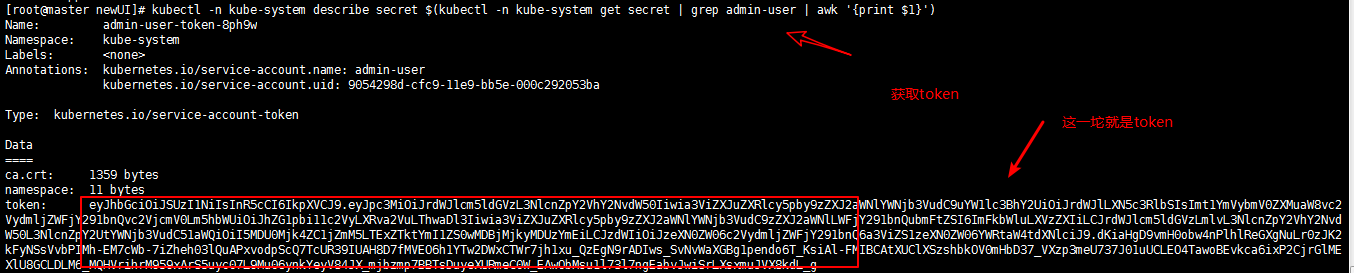
创建好了,需要token秘钥,
kubectl -n kube-system describe secret $(kubectl -n kube-system get secret | grep admin-user | awk '{print $1}')
[root@master newUI]# cat kubernetes-dashboard.yaml

# Copyright 2017 The Kubernetes Authors.

#

# Licensed under the Apache License, Version 2.0 (the "License");

# you may not use this file except in compliance with the License.

# You may obtain a copy of the License at

#

#     http://www.apache.org/licenses/LICENSE-2.0

#

# Unless required by applicable law or agreed to in writing, software

# distributed under the License is distributed on an "AS IS" BASIS,

# WITHOUT WARRANTIES OR CONDITIONS OF ANY KIND, either express or implied.

# See the License for the specific language governing permissions and

# limitations under the License.

# ------------------- Dashboard Secret ------------------- #

apiVersion: v1

kind: Secret

metadata:

  labels:

    k8s-app: kubernetes-dashboard

  name: kubernetes-dashboard-certs

  namespace: kube-system

type: Opaque

---

# ------------------- Dashboard Service Account ------------------- #

apiVersion: v1

kind: ServiceAccount

metadata:

  labels:

    k8s-app: kubernetes-dashboard

  name: kubernetes-dashboard

  namespace: kube-system

---

# ------------------- Dashboard Role & Role Binding ------------------- #

kind: Role

apiVersion: rbac.authorization.k8s.io/v1

metadata:

  name: kubernetes-dashboard-minimal

  namespace: kube-system

rules:

  # Allow Dashboard to create 'kubernetes-dashboard-key-holder' secret.

- apiGroups: [""]

  resources: ["secrets"]

  verbs: ["create"]

  # Allow Dashboard to create 'kubernetes-dashboard-settings' config map.

- apiGroups: [""]

  resources: ["configmaps"]

  verbs: ["create", "list"]

  # Allow Dashboard to get, update and delete Dashboard exclusive secrets.

- apiGroups: [""]

  resources: ["secrets"]

  resourceNames: ["kubernetes-dashboard-key-holder", "kubernetes-dashboard-certs"]

  verbs: ["get", "update", "delete"]

  # Allow Dashboard to get and update 'kubernetes-dashboard-settings' config map.

- apiGroups: [""]

  resources: ["configmaps"]

  resourceNames: ["kubernetes-dashboard-settings"]

  verbs: ["get", "update"]

  # Allow Dashboard to get metrics from heapster.

- apiGroups: [""]

  resources: ["services"]

  resourceNames: ["heapster"]

  verbs: ["proxy"]

- apiGroups: [""]

  resources: ["services/proxy"]

  resourceNames: ["heapster", "http:heapster:", "https:heapster:"]

  verbs: ["get"]

---

apiVersion: rbac.authorization.k8s.io/v1

kind: RoleBinding

metadata:

  name: kubernetes-dashboard-minimal

  namespace: kube-system

roleRef:

  apiGroup: rbac.authorization.k8s.io

  kind: Role

  name: kubernetes-dashboard-minimal

subjects:

- kind: ServiceAccount

  name: kubernetes-dashboard

  namespace: kube-system

---

# ------------------- Dashboard Deployment ------------------- #

kind: Deployment

apiVersion: apps/v1

metadata:

  labels:

    k8s-app: kubernetes-dashboard

  name: kubernetes-dashboard

  namespace: kube-system

spec:

  replicas: 1

  revisionHistoryLimit: 10

  selector:

    matchLabels:

      k8s-app: kubernetes-dashboard

  template:

    metadata:

      labels:

        k8s-app: kubernetes-dashboard

    spec:

      containers:

      - name: kubernetes-dashboard

        image: registry.cn-hangzhou.aliyuncs.com/google_containers/kubernetes-dashboard-amd64:v1.10.1

        ports:

        - containerPort: 8443

          protocol: TCP

        args:

          - --auto-generate-certificates

          # Uncomment the following line to manually specify Kubernetes API server Host

          # If not specified, Dashboard will attempt to auto discover the API server and connect

          # to it. Uncomment only if the default does not work.

          # - --apiserver-host=http://my-address:port

        volumeMounts:

        - name: kubernetes-dashboard-certs

          mountPath: /certs

          # Create on-disk volume to store exec logs

        - mountPath: /tmp

          name: tmp-volume

        livenessProbe:

          httpGet:

            scheme: HTTPS

            path: /

            port: 8443

          initialDelaySeconds: 30

          timeoutSeconds: 30

      volumes:

      - name: kubernetes-dashboard-certs

        secret:

          secretName: kubernetes-dashboard-certs

      - name: tmp-volume

        emptyDir: {}

      serviceAccountName: kubernetes-dashboard

      # Comment the following tolerations if Dashboard must not be deployed on master

      tolerations:

      - key: node-role.kubernetes.io/master

        effect: NoSchedule

---

# ------------------- Dashboard Service ------------------- #

kind: Service

apiVersion: v1

metadata:

  labels:

    k8s-app: kubernetes-dashboard

  name: kubernetes-dashboard

  namespace: kube-system

spec:

  type: NodePort   # 这里修改为NodePort,就可以去外部访问了

  ports:

    - port: 443

      targetPort: 8443

  selector:

    k8s-app: kubernetes-dashboard
如果在这过程中出现无法登陆的情况:
# 查看secret

kubectl get secret -n kube-system

# 查看token

kubectl describe secret -n kube-system admin-user-token-8ph9w
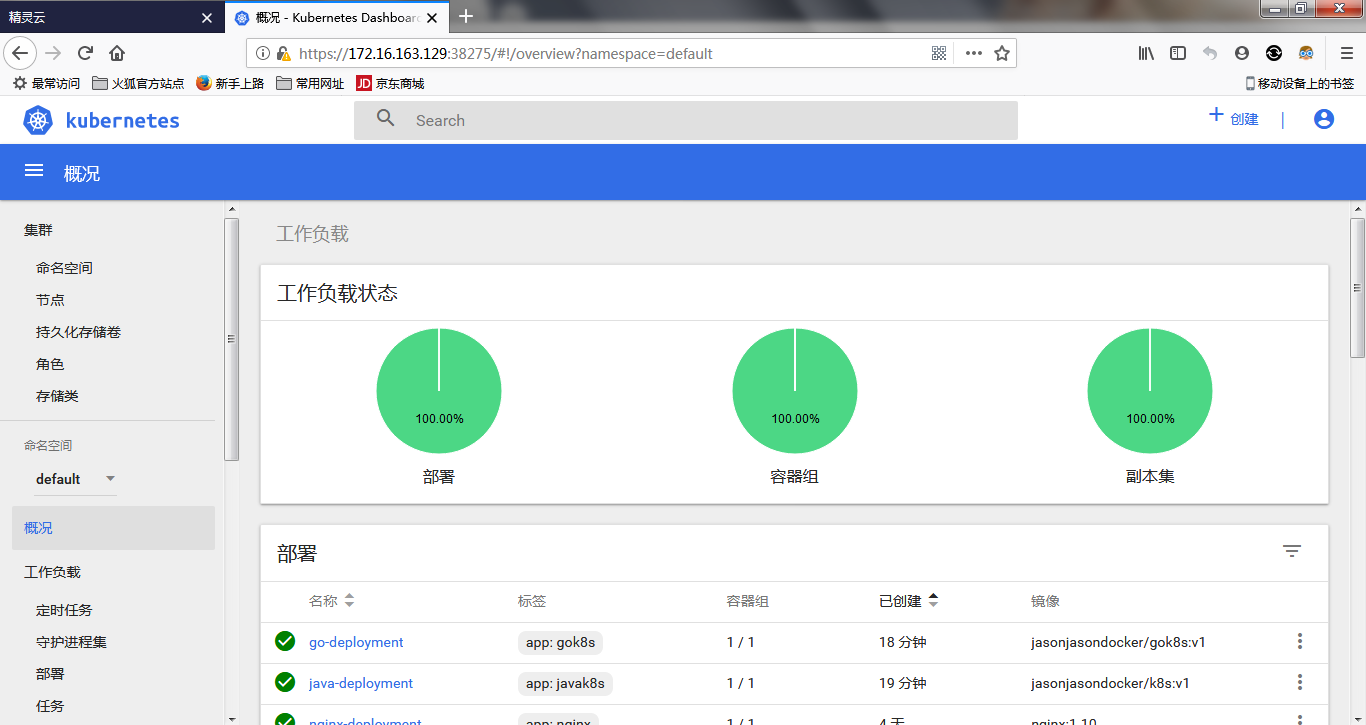
最终结果:
部署Dashboard,监控应用的更多相关文章
- 基于k8s集群部署prometheus监控etcd
目录 基于k8s集群部署prometheus监控etcd 1.背景和环境概述 2.修改prometheus配置 3.检查是否生效 4.配置grafana图形 基于k8s集群部署prometheus监控 ...
- CentOS 6.5安装部署Zabbix监控系统
CentOS 6.5安装部署Zabbix监控系统 先说一点废话,我没有用centos7做实验,讲真,centos 7我也不常用,喜欢新版本的同学其实可以尝试下,注意一点的就是centos 6.5只支持 ...
- kubernetes1.9中部署dashboard
在1.9k8s中 dashboard可以有两种访问方式 kubeconfig(HTTPS)和token(http) 2018-03-18 一.基于token的访问1.下载官方的dashboardwge ...
- prometheus + grafana部署RabbitMQ监控
prometheus + grafana部署RabbitMQ监控 1.grafana导入dashboards https://grafana.com/dashboards/2121 2.expor ...
- linux基础 -nginx和nfs代理 开发脚本自动部署及监控
开发脚本自动部署及监控 1.编写脚本自动部署反向代理.web.nfs: (1).部署nginx反向代理三个web服务,调度算法使用加权轮询: (2).所有web服务使用共享存储nfs,保证所有web ...
- Redis高可用部署及监控
Redis高可用部署及监控 目录 一.Redis Sentinel简介 二.硬件需求 三.拓扑结构 .单M-S结构 .双M-S结构 .优劣对比 四.配置部 ...
- Spring Cloud学习笔记【五】Hystrix Dashboard监控面板
ystrix除了隔离依赖服务的调用以外,Hystrix 还提供了准实时的调用监控(Hystrix Dashboard),Hystrix 会持续地记录所有通过 Hystrix 发起的请求的执行信息,并以 ...
- 基于k8s集群部署prometheus监控ingress nginx
目录 基于k8s集群部署prometheus监控ingress nginx 1.背景和环境概述 2.修改prometheus配置 3.检查是否生效 4.配置grafana图形 基于k8s集群部署pro ...
- springcloud断路器Dashboard监控仪表盘的使用
断路器Dashboard监控仪表盘的使用 在原有的orderserverfeignhystrix服务中使用 1.增加依赖仓库 <dependency> <g ...
- 部署zabbix监控平台(源码安装)
案例:部署Zabbix监控平台 1 问题 本案例要求部署一台Zabbix监控服务器,一台被监控主机,为进一步执行具体的监控任务做准备: 安装LNMP环境 源码安装Zabbix 安装监控端主机,修改基本 ...
随机推荐
- 苹果应用(.ipa)打包和上传,不用通过苹果商店即可用
签名工具: appuploader(.p12:.cer) 打包平台: http://www.lbuilder.com(收费) 上传平台: http://www.58apk.com (每日50次下载,加 ...
- C#获取实体类属性名和值
遍历获得一个实体类的所有属性名,以及该类的所有属性的值 //先定义一个类: public class User { public string name { get; set; } public st ...
- 通过ID获取元素
网页由标签将信息组织起来,而标签的id属性值是唯一的,就像是每人有一个身份证号一样,只要通过身份证号就可以找到相对应的人.那么在网页中,我们通过id先找到标签,然后进行操作. 语法: document ...
- IIS7 部署MVC 运行不了 注意事项
经常安装完iis7或者7.5后,部署MVC3.运行后提示 403 找不到目录. 解决办法:需要重新注册下iis C:\Windows\Microsoft.NET\Framework64\v4.0.30 ...
- JS编程规范
在第一家公司用C++时,公司有着严格的代码规范,甚至到了严苛的地步,现在回想起来,对它充满感激.一个好的习惯让你收益终身. 之后使用JS/TS却没有为自己定一套编程规范,所幸为时不晚,在这里参考air ...
- Canvas学习:封装Canvas绘制基本图形API
Canvas学习:封装Canvas绘制基本图形API Canvas Canvas学习 从前面的文章中我们了解到,通过Canvas中的CanvasRenderingContext2D对象中的属性和方 ...
- HAproxy负载均衡-ACL篇(转) blog.csdn.net/tantexian
ACL定制法则: 开放策略:拒绝所有,只开放已知 拒绝策略:允许所有,只拒绝某些 事实上实现安全策略,无非也就是以上两种方法 redirect 参考:http://cbonte.github.io/h ...
- WPF Slider Tickbar 中显示数值
class CustomTickBar : TickBar { protected override void OnRender(System.Windows.Media.DrawingContext ...
- MySQL 5.7 中文全文检索
MySQL 5.7 中文全文检索 在 MySQL 5.7.6 之前,全文索引只支持英文全文索引,不支持中文全文索引,需要利用分词器把中文段落预处理拆分成单词,然后存入数据库.从 MySQL 5.7.6 ...
- SD相关号码范围IMG设定
一.定义项目建议的号码范围——OVZA.VN01 二.免费货物的号码范围——WC07 三.定义销售文件的号码范围——VN01 四.金额契约产品建议模组的号码范围——WSN1 五.定义出口.进口的号码范 ...