
spring注解定时器
上一篇文章写了一个在配置文件中设置时间的定时器,现在来写一个注解方式的定时器:
1.工程结构如下:
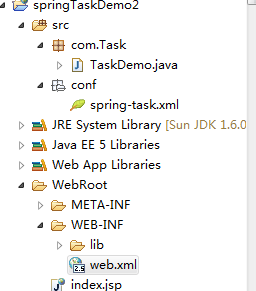
2.需要执行的代码块:
 package com.Task;

 import org.springframework.scheduling.annotation.Scheduled;

 import org.springframework.stereotype.Component;

 @Component

 public class TaskDemo {

     private static int sf = 0;

     @Scheduled(cron = "0/5 * * * * ?")

     public void testTask(){

         sf++;

         System.out.println("5秒输出一次。。。。。sf:"+sf);

     }

 }
注意:不要忘记@Component,否则配置文件扫描不到需要执行的代码块;
3.
 <?xml version="1.0" encoding="UTF-8"?>

 <beans xmlns="http://www.springframework.org/schema/beans"

     xmlns:xsi="http://www.w3.org/2001/XMLSchema-instance" xmlns:context="http://www.springframework.org/schema/context"

     xmlns:tx="http://www.springframework.org/schema/tx" xmlns:task="http://www.springframework.org/schema/task"

     xmlns:aop="http://www.springframework.org/schema/aop"

     xsi:schemaLocation="http://www.springframework.org/schema/beans

     http://www.springframework.org/schema/beans/spring-beans-3.0.xsd

     http://www.springframework.org/schema/context

     http://www.springframework.org/schema/context/spring-context-3.0.xsd

     http://www.springframework.org/schema/tx

     http://www.springframework.org/schema/tx/spring-tx-3.0.xsd

     http://www.springframework.org/schema/task

     http://www.springframework.org/schema/task/spring-task-3.0.xsd

     http://www.springframework.org/schema/aop

     http://www.springframework.org/schema/aop/spring-aop-3.0.xsd">

     <context:component-scan base-package="com"/>

     <task:annotation-driven/>

 </beans>
说明:相对于上一遍的配置文件的设置时间方式,这种方式就简单多了,
如果启动过程中报:The prefix "task" for element "task:annotation-driven" is not bound.错误,
则需要在beans中加:
xmlns:task="http://www.springframework.org/schema/task"
xmlns:aop="http://www.springframework.org/schema/aop"
4.web.xml配置文件:
 <?xml version="1.0" encoding="UTF-8"?>

 <web-app version="2.5"

     xmlns="http://java.sun.com/xml/ns/javaee"

     xmlns:xsi="http://www.w3.org/2001/XMLSchema-instance"

     xsi:schemaLocation="http://java.sun.com/xml/ns/javaee

     http://java.sun.com/xml/ns/javaee/web-app_2_5.xsd">

   <display-name></display-name>

   <welcome-file-list>

     <welcome-file>index.jsp</welcome-file>

   </welcome-file-list>

   <servlet>

     <servlet-name>dispatcherServlet</servlet-name>

     <servlet-class>org.springframework.web.servlet.DispatcherServlet</servlet-class>

     <init-param>

         <param-name>contextConfigLocation</param-name>

         <param-value>

                  classpath:conf/spring-task.xml

             </param-value>

     </init-param>

     <load-on-startup>1</load-on-startup>

 </servlet>

 </web-app>
web.xml配置的信息目的就是让spring-task.xml文件生效;
5.相关jar包:http://pan.baidu.com/s/1qYwCrBQ
6.部署到tomcat上启动即可;
注解时间设置和上一篇文章一样;
spring注解定时器的更多相关文章
- Spring注解定时器使用
一.首先要配置我们的spring-service.xml 1.xmlns 多加下面的内容 xmlns:task="http://www.springframework.org/schema/ ...
- Spring注解实现定时功能以及Quartz定时器
一:Spring注解实现--------->Spring3.0以后自带的task,可以将它看成一个轻量级的Quartz 1:maven配置: <!-- quartz--> <d ...
- spring注解scheduled实现定时任务
只想说,spring注解scheduled实现定时任务使用真的非常简单. 一.配置spring.xml文件 1.在beans加入xmlns:task="http://www.springfr ...
- Spring注解式与配置文件式
http://tom-seed.iteye.com/blog/1584632 Spring注解方式bean容器管理 1.通过在配置文件中配置spring组件注入 <context:compone ...
- 你真的知道Spring注解驱动的前世今生吗?这篇文章让你豁然开朗!
本篇文章,从Spring1.x到Spring 5.x的迭代中,站在现在的角度去思考Spring注解驱动的发展过程,这将有助于我们更好的理解Spring中的注解设计. Spring Framework ...
- spring注解源码分析--how does autowired works?
1. 背景 注解可以减少代码的开发量,spring提供了丰富的注解功能.我们可能会被问到,spring的注解到底是什么触发的呢?今天以spring最常使用的一个注解autowired来跟踪代码,进行d ...
- Spring注解
AccountController .java Java代码 1. /** 2. * 2010-1-23 3. */ 4. packag ...
- spring 注解的优点缺点
注解与XML配置的区别 注解:是一种分散式的元数据,与源代码耦合. xml :是一种集中式的元数据,与源代码解耦. 因此注解和XML的选择上可以从两个角度来看:分散还是集中,源代码耦合/解耦. 注解的 ...
- spring注解说明之Spring2.5 注解介绍(3.0通用)
spring注解说明之Spring2.5 注解介绍(3.0通用) 注册注解处理器 方式一:bean <bean class="org.springframework.beans.fac ...
随机推荐
- leetcode-hard-array-149. Max Points on a Line -NO
mycode 不会.... 参考 因为每次遍历一个点,也就是i的时候,都是新建的一个lines,所以也就是考虑了k相同b不同的情况 最后gcd函数就求最大公约数,来解决斜率精度的问题 class S ...
- 客户端连接虚拟机上的MYSQL报错
这个原因是因为虚拟机的数据库拒绝其他主机访问 所以需要设置虚拟机的mysql 打开mysql mysql>GRANT ALL PRIVILEGES ON *.* TO 'root'@'%' ID ...
- document.querySelectorAll遍历
document.querySelectorAll兼容性良好,在之前的项目中就其遍历方式出了错误,先做个小结: 1.for循环 传统遍历方法 for(var i= 0; i< document. ...
- Jmeter 时间函数
1.参数值是日期,而日期是当前时间:用__time函数,生成任意格式时间 把生成的函数字符串直接复制粘贴即可使用 2.参数是昨天或者明天,即以当前时间为基准,增加或减少固定时间的,可以用__timeS ...
- Android云端APP
使用HbuilderX打包APP 首先创建一个 5+APP+使用MUI项目 <!DOCTYPE html> <html> <head> <meta chars ...
- jenkins配置记录
jenkins配置记录 http://www.cnblogs.com/kevingrace/p/6022447.html
- springboot和jsp,以及引入jquery
包: src: main: java: resources: static: templates: test: 2.在static导入jquery源文件,在templates写入jsp文件 3.配置文 ...
- mkvirtualenv管理python版本
centos7安装pip 安装pip yum -y install epel-release yum -y install python2-pip 安装virtualenvwrapper pip in ...
- 【笔记】Docker部署Odoo
一,制作一个自己的odoo镜像odoo:yto 1,下载一个odoo10的镜像 docker pull odoo:10.0 2,按照自己的意愿修改里面的内容 docker run -it -u roo ...
- STS如何将一个文件夹设置缺省的创建路径(build path)
STS中的build path是一种缺省的路径,相当于windows的环境变量中的path,利用它可以将jsp等文件放入其中,程序只需要文件名就可以找到它. (1)在Package Explorer中 ...