
调查问卷WebApp
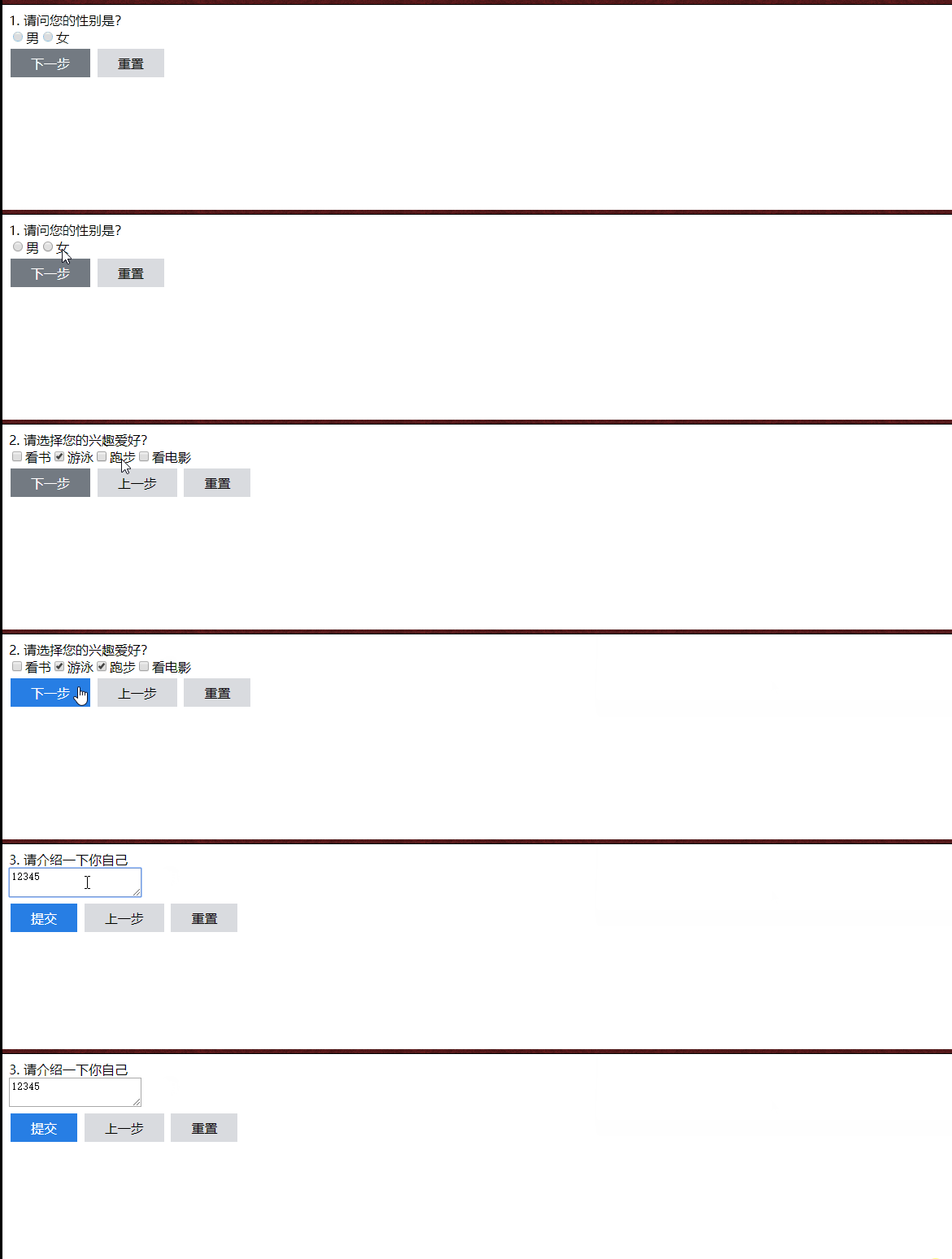
1. 效果演示
2. 主要知识点
- 使用slot分发内容
- 动态组件
- 组件通信
- 实例的生命周期
- 表单
3. 遇到的问题
bus 通信 第一次 $on 监听不到
// 解决bus 第一次通信 $on 监听不到

this.$nextTick(function () {

      if (_this.totalSize - 1 == _this.order) {

         bus.$emit('submiteDisabled', disabledStatus)

      } else {

         bus.$emit('nextStepDisabled', disabledStatus)

      }

 })
bus 通信 $on 多次触发
//  bus传值之后要进行销毁, 尤其是跳转页面进行使用的时候

beforeDestroy() {

     if (this.totalSize - 1 == this.order) {

            bus.$off('submiteDisabled')

      } else {

            bus.$off('nextStepDisabled')

      }

},
4. 代码整理
HTML
<!DOCTYPE html>

<html lang="en">

<head>

    <meta charset="UTF-8">

    <title>答题卡</title>

    <link rel="stylesheet" href="./css/style.css">

</head>

<body>

    <div id="app">

        <main-component v-for="(question, index) in questions" :key="index" :title="question.title" :order="index"

            v-if="index === currentOrder" :content="question.chooses">

            <template slot="title" slot-scope="props">

                <span>{{props.order}}. {{props.title}}</span>

            </template>

            <template slot="content" slot-scope="props">

                <component :is="props.type"

                :datas="question.chooses.values"

                :selected = "question.chooses.selected"

                :order = "index"

                :total-size = "questions.length"

                v-if="props.type != ''"></component>

                <textarea-component :value="question.chooses.value"

                    :order="index"

                    :total-size = "questions.length" v-else></textarea-component>

            </template>

            <template slot="functionalDomain">

                <button-component :now-order = "currentOrder"

                    :total-elements = "questions.length"

                    :next-step-disabled = "true"

                    ></button-component>

            </template>

        </main-component>

    </div>

    <script src="./js/vue.js"></script>

    <script src="./js/index.js"></script>

</body>

</html>
JS
var bus = new Vue();

Vue.component('main-component', {

    props: {

        order: Number,

        title: String,

        content: {

            type: Object

        }

    },

    template: '<div class="main">\

                <div class="title">\

                    <slot name="title" :title="mytitle" :order="myorder + 1"></slot>\

                </div>\

                <div class="content">\

                    <slot name="content" :type="typeSelect"></slot>\

                </div>\

                <div class="footer">\

                    <slot name="functionalDomain" ></slot>\

                </div>\

            </div>',

    data: function () {

        return {

            mytitle: this.title,

            myorder: this.order

        }

    },

    computed: {

        typeSelect: function () {

            let type_co = this.content.type;

            if ('radio' == type_co || 'checkbox' == type_co) {

                return type_co + '-component';

            }else{

                return '';

            }

        }

    },

});

Vue.component('radio-component', {

    props:{

        selected: String,

        datas:Array,

        order: Number,

        totalSize: Number

    },

    template: '<div>\

                    <label v-for="(item, index) in mydatas" :key="index"><input type="radio" :value="item.value" v-model="results" />{{item.name}}</label>\

                </div>',

    data:function (){

        return {

            results: this.selected,

            mydatas: this.datas

        }

    },

    methods: {

        updatNextStepStatus: function (val) {

            let disabledStatus = true;

            let _this = this;

            if (val != '') {

                disabledStatus = false;

            }

            // 解决bus 第一次通信 $on 监听不到

            this.$nextTick(function () {

                if (_this.totalSize - 1 == _this.order) {

                    bus.$emit('submiteDisabled', disabledStatus)

                } else {

                    bus.$emit('nextStepDisabled', disabledStatus)

                }

            })

        }

    },

    watch: {

        results: function (val) {

            this.updatNextStepStatus(val);

            bus.$emit('valueChange', this.order, val)

        },

        selected: function (val) {

            this.results = val

        }

    },

    mounted() {

        this.updatNextStepStatus(this.results);

    },

    beforeDestroy() {

        if (this.totalSize - 1 == this.order) {

            bus.$off('submiteDisabled')

        } else {

            bus.$off('nextStepDisabled')

        }

    },

});

Vue.component('checkbox-component', {

    props: {

        selected: Array,

        datas: Array,

        order: Number,

        totalSize: Number

    },

    template: '<div>\

                    <label v-for="(item, index) in mydatas" :key="index"><input type="checkbox" :value="item.value" v-model="results" />{{item.name}}</label>\

                </div>',

    data: function () {

        return {

            results: this.selected,

            mydatas: this.datas

        }

    },

    methods: {

        updatNextStepStatus: function (newValue, oldValue) {

            let disabledStatus = true;

            let _this = this;

            if (oldValue.length < 2 && newValue.length < 2) {

                return;

            } else if (oldValue.length >= 2 && newValue.length < 2) {

                disabledStatus = true;

            } else if (newValue.length >= 3){

                alert("多选,最多选择3个选项")

            }else{

                disabledStatus = false;

            }

            // 解决bus 第一次通信 $on 监听不到

            this.$nextTick(function () {

                if (_this.totalSize - 1 == _this.order) {

                    bus.$emit('submiteDisabled', disabledStatus)

                } else {

                    bus.$emit('nextStepDisabled', disabledStatus)

                }

            })

        }

    },

    watch: {

        results: function (newValue, oldValue) {

            this.updatNextStepStatus(newValue, oldValue);

            bus.$emit('valueChange', this.order, newValue)

        },

        selected: function (val) {

            this.results = val

        }

    },

    mounted() {

        this.updatNextStepStatus(this.results,[]);

    },

    beforeDestroy() {

        if (this.totalSize - 1 == this.order) {

            bus.$off('submiteDisabled')

        } else {

            bus.$off('nextStepDisabled')

        }

    },

});

Vue.component('textarea-component', {

    props: {

        value: String,

        order: Number,

        totalSize: Number

    },

    template: '<textarea v-model="results" placeholder="不少于100字"></textarea>',

    data: function () {

        return {

            results: this.value,

        }

    },

    methods: {

        updatNextStepStatus: function (newValue, oldValue) {

            let disabledStatus = true;

            let _this = this;

            if (newValue.length > 0 && newValue.length <= 5) {

                disabledStatus = false;

            }else{

                disabledStatus = true;

            }

            // 解决bus 第一次通信 $on 监听不到

            this.$nextTick(function () {

                if (_this.totalSize - 1 == _this.order) {

                    bus.$emit('submiteDisabled', disabledStatus)

                }else{

                    bus.$emit('nextStepDisabled', disabledStatus)

                }

            })

        }

    },

    watch: {

        results: function (newValue, oldValue) {

            this.updatNextStepStatus(newValue, '');

            bus.$emit('valueChange', this.order, newValue)

        },

        value: function (val) {

            this.results = val

        }

    },

    mounted() {

        this.updatNextStepStatus(this.results, '');

    },

    beforeDestroy() {

        if (this.totalSize - 1 == this.order) {

            bus.$off('submiteDisabled')

        }else{

            bus.$off('nextStepDisabled')

        }

    },

});

Vue.component('button-component', {

    props: {

        basicClasses: {

            type: Object,

            default: function () {

                return {

                    'button-white': true

                }

            }

        },

        nextStepClasses: {

            type: Object,

            default: function () {

                return {

                    'button-primary': true

                }

            }

        },

        nextStepDisabled:{

            type: Boolean,

            default: false

        },

        nowOrder: Number,

        totalElements: Number

    },

    template: '<div>\

                    <button class="btn" :disabled="nextStepStatus" :class="primary" \

                        v-if="order  != total - 1" @click="handleNextStep">下一步</button>\

                    <button class="btn" :disabled="submiteStatus" :class="primary" \

                        v-if="order  == total - 1" @click="handleSubmit">提交</button>\

                    <button class="btn" :disabled="false" :class="basic"\

                        v-if= "order  != 0" @click="handleBackStep">上一步</button>\

                    <button class="btn" :disabled="false" @click="handleReset" :class="basic">重置</button>\

                </div>',

    data() {

        return {

            basic: this.basicClasses,

            primary: this.nextStepClasses,

            nextStepStatus: this.nextStepDisabled,

            order: this.nowOrder,

            total: this.totalElements,

            submiteStatus: true

        }

    },

    methods: {

        handleNextStep: function () {

            bus.$emit('nextStep')

        },

        handleBackStep: function () {

            bus.$emit('backStep')

        },

        handleSubmit: function () {

            bus.$emit('submit')

        },

        handleReset: function () {

            let _this = this;

            bus.$emit('reset', _this.order)

        }

    },

    mounted() {

        let _this = this;

        bus.$on('nextStepDisabled', function (status) {

            _this.nextStepStatus = status

        });

        bus.$on('submiteDisabled', function (status) {

            _this.submiteStatus = status

        })

    },

});

var app = new Vue({

    el: "#app",

    data: {

        currentOrder: 0,

        questions: [

            {

                title: '请问您的性别是?',

                chooses: {

                    type: 'radio',

                    values: [{ 'name': '男', 'value': '1' }, { 'name': '女', 'value': '2' }, { 'name': '保密', 'value': '3' }],

                    selected: ''

                }

            },

            {

                title: '请选择您的兴趣爱好?',

                chooses: {

                    type: 'checkbox',

                    values: [{ 'name': '看书', 'value': 'read book' },

                    { 'name': '游泳', 'value': 'swim' },

                    { 'name': '跑步', 'value': 'run' },

                    { 'name': '看电影', 'value': 'see movie' }],

                    selected: []

                }

            },

            {

                title: '请介绍一下你自己',

                chooses: {

                    type: 'text',

                    value: ''

                }

            },

        ]

    },

    methods: {

        handleNext: function () {

            let current = this.currentOrder;

            if (++current >= this.questions.length) {

                return;

            }else{

                this.currentOrder += 1;

            }

        },

        handleBack: function () {

            let currentOrder = this.currentOrder;

            if (-- currentOrder < 0) {

                return;

            }else{

                this.currentOrder -= 1;

            }

        },

        handleReset: function (order, val) {

            let currentQuestion = this.questions[order].chooses;

            if (currentQuestion.type == 'radio') {

                currentQuestion.selected = val === undefined ? '': val;

            } else if (currentQuestion.type == 'checkbox') {

                currentQuestion.selected = val === undefined ? [] : val;

            } else {

                currentQuestion.value = val === undefined ? '' : val

            }

        }

    },

    mounted: function () {

        let _this = this;

        bus.$on('nextStep', function (msg) {

            let current = _this.currentOrder;

            if (++current >= _this.questions.length) {

                return;

            } else {

                _this.currentOrder += 1;

            }

        });

        bus.$on('backStep', function (msg) {

            let currentOrder = _this.currentOrder;

            if (--currentOrder < 0) {

                return;

            } else {

                _this.currentOrder -= 1;

            }

        });

        bus.$on('submit', function (msg) {

            console.log('提交')

        });

        bus.$on('reset', function (order) {

            _this.handleReset(order)

        });

        bus.$on('valueChange', function (order, val) {

            _this.handleReset(order, val)

        });

    }

})
CSS
[v-cloak]{

    display: none;

}

.btn {

    border: none;

    outline:none;

    color: white;

    padding: 7px 25px;

    text-align: center;

    text-decoration: none;

    display: inline-block;

    font-size: 16px;

    margin: 4px 2px;

    cursor: pointer;

}

.button-white {

    background-color: rgb(217, 219, 223);

    color: #000000;

}

.button-white:active {

    background-color: rgb(134, 149, 179);

    color: #000000;

}

.button-primary {

    background-color: rgb(39, 126, 228);

    border: none;

    color: white;

    padding: 7px 25px;

    text-align: center;

    text-decoration: none;

    display: inline-block;

    font-size: 16px;

    margin: 4px 2px;

    cursor: pointer;

}

.button-primary:active {

    background-color: rgb(185, 171, 31);

}

.button-primary:disabled {

    background-color: rgb(115, 122, 130);

}
5. 升级
- 组件重复内容很多,可合并
调查问卷WebApp的更多相关文章
- "琳琅满屋"调查问卷 心得体会及结果分析
·关于心得体会 当时小组提出这个校园二手交易市场的时候,就确定了对象范围,仅仅是面向在校大学生,而且在我们之前就已经有了很多成功的商品交易的例子可以让我们去借鉴,再加上我们或多或少的有过网 ...
- JavasScript实现调查问卷插件
原文:JavasScript实现调查问卷插件 鄙人屌丝程序猿一枚,闲来无事,想尝试攻城师是感觉,于是乎搞了点小玩意.用js实现调查问卷,实现了常规的题型,单选,多选,排序,填空,矩阵等. 遂开源贴出来 ...
- 关于“Durian”调查问卷的心得体会
这周我们做了项目着手前的客户需求调查,主要以调查问卷的方式进行.其实做问卷调查并不是想象中的那么简单,首先要确定问卷调查的内容,每一个问题都要经过深思熟虑,字字斟酌,既要切合问卷主要目的,又要简洁扼要 ...
- 从Adobe调查问卷看原型设计工具大战
近年国内外原型设计工具新品频出,除了拥趸众多的老牌Axure在RP 8之后没有什么大的动作,大家都拼了命地在出新品.今天 inVision 的 Craft 出了 2.0 的预告视频,明天 Adobe ...
- Scrum立会报告+燃尽图(十一月十七日总第二十五次):设计调查问卷;修复上一阶段bug
此作业要求参见:https://edu.cnblogs.com/campus/nenu/2018fall/homework/2284 项目地址:https://git.coding.net/zhang ...
- <问吧>调查问卷心得体会
<问吧>调查问卷心得与体会 在这之前,我们已经组成了一个六个人的小团队---“走廊奔跑队”,我们这次做的这个项目的名称是:问吧.在项目实施之前,我们必做的一步就是需求分析,目的就是充分了解 ...
- android 实现调查问卷-单选-多选
非常久没写东西了.今天来总结下有关android调查问卷的需求实现. 转载请加地址:http://blog.csdn.net/jing110fei/article/details/46618229 先 ...
- 自动化测试调查问卷送《QTP自动化测试最佳实践》
自动化测试调查问卷送<QTP自动化测试最佳实践> http://automationqa.com/forum.php?mod=viewthread&tid=2308&fro ...
- HDU - 6344 2018百度之星资格赛 1001调查问卷(状压dp)
调查问卷 Accepts: 1289 Submissions: 5642 Time Limit: 6500/6000 MS (Java/Others) Memory Limit: 262144 ...
随机推荐
- 比特币nBits计算
转载:比特币源码分析(二十二) - 挖矿和共识 https://blog.csdn.net/yzpbright/article/details/81231351 CalculateNextWorkRe ...
- STM32命名规则解析
- python基础----pymysql模块
安装pymysql ----pip install mysql 步骤: 1.建立连接 指定ip.端口号.密码.账号.数据库 2.建立游标 3.执行sql语句 4.获取结果或提交 5.关闭游标, ...
- STL标准模板库之set
目录 一.关联式容器 二.什么是set? 特点 优缺点和适用场景: 三.定义及初始化 四.基本操作 1)容量函数 2)修改函数 3)迭代器 4)其他函数 五.与序列容器的不同点 一.关联式容器 关联式 ...
- 【ARM-Linux开发】在win下开发的eclipse+yougatoo+jlink环境搭建
在win下开发的eclipse+yougatoo+jlink环境搭建 一 工具的安装 第一步:安装gcc编译工具 yagarto-bu-2.21_gcc-4.6.2-c-C++_nl-1.19.0_g ...
- 《MIT 6.828 Lab 1 Exercise 4》实验报告
本实验链接:mit 6.828 lab1 Exercise 4. 题目 Exercise 4. Read about programming with pointers in C. The best ...
- FastJson 介绍
Json详解 Json是一种轻量级的数据交换格式,采用一种“键:值”对的文本格式来存储和表示数据,在系统交换数据过程中常常被使用,是一种理想的数据交换语言.在使用 Java 做 Web 开发时,不可避 ...
- java日期比较工具类
package com.net.util; import java.text.DateFormat; import java.text.SimpleDateFormat; import java.ut ...
- Java面试--类加载顺序
类什么时候就行初始化: 1)创建类的实例,也就是new一个对象 2)访问某个类或接口的静态变量,或者对该静态变量赋值 3)调用类的静态方法 4)反射(Class.forName(“com.fan ...
- Python初学者常见错误详解
Python初学者常见错误详解 0.忘记写冒号 在 if.elif.else.for.while.class.def 语句后面忘记添加 “:” if spam == 42 print('Hello ...