
osgText::Text osg字体
#ifdef _WIN32

#include <Windows.h>

#endif // _WIN32

#include<iostream>

#include <osgViewer/Viewer>

#include <osgViewer/ViewerEventHandlers>

#include <osgViewer/CompositeViewer>

#include <osgDB/ReadFile>

#include <osg/Geode>

#include <osg/Node>

#include <osg/Geometry>

#include <osg/GraphicsContext>

#include <osg/ShapeDrawable>

#include <osg/Material>

#include <osg/Image>

#include <osg/Texture2D>

#include <osg/TexEnv>

#include <osg/TexGen>

#include <osg/NodeVisitor>

#include <osg/MatrixTransform>

#include <osg/PositionAttitudeTransform>

#include <osg/AnimationPath>

#include <osg/Matrixd>

#include <osg/PagedLOD>

#include <osg/Camera>

#include <osgText/Text>

#include <osgGA/TrackballManipulator>

#include <osgGA/GUIEventHandler>

#include <osgGA/CameraManipulator>

#include <osgGA/StandardManipulator>

#include <osgGA/OrbitManipulator>

#include <osgGA/TrackballManipulator>

#include <osgUtil/IntersectionVisitor>

#include <osgUtil/LineSegmentIntersector>

osg::Camera* createTextHUD()

{

    osg::ref_ptr<osg::Geode> geode1 = new osg::Geode;

    osg::ref_ptr<osgText::Text> text1 = new osgText::Text;

    osg::ref_ptr<osg::Camera> camera1 = new osg::Camera;

    camera1->setViewMatrix(osg::Matrix::identity());

    camera1->setRenderOrder(osg::Camera::POST_RENDER);

    camera1->setClearMask(GL_DEPTH_BUFFER_BIT);

    camera1->setAllowEventFocus(false);

    camera1->setReferenceFrame(osg::Transform::ABSOLUTE_RF);

    camera1->setProjectionMatrixAsOrtho2D(-, , -, );

    text1->setFont("Fonts/simhei.ttf");

    text1->setCharacterSize();

    text1->setText(L"OSG 中文字体");

    text1->setPosition(osg::Vec3(0.0,0.0,0.0));

    geode1->getOrCreateStateSet()->setMode(GL_LIGHTING,osg::StateAttribute::OFF);

    geode1->addDrawable(text1);

    camera1->addChild(geode1.get());

    return camera1.release();

}

int main()

{

    osg::ref_ptr<osgViewer::Viewer> viewer1 = new osgViewer::Viewer;

    osg::ref_ptr<osg::Group> group1 = new osg::Group;

    //osg::ref_ptr<osg::Node> node1 = osgDB::readNodeFile("D:\\参考手册\\BIM\\osg\\build20190628.osgb");

    osg::ref_ptr<osg::Node> node2 = osgDB::readNodeFile("D:\\参考手册\\BIM\\osg\\build1.osgb");

    group1->addChild(node2.get());

    group1->addChild(createTextHUD());

    viewer1->setSceneData(group1.get());

    viewer1->setUpViewInWindow(,,,,);

    viewer1->run();

}
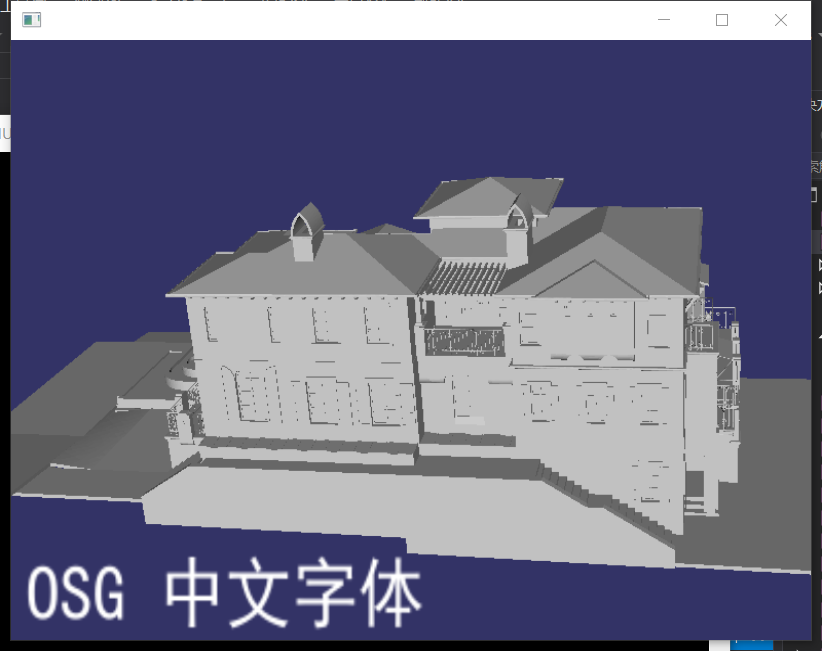
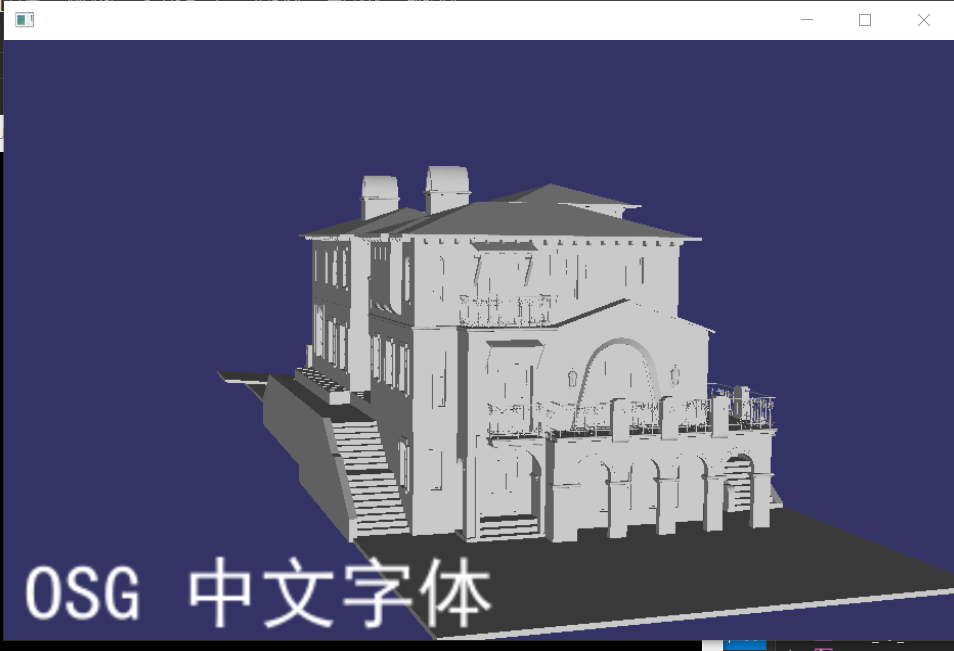
osgText::Text osg字体的更多相关文章
- 【OSG】osgText::Text 研究
由于需要在3D坐标轴上显示刻度值,所以要用到osgText::Text,这里简单记录一下其常见用法. 一.基本知识 常见设置 设置字体:setFont 设置内容:setText,这里输入参数需要是os ...
- osgText::Text简介
整理自<OpenSceneGraph三维渲染引擎编程指南> 在OSG中,为了显示高质量的文字,专门定义了一个新的名字空间来管理场景中的文字渲染,这个名字空间中的类主要用于加载字体和控制文字 ...
- 0312-css样式(选择器、文本text、字体fonts、背景background)
问题: 1.css中table{border:1px:}是定义table的样式,只有表格的外边框,不能实现<table border="1"></table> ...
- css文本样式text、字体样式font
文本样式text 1.文本颜色color 例如h1 {color:red;} 2.文本方向direction,不常用 默认ltr从左到右,rtl表示从右到左 3.文本水平对齐方式text-align ...
- 更换Sublime Text主题字体
Sublime Text作为脚本程序开发工具是一个不错的选择,支持多种语言,支持代码高亮显示,必要时还有代码提示功能.但是有的主题字体实在是难看,不过Sublime Text中也是可以更改的,只是更改 ...
- css 文本外观属性(text) 和 字体样式属性(font)
css文本 text外观属性 color: 颜色值(red,blue)十六进制 ,rgb letter-spacing: 字间距 px,em word-spacing: 单词间距 对中文无效 line ...
- CSS3总结三:文字(text)/字体、文本、文本装饰、多列
Text-Decoration text-shadow text-decoration Font font font-face Text 常用Text属性 Multi-column Multi-col ...
- 第4章 css文字text与字体font-face
text-overflow 与 word-wrap text-overflow:用来设置是否使用一个省略标记(...)标示对象内文本的溢出. 语法: 但是text-overflow只是用来说明文字溢出 ...
- sublime Text 3 字体
1,Comic Sans Ms 2,DejaVu Sans Mono 3,microsoft yahei(微软雅黑) 4,Microsoft Yahei UI(微软雅黑增强版) 5,Ubuntu Mo ...
随机推荐
- 第五次个人作业---Alpha2项目测试
这个课程属于哪个课程 <课程的链接> 作业的要求 <作业要求的链接> 团队名称 <团队名称:六扇门编程团队> 作业的目标 从一个普通用户的角度,在测试其他团队项目的 ...
- Eclipse启动tomcat超时
启动tomcat 超时 Server Tomcat v8.0 Server at localhost was unable to start within 45 seconds. If the ser ...
- AJAX学习笔记——同源策略
同源策略 同源策略,所有浏览器都实行这个政策 最初,它的含义是指,A 网页设置的 Cookie,B 网页不能打开,除非这两个网页"同源".所谓"同源"指的是&q ...
- machine learning(9) -- classification:Decision boundary
machine learning(9) -- classification:Decision boundary 上图的decision boundary是一条直线,是属于预测函数的一个属性(当参数已经 ...
- vue 2.0 watch 监听对象的变化
- vue quill使用&quill 自定义图片上传&自定义mp4 更换标签
pluins 创建quill 目录 创建文件video.js import { Quill } from 'vue-quill-editor' // 源码中是import直接倒入,这里要用Quill. ...
- 使用 IDEA 打包spring cloud 成 jar在ubuntu 中运行
1. 打开终端 termial , 使用 mvn install . 如果提示 mvn 不是xx 命令 ; 2 则需要配置环境变量 : path : C:\Program F ...
- KMP模板,注释
#include<bits/stdc++.h> using namespace std; queue<int> KMP(string a,string b){//a是主串,b是 ...
- win32按钮
1.按钮是什么 在win32窗口中,经常可以看到按钮,点击按钮可以触发各种事件: 创建按钮的函数: void CreateButton(HWND hwnd) //参数为父窗口句柄,按钮必须属于一个 ...
- hive优化,开启压缩功能
1.开启hive作业mapreduce任务中间压缩功能: 对于数据进行压缩可以减少job中map和reduce task间的数据传输量.对于中间数据压缩,选择一个低cpu开销编/解码器要不选择一个压缩 ...