
Mstering QT5 chapter1
涉及到c++ 14新特性: lambda,autovariables.
A basic .pro file generally contains:
1) Qt modules used (core, gui, and so on)
2) Target name (todo, todo.exe, and so on)
3) Project template (app, lib, and so on)
4) Sources, headers, and forms
----------------------------------------------------- 例 子-----------------------------------------------------------------------
In Qt Creator, you can create a new Qt project via File | New File or Project | Application| Qt Widgets Application.
下面四个文件的基本架构都是由qt creator在创建工程时自动生成的!
1) pro文件:
For GCC and CLANG compilers, you must add CONFIG += c++14 to the .pro file to enable C++14 on a Qt project, as shown in the following code:
QT += core gui
CONFIG += c++14
greaterThan(QT_MAJOR_VERSION, 4): QT += widgets
TARGET = todo
TEMPLATE = app
SOURCES += main.cpp \
MainWindow.cpp
HEADERS += MainWindow.h \
FORMS += MainWindow.ui \ //qt5里面没有.ui
其中,MainWindow.ui是xml形式的ui 文件,可以由qt creator打开。
2)main.cpp file
#include "MainWindow.h"
#include <QApplication>
int main(int argc, char *argv[])
{
QApplication a(argc, argv);
MainWindow w;
w.show();
return a.exec();
}
As usual, the main.cpp file , by default, perform two actions:
Instantiate and show your main window
Instantiate a QApplication and execute the blocking main event loop
Qt tip:
编译快捷键:Ctrl + B (for Windows/Linux) or Command + B (for Mac)
Debug模式下运行快捷键: F5 (for Windows / Linux) or Command +R (for Mac) to run your application in debug mode。
3)mainwindow.h
#ifndef MAINWINDOW_H
#define MAINWINDOW_H
#include <QMainWindow>
namespace Ui {
class MainWindow; //用于声明在Ui命名空间中存在一个与界面对应的MainWindows类,跟下面定义的同名类是不同的。 ?
}
class MainWindow : public QMainWindow
{
Q_OBJECT
public:
//C++关键字explici,声明为explicit的构造函数不能在隐式转换中使用。
explicit MainWindow(QWidget *parent = 0);
~MainWindow();
public slots:
void addTask();
private:
Ui::MainWindow *ui;
};
#endif // MAINWINDOW_H
私有成员变量ui属于类 Ui::MainWindow, which is defined in the ui_MainWindow.h file generated by Qt. It's the C++ transcription of the UI design file MainWindow.ui, 如果你用qt designer添加了一些控件,例如按钮,重新编译后,会看到ui_MainWindow.h中会增加相应的button的定义,从而也可以直接在该文件中通过代码来增加控件!!
The ui member variable will allow you to interact with your UI components (QLabel, QPushButton, and so on) from C++。
4)mainwindow.cpp
#include "mainwindow.h"
#include "ui_mainwindow.h" //该文件是根据mainwindow.ui文件自动生成的
#include <QDebug>
MainWindow::MainWindow(QWidget *parent) :
QMainWindow(parent),
ui(new Ui::MainWindow) //通过初始化成员列表来给成员变量ui赋值。
{
// setupUi function is to initialize all widgets used by the MainWindow.ui design file,例如 menuBar = new QMenuBar(MainWindow);
ui->setupUi(this);
//connect的使用,pushButton 是按钮类型的指针,其在ui_mainwindow.h中被定义:pushButton = new QPushButton(centralWidget);
//信号接收者: QApplication::instance(). It is the QApplication object created in main.cpp.
//槽函数:&QApplication::quit,this is a pointer to one of the receiver's member slot functions. In
//this example, we use the built-in quit() slot from Qapplication, which will exit the application. quit是 QCoreApplication类的静态函数。
connect(ui->pushButton, &QPushButton::clicked,
QApplication::instance(), &QApplication::quit);
//使用自己在类中定义的槽函数:
connect(ui->pushButton_2, &QPushButton::clicked,
this, &MainWindow::addTask);
}
MainWindow::~MainWindow()
{
delete ui;
}
void MainWindow::addTask()
{
qDebug() << "User clicked on the button!";
}
ui_mainwindow.h 中定义了命名空间Ui。可以查看代码。
--------------------------------------------------- 例 子 end-----------------------------------------------------------------------
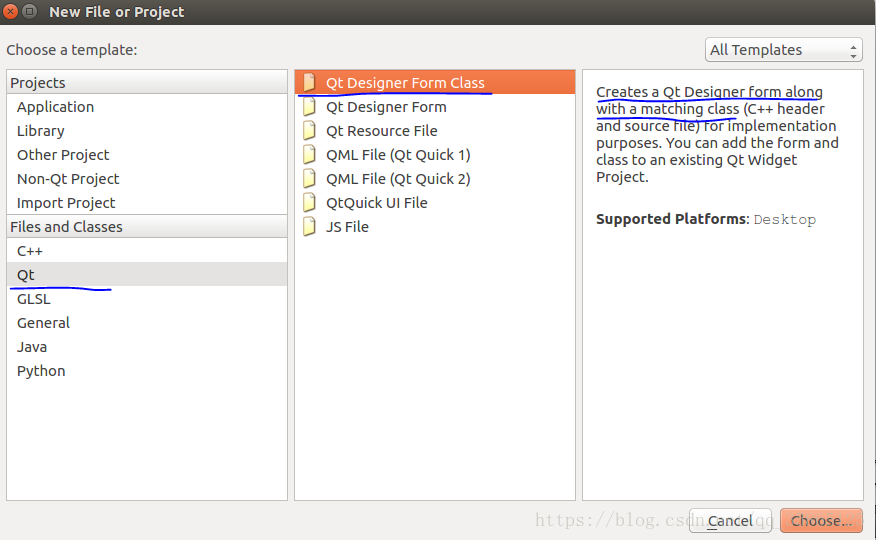
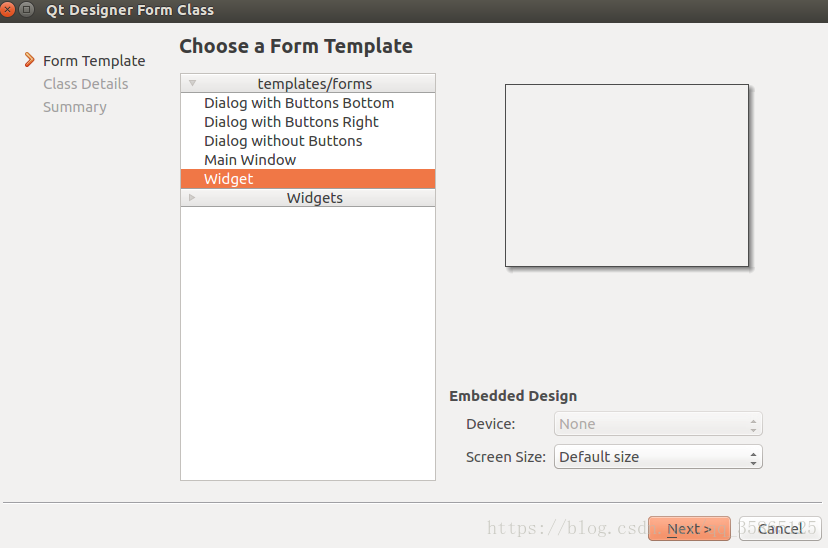
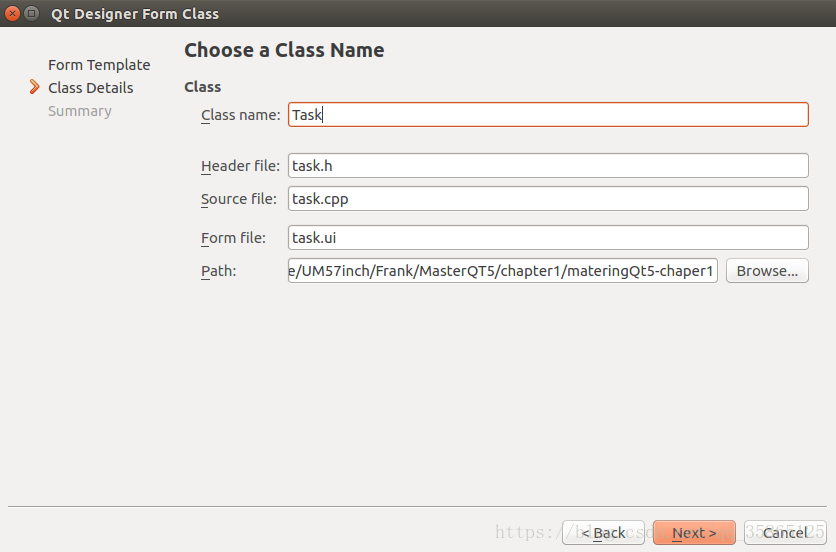
新建一个类,来用这个类hold our data. 新建的这个类有自己的ui文件,从而可以与mainWindow区分开来。qt creator提供了一个自动工具
来新建一个C++类以及与它关联的ui文件。
Mstering QT5 chapter1的更多相关文章
- QT5利用chromium内核与HTML页面交互
在QT5.4之前,做QT开发浏览器只能选择QWebkit,但是有过使用的都会发现,这个webkit不是出奇的慢,简直是慢的令人发指,Release模式下还行,debug下你就无语了,但是webkit毕 ...
- qt5中信号和槽的新语法
qt5中的连接 有下列几种方式可以连接到信号上 旧语法 qt5将继续支持旧的语法去连接,在QObject对象上定义信号和槽函数,及任何继承QObjec的对象(包含QWidget). connect(s ...
- Ubuntu在wps-office等qt5程序下不能切换中文fcitx输入法的问题
经检查,是缺了fcitx-qt的包.比如qt5的程序,需要一个叫fcitx-libs-qt5的包. 如果您在基于qt的程序下不能使用基于fcitx的中文输入法,请检查以下包是否已安装: sudo ap ...
- qt5中文代码编码编译问题
qt中文代码用vs2010编译问题解决 总结说就是qt5默认UTF8不支持微软默认的ANSI(GB2312/GBK).解决办法是把中文字符串全部用 QString::fromLocal8Bit() 封 ...
- VS2010+Qt5.4.0 环境搭建(离线安装)
原创作者:http://blog.csdn.net/solomon1558/article/details/44084969 前言 因项目需要Qt开发GUI,我根据网上资料及自己的经验整理了搭建vs2 ...
- qt5.5程序打包发布以及依赖【转】
玩qt5也有一段时间了,惭愧的是一直没有好好的发布过程序,因为写的都是小程序没啥需要用到发布,而且qt也说不上很熟悉,本来打算到基本掌握qt之后再来研究研究怎么打包程序,最近晚上的空闲时间多了,闲着也 ...
- Qt5.5.1编译出来的程序出现libgcc_s_dw2-1.dll的解决方案
问题如图: 输入"myudp2016.exe 1 " 后出现 这是因为没有在系统环境变量path里加上相关路径,我们添加如下路径: 比如说WIN7系统-开始-计算机-右键-属性- ...
- ubuntu 16.04 + N驱动安装 +CUDA+Qt5 + opencv
Nvidia driver installation(after download XX.run installation file) 1. ctrl+Alt+F1 //go to virtual ...
- Qt5中的信号槽
Qt4中的信号槽 Qt4中的信号槽是通过SIGNAL,SLOT两个宏,将参数转换成字符串.Qt编译前,会从源码的头文件中提取由signal和slot声明的信号和槽的函数, 将其组成一张信号和槽对应的字 ...
随机推荐
- 使用dig进行DNS查询
dig全称Domain Information Groper,是一个DNS域名信息查询的工具,可以使用来查看域名解析的过程. dig是linux下自带的工具,如果要在windows下使用需要自行下载和 ...
- 微信小程序--更换用户头像/上传用户头像/更新用户头像
changeAvatar:function (){ var that=this; wx.chooseImage({ count: 1, // 默认9 sizeType: ['original', 'c ...
- JavaString在虚拟机中的实现
1.String在虚拟机中的实现 特点: ① 不变性,是在多线程的访问中,保持对象的不变性的话就不需要实现同步,省略了同步和锁的等待时间.提高了多线程的访问性能,堆所有想成都是只读的.它的修改操作都是 ...
- Chrome接口调试工具
网页接口测试工具开发背景 在web开发中,服务器端和客户端的开发和测试必不可少,但是测试的工作往往需要服务器端完成之后,客户端才能进行测试,这无疑延后了测试流程,导致服务器端开发完成后,无法进行充分的 ...
- DELPHI10.3.2安卓SDK安装
DELPHI10.3.2安卓SDK安装 DELPHI10.3.2默认安装以后,还需要安装安卓SDK,才可以编译安卓项目. 1)运行Android Tools 2)勾选安装下面几个
- cin中的注意事项
猎豹网校C++ Primer学习笔记 - ostartech - 博客园 https://www.cnblogs.com/wxl845235800/p/11396323.html 在VS中使用cin& ...
- 初始化jsp页面下拉选备选项【我】
将下列 script标签放到页面的最下端 <!-- 初始化的全局变量,供js中使用,主要拼接下拉选的初始化值 --> <script type="text/javascri ...
- SpringCloud学习成长之路二 服务客户端(rest+ribbon)
在微服务架构中,业务都会被拆分成一个独立的服务,服务与服务的通讯是基于http restful的. Spring cloud有两种服务调用方式,一种是ribbon+restTemplate,另一种是f ...
- jQuery前端插件以及图片延迟加载
插件名称 用途 插件官网地址 fontawsome CSS图标插件 http://fontawesome.io easyui 基于jQuery的用户界面插件集合 http://www.jeasyui. ...
- Apache配置日志切割
随着网站的访问越来越大,WebServer产生的日志文件也会越来越大,如果不对日志进行分割,那么只能一次将大的日志(如Apache的日志)整个删除,这样也丢失了很多对网站比较宝贵的信息,因为这些日志可 ...