
虚拟机扩展Linux根目录磁盘空间
简要扩展空间方法http://www.kwx.gd/CentOSApp/Xen-Centos6-Mounted-HardDrive.html
最近在VMware虚拟机上使用Centos,用着用着,发现虚拟机的磁盘空间不够了。通过以下步骤成功扩展了根目录的磁盘空间
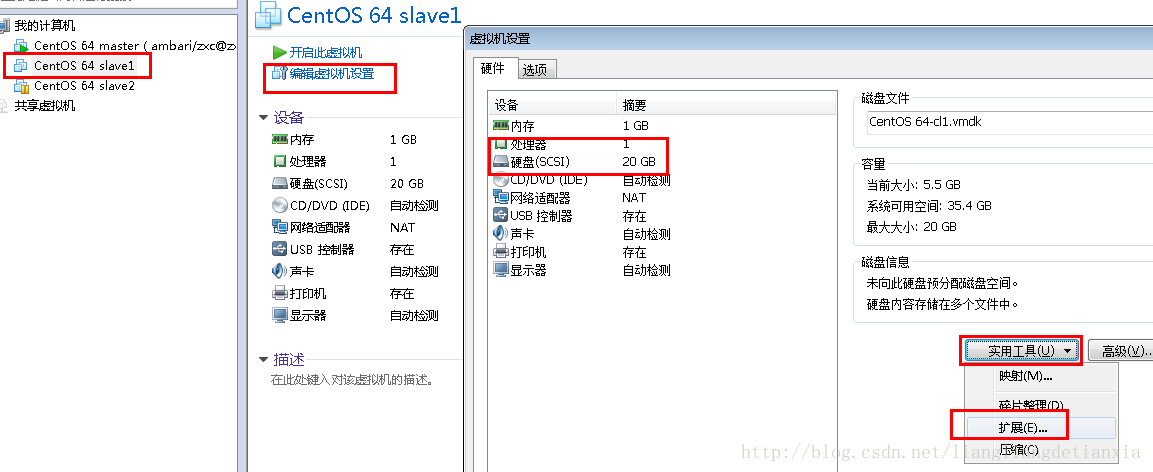
1、Centos 关机,选择编辑虚拟机设置,硬盘,在实用工具那里选择“扩展”
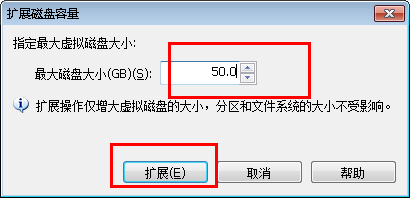
填写扩展的磁盘容量
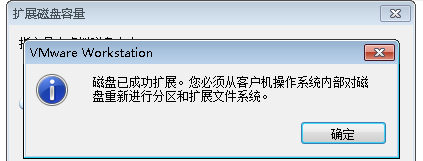
点击扩展后,VMware会提示磁盘已成功扩展。您必须从客户机操作系统内部对磁盘重新进行分区和扩展文件系统。也就是说,这里扩展的磁盘空间,在操作系统里面还不可用,还没生效,需要在操作系统里面进行设置后才能使用。
2、启动客户机操作系统Centos,查看磁盘情况
输入指令
fdisk -l
显示结果如下
Disk /dev/loop0: 107.4 GB, 107374182400 bytes
255 heads, 63 sectors/track, 13054 cylinders
Units = cylinders of 16065 * 512 = 8225280 bytes
Sector size (logical/physical): 512 bytes / 512 bytes
I/O size (minimum/optimal): 512 bytes / 512 bytes
Disk identifier: 0x00000000Disk /dev/loop1: 2147 MB, 2147483648 bytes
255 heads, 63 sectors/track, 261 cylinders
Units = cylinders of 16065 * 512 = 8225280 bytes
Sector size (logical/physical): 512 bytes / 512 bytes
I/O size (minimum/optimal): 512 bytes / 512 bytes
Disk identifier: 0x00000000Disk /dev/sda: 37.6 GB, 37580963840 bytes
255 heads, 63 sectors/track, 4568 cylinders
Units = cylinders of 16065 * 512 = 8225280 bytes
Sector size (logical/physical): 512 bytes / 512 bytes
I/O size (minimum/optimal): 512 bytes / 512 bytes
Disk identifier: 0x000c8278Device Boot Start End Blocks Id System
/dev/sda1 * 1 64 512000 83 Linux
Partition 1 does not end on cylinder boundary.
/dev/sda2 64 1306 9972736 8e Linux LVMDisk /dev/mapper/vg_test001-lv_root: 9135 MB, 9135194112 bytes
255 heads, 63 sectors/track, 1110 cylinders
Units = cylinders of 16065 * 512 = 8225280 bytes
Sector size (logical/physical): 512 bytes / 512 bytes
I/O size (minimum/optimal): 512 bytes / 512 bytes
Disk identifier: 0x00000000Disk /dev/mapper/vg_test001-lv_swap: 1073 MB, 1073741824 bytes
255 heads, 63 sectors/track, 130 cylinders
Units = cylinders of 16065 * 512 = 8225280 bytes
Sector size (logical/physical): 512 bytes / 512 bytes
I/O size (minimum/optimal): 512 bytes / 512 bytes
Disk identifier: 0x00000000Disk /dev/mapper/docker-253:0-264224-pool: 107.4 GB, 107374182400 bytes
255 heads, 63 sectors/track, 13054 cylinders
Units = cylinders of 16065 * 512 = 8225280 bytes
Sector size (logical/physical): 512 bytes / 512 bytes
I/O size (minimum/optimal): 512 bytes / 65536 bytes
Disk identifier: 0x00000000
其中,可以看到现在的分区情况如下
- Device Boot Start End Blocks Id System
- /dev/sda1 * 1 64 512000 83 Linux
- Partition 1 does not end on cylinder boundary.
- /dev/sda2 64 306 9972736 8e Linux LVM
3、创建分区 sda3
输入指令
fdisk /dev/sda
然后根据命令提示创建分区,具体见以下 # 后面的注释
WARNING: DOS-compatible mode is deprecated. It s strongly recommended to

         switch off the mode (command 'c') and change display units to

         sectors (command 'u').

Command (m for help): n   # 输入 n 表示创建新分区

Command action

   e   extended

   p   primary partition (1-4)

p

Partition number (1-4):    # 输入 3 表示sda3,因为前面已经有两个了

First cylinder (1306-4568, default 1306):     # 回车,按默认值

Using default value 1306

Last cylinder, +cylinders or +size{K,M,G} (1306-4568, default 4568):   # 回车,按默认值

Using default value 4568

Command (m for help): w     # 输入 w 保存退出

The partition table has been altered!

Calling ioctl() to re-read partition table.

WARNING: Re-reading the partition table failed with error 16: Device or resource busy.

The kernel still uses the old table. The new table will be used at

the next reboot or after you run partprobe(8) or kpartx(8)

Syncing disks.
再次查看分区情况
fdisk -l
这时可以看到
Disk /dev/loop0: 107.4 GB, 107374182400 bytes
255 heads, 63 sectors/track, 13054 cylinders
Units = cylinders of 16065 * 512 = 8225280 bytes
Sector size (logical/physical): 512 bytes / 512 bytes
I/O size (minimum/optimal): 512 bytes / 512 bytes
Disk identifier: 0x00000000Disk /dev/loop1: 2147 MB, 2147483648 bytes
255 heads, 63 sectors/track, 261 cylinders
Units = cylinders of 16065 * 512 = 8225280 bytes
Sector size (logical/physical): 512 bytes / 512 bytes
I/O size (minimum/optimal): 512 bytes / 512 bytes
Disk identifier: 0x00000000Disk /dev/sda: 37.6 GB, 37580963840 bytes
255 heads, 63 sectors/track, 4568 cylinders
Units = cylinders of 16065 * 512 = 8225280 bytes
Sector size (logical/physical): 512 bytes / 512 bytes
I/O size (minimum/optimal): 512 bytes / 512 bytes
Disk identifier: 0x000c8278Device Boot Start End Blocks Id System
/dev/sda1 * 1 64 512000 83 Linux
Partition 1 does not end on cylinder boundary.
/dev/sda2 64 1306 9972736 8e Linux LVM
/dev/sda3 1306 4568 26206700 83 LinuxDisk /dev/mapper/vg_test001-lv_root: 9135 MB, 9135194112 bytes
255 heads, 63 sectors/track, 1110 cylinders
Units = cylinders of 16065 * 512 = 8225280 bytes
Sector size (logical/physical): 512 bytes / 512 bytes
I/O size (minimum/optimal): 512 bytes / 512 bytes
Disk identifier: 0x00000000Disk /dev/mapper/vg_test001-lv_swap: 1073 MB, 1073741824 bytes
255 heads, 63 sectors/track, 130 cylinders
Units = cylinders of 16065 * 512 = 8225280 bytes
Sector size (logical/physical): 512 bytes / 512 bytes
I/O size (minimum/optimal): 512 bytes / 512 bytes
Disk identifier: 0x00000000Disk /dev/mapper/docker-253:0-264224-pool: 107.4 GB, 107374182400 bytes
255 heads, 63 sectors/track, 13054 cylinders
Units = cylinders of 16065 * 512 = 8225280 bytes
Sector size (logical/physical): 512 bytes / 512 bytes
I/O size (minimum/optimal): 512 bytes / 65536 bytes
Disk identifier: 0x00000000
其中,分区已变为3个了,但这时还没挂载,还不能用
- Device Boot Start End Blocks Id System
- /dev/sda1 * 1 64 512000 83 Linux
- Partition 1 does not end on cylinder boundary.
- /dev/sda2 64 1306 9972736 8e Linux LVM
- /dev/sda3 1306 4568 26206700 83 Linux
4、重启操作系统
reboot
5、格式化新分区为ext3
输入指令
mkfs -t ext3 /dev/sda3
结果为
mke2fs 1.41.12 (17-May-2010)
Filesystem label=
OS type: Linux
Block size=4096 (log=2)
Fragment size=4096 (log=2)
Stride=0 blocks, Stripe width=0 blocks
1638400 inodes, 6551675 blocks
327583 blocks (5.00%) reserved for the super user
First data block=0
Maximum filesystem blocks=4294967296
200 block groups
32768 blocks per group, 32768 fragments per group
8192 inodes per group
Superblock backups stored on blocks:
32768, 98304, 163840, 229376, 294912, 819200, 884736, 1605632, 2654208,
4096000Writing inode tables: done
Creating journal (32768 blocks): done
Writing superblocks and filesystem accounting information: doneThis filesystem will be automatically checked every 33 mounts or
180 days, whichever comes first. Use tune2fs -c or -i to override.
6、将物理硬盘分区初始化为物理卷,以便被LVM使用,输入指令
lvs

pvcreate /dev/sda3
7、向卷组中添加物理卷来增加卷组的容量
查看lvm组名,输入指令 df -h
[root@test001 ~]# df -h

Filesystem            Size  Used Avail Use% Mounted on

/dev/mapper/vg_test001-lv_root #这个是卷组

                      8.3G  5.4G  2.5G  69% /

tmpfs                1001M     0 1001M   0% /dev/shm

/dev/sda1             477M   54M  394M  12% /boot
其中,vg_test001 就是 根 所在的组名
输入指令,增加卷组的容量
vgextend vg_test001 /dev/sda3 #组名根据实际
8、查看可扩展的空间大小
输入指令,显示LNM卷组的元数据信息
vgdisplay
结果为
--- Volume group ---
VG Name vg_test001
System ID
Format lvm2
Metadata Areas 2
Metadata Sequence No 4
VG Access read/write
VG Status resizable
MAX LV 0
Cur LV 2
Open LV 2
Max PV 0
Cur PV 2
Act PV 2
VG Size 34.50 GiB
PE Size 4.00 MiB
Total PE 8831
Alloc PE / Size 2434 / 9.51 GiB
Free PE / Size 6397 / 24.99 GiB # 剩余可分配空间,1G=256
VG UUID JuPKc8-Ydps-1bsN-0Wld-fbYS-0Hd2-NgvX1q
其中 Free PE / Size 就是可供分配的自由空间,最多有 24.99G,在扩展时输入小于该值
9、扩充磁盘空间
lvextend -L+24G /dev/mapper/vg_test001-lv_root /dev/sda3

或
lvextend -L+6397 /dev/mapper/vg_test001-lv_root /dev/sda3
10、使用e2fsck指令检查文件系统错误
e2fsck -a /dev/mapper/vg_test001-lv_root
11、使用resize2fs指令来增大或者收缩未加载的“ext2/ext3”文件系统的大小
resize2fs /dev/mapper/vg_test001-lv_root
12、查看扩展空间后的结果
[root@test001 ~]# df -h

Filesystem            Size  Used Avail Use% Mounted on

/dev/mapper/vg_test001-lv_root

                       32G  5.4G   26G  18% /

tmpfs                1001M     0 1001M   0% /dev/shm

/dev/sda1             477M   54M  394M  12% /boot
可以看出,在根目录下磁盘空间已经扩容了,大功告成!
虚拟机扩展Linux根目录磁盘空间的更多相关文章
- VMware扩展Linux根目录磁盘空间(Centos版本)
1.Centos 关机,选择编辑虚拟机设置,硬盘,在实用工具那里选择“扩展”,指定你需要的存储大小 2.启动客户机操作系统Centos,查看磁盘情况 输入指令 fdisk -l 显示结果如下 Disk ...
- VMware虚拟机扩展Ubuntu系统磁盘空间
1 首先给虚拟机扩容 虚拟机->设置->硬盘->实用程序->扩展磁盘容量 2 启动Ubuntu系统 2.1 打开终端安装gparted,sudo apt-get install ...
- Linux系统扩容根目录磁盘空间
作者:非法小恋 一.使用背景 Linux根目录磁盘空间不够用了,当修改了虚拟机模版增加磁盘大小或者插入了一块新硬盘,但是发现系统里的大小还是没改变. 产生的原因是没有给磁盘格式化,没有增加分区. 二. ...
- VMware 虚拟机(linux)增加根目录磁盘空间 转自
转自 http://wenku.baidu.com/link?url=WZDgESO0oXqYfhPYOWFalZsMglS0HKtLw7t6ICRs_sJ_sfPc85RpxsqKMwqSniis0 ...
- VMware 虚拟机(linux)增加根目录磁盘空间
今天查看学校的监控报修系统,不能访问了!!!系统运行很慢,用top命令查看发现内存使用率90%,用"df -h ”查看“/”目录使用率已达到80%,导致系统运行很慢.我用以下方法扩大根目录磁 ...
- VMware 虚拟机(linux)增加根目录磁盘空间
VMware 虚拟机(linux)增加根目录磁盘空间 今天查看学校的监控报修系统,不能访问了!!!系统运行很慢,用top命令查看发现内存使用率90%,用"df -h ”查看“/”目录 ...
- 解决Linux下pcieport 0000:00:1c.5问题导致的系统根目录/磁盘空间不足
最近刚换了笔记本,拿到本后在win10基础装上Ubuntu 16.04双系统,有个问题是每次关机都会报一堆pcie问题,并且经常没声音,声音问题通过上一篇文章暂时解决,然后就没在意了,可是几天后出现系 ...
- Linux查看磁盘空间大小命令
Linux查看磁盘空间大小命令df -hldf -hl 查看磁盘剩余空间df -h 查看每个根路径的分区大小du -sh [目录名] 返回该目录的大小du -sm [文件夹] 返回该文件夹总M数du ...
- linux 查看磁盘空间
linux 查看磁盘空间大小命令 df :命令是linux系统以磁盘分区为单位查看文件系统,可以加上参数查看磁盘剩余空间信息 df -hl:查看磁盘剩余空间信息,显示如下: 文件系统 ...
随机推荐
- 深入理解Java自动装箱拆箱机制
1.自动装箱与拆箱的定义 装箱就是自动将基本数据类型转换为包装器类型(int-->Integer): 拆箱就是自动将包装器类型转换为基本数据类型(Integer-->int). Java中 ...
- python计算出现错误
用python计算39.8-0.1得出的结果是39.699999999999996 其他数字计算正确,唯独这个计算错误. 原因: 中文解释: https://docs.python.org/zh-cn ...
- ASP.NET IHttpModule IHttpHandler IHttpHandlerFactory 拦截请求
先来看看代码,拦截所有Http请求类.下面包含了两种类的集成 IHttpModule IHttpHandlerFactory using System; using System.Collection ...
- Eclipse创建Maven项目时,项目中只存在src/main/resources(没有src/main/java、src/test/java)的解决方法
例:Maven项目(chapter11),发现只存在src/main/resources,缺少了src/main/java和src/test/java 解决方法: 1.eclipse->wi ...
- Google C++单元测试框架GoogleTest---AdvancedGuide(译文)
上篇在这里: 下篇在这里.
- 关于postgres数据库部署之后,发现不能被外机连接解决办法
数据库 部署完毕之后,用其他机器的navcat连接发现不能连接,如下报错信息 于是在数据库服务器上查询是否启动正常,端口是否正常,发现都没有问题,由于之前也遇到了mysql部署之后,不能被其他机器访问 ...
- Linux目录结构以及一些常见操作
本章内容: Linux 目录结构 远程服务器关机及重启时的注意事项 不要在服务器访问高峰运行高负载命令 远程配置防火墙时不要把自己踢出服务器 指定合理的密码规范并定期更新 合理分配权限 定期备份重要数 ...
- javascript typeof instanceof
typeof用以获取一个变量或者表达式的类型,typeof一般只能返回如下几个结果: number,boolean,string,function(函数),object(NULL,数组,对象),und ...
- swap的创建和优先级
生产环境中,有的时候会遇到swap不够用,或者没有swap的情况,然而生产中需要用到swap,那么下面来实现以下如何创建新的swap. 方法一:如果有空余磁盘,可以直接使用空余磁盘 以/dev/sdb ...
- Linux学习日志(一)
1 .Ubuntu 自带python 2 和 python 3的版本,切换方法如下: shell里执行: sudo update-alternatives --install /usr/bin/pyt ...