
EF Core如何输出日志到Visual Studio的输出窗口
我们在使用EF Core的时候,很多时候需要在Visual Studio的输出窗口中知道EF Core在后台生成的SQL语句是什么,这个需求可以通过自定义EF Core的ILoggerFactory和ILogger类来实现:
首先定义一个实现了ILogger接口的类EFLogger,主要目的是将EF Core生成的Log信息输出到Visual Studio的输出窗口:
using Microsoft.Extensions.Logging;

using System;

using System.Diagnostics;

namespace WebCore.Utils

{

    public class EFLogger : ILogger

    {

        protected string categoryName;

        public EFLogger(string categoryName)

        {

            this.categoryName = categoryName;

        }

        public IDisposable BeginScope<TState>(TState state)

        {

            return null;

        }

        public bool IsEnabled(LogLevel logLevel)

        {

            return true;

        }

        public void Log<TState>(LogLevel logLevel, EventId eventId, TState state, Exception exception, Func<TState, Exception, string> formatter)

        {

            //通过Debugger.Log方法来将EF Core生成的Log信息输出到Visual Studio的输出窗口

            Debugger.Log(, categoryName, "=============================== EF Core log started ===============================\r\n");

            Debugger.Log(, categoryName, formatter(state,exception)+"\r\n");

            Debugger.Log(, categoryName, "=============================== EF Core log finished ===============================\r\n");

        }

    }

}
然后定义一个实现了ILoggerFactory接口的类EFLoggerFactory,用于创建上面定义的EFLogger类的实例:
using Microsoft.Extensions.Logging;

namespace WebCore.Utils

{

    public class EFLoggerFactory : ILoggerFactory

    {

        public void AddProvider(ILoggerProvider provider)

        {

        }

        public ILogger CreateLogger(string categoryName)

        {

            return new EFLogger(categoryName);//创建EFLogger类的实例

        }

        public void Dispose()

        {

        }

    }

}
最后在DbContext的OnConfiguring方法中,调用optionsBuilder.UseLoggerFactory来将EFLoggerFactory类的实例注入给EF Core,这样所有DbContext的Log信息,都会由EFLogger类输出到Visual Studio的输出窗口了。
using System;

using Microsoft.EntityFrameworkCore;

using Microsoft.EntityFrameworkCore.Metadata;

using WebCore.Utils;

namespace WebCore.Entities

{

    public partial class TestDBContext : DbContext

    {

        public TestDBContext()

        {

            this.Database.SetCommandTimeout();//设置SqlCommand永不超时

        }

        public TestDBContext(DbContextOptions<TestDBContext> options)

            : base(options)

        {

        }

        public virtual DbSet<Person> Person { get; set; }

        protected override void OnConfiguring(DbContextOptionsBuilder optionsBuilder)

        {

            if (!optionsBuilder.IsConfigured)

            {

                optionsBuilder.UseLoggerFactory(new EFLoggerFactory());//将EFLoggerFactory类的实例注入给EF Core,这样所有DbContext的Log信息,都会由EFLogger类输出到Visual Studio的输出窗口了

                optionsBuilder.UseSqlServer("Server=localhost;User Id=sa;Password=1qaz!QAZ;Database=TestDB");

            }

        }

        protected override void OnModelCreating(ModelBuilder modelBuilder)

        {

            //省略代码...

        }

    }

}
注意OnConfiguring这个方法是virtual的,所以我们也可以选择在DbContext的子类中来重写这个方法,在子类的OnConfiguring中注入EFLoggerFactory类的实例到DbContext。
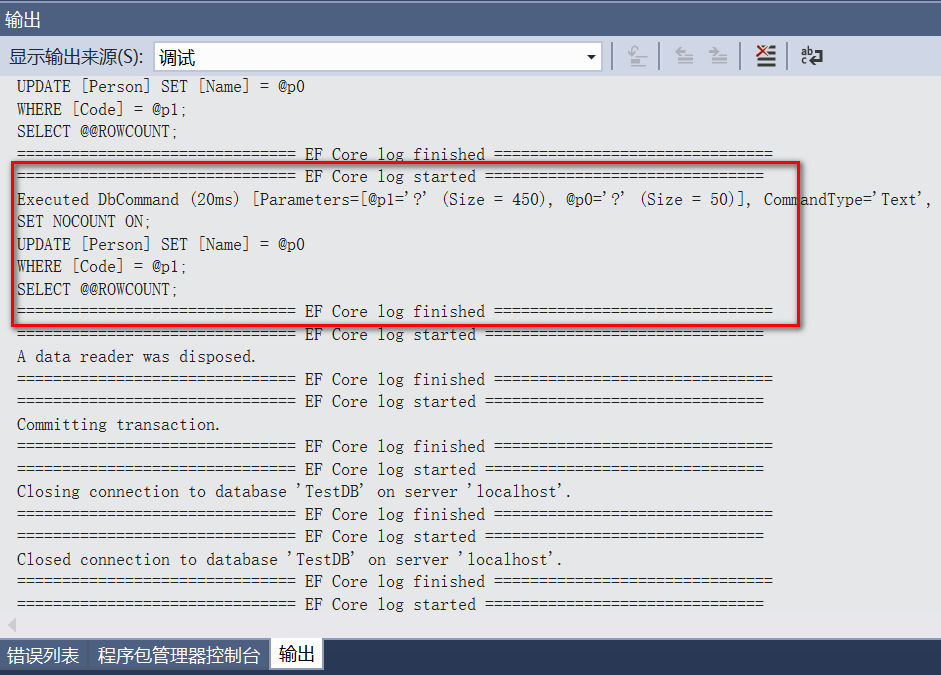
最后我们来看看EF Core日志输出的效果,还是很规整的,最重要的是我们可以实时的得到EF Core在后台生成的SQL语句:
EF Core如何输出日志到Visual Studio的输出窗口的更多相关文章
- Visual Studio的输出窗口上输出调试信息的函数
Visual Studio的输出窗口上输出文字的函数 参考网站:http://www.voidcn.com/blog/u011808175/article/p-2083567.html 当你编写非控制 ...
- 安装软件(名称不记得了)后,系统开机提示 visual studio just-in-time debugger窗口(WINDOWS错误提示框)
出现这种情况,往往是因为原先安装有VS,后来因某些原因(比如:卸载)导致VS无法使用!!当系统中的有些软件出现错误时,会自动调用vs进行调试,但因为VS无法使用,就出现了visual studio j ...
- log4net日志输出配置即输出到文件又输出到visual studio的output窗口
<configuration> <configSections> <section name="log4net" type="log4net ...
- ASP.NET Core + Angular 2 Template for Visual Studio
多个月以来,我和多个Github上的社区贡献者一起建立支持库.包,我们最终的目的是希望完成这样一个作为起点的模板,也就是基于把Typescript代码和Angular2宿主在ASP.NET Core项 ...
- .NET CORE 实践(3)--Visual Studio 2015 Update 3更新之后DotNetCore.1.0.1-VS2015Tools.Preview2.0.2.exe无法正确安装
打开 https://www.microsoft.com/net/core#windows,点击 https://go.microsoft.com/fwlink/?LinkId=691129下载vs2 ...
- .NET 6.0.6 和 .NET Core 3.1.26、Visual Studio 2022 17.2 和 17.3 Preview 2 和 .NET 7.0 Preview 5 同时发布
Microsoft 昨天发布了适用于 .NET 6.0.6 和 .NET Core 3.1.26.NuGet.Visual Studio 2019 和 Visual Studio 2022 17.2 ...
- visual studio code 输出乱码
问题: 解决方法: 首先,这个与VS本身无关,问题是出现在windows的dos显示设置上. 如何解决这个问题? 1.打开运行,输入cmd: 2.界面顶部右键,选择默认值: 3.将437(OEM-美国 ...
- Working with Data » 使用Visual Studio开发ASP.NET Core MVC and Entity Framework Core初学者教程
原文地址:https://docs.asp.net/en/latest/data/ef-mvc/intro.html The Contoso University sample web applica ...
- 【翻译】使用Visual Studio创建Asp.Net Core MVC (一)
This tutorial will teach you the basics of building an ASP.NET Core MVC web app using Visual Studio ...
随机推荐
- flask-login2的简单使用
#coding:utf8 from flask import Flask, render_template, request, redirect, url_for, flash, abort from ...
- javascript 文字大小自动适应文本框 (文字大小自动调整)
javascript 文字大小自动适应文本框 (文字大小自动调整) TOC 思考 思考一:面积法 思考二:微调法 代码 在进行类似微博墙之类的展示页面中,经常会遇到这样的需求:在固定大小的区域放入字数 ...
- Linux基础之-shell script(变量,运算符,流程控制,函数)
一.shell script Shell 脚本(shell script),是一种为shell编写的脚本程序.业界所说的shell通常都是指shell脚本,但读者朋友要知道,shell和shell s ...
- SpringBoot框架下基于Junit的单元测试
前言 Junit是一个Java语言的单元测试框架,被开发者用于实施对应用程序的单元测试,加快程序编制速度,同时提高编码的质量.是一个在发展,现在已经到junit5,在javaEE开发中与很多框架相集成 ...
- 基于Vue的WebApp项目开发(一)
了解webpack的魔力: 项目结构以及开发环境 webpack初体验之打包文件 1.首先创建三个文件,分别是index.html.main.js和calc.js index.html <!DO ...
- libgdx for eclipse开发环境搭建
1.安装jdk1.7以上 2.下载libgdx1.2.0 下载地址:https://libgdx.badlogicgames.com/releases 3.下载项目创建工具(老版本的) 下载地址:ht ...
- 新开篇关于vue
参考链接:http://cn.vuejs.org/v2/guide/instance.html 了解vue组件的生命周期: 1.beforeCreate 即将创建 2.created 创建 3.bef ...
- SQL Server ->> 时间函数: EOMONTH, DATEFROMPARTS, TIMEFROMPARTS, DATETIMEFROMPARTS, DATETIMEOFFSETFROMPARTS
上面几个函数都是SQL Server 2012新增的时间函数. EOMONTH 返回传入时间的月结束日,返回数据类型为DATE SELECT EOMONTH(GETDATE()) 结果为 DATEFR ...
- ASP.NET 4.5 MVC 4 无法在Windows2008的IIS7.0上解决方案
环境 : Windows2008 R2 Standard IIS 7.5 VS2012 SQL2005 最近才接触MVC4 自己做了个小实例 准备部署在 win2008 的IIS7.5 ...
- 运维不仅仅是懂Linux就行,还需要知道这些……
运维不仅仅是懂Linux就行,因为还有一大部分的Windows运维,最近看一个报道说,windows的服务器占了47.71%.嗯,向windows运维人员致敬.当然我们这篇文章不是说运维除了懂Linu ...