
IntelliJ IDEA SpringBoot 使用第三方Tomcat以及部署
花了半天时间终于成功,记录以备查阅。
一、第三方Tomcat部署
部署部分参考的是:把spring-boot项目部署到tomcat容器中
目标:把spring-boot项目按照平常的web项目一样发布到tomcat容器下
1. 修改打包形式
在pom.xml里设置 <packaging>war</packaging>
<groupId>com.study</groupId>
<artifactId>test</artifactId>
<version>0.0.1-SNAPSHOT</version>
<packaging>war</packaging>
2. 移除嵌入式tomcat插件
在pom.xml里找到spring-boot-starter-web依赖节点,在其中添加如下代码:
<dependency>

    <groupId>org.springframework.boot</groupId>

    <artifactId>spring-boot-starter-web</artifactId>

    <!-- 移除嵌入式tomcat插件 -->

    <exclusions>

        <exclusion>

            <groupId>org.springframework.boot</groupId>

            <artifactId>spring-boot-starter-tomcat</artifactId>

        </exclusion>

    </exclusions>

</dependency>
3. 添加servlet-api的依赖
下面两种方式都可以,任选其一
<dependency>

    <groupId>javax.servlet</groupId>

    <artifactId>javax.servlet-api</artifactId>

    <version>3.1.0</version>

    <scope>provided</scope>

</dependency>
<dependency>

    <groupId>org.apache.tomcat</groupId>

    <artifactId>tomcat-servlet-api</artifactId>

    <version>8.0.36</version>

    <scope>provided</scope>

</dependency>
4. 修改启动类,并重写初始化方法
我们平常用main方法启动的方式,都有一个App的启动类,代码如下:
@SpringBootApplication

public class Application {

    public static void main(String[] args) {

        SpringApplication.run(Application.class, args);

    }

}
直接让启动类继承SpringBootServletInitializer,并覆盖configure()方法:
@SpringBootApplication

public class Application extends SpringBootServletInitializer {

    @Override

    protected SpringApplicationBuilder configure(SpringApplicationBuilder builder) {

        // 注意这里要指向原先用main方法执行的Application启动类

        return builder.sources(Application.class);

    }

    public static void main(String[] args) {

        SpringApplication.run(Application.class, args);

    }

}
5. 打包部署
在项目根目录下(即包含pom.xml的目录),在命令行里输入:

mvn clean package即可, 等待打包完成,出现[INFO] BUILD SUCCESS即为打包成功。

mvn clean package 命令可以按需要添加参数,

-DskipTests 不执行测试用例,但编译测试用例类生成相应的class文件至target/test-classes下。

-Dspring.profiles.active=dev 如果配置了多环境,可以设置打包到哪个环境。

然后把target目录下的war包放到tomcat的webapps目录下,启动tomcat,即可自动解压部署。

最后在浏览器中输入

http://localhost:[端口号]/[打包项目名]/

发布成功
二、IntelliJ IDEA下使用第三方Tomcat运行项目
1. 完成部署中的1,2,3,4步骤
2. 配置第三方Tomcat
IDEA上方工具栏:Run->Edit Configurations
打开配置界面,左边"+"号->Tomcat Server->Local
完成后如下所示

然后在Deployment中点击"+"号,选择client:war,这样每次server启动的时候都会去打包一次war包(个人理解),然后去运行war包。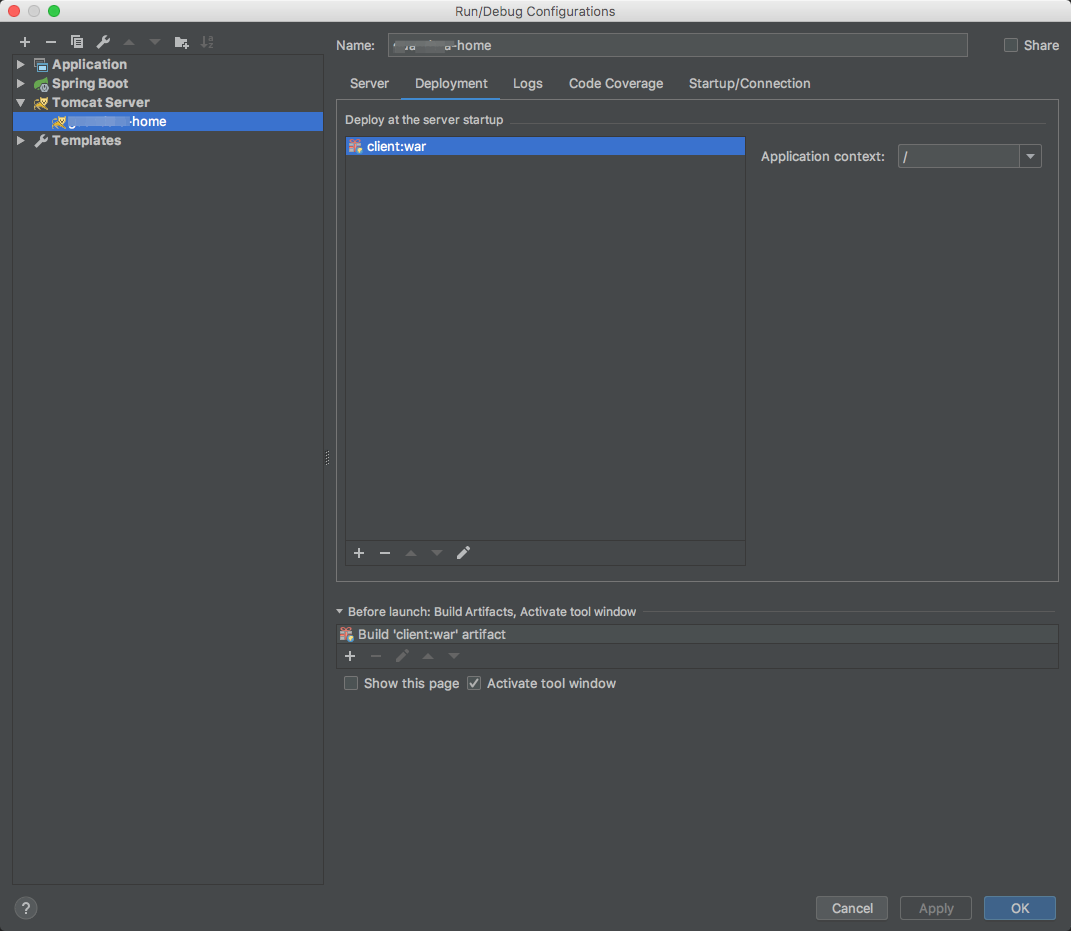
然后保存就可以了,然后启动项目就运行起来了。
三、部署中遇到的问题
1. log4j.properties中使用了环境变量
log4j.appender.dailyFile.File=${catalina.base}/logs/guandata/log.log4j
在启动第三方Tomcat时,Tomcat会去环境变量中寻找叫CATALINA_HOME、CATALINA_BASE的环境变量,并将它们加入到Tomcat到系统变量中,这样我们就能在项目中使用它们了。
2. 部署后访问静态资源,访问路径URL中多了项目名,导致静态资源找不到
举例:
原本在springboot内置Tomcat中运行项目,资源访问路径URL类似于:http://localhost:8080/css/bootstrap.min.css

但是打包部署到第三方Tomcat中,Tomcat默认会在路径中加上项目名,类似于:http://localhost:8080/myproject/css/bootstrap.min.css

这样就导致了访问不到静态资源 404
原因:
由于在前端引用资源时使用了绝对路径:
<link href="/css/bootstrap.min.css" rel="stylesheet">
这样默认在 http://localhost:8080/css/bootstrap.min.css 下面寻找,因此,我们需要在前面加上项目名,但是写死的话万一改项目名就很麻烦,当然是有办法解决的。
解决:
1. 在Java后端定义一个拦截器,用来获取 request.getContextPath() 然后传到前端,request.getContextPath() 得到的是项目的根路径,具体参考:关于request.getServletPath(),request.getContextPath()的总结
 @Component

 public class CommonIntercepter implements HandlerInterceptor {

     private final Logger logger = LoggerFactory.getLogger(this.getClass());

     @Override

     public boolean preHandle(HttpServletRequest request,

                              HttpServletResponse response, Object handler) throws Exception {

          return true;

     }

     @Override

     public void postHandle(HttpServletRequest request,

                            HttpServletResponse response, Object handler,

                            ModelAndView modelAndView) throws Exception {

             request.setAttribute("ctx", request.getContextPath());

             request.setAttribute("version", DateTimeUtils.currentTimeMillis());

     }

     @Override

     public void afterCompletion(HttpServletRequest request,

                                 HttpServletResponse response, Object handler, Exception ex)

             throws Exception {

     }

 }
2. 前端在静态资源访问url前加上${ctx!},注意我用的是freemarker模版
<link href="${ctx!}/css/bootstrap.min.css" rel="stylesheet">

<link href="${ctx!}/css/font-awesome.min.css" rel="stylesheet">

<link href="${ctx!}/css/plugins/bootstrap-table/bootstrap-table.min.css" rel="stylesheet">

<link href="${ctx!}/css/animate.css" rel="stylesheet">

<link href="${ctx!}/css/style.css" rel="stylesheet">
这样就能正确访问到静态资源啦。
3. 要注意给Tomcat/bin路径下的脚本权限,否则可能会出现不可预料的后果
sudo chmod 777 /Library/Tomcat/apache-tomcat-9.0.10/bin/*.sh
IntelliJ IDEA SpringBoot 使用第三方Tomcat以及部署的更多相关文章
- SpringBoot以war包形式部署到外部Tomcat
SpringBoot 项目打包时能打成 .jar 与 .war包文件,.jar使用 java -jar xx.jar 就可以启动,而 .war 可以部署到tomcat的 webapps 中,随tomc ...
- springboot打war包后部署到tomcat后访问返回404错误
springboot打war包后部署到tomcat后访问返回404错误 1.正常情况下,修改打包方式为war <packaging>war</packaging> 2.启动类继 ...
- IntelliJ IDEA配置Tomcat及部署项目
IntelliJ IDEA配置Tomcat及部署项目(原链接) 主要有以下几个要点 1.选择本地的tomcat容器. 2.可以选择修改访问路径. 3.On Update action 当我们按 Ctr ...
- Intellij IDEA 创建Web项目并在Tomcat中部署运行(不使用maven)【转载】
原文链接:http://www.thinksaas.cn/topics/0/350/350000.html 一.创建Web项目 1.File -> New Module,进入创建项目窗口 2.选 ...
- Intellij IDEA 创建Web项目并在Tomcat中部署运行
一.创建Web项目 1.File -> New Module,进入创建项目窗口 2.选择Java类型,在 Module name 处输入项目名,点击Next 3.勾选 Web Applica ...
- IntelliJ IDEA 学习(二):Intellij IDEA 创建Web项目并在Tomcat中部署运行IDEA
一.创建Web项目 1.File -> New Module,进入创建项目窗口 2.选择Java类型,在 Module name 处输入项目名,点击Next 3.勾选 Web Applicat ...
- IDEA/JRebel实现内部/外部/远程Tomcat热部署Spring Boot
1 概述 所谓热部署,对于Java应用程序来说,就是在运行时更新Java类文件.IDEA可以使用自带的Spring Boot热部署的方式进行本地/远程热部署,或者使用JRebel进行本地/远程热部署, ...
- SpringBoot入门教程(二)CentOS部署SpringBoot项目从0到1
在之前的博文<详解intellij idea搭建SpringBoot>介绍了idea搭建SpringBoot的详细过程, 并在<CentOS安装Tomcat>中介绍了Tomca ...
- SpringBoot启动方式讲解和部署war项目到tomcat9
1.SpringBoot启动方式讲解和部署war项目到tomcat9简介:SpringBoot常见启动方式讲解和部署war项目Tomcat 1.ide启动 2.jar包方式启动 maven插件: &l ...
随机推荐
- Codeforces Round #466 (Div. 2) E. Cashback
Codeforces Round #466 (Div. 2) E. Cashback(dp + 贪心) 题意: 给一个长度为\(n\)的序列\(a_i\),给出一个整数\(c\) 定义序列中一段长度为 ...
- JavaScript滚动条的制作
效果演示 这个效果的制作是借助setTimeout的第三个参数.setTimeout/setInterval,这两个函数相信前端开发同学都很熟悉.它们在非IE(6-9)浏览器中还可以如下使用: v ...
- XML 树结构,语法规则,元素,属性,验证及其解析
XML 文档形成了一种树结构,它从"根部"开始,然后扩展到"枝叶". 一个 XML 文档实例 XML 文档使用简单的具有自我描述性的语法: <?xml v ...
- ringbuffer
http://blog.csdn.net/xiaolang85/article/details/38419163
- C语言实现单链表的遍历,逆序,插入,删除
单链表的遍历,逆序,插入,删除 #include<stdio.h> #include<stdlib.h> #include <string.h> #define b ...
- CCF-20170901
试题编号: 201709-1 试题名称: 打酱油 时间限制: 1.0s 内存限制: 256.0MB 问题描述 小明带着N元钱去买酱油.酱油10块钱一瓶,商家进行促销,每买3瓶送 ...
- 让ie8、ie9支持媒体查询
<!-- 让IE8/9支持媒体查询,从而兼容栅格 --> <!--[if lt IE 9]> <script src="https://cdn.staticfi ...
- python基础--结构篇
在C/C++/Java中,main是程序执行的起点,Python中,也有类似的运行机制,但方式却截然不同: Python使用缩进对齐组织代码的执行,所有没有缩进的代码(非函数定义和类定义),都会在载入 ...
- 持续集成之配置环境创建JOB
1.安装mvn.gitlab插件 2.配置参数构建
- JAVA开发常用工具包
一个有经验的Java开发人员特征之一就是善于使用已有的轮子来造车.<Effective Java>的作者Joshua Bloch曾经说过:“建议使用现有的API来开发,而不是重复造轮子”. ...