
Post+Get方式接口测试代码编写
详细代码如下
 package testproject;

 import java.io.BufferedReader;

 import java.io.IOException;

 import java.io.InputStreamReader;

 import java.io.PrintWriter;

 import java.net.URL;

 import java.net.URLConnection;

 import java.util.List;

 import java.util.Map;

 import org.junit.Test;

 import net.sf.json.JSONObject;

 /**

  * @author mrjade

  * @version 创建时间:2017年8月3日

  * 类说明:GET,POST请求接口测试

  */

 public class HttpInterfaceTest {

     /**

      * 向指定URL发送GET方法的请求

      *

      * @param url

      *            发送请求的URL

      * @param param

      *            请求参数,请求参数应该是name1=value1&name2=value2的形式。

      * @return URL所代表远程资源的响应

      */

     public static String sendGet(String url, String param) {

         String result = "";

         BufferedReader in = null;

         try {

             String urlName = url + "?" + param;

             System.out.println("Get请求接口:" + urlName);

             URL realUrl = new URL(urlName);

             // 打开和URL之间的连接

             URLConnection conn = realUrl.openConnection();

             // 设置通用的请求属性

             conn.setRequestProperty("accept", "*/*");

             conn.setRequestProperty("connection", "Keep-Alive");

             conn.setRequestProperty("user-agent", "Mozilla/4.0 (compatible; MSIE 6.0; Windows NT 5.1; SV1)");

             // 建立实际的连接

             conn.connect();

             // 获取所有响应头字段

             Map<String, List<String>> map = conn.getHeaderFields();

             // 遍历所有的响应头字段

             for (String key : map.keySet()) {

                 System.out.println(key + "--->" + map.get(key));

             }

             // 定义BufferedReader输入流来读取URL的响应

             in = new BufferedReader(new InputStreamReader(conn.getInputStream()));

             String line;

             while ((line = in.readLine()) != null) {

                 result += "\n" + line;

             }

         } catch (Exception e) {

             System.out.println("发送GET请求出现异常!" + e);

             e.printStackTrace();

         }

         // 使用finally块来关闭输入流

         finally {

             try {

                 if (in != null) {

                     in.close();

                 }

             } catch (IOException ex) {

                 ex.printStackTrace();

             }

         }

         return result;

     }

     /**

      * 向指定URL发送POST方法的请求

      *

      * @param url

      *            发送请求的URL

      * @param param

      *            请求参数,请求参数应该是name1=value1&name2=value2的形式或者是json。

      * @return URL所代表远程资源的响应

      */

     public static String sendPost(String url, String param) {

         PrintWriter out = null;

         BufferedReader in = null;

         String result = "";

         try {

             URL realUrl = new URL(url);

             // 打开和URL之间的连接

             URLConnection conn = realUrl.openConnection();

             // 设置通用的请求属性

             conn.setRequestProperty("accept", "*/*");

             conn.setRequestProperty("connection", "Keep-Alive");

             conn.setRequestProperty("user-agent", "Mozilla/4.0 (compatible; MSIE 6.0; Windows NT 5.1; SV1)");

             conn.setRequestProperty("Content-Type", "application/json; charset=utf-8");

             // 发送POST请求必须设置如下两行

             conn.setDoOutput(true);

             conn.setDoInput(true);

             // 获取URLConnection对象对应的输出流

             out = new PrintWriter(conn.getOutputStream());

             // 发送请求参数

             out.print(param);

             // flush输出流的缓冲

             out.flush();

             // 定义BufferedReader输入流来读取URL的响应

             in = new BufferedReader(new InputStreamReader(conn.getInputStream()));

             String line;

             while ((line = in.readLine()) != null) {

                 result += "\n" + line;

             }

         } catch (Exception e) {

             System.out.println("发送POST请求出现异常!" + e);

             e.printStackTrace();

         }

         // 使用finally块来关闭输出流、输入流

         finally {

             try {

                 if (out != null) {

                     out.close();

                 }

                 if (in != null) {

                     in.close();

                 }

             } catch (IOException ex) {

                 ex.printStackTrace();

             }

         }

         return result;

     }

     // 调用天气预报接口请求地址

     String getUrl = "http://api.ip138.com/weather";

     // 调用天气预报接口请求参数

     String getParams = "&code=350229" + "&callback=find" + "&type=1"

             + "&token=cc87f3c77747bccbaaee35006da1ebb65e0bad57";

     // 调用天气预报接口请求参数方式一

     String postUrl = "http://op.juhe.cn/onebox/weather/query";

     String postParamsOne = "&cityname=上海市" + "&key=1234567890";

     // 调用天气预报接口请求参数方式二

     String postParamsTwo = "{'cityname':'上海市'," + "'key':'1234567890'}";

     JSONObject jsonPostParamsTwo = JSONObject.fromObject(postParamsTwo);

     // 提供主方法,测试发送GET请求和POST请求

     @Test

     public void test() {

         // 发送GET请求

         String getResult = HttpInterfaceTest.sendGet(getUrl, getParams);

         System.out.println("GET请求参数:" + postParamsOne);

         System.out.println("GET请求响应结果:" + getResult);

         // 发送POST请求

         String postResultOne = HttpInterfaceTest.sendPost(postUrl, postParamsOne);

         System.out.println("POST请求参数一:" + postParamsOne);

         System.out.println("POST请求响应结果:" + postResultOne);

         // 发送POST请求

         String postResultTwo = HttpInterfaceTest.sendPost(postUrl, jsonPostParamsTwo.toString());

         System.out.println("POST请求参数二:" + jsonPostParamsTwo);

         System.out.println("POST请求响应结果:" + postResultTwo);

     }

 }
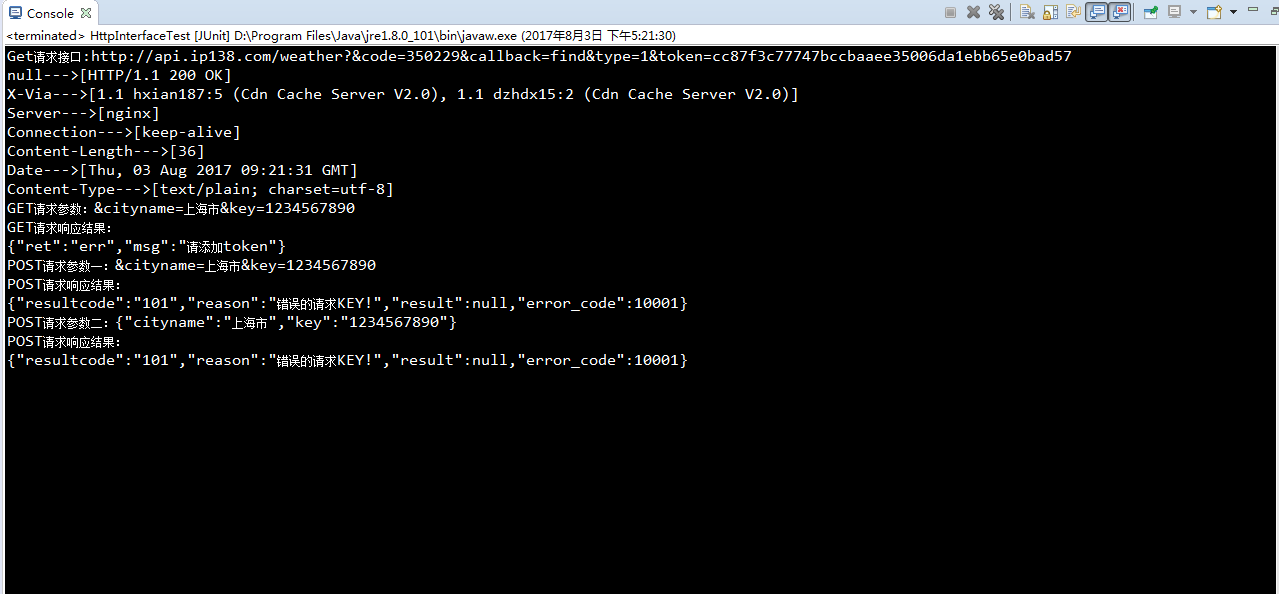
测试结果如下
Post+Get方式接口测试代码编写的更多相关文章
- 无感知的用同步的代码编写方式达到异步IO的效果和性能,避免了传统异步回调所带来的离散的代码逻辑和陷入多层回调中导致代码无法维护
golang/goroutine 和 swoole/coroutine 协程性能测试对比 - Go语言中文网 - Golang中文社区 https://studygolang.com/articles ...
- 使用Spring注解来简化ssh框架的代码编写
目的:主要是通过使用Spring注解的方式来简化ssh框架的代码编写. 首先:我们浏览一下原始的applicationContext.xml文件中的部分配置. <bean id="m ...
- 如何优雅的代码编写 AutoLayout
概述 使用 Objective-C 纯代码编写 AutoLayout,看 AutoLayout 的字面理解就是自动布局,听起来好像蛮屌的样子.说白了就是适配:适应.兼容各种不同的情况,包括不同版本的操 ...
- 使用python制作ArcGIS插件(2)代码编写
使用python制作ArcGIS插件(2)代码编写 by 李远祥 上一章节已经介绍了如何去搭建AddIn的界面,接下来要实现具体的功能,则到了具体的编程环节.由于使用的是python语言进行编程,则开 ...
- php 代码编写规范
1 编写目的为了更好的提高技术部的工作效率,保证开发的有效性和合理性,并可最大程度的提高程序代码的可读性和可重复利用性,指定此规范.开发团队根据自己的实际情况,可以对本规范进行补充或裁减. 2 整体要 ...
- OC开发_代码片段——代码编写自定义的tableViewCell
一.介绍 之前已经实现过通过简单的XIB文件来自定义我们的tableViewCell,包括每一步的步骤和代码:http://www.cnblogs.com/daomul/p/4355999.html ...
- 这些HTML、CSS知识点,面试和平时开发都需要 No10-No11(知识点:表格操作、代码编写规则)
系列知识点汇总 1.基础篇 这些HTML.CSS知识点,面试和平时开发都需要 No1-No4(知识点:HTML.CSS.盒子模型.内容布局) 这些HTML.CSS知识点,面试和平时开发都需要 No5- ...
- Java学习---Java代码编写规范
编码规范 1 前言为确保系统源程序可读性,从而增强系统可维护性,java编程人员应具有基本类似的编程风格,兹制定下述Java编程规范,以规范系统Java部分编程.系统继承的其它资源中的源程序也应按此规 ...
- 14条最佳JS代码编写技巧
http://gaohaixian.blog.163.com/blog/static/123260105201142645458315/写任何编程代码,不同的开发者都会有不同的见解.但参考一下总是好的 ...
随机推荐
- Java Excel 插入图片
在POI中有HSSFPatriarch对象,该对象为画图的顶级管理器,它的createPicture(anchor, pictureIndex)方法就能够在Excel插入一张图片.所以要在Excel中 ...
- 通过命名管道协议方式访问群集SQL的一个小问题
原来的单机实例SQL如果开放命名管道协议访问可以在.Net程序的连接字符串中增加“;Net=dbnmpntw"以通过命名管道协议方式访问,但是当迁移到群集SQL后,.net通过它可能无法正常 ...
- iOS:文本视图控件UITextView的详细使用
文本视图控件:UITextView 介绍:它是一个文本域的编辑视图,可以在该区域上进行编辑(包括删除.剪贴.复制.修改等),它与文本框UITextField的不同之处是:当它里面的每一行内容超出时,可 ...
- OTL调用存储过程/函数及注意事项
OTL 是 Oracle, Odbc and DB2-CLI Template Library 的缩写,是一个 C++ 编译中操控关系数据库的模板库,它目前几乎支持所有的当前各种主流数据库. OTL ...
- LINUX提权笔记
没啥技术含量,一种思路,让某些得到root权限webshell的童鞋可以快点拿到权限. 某日拿到某站webshell,RedHat 系统,Tomcat程序是root身份启动的,webshell当然也拥 ...
- 如何使用awk的比较操作符
对于使用 awk 命令的用户来说,处理一行文本中的数字或者字符串时,使用比较运算符来过滤文本和字符串是十分方便的.下面的部分我们介绍"awk"的比较运算符. awk 中的比较运算符 ...
- 将思维转向rss
本屌丝因为穷住在了离市区比较远的农民房,平时上下班单程地铁时间接近一小时.在这漫长的一小时里,总得干点什么来蹉跎这段时光,看手机是最容易实现的事情.最地铁信号不好,手机也没什么好看的. 经过高人指点说 ...
- string 与BigDecimal互转
小编知道在java中数据类型非常 的严格了,我们如果一个地方不小心就会导致应用出问题了,今天 小编就在string 转BigDecimal上碰到了一些问题,下面整理了几个例子大家一起来看看. 例子 ...
- java线程总结(3/5)
一.线程同步和死锁问题 异步问题: package com.horizon.action; /** * 测试同步问题 * */ public class TestSync { public stati ...
- Style对象之一
<html> <style type="text/css"> body{ background-color="#FFCC80"; bac ...