
Spring.Net IOC基本应用和在MVC4中的应用
1.Spring.Net的IOC简单应用
新建一个解决方案添加一个控制台应用程序和一个业务层一个业务层的接口层,通过配置,让控制台应用程序调业务层的方法
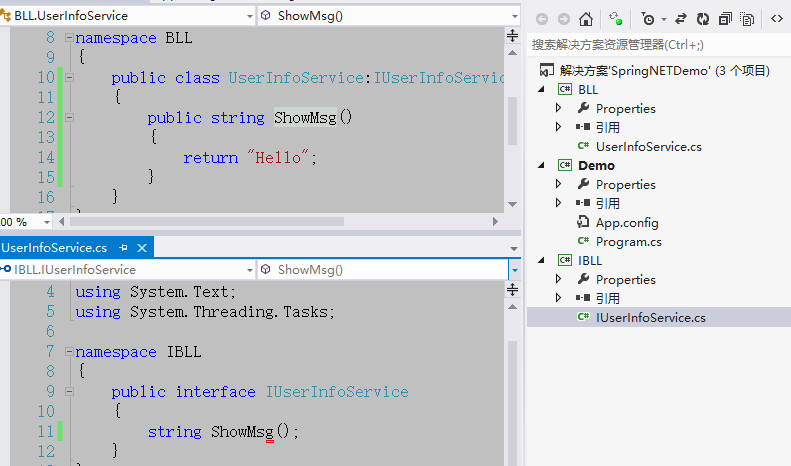
1)新建如下图所示,BLL为业务层,通过Spring.Net在Demo控制台应用程序中获取BLL中UserInfoService的方法
2)在Demo项目文件夹中新建一个Lib文件夹用来放第三方类库,把Spring.Net的核心类库Spring.Core.dll和Common.Logging.dll放进去然后Demo项目引用一下
3)给Demo项目的App.config中配置Spring.Net所需要的配置信息,如下
其中objects节点的子节点object是配置获取类的实例的,type中写的是类的全名称(BLL.UserInfoService)和其所在程序集(BLL),创建类UserInfoService的实例
 <?xml version="1.0" encoding="utf-8" ?>

 <configuration>

   <configSections>

     <sectionGroup name="spring">

       <section name="context" type="Spring.Context.Support.ContextHandler, Spring.Core"/>

       <section name="objects" type="Spring.Context.Support.DefaultSectionHandler, Spring.Core" />

     </sectionGroup>

   </configSections>

   <spring>

     <context>

       <resource uri="config://spring/objects"/>

     </context>

     <objects xmlns="http://www.springframework.net">

       <description>An  example that demonstrates simple IoC features.</description>

       <object name="MyUserInfoService" type="BLL.UserInfoService, BLL"></object>

     </objects>

   </spring>

 </configuration>
4)Demo项目中的Program中的代码
 static void Main(string[] args)

         {

             IApplicationContext ctx = ContextRegistry.GetContext();//读取配置文件

             IUserInfoService userInfoService = (IUserInfoService)ctx.GetObject("MyUserInfoService");//由ctx容器拿到UserInfoService的实例,MyUserInfoService就是配置文件中object的name属性值

             Console.WriteLine(userInfoService.ShowMsg());//调取方法

             Console.ReadKey();

         }
5)运行结果,这样就实现了Demo项目和BLL的解耦,不用再Demo中通过IUserInfoService userService =new UserInfoService();来调取他里面的方法。
以后我们想要换另一个命名空间中的UserInfoService只要引用新的业务层,修改配置文件中object中的属性值对应新的业务层的命名空间,变成另一个项目了就。
如果有多个需要获取的类,则在objects节点下写多个object节点即可。

2.Spring.Net DI属性注入(简单类型和实体的注入)
1)首先在UserInfoService中添加一个属性值
 namespace BLL

 {

     public class UserInfoService : IUserInfoService

     {

         public string UserName { get; set; }

         public string UserAge { get; set; }

         public string ShowMsg()

         {

             return "Hello " + UserName + " " + UserAge;

         }

     }

 }
2)在配置文件App.config中对这个属性赋值,如下
 <objects xmlns="http://www.springframework.net">

       <description>An  example that demonstrates simple IoC features.</description>

       <object name="MyUserInfoService" type="BLL.UserInfoService, BLL">

         <property name="UserName" value="XiaoMing"></property>

         <property name="UserAge" value=""></property>

       </object>

     </objects>
3)运行结果,这就是简单类型注入

4)比如新建Model层,新建实体Department,如下图

在UserInfoService中实现Department的注入,UserInfoService的代码如下
 namespace BLL

 {

     public class UserInfoService : IUserInfoService

     {

         public string UserName { get; set; }

         public string UserAge { get; set; }

         public Department Department { get; set; }

         public string ShowMsg()

         {

             return "Hello " + UserName + " " + UserAge

                 +" 部门名称:" +Department.Name;

         }

     }

 }
配置文件App.config中的写法,如下注释解释
 <objects xmlns="http://www.springframework.net">

       <description>An  example that demonstrates simple IoC features.</description>

       <object name="MyUserInfoService" type="BLL.UserInfoService, BLL">

         <property name="UserName" value="XiaoMing"></property>

         <property name="UserAge" value=""></property>

         <property name="Department" ref="MyDepartment"></property>//ref所指的名称是另一个object,代表该属性和另一个object节点绑定,这样就实现实体的注入

       </object>

       <object name="MyDepartment" type="Model.Department,Model">//type中第一个是类的全名和程序集名称

         <property name="Name" value="研发部门"></property>//给实体中的属性赋值

       </object>

     </objects>
5)运行结果如下,这是实体的注入

6)在App.config中放很多object会很乱,在Demo项目新建一个services.xml,记得设置属性(复制到输出目录为始终复制),然后把App.config中objects代码挪过去,如下
 <?xml version="1.0" encoding="utf-8" ?>

 <objects xmlns="http://www.springframework.net">

   <description>An  example that demonstrates simple IoC features.</description>

   <object name="MyUserInfoService" type="BLL.UserInfoService, BLL">

     <property name="UserName" value="XiaoMing"></property>

     <property name="UserAge" value=""></property>

     <property name="Department" ref="MyDepartment"></property>

   </object>

   <object name="MyDepartment" type="Model.Department,Model">

     <property name="Name" value="研发部门"></property>

   </object>

 </objects>
App.config中添加services.xml的关联
 <?xml version="1.0" encoding="utf-8" ?>

 <configuration>

   <configSections>

     <sectionGroup name="spring">

       <section name="context" type="Spring.Context.Support.ContextHandler, Spring.Core"/>

       <section name="objects" type="Spring.Context.Support.DefaultSectionHandler, Spring.Core" />

     </sectionGroup>

   </configSections>

   <spring>

     <context>

       <resource uri="config://spring/objects"/>

       <resource uri="file://services.xml"/>//和services.xml做关联

     </context>

     <objects xmlns="http://www.springframework.net">

       <!--<description>An  example that demonstrates simple IoC features.</description>

       <object name="MyUserInfoService" type="BLL.UserInfoService, BLL">

         <property name="UserName" value="XiaoMing"></property>

         <property name="UserAge" value=""></property>

         <property name="Department" ref="MyDepartment"></property>

       </object>

       <object name="MyDepartment" type="Model.Department,Model">

         <property name="Name" value="研发部门"></property>

       </object>-->

     </objects>

   </spring>

 </configuration>
7)运行后结果和上个结果一致。
3.Spring.Net在MVC4中的应用
1)导入dll文件
新建MVC4的项目WebMVC然后,导入Spring.Net中的dll文件:Spring.Core.dll,Spring.Web.dll,Spring.Web.Extensions.dll,Spring.Web.Extensions.xml,Spring.Web.Mvc4.dll,Spring.Web.Mvc4.xml
2)修改配置信息
将Spring.Net带的examples中的Spring.Mvc4QuickStart中的Config文件夹拷到项目WebMVC(这里其实就是在新建的MVC4项目根目录添加一个Config文件夹里面添加一个controllers.xml代码如下),代码中objects的子节点对应的是Controller,它的property对应的是Controller中需要DI注入的属性,这里singleton指是否是单例模式
 <?xml version="1.0" encoding="utf-8" ?>

 <objects xmlns="http://www.springframework.net">

   <object type="Spring.Mvc4QuickStart.Controllers.HomeController, Spring.Mvc4QuickStart" singleton="false" >

     <property name="Message" value="Welcome to ASP.NET MVC4 powered by Spring.NET!" />

   </object>

   <object type="Spring.Mvc4QuickStart.Controllers.SuffixController, Spring.Mvc4QuickStart" singleton="false" >

     <property name="Suffix" value="_Spring.NET_was_Here!" />

   </object>

   <object type="Spring.Mvc4QuickStart.Controllers.OdataController, Spring.Mvc4QuickStart" singleton="false" />

   <!--intentionally do NOT register the AccountController or the ValuesController with the container; demonstrates that the underlying

   default controller factory will properly (attempt to!) resolve all controllers not registered with Spring.NET

   using its default controller resolution behavoir-->

   <!--<object type="Spring.Mvc4QuickStart.Controllers.AccountController, Spring.Mvc4QuickStart" singleton="false" />-->

   <!--<object type="Spring.Mvc4QuickStart.Controllers.ValuesController, Spring.Mvc4QuickStart" singleton="false" />-->

 </objects>
3)在WebMVC项目中的Controller中新增一个,如下
 namespace WebMVC.Controllers

 {

     public class UserInfoController : Controller

     {

         //

         // GET: /UserInfo/

         IUserInfoService UserInfoService { get; set; }

         public ActionResult Index()

         {

             string msg = UserInfoService.ShowMvcMsg();

             ViewData["msg"] = msg;

             return View();

         }

     }

 }
同时分别在IUserInfoService中添加一个ShowMvcMsg()和UserInfoService中添加代码如下
         public string ShowMvcMsg()

         {

             return "Hello Spring.Net MVC4";

         }
4)修改controller.xml中的配置信息如下
 <?xml version="1.0" encoding="utf-8" ?>

 <objects xmlns="http://www.springframework.net">

   <object type="WebMVC.Controllers.UserInfoController, WebMVC" singleton="false" >

     <property name="UserInfoService" ref="MyUserInfoService" />

   </object>

   <object name="MyUserInfoService" type="BLL.UserInfoService, BLL" singleton="false" >

   </object>

 </objects>
5)修改WebMVC项目中Web.config配置文件,添加Spring.Net的配置,这里只是显示和Spring.Net相关的配置设置
 <configSections>

     <sectionGroup name="spring">

       <section name="context" type="Spring.Context.Support.MvcContextHandler, Spring.Web.Mvc4"/>

     </sectionGroup>

   </configSections>

   <spring>

     <context>

       <resource uri="file://~/Config/controllers.xml"/>

     </context>

   </spring>
6)同样的道理将controller.xml中将控制器的配置与业务类的配置分离到services.xml
controller.xml代码如下
 <?xml version="1.0" encoding="utf-8" ?>

 <objects xmlns="http://www.springframework.net">

   <object type="WebMVC.Controllers.UserInfoController, WebMVC" singleton="false" >

     <property name="UserInfoService" ref="MyUserInfoService" />

   </object>

 </objects>
services.xml代码如下
 <?xml version="1.0" encoding="utf-8" ?>

 <objects>

   <object name="MyUserInfoService" type="BLL.UserInfoService, BLL" singleton="false" >

   </object>

 </objects>
MVC项目中的Web.config中context节点下添加子节点
<resource uri="file://~/Config/services.xml"/>
7)修改Global.asax文件原来该类继承System.Web.HttpApplication,修改为继承SpringMvcApplication
8)WebMVC项目展示

运行结果如下,实现了Controller和业务层(BLL层)的解耦。

4.Spring.Net在MVC4中请求Webservice
为什么要解耦UI层和业务逻辑层呢?业务层不可能说今天换一个明天可能换另一个。数据访问层和数据库解耦是因为现在
用SqlServer实际环境会变成Oracle这样大大降低了修改成本。其实解耦Ui层和业务逻辑层是因为,让程序更加灵活,有了面
向服务的资本,可以把业务层做成服务发布出去,UI层可以通过Spring.Net去请求服务来实例化UI层中的接口,就是
(3.Spring.Net在MVC4中的应用)中是用本地的(BLL)中来注册实例化IUserInfoService UserInfoService { get; set; },
下面其实就是在配置文件中把本地的写法,换成服务地址的写法,如下:
1)新建一个Webservice服务
 using IBLL;

 using System;

 using System.Collections.Generic;

 using System.Linq;

 using System.Web;

 using System.Web.Services;

 namespace WebService

 {

     /// <summary>

     /// WebService1 的摘要说明

     /// </summary>

     [WebService(Namespace = "http://tempuri.org/")]

     [WebServiceBinding(ConformsTo = WsiProfiles.BasicProfile1_1)]

     [System.ComponentModel.ToolboxItem(false)]

     // 若要允许使用 ASP.NET AJAX 从脚本中调用此 Web 服务,请取消注释以下行。

     // [System.Web.Script.Services.ScriptService]

     public class WebService1 : System.Web.Services.WebService,IUserInfoService

     {

         [WebMethod]

         public string ShowMsg()

         {

             return "Hello ";

         }

         [WebMethod]

         public string ShowMvcMsg()

         {

             return "Hello Spring.Net MVC4 Webservice服务";

         }

     }

 }
2)项目引用该服务,在项目的引用上右击添加服务引用,下图

然后就和上面一样了,配置如下:controllers.xml
 <?xml version="1.0" encoding="utf-8" ?>

 <objects xmlns="http://www.springframework.net">

   <object type="WebMVC.Controllers.UserInfoController, WebMVC" singleton="false" >

     <property name="UserInfoService" ref="MyUserInfoService" />

   </object>

 </objects>
主要是services.xml,看见了吗?就是把value的地址改成服务的地址就是这样。
 <?xml version="1.0" encoding="utf-8" ?>

 <objects>

   <object name="MyUserInfoService" type="Spring.Web.Services.WebServiceProxyFactory, Spring.Services" >

     <property name="ServiceUri" value="http://localhost:3042/WebService1.asmx"/>

     <property name="ServiceInterface" value="IBLL.IUserInfoService, IBLL"/>

   </object>

 </objects>
3)结果如下

Spring.Net IOC基本应用和在MVC4中的应用的更多相关文章
- Spring.Net —IOC详解
一. Spring.net中IOC介绍 1. 什么是IOC,控制反转(Inversion of Control,缩写为IoC),是面向对象编程中的一种设计原则,可以用来减低计算机代码之间的耦合度.其中 ...
- Spring的IOC和AOP之深剖
今天,既然讲到了Spring 的IOC和AOP,我们就必须要知道 Spring主要是两件事: 1.开发Bean:2.配置Bean.对于Spring框架来说,它要做的,就是根据配置文件来创建bean实例 ...
- Spring框架IOC容器和AOP解析
主要分析点: 一.Spring开源框架的简介 二.Spring下IOC容器和DI(依赖注入Dependency injection) 三.Spring下面向切面编程(AOP)和事务管理配置 一.S ...
- Spring总结—— IOC 和 Bean 的总结
一.Spring 官方文档中给出的 Spring 的整体结构. 二.我自己所理解的 Spring 整体结构图. 三.本次总结 Spring 核心部分 1.从上面图中可以看出,Beans 和 Conte ...
- spring的IOC和AOP
spring的IOC和AOP 1.解释spring的ioc? 几种注入依赖的方式?spring的优点? IOC你就认为他是一个生产和管理bean的容器就行了,原来需要在调用类中new的东西,现在都是 ...
- spring容器IOC创建对象<二>
问题?spring是如何创建对象的?什么时候创建对象?有几种创建方式?测试对象是单例的还是多例的 ?对象的初始化和销毁? 下面的四大模块IOC的内容了!需要深刻理解 SpringIOC定义:把对象的创 ...
- Spring的IoC应用
IoC(Inversion of Control,控制反转) Spring的IoC应用是其框架的最大的特点,通过依赖注入可以大大降低代码之间的耦合度,从而实现代码和功能之间的分离.在代码中可以不直接和 ...
- Spring 实践 -IoC
Spring 实践 标签: Java与设计模式 Spring简介 Spring是分层的JavaSE/EE Full-Stack轻量级开源框架.以IoC(Inverse of Control 控制反转) ...
- 挖坟之Spring.NET IOC容器初始化
因查找ht项目中一个久未解决spring内部异常,翻了一段时间源码.以此文总结springIOC,容器初始化过程. 语言背景是C#.网上有一些基于java的spring源码分析文档,大而乱,乱而不全, ...
随机推荐
- jQuery滚动到特定位置时出现
<!DOCTYPE html> <html lang="en"> <head> <meta charset="UTF-8&quo ...
- kvm虚拟机静态迁移
1.静态迁移就是虚拟机在关机状态下,拷贝虚拟机虚拟磁盘文件与配置文件到目标虚拟主机中,实现的迁移. (1)虚拟主机各自使用本地存储存放虚拟机磁盘文件 本文实现基于本地磁盘存储虚拟机磁盘文件的迁移方式, ...
- zTree API中刷新树没效果
想刷新树,但是根据API来的refresh无效 ---------------------------------------------------------------------------- ...
- [ActionScript 3.0] 翻牌效果,运用语法rotationY,PerspectiveProjection
package { import com.tweener.transitions.Tweener; import flash.display.Bitmap; import flash.display. ...
- [转] Linux 安装.src.rpm源码包的方法
方法一:以setarch-1.3-1.src.rpm 软件包为例(可以到CSDN http://download.csdn.net/source/215173#acomment下载) 假设该文件已经存 ...
- Spring AOP 杂谈
其实AOP的思想现在讲的已经很多了,本身没有什么难点,难的是AOP有自己的一套术语,而我们经常被这套术语搞晕.术语没招,只能理解背诵了,尽管背诵很讨厌,可大家都这么说,不知道,就会被说晕. AOP思想 ...
- openstack 的horizon的结构
openstack的控制台应用horizon 特点: 1.界面的显示元素进行深度封装: 将元素的后台与前台模板结合在一起.制作html整个界面有点类似搭积木组合的方式. 2.模块加载: 根据权限对ur ...
- 【关于selenium自动化中,Webdriver的原理以及工作流程】
原文地址:https://www.cnblogs.com/imyalost/p/7242747.html#4109245 作者:老 张 1.关于Webdriver 设计模式:按照Server-Clie ...
- 3、激活层(Activiation Layers)及参数
caffe激活层(Activiation Layers) 在激活层中,对输入数据进行激活操作(实际上就是一种函数变换),是逐元素进行运算的.从bottom得到一个blob数据输入,运算后,从top输入 ...
- http、tcp及从请求到渲染的过程
http.tcp及从请求到渲染的过程 https://blog.csdn.net/pambassador/article/details/88539478 http请求的结构内容 https://ww ...