
11、SpringBoot-CRUD-thymeleaf公共页面元素抽取
thymeleaf公共页面元素抽取
存在一种现象:两个文件的代码只有一部分代码不一样
其余的均相同,此时就可以提取公共的代码去简化开发
、抽取公共片段
<div th:fragment="copy">
© The Good Thymes Virtual Grocery
</div> 、引入公共片段
<div th:insert="~{footer :: copy}"></div>
~{templatename::selector}:模板名::选择器
~{templatename::fragmentname}:模板名::片段名 、默认效果:
insert的公共片段在div标签中
如果使用th:insert等属性进行引入,可以不用写~{}:
行内写法可以加上:[[~{}]];[(~{})]
<footer th:fragment="copy">
© The Good Thymes Virtual Grocery
</footer> 引入方式
<div th:insert="footer :: copy"></div>
<div th:replace="footer :: copy"></div>
<div th:include="footer :: copy"></div> 效果
th:insert:
<div>
<footer>
© The Good Thymes Virtual Grocery
</footer>
</div> th:replace:
<footer>
© The Good Thymes Virtual Grocery
</footer> th:include:
<div>
© The Good Thymes Virtual Grocery
</div>
<nav class="navbar navbar-dark sticky-top bg-dark flex-md-nowrap p-0"
    th:fragment="top">

   <a class="navbar-brand col-sm-3 col-md-2 mr-0" >[[${session.user}]]</a>

   <input class="form-control form-control-dark w-100" type="text" placeholder="Search" aria-label="Search">

   <ul class="navbar-nav px-3">

      <li class="nav-item text-nowrap">

         <a class="nav-link" href="http://getbootstrap.com/docs/4.0/examples/dashboard/#">Sign out</a>

      </li>

   </ul>

</nav>
list.html
<!-- 引入公共的模板 -->

<!-- 模板名:会使用默认的thymeleaf的前后配置规则进行解析 -->

<div th:replace="~{dashboard::#selector}"></div>
<nav class="col-md-2 d-none d-md-block bg-light sidebar" id="selector">
list.html
<div th:replace="~{dashboard::#selector}"></div>
引入片段的时候传入参数
<li class="nav-item">

    <a class="nav-link active"

       th:class="${activeUri=='main.html'?'nav‐link active':'nav‐link'}"

       href="#" th:href="@{/main.html}">

        <svg xmlns="http://www.w3.org/2000/svg" width="" height="" viewBox="0 0 24 24" fill="none" stroke="currentColor" stroke-width="" stroke-linecap="round" stroke-linejoin="round" class="feather feather-home">

            <path d="M3 9l9-7 9 7v11a2 2 0 0 1-2 2H5a2 2 0 0 1-2-2z"></path>

            <polyline points="9 22 9 12 15 12 15 22"></polyline>

        </svg>

        Dashboard <span class="sr-only">(current)</span>

    </a>

</li>

<li class="nav-item">

    <a class="nav-link" href="http://getbootstrap.com/docs/4.0/examples/dashboard/#">

        <svg xmlns="http://www.w3.org/2000/svg" width="" height="" viewBox="0 0 24 24" fill="none" stroke="currentColor" stroke-width="" stroke-linecap="round" stroke-linejoin="round" class="feather feather-file">

            <path d="M13 2H6a2 2 0 0 0-2 2v16a2 2 0 0 0 2 2h12a2 2 0 0 0 2-2V9z"></path>

            <polyline points="13 2 13 9 20 9"></polyline>

        </svg>

        Orders

    </a>

</li>

<li class="nav-item">

    <a class="nav-link" href="http://getbootstrap.com/docs/4.0/examples/dashboard/#">

        <svg xmlns="http://www.w3.org/2000/svg" width="" height="" viewBox="0 0 24 24" fill="none" stroke="currentColor" stroke-width="" stroke-linecap="round" stroke-linejoin="round" class="feather feather-shopping-cart">

            <circle cx="" cy="" r=""></circle>

            <circle cx="" cy="" r=""></circle>

            <path d="M1 1h4l2.68 13.39a2 2 0 0 0 2 1.61h9.72a2 2 0 0 0 2-1.61L23 6H6"></path>

        </svg>

        Products

    </a>

</li>

<li class="nav-item">

    <a class="nav-link active"

       th:class="${activeUri=='emps'?'nav‐link active':'nav‐link'}"

       th:href="@{/emps}" href="@{/emps}">

        <svg xmlns="http://www.w3.org/2000/svg" width="" height="" viewBox="0 0 24 24" fill="none" stroke="currentColor" stroke-width="" stroke-linecap="round" stroke-linejoin="round" class="feather feather-users">

            <path d="M17 21v-2a4 4 0 0 0-4-4H5a4 4 0 0 0-4 4v2"></path>

            <circle cx="" cy="" r=""></circle>

            <path d="M23 21v-2a4 4 0 0 0-3-3.87"></path>

            <path d="M16 3.13a4 4 0 0 1 0 7.75"></path>

        </svg>

        员工列表

    </a>

</li>
<div th:replace="~{commons/bar::.sider(activeUri='emps')}"></div>
前台接受手台的数据
public class Employee {

   private Integer id;

    private String lastName;

    private String email;

    //1 male, 0 female

    private Integer gender;

    private Department department;

    private Date birth;

...}

public class Department {

   private Integer id;

   private String departmentName;

...}
@Repository

public class DepartmentDao {

   private static Map<Integer, Department> departments = null;

   static{

      departments = new HashMap<Integer, Department>();

      departments.put(, new Department(, "D-AA"));

      departments.put(, new Department(, "D-BB"));

      departments.put(, new Department(, "D-CC"));

      departments.put(, new Department(, "D-DD"));

      departments.put(, new Department(, "D-EE"));

   }

   public Collection<Department> getDepartments(){

      return departments.values();

   }

   public Department getDepartment(Integer id){

      return departments.get(id);

   }

}
@Repository

public class EmployeeDao {

   private static Map<Integer, Employee> employees = null;

   @Autowired

   private DepartmentDao departmentDao;

   static{

      employees = new HashMap<Integer, Employee>();

      employees.put(, new Employee(, "E-AA", "aa@163.com", , new Department(, "D-AA")));

      employees.put(, new Employee(, "E-BB", "bb@163.com", , new Department(, "D-BB")));

      employees.put(, new Employee(, "E-CC", "cc@163.com", , new Department(, "D-CC")));

      employees.put(, new Employee(, "E-DD", "dd@163.com", , new Department(, "D-DD")));

      employees.put(, new Employee(, "E-EE", "ee@163.com", , new Department(, "D-EE")));

   }

   private static Integer initId = ;

   public void save(Employee employee){

      if(employee.getId() == null){

         employee.setId(initId++);

      }

      employee.setDepartment(departmentDao.getDepartment(employee.getDepartment().getId()));

      employees.put(employee.getId(), employee);

   }

   public Collection<Employee> getAll(){

      return employees.values();

   }

   public Employee get(Integer id){

      return employees.get(id);

   }

   public void delete(Integer id){

      employees.remove(id);

   }

}
@Controller

public class EmployeeController {

    @Autowired

    EmployeeDao employeeDao;

    //查询所有员工返回列表页面

    @GetMapping("/emps")

    public String list(Model model){

        Collection<Employee> emps = employeeDao.getAll();

        //将查询到的数值放在请求域中

        model.addAttribute("emps",emps);

        //目标引擎会自动进行拼串

        return "emp/list";

    }

}
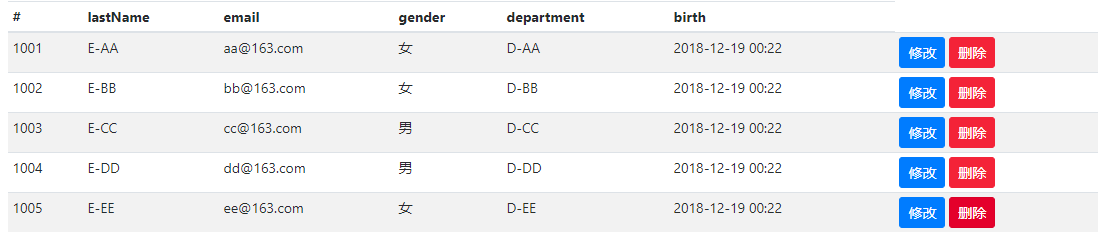
<table class="table table-striped table-sm">

   <thead>

      <tr>

         <th>#</th>

         <th>lastName</th>

         <th>email</th>

         <th>gender</th>

         <th>department</th>

         <th>birth</th>

      </tr>

   </thead>

   <tbody>

      <!-- 遍历emps,取出的数值叫emp-->

      <tr th:each="emp:${emps}">

         <td th:text="${emp.id}"></td>

         <td>[[${emp.lastName}]]</td>

         <td th:text="${emp.email}"></td>

         <td th:text="${emp.gender}==0?'男':'女'"></td>

         <td th:text="${emp.department.departmentName}"></td>

         <td th:text="${#dates.format(emp.birth,'yyyy-MM-dd HH:mm')}"></td>

         <td>

            <button class="btn btn-sm btn-primary">修改</button>

            <button class="btn btn-sm btn-danger">删除</button>

         </td>

      </tr>

   </tbody>

</table>
11、SpringBoot-CRUD-thymeleaf公共页面元素抽取的更多相关文章
- thymeleaf公共页面元素抽取
1.抽取公共片段 使用thymeleaf的th:fragment为样抽取的公共片段命名, 如下把div标签命名为 copy,就可以获取到div整个里的内容<div th:fragment=&qu ...
- Thymeleaf静态资源引入方式及公共页面代码抽取
静态资源引入 Thymeleaf模板引擎url问题,要用如下的方式写,确保在任何情况下都能访问到 <!-- Bootstrap core CSS --> <link href=&qu ...
- SpringBoot 结合 Thymeleaf 进行页面的跳转
1.引入thymeleaf依赖 <!--thymeleaf--> <dependency> <groupId>org.springframework.boot< ...
- 通过动态包含和Ajax机制抽取Web应用的公共页面
在Java Web应用开发中,经常遇到的一种情况是,许多的页面中都包含着“公共页面”,这部分动态页面的特征是:访问量大,会带来较大的性能压力.功能设计上会动态地改变自身的元素.比如在登录前和登录后所展 ...
- 如何针对Thymeleaf模板抽取公共页面
对于公共页面(导航栏nav.页头head.页尾footer)的抽取有三种方式: 1)基于iframe进行抽取,这种方式很有效,但比较老了,另外为了页面的自适应性,还得做不少工作: ...
- 11. SpringBoot 之CRUD实例
SpringBoot静态页路径,可直接通过URL访问的: /META-INF/resources /resources /static /public 而 5. /template 只和模板引擎 ...
- SpringBoot thymeleaf模板页面没提示,SpringBoot thymeleaf模板插件安装
SpringBoot thymeleaf模板插件安装 SpringBoot thymeleaf模板Html页面没提示 SpringBoot thymeleaf模板页面没提示 SpringBoot t ...
- 【SpringBoot】转载 springboot使用thymeleaf完成数据的页面展示
版权声明:本文为博主原创文章,遵循 CC 4.0 BY-SA 版权协议,转载请附上原文出处链接和本声明.本文链接:https://blog.csdn.net/weixin_36380516/artic ...
- thymeleaf 模板使用 提取公共页面
切记!!!thymeleaf模板的使用,姿势很重要!!!姿势不对,可能导致样式.js等的使用受到影响 前台开发中,由于页面目录结构不同,可能导致引入的公共页面中的的跳转路径在部分页面能用,部分页面不能 ...
随机推荐
- [转].Net Core Web应用发布至IIS后报“An error occurred while starting the application”错误
本文转自:http://www.cnblogs.com/TomGui/p/6438686.html An error occurred while starting the application. ...
- .net托管资源与非托管资源
在项目当中用到的资源分为托管资源和非托管资源,托管资源无非就是什么int.string.datatime之类,托管资源不需要人为去管理,.net framework中有专门针对托管资源的管理机制(GC ...
- Hibernate生成数据库表
首先创建实体类 import java.util.Date; public class ProductionEntity { public Integer getId() { return id; } ...
- Aspose.Cells 对excel的使用总结
using System;using System.Collections.Generic;using System.ComponentModel;using System.Data;using Sy ...
- Cheatsheet: 2017 02.01 ~ 02.28
Web Debouncing and Throttling Explained Through Examples What is TypeScript? An Absolute Beginner's ...
- hibernate5的一些坑
SessionFactory创建的修改 如果你是刚刚从hibernate4升级到hibernate5,这时候你的项目肯定就要出错了,什么错呢? org.hibernate.MappingExcepti ...
- 第9章 CSS3中的变形与动画(下)
Keyframes介绍 Keyframes被称为关键帧,其类似于Flash中的关键帧.在CSS3中其主要以"@keyframes"开头,后面紧跟着是动画名称加上一对花括号" ...
- Algorithm——最长公共前缀
一.问题 编写一个函数来查找字符串数组中的最长公共前缀. 如果不存在公共前缀,返回空字符串 "". 示例 1: 输入: ["flower","flow ...
- NodeJS require路径
项目需要用nodejs,感觉nodejs是前端装逼神器了,是通向全栈工程师的必经之路哇,接下来开始踏上学习nodejs的征程.下面是第一个hello,world的程序. 1.server.js文件,这 ...
- <Android 应用 之路> 百度地图API使用(2)
简介 上一篇只是大致的提一下百度地图API的Android SDK的基本内容,然后抄袭一个官网上的Demo,今天看一下百度地图的第一部分,地图类型和基本的显示. 简单实战 不同类型地图的显示 //设置 ...