
PRM路径规划算法
路径规划作为机器人完成各种任务的基础,一直是研究的热点。研究人员提出了许多规划方法:如人工势场法、单元分解法、随机路标图(PRM)法、快速搜索树(RRT)法等。传统的人工势场、单元分解法需要对空间中的障碍物进行精确建模,当环境中的障碍物较为复杂时,将导致规划算法计算量较大。基于随机采样技术的PRM法可以有效解决高维空间和复杂约束中的路径规划问题。
PRM是一种基于图搜索的方法,它将连续空间转换成离散空间,再利用A*等搜索算法在路线图上寻找路径,以提高搜索效率。这种方法能用相对少的随机采样点来找到一个解,对多数问题而言,相对少的样本足以覆盖大部分可行的空间,并且找到路径的概率为1(随着采样数增加,P(找到一条路径)指数的趋向于1)。显然,当采样点太少,或者分布不合理时,PRM算法是不完备的,但是随着采用点的增加,也可以达到完备。所以PRM是概率完备且不最优的。

The PRM path planner constructs a roadmap in the free space of a given map using randomly sampled nodes in the free space and connecting them with each other. Once the roadmap has been constructed, you can query for a path from a given start location to a given end location on the map.
The probabilistic roadmap planner consists of two phases: a construction and a query phase. 学习阶段:在给定图的自由空间里随机撒点(自定义个数),构建一个路径网络图。查询阶段:查询从一个起点到一个终点的路径。
• Roadmap is a graph G(V, E) (无向网络图G,其中V代表随机点集,E代表所有可能的两点之间的路径集)
• Robot configuration q→Q_free is a vertex (每个点都要确保机器人与障碍物无碰撞)
• Edge (q1, q2) implies collision-free path between these robot configurations
• A metric is needed for d(q1,q2) (e.g. Euclidean distance) (Dist function计算Configuration Space中点与点之间的距离,判断是否是同一个点)
• Uses coarse sampling of the nodes, and fine sampling of the edges
• Result: a roadmap in Q_free
Step 1, Learning the Map
• Initially empty Graph G
• A configuration q is randomly chosen
• If q →Q_free then added to G (collision detection needed here)
• Repeat until N vertices chosen
• For each q, select k closest neighbors,
• Local planner connects q to neighbor q’
• If connect successful (i.e. collision free local path), add edge (q, q’)

参考这里的MATLAB代码,输入一幅500×500的地图,根据Roadmap Construction Algorithm建立网络图,然后使用A*算法搜索出一条最短路径。
PRM.m文件如下,注意下面代码中并没有选取k个最近点进行连接(或是限定连接距离),而是连接了全部的节点。
%% PRM parameters

map=im2bw(imread('map1.bmp')); % input map read from a bmp file. for new maps write the file name here

source=[10 10]; % source position in Y, X format

goal=[490 490]; % goal position in Y, X format

k=50; % number of points in the PRM

display=true; % display processing of nodes

if ~feasiblePoint(source,map), error('source lies on an obstacle or outside map'); end

if ~feasiblePoint(goal,map), error('goal lies on an obstacle or outside map'); end

imshow(map);

rectangle('position',[1 1 size(map)-1],'edgecolor','k')

vertex=[source;goal]; % source and goal taken as additional vertices in the path planning to ease planning of the robot

if display, rectangle('Position',[vertex(1,2)-5,vertex(1,1)-5,10,10],'Curvature',[1,1],'FaceColor','r'); end % draw circle

if display, rectangle('Position',[vertex(2,2)-5,vertex(2,1)-5,10,10],'Curvature',[1,1],'FaceColor','r'); end

tic; % tic-toc: Functions for Elapsed Time

%%%%%%%%%%%%%%%%%%%%%%%%%%%%%%%%%%%%%%%%%%%%%%%%%  Step 1, Constructs the Map  %%%%%%%%%%%%%%%%%%%%%%%%%%%%%%%%%%%%%%%%%%%

%%  iteratively add vertices

while length(vertex)<k+2

    x = double(int32(rand(1,2) .* size(map))); % using randomly sampled nodes(convert to pixel unit)

    if feasiblePoint(x,map),

        vertex=[vertex;x];

        if display, rectangle('Position',[x(2)-5,x(1)-5,10,10],'Curvature',[1,1],'FaceColor','r'); end

    end

end

if display

    disp('click/press any key');

	% blocks the caller's execution stream until the function detects that the user has pressed a mouse button or a key while the Figure window is active

    waitforbuttonpress;

end

%%  attempts to connect all pairs of randomly selected vertices

edges = cell(k+2,1);  % edges to be stored as an adjacency list

for i=1:k+2

    for j=i+1:k+2

        if checkPath(vertex(i,:),vertex(j,:),map);

            edges{i}=[edges{i};j];

			edges{j}=[edges{j};i];

            if display, line([vertex(i,2);vertex(j,2)],[vertex(i,1);vertex(j,1)]); end

        end

    end

end

if display

    disp('click/press any key');

    waitforbuttonpress;

end

%%%%%%%%%%%%%%%%%%%%%%%%%%%%%%%%%%%%%%%%%%%%%%%%%%%  Step 2,  Finding a Path using A*  %%%%%%%%%%%%%%%%%%%%%%%%%%%%%%%%%%%%%%%%%%%%%%%

% structure of a node is taken as: [index of node in vertex, historic cost, heuristic cost, total cost, parent index in closed list (-1 for source)]

Q=[1 0 heuristic(vertex(1,:),goal) 0+heuristic(vertex(1,:),goal) -1]; % the processing queue of A* algorihtm, open list

closed=[]; % the closed list taken as a list

pathFound=false;

while size(Q,1) > 0 	  % while open-list is not empty

     [A, I] = min(Q,[],1);% find the minimum value of each column

     current = Q(I(4),:); % select smallest total cost element to process

     Q=[Q(1:I(4)-1,:);Q(I(4)+1:end,:)]; % delete element under processing

     if current(1)==2 				    % index of node in vertex==2(goal)

         pathFound=true;break;

     end

     for mv = 1:length(edges{current(1)}) % iterate through all edges from the node

         newVertex=edges{current(1)}(mv); % move to neighbor node

         if length(closed)==0 || length(find(closed(:,1)==newVertex))==0 % not in closed(Ignore the neighbor which is already evaluated)

             historicCost = current(2) + historic(vertex(current(1),:),vertex(newVertex,:)); % The distance from start to a neighbor

             heuristicCost = heuristic(vertex(newVertex,:),goal);

             totalCost = historicCost + heuristicCost;

             add = true; % not already in queue with better cost

             if length(find(Q(:,1)==newVertex))>=1

                 I = find(Q(:,1)==newVertex);

                 if totalCost > Q(I,4), add=false; % not a better path

                 else Q=[Q(1:I-1,:);Q(I+1:end,:);];add=true;

                 end

             end

             if add

                 Q=[Q;newVertex historicCost heuristicCost totalCost size(closed,1)+1]; % add new nodes in queue

             end

         end

     end

     closed=[closed;current]; % update closed lists

end

if ~pathFound

    error('no path found')

end

fprintf('processing time=%d \nPath Length=%d \n\n', toc, current(4));

path=[vertex(current(1),:)]; % retrieve path from parent information

prev = current(5);

while prev > 0

    path = [vertex(closed(prev,1),:);path];

    prev = closed(prev, 5);

end

imshow(map);

rectangle('position',[1 1 size(map)-1],'edgecolor','k')

line(path(:,2),path(:,1),'color','r');
其它M文件:
%% checkPath.m

function feasible=checkPath(n,newPos,map)

	feasible = true;

	dir=atan2(newPos(1)-n(1),newPos(2)-n(2));

	for r=0:0.5:sqrt(sum((n-newPos).^2))

		posCheck = n + r.*[sin(dir) cos(dir)];

		if ~(feasiblePoint(ceil(posCheck),map) && feasiblePoint(floor(posCheck),map) && ...

				feasiblePoint([ceil(posCheck(1)) floor(posCheck(2))],map) && feasiblePoint([floor(posCheck(1)) ceil(posCheck(2))],map))

			feasible = false;break;

		end

		if ~feasiblePoint(newPos,map), feasible = false; end

	end

end

%% feasiblePoint.m

function feasible=feasiblePoint(point,map)

	feasible=true;

	% check if collission-free spot and inside maps

	% 0: obstacle   1: free space

	if ~(point(1)>=1 && point(1)<=size(map,1) && point(2)>=1 && point(2)<=size(map,2) && map(point(1),point(2))==1)

		feasible=false;

	end

end

%% heuristic.m

function h=heuristic(X,goal)

	h = sqrt(sum((X-goal).^2));

end

%% historic.m

function h=historic(a,b)

	h = sqrt(sum((a-b).^2));

end

MATLAB Robotics System Toolbox
MATLAB的robotics system toolbox中提供了PRM路径规划方法,可以很方便的创建一个probabilistic roadmap path planner来进行路径规划。使用时有下面几点需要注意:
- Tune the Number of Nodes(调整节点数目)
Increasing the number of nodes can increase the efficiency of the path by giving more feasible paths. However, the increased complexity increases computation time. To get good coverage of the map, you might need a large number of nodes. Due to the random placement of nodes, some areas of the map may not have enough nodes to connect to the rest of the map. In this example, you create a large and small number of nodes in a roadmap.
% Create an occupancy grid

map = robotics.OccupancyGrid(simpleMap, );

% Create a simple roadmap with 50 nodes.

prmSimple = robotics.PRM(map, );

show(prmSimple)

% Create a dense roadmap with 250 nodes.

prmComplex = robotics.PRM(map,);

show(prmComplex)
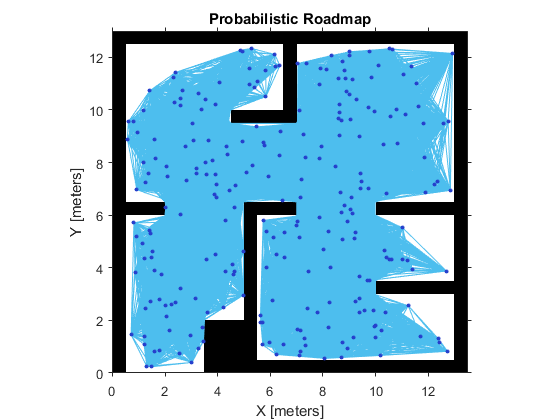
- Tune the Connection Distance(调整连接距离)
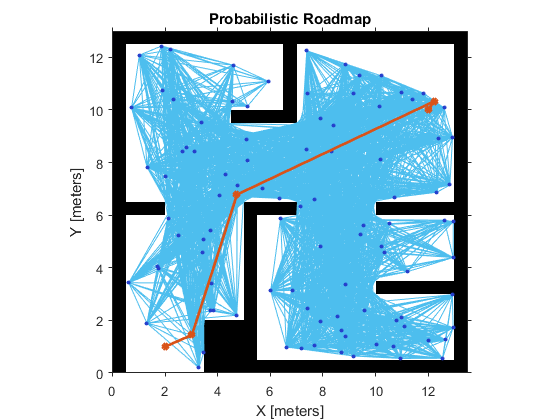
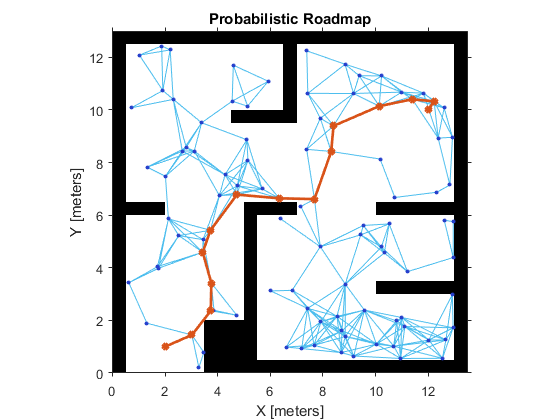
Use the ConnectionDistance property on the PRM object to tune the algorithm. ConnectionDistance is an upper threshold for points that are connected in the roadmap. Each node is connected to all nodes within this connection distance that do not have obstacles between them. By lowering the connection distance, you can limit the number of connections to reduce the computation time and simplify the map. However, a lowered distance limits the number of available paths from which to find a complete obstacle-free path. When working with simple maps, you can use a higher connection distance with a small number of nodes to increase efficiency. For complex maps with lots of obstacles, a higher number of nodes with a lowered connection distance increases the chance of finding a solution.
% Save the random number generation settings using the rng function. The saved settings enable you to reproduce the same points and see the effect of changingConnectionDistance.
rngState = rng;
% Create a roadmap with 100 nodes and calculate the path. The default ConnectionDistance is set to inf.
prm = robotics.PRM(map, );
startLocation = [ ];
endLocation = [ ];
path = findpath(prm,startLocation,endLocation);
show(prm)
% Reload the random number generation settings to have PRM use the same nodes

rng(rngState);

% Lower ConnectionDistance to 2 m

prm.ConnectionDistance = ;

path = findpath(prm, startLocation, endLocation);

show(prm)
Create or Update PRM
This roadmap changes only if you call update or change the properties in the PRM object. When properties change, any method (update, findpath, or show) called on the object triggers the roadmap points and connections to be recalculated. Because recalculating the map can be computationally intensive, you can reuse the same roadmap by calling findpath with different starting and ending locations. 即当使用update函数进行更新或者改变PRM对象属性后,调用findpath、show等方法会引发重新计算。
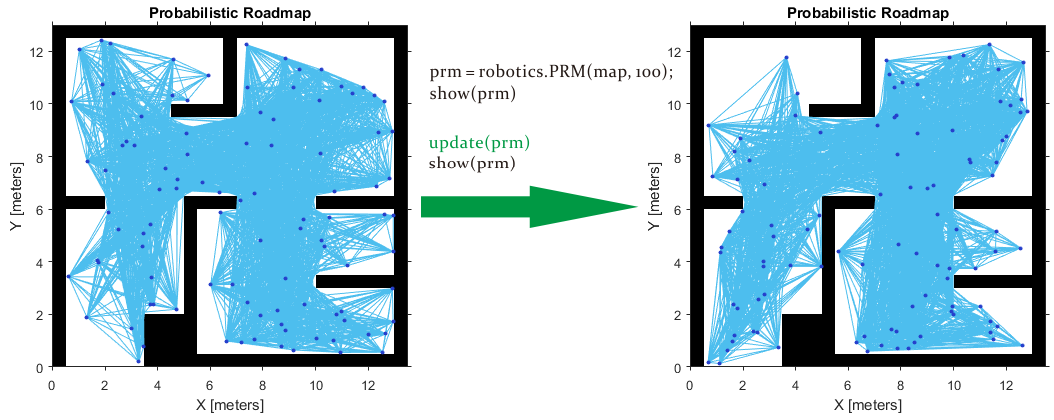
The PRM algorithm recalculates the node placement and generates a new network of nodes
- Inflate the Map Based on Robot Dimension
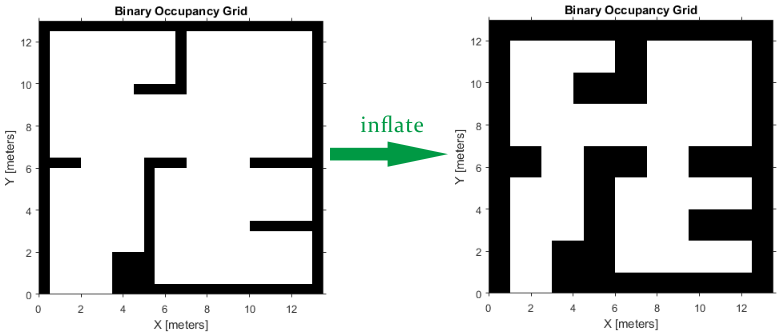
PRM does not take into account the robot dimension while computing an obstacle free path on a map. Hence, you should inflate the map by the dimension of the robot, in order to allow computation of an obstacle free path that accounts for the robot's size and ensures collision avoidance for the actual robot. This inflation is used to add a factor of safety on obstacles and create buffer zones between the robot and obstacle in the environment. The inflate method of an occupancy grid object converts the specified radius to the number of cells rounded up from the resolution*radius value.
robotRadius = 0.2;

mapInflated = copy(map);

inflate(mapInflated,robotRadius);

show(mapInflated)
- Find a Feasible Path on the Constructed PRM
Since you are planning a path on a large and complicated map, larger number of nodes may be required. However, often it is not clear how many nodes will be sufficient. Tune the number of nodes to make sure there is a feasible path between the start and end location.
path = findpath(prm, startLocation, endLocation)
while isempty(path)

    % No feasible path found yet, increase the number of nodes

    prm.NumNodes = prm.NumNodes + ;

    % Use the |update| function to re-create the PRM roadmap with the changed attribute

    update(prm);

    % Search for a feasible path with the updated PRM

    path = findpath(prm, startLocation, endLocation);

end
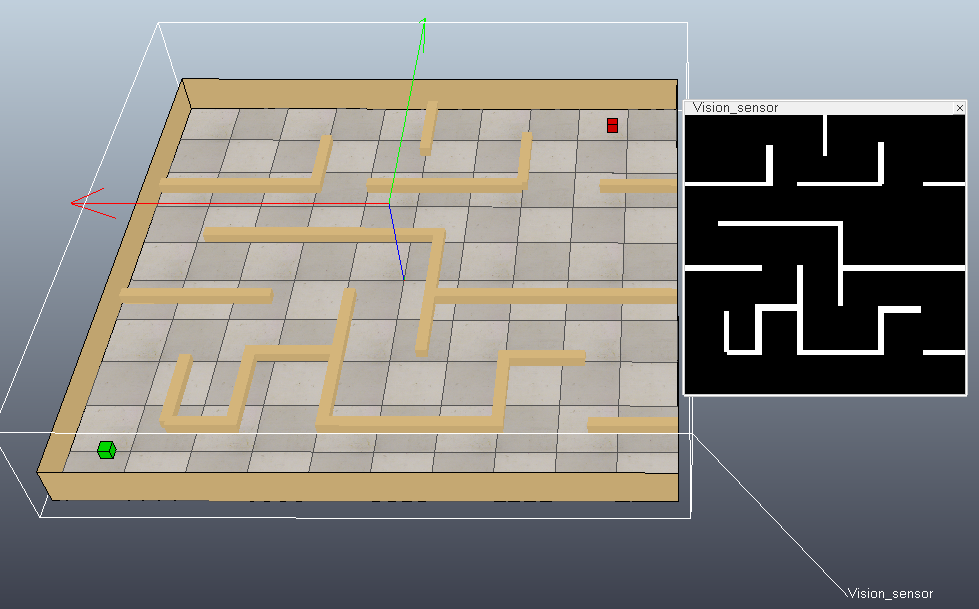
下面在VREP仿真软件中搭建一个简单的场景(修改practicalPathPlanningDemo.ttt):在地图正上方放置一个视觉传感器采集地图黑白图像,绿色方块代表起始位置,红色方块代表目标位置。然后使用MATLAB中的PRM进行路径规划。
MATLAB代码如下:
function simpleTest()

    disp('Program started');

    vrep=remApi('remoteApi'); % using the prototype file (remoteApiProto.m)

    vrep.simxFinish(-1);      % just in case, close all opened connections

    clientID=vrep.simxStart('127.0.0.1',19999,true,true,5000,5);

    if (clientID>-1)

        disp('Connected to remote API server');

		[returnCode,sensorHandle] = vrep.simxGetObjectHandle(clientID,'Vision_sensor',vrep.simx_opmode_blocking);

		[returnCode,objectHandle] = vrep.simxGetObjectHandle(clientID,'start',vrep.simx_opmode_blocking);

		[returnCode,goalHandle] =   vrep.simxGetObjectHandle(clientID,'goal',vrep.simx_opmode_blocking);

		% Retrieves the image of a vision sensor as an image array(each image pixel is a byte (greyscale image))

		[returnCode,resolution,image] = vrep.simxGetVisionSensorImage2(clientID, sensorHandle, 1, vrep.simx_opmode_blocking);

		% Creates a BinaryOccupancyGrid object with resolution specified in cells per meter.

		width = 5; 	height = 5; 	  % Map width / height, specified as a double in meters.

		grid = robotics.BinaryOccupancyGrid(image, resolution(1) / width);

		grid.GridLocationInWorld = [-width/2, -height/2]; % world coordinates of the bottom-left corner of the grid

		% Inflate the Map Based on Robot Dimension

		inflate(grid, 0.1);

		% Create a roadmap with 200 nodes and calculate the path

		prm = robotics.PRM(grid, 200);

		prm.ConnectionDistance = 1;

		[returnCode,startLocation] = vrep.simxGetObjectPosition(clientID,objectHandle,-1,vrep.simx_opmode_blocking);

		[returnCode,endLocation] =   vrep.simxGetObjectPosition(clientID,goalHandle,  -1,vrep.simx_opmode_blocking);

		path = findpath(prm, double(startLocation(1:2)), double(endLocation(1:2)));

		show(prm)

		% Simply jump through the path points, no interpolation here:

		for i=1 : size(path,1)

		  pos = [path(i,:), 0.05];

		  vrep.simxSetObjectPosition(clientID, objectHandle, -1, pos, vrep.simx_opmode_blocking);

		  pause(0.5);

		end

        % Now close the connection to V-REP:

        vrep.simxFinish(clientID);

    else

        disp('Failed connecting to remote API server');

    end

    vrep.delete(); % call the destructor!

    disp('Program ended');

end
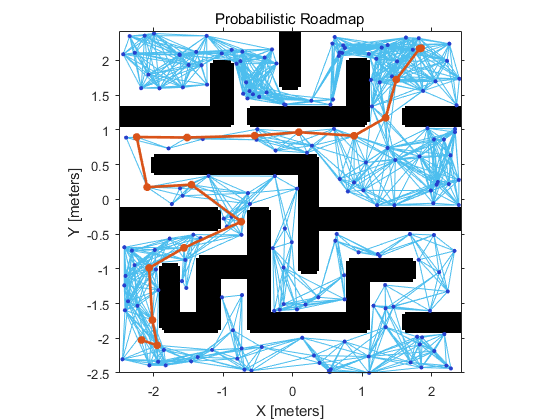
下图是MATLAB根据获取到的黑白图像创建的栅格图,并进行路径规划的结果:
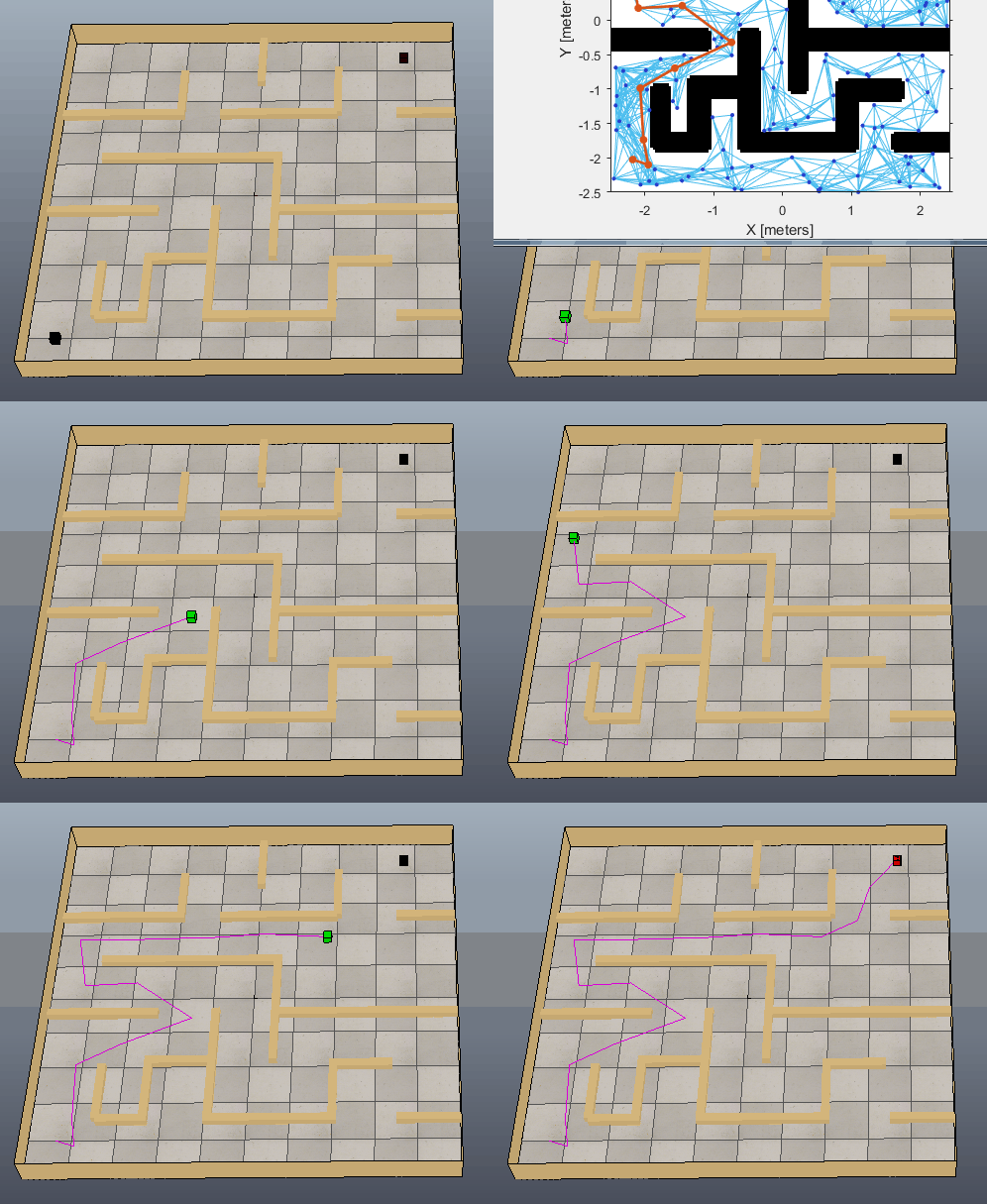
下图可以看出方块沿着生成的路径移动到目标位置,只是路径还需要进一步优化。
参考:
Path Planning in Environments of Different Complexity
Code for Robot Path Planning using Probabilistic Roadmap
Roadmap Methods for Multiple Queries
Probabilistic Roadmap Path Planning
Motion Planning-UC Berkeley EECS
PRM路径规划算法的更多相关文章
- 路径规划: PRM 路径规划算法 (Probabilistic Roadmaps 随机路标图)
随机路标图-Probabilistic Roadmaps (路径规划算法) 路径规划作为机器人完成各种任务的基础,一直是研究的热点.研究人员提出了许多规划方法如: 1. A* 2. Djstar 3. ...
- RRT路径规划算法
传统的路径规划算法有人工势场法.模糊规则法.遗传算法.神经网络.模拟退火算法.蚁群优化算法等.但这些方法都需要在一个确定的空间内对障碍物进行建模,计算复杂度与机器人自由度呈指数关系,不适合解决多自由度 ...
- RRT路径规划算法(matlab实现)
基于快速扩展随机树(RRT / rapidly exploring random tree)的路径规划算法,通过对状态空间中的采样点进行碰撞检测,避免了对空间的建模,能够有效地解决高维空间和复杂约束的 ...
- 全局路径规划算法Dijkstra(迪杰斯特拉算法)- matlab
参考博客链接:https://www.cnblogs.com/kex1n/p/4178782.html Dijkstra是常用的全局路径规划算法,其本质上是一个最短路径寻优算法.算法的详细介绍参考上述 ...
- DWA局部路径规划算法论文阅读:The Dynamic Window Approach to Collision Avoidance。
DWA(动态窗口)算法是用于局部路径规划的算法,已经在ROS中实现,在move_base堆栈中:http://wiki.ros.org/dwa_local_planner DWA算法第一次提出应该是1 ...
- 基础路径规划算法(Dijikstra、A*、D*)总结
引言 在一张固定地图上选择一条路径,当存在多条可选的路径之时,需要选择代价最小的那条路径.我们称这类问题为最短路径的选择问题.解决这个问题最经典的算法为Dijikstra算法,其通过贪心选择的步骤从源 ...
- 路径规划算法之Bellman-Ford算法
最近由于工作需要一直在研究Bellman-Ford算法,这也是我第一次用C++编写代码. 1.Bellman-Ford算法总结 (1)Bellman-Ford算法计算从源点(起始点)到任意一点的最短路 ...
- 机器人路径规划其一 Dijkstra Algorithm【附动态图源码】
首先要说明的是,机器人路径规划与轨迹规划属于两个不同的概念,一般而言,轨迹规划针对的对象为机器人末端坐标系或者某个关节的位置速度加速度在时域的规划,常用的方法为多项式样条插值,梯形轨迹等等,而路径规划 ...
- 机器人路径规划其二 A-Star Algorithm【附动态图源码】
首先要说明的是,机器人路径规划与轨迹规划属于两个不同的概念,一般而言,轨迹规划针对的对象为机器人末端坐标系或者某个关节的位置速度加速度在时域的规划,常用的方法为多项式样条插值,梯形轨迹等等,而路径规划 ...
随机推荐
- C#取硬盘、CPU、主板、网卡的序号 ManagementObjectSearcher (WMI)
实现方法参考 http://www.cnblogs.com/chengulv/archive/2012/12/29/2839303.html 下面介绍查看属性的方法: (1)在运行里输入 “WBEMT ...
- 利用Bootstrap+Avalonjs+EntityFramework 开发ASP.NET WebForm应用程序(上)
本文将介绍如何利用Bootstrap+Avalonjs+EntityFramework 开发ASP.NET WebForm应用程序,分为上下两篇.上篇主要介绍实现,下篇主要介绍界面. 打开Visual ...
- linux C++ 多线程使用pthread_cond 条件变量
1. 背景 多线程中经常需要使用到锁(pthread_mutex_t)来完成多个线程之间的互斥操作. 但是互斥锁有一个明显到缺点: 只有两种状态,锁定和非锁定. 而条件变量则通过允许线程阻塞并等待另一 ...
- 读书笔记,《Java 8实战》第五章,使用流
本章我们将会了解到关于Stream API的很多操作,这些操作能够完成很多复杂的查询,比如,比如筛选,切片,映射,查找,匹配和规约, 第一节,筛选和切片 首先我们来看看用谓词来选择流动的元素,主 ...
- 修改IP地址的PowerShell
$wmi = Get-WmiObject win32_networkadapterconfiguration -filter "ipenabled = 'true'" $wmi.E ...
- System.Diagnostics.Debug和System.Diagnostics.Trace
在 .net 类库中有一个 system.diagnostics 命名空间,该命名空间提供了一些与系统进程.事件日志.和性能计数器进行交互的类库.当中包括了两个对开发人员而言十分有用的类——debug ...
- Flyweight 享元模式 MD
享元模式 简介 在JAVA语言中,String类型就是使用了享元模式,JAVA中的字符串常量都是存在常量池中的,JAVA会确保一个字符串常量在常量池中只有一个拷贝,避免了在创建N多相同对象时所产生的不 ...
- Android -- ADT变化&aar&Lint
Switch Case switch case 常用的使用方法: switch(v.getId()){ case R.id.btn1: doClick1(); break; } 在ADT中的改变 在正 ...
- 【Kafka】Kafka-分区数-备份数-如何设置-怎么确定-怎么修改
Kafka-分区数-备份数-如何设置-怎么确定-怎么修改 kafka partition 数量 更新_百度搜索 kafka重新分配partition - - CSDN博客 如何为Kafka集群选择合适 ...
- Wide and Deep Learning Model
https://blog.csdn.net/starzhou/article/details/78845931 The Wide and Deep Learning Model(译文+Tensorlf ...