
client version is higher than daemon version (client is v.1.29 daemon is v.1.22)
安装好coreseek,建了索引,启动了服务,用php建了一个test.php,用于测试;<?phpinclude_once('sphinxapi.php');//向搜索引擎发起请求
$cl = new SphinxClient ();

$cl->SetServer ( '10.10.10.10', 9312);
//$cl->getLastError();
//$cl -> getLastWarning();

print_r($cl);

$cl->SetConnectTimeout ( 3 );

$cl->SetArrayResult ( true );

$cl->SetMatchMode ( SPH_MATCH_ANY);

$cl->SetSortMode ( SPH_SORT_ATTR_ASC,'rank' ); //以排名rank升序排列

$cl->SetLimits(0,2);

$query_data  = $cl->Query ( '小米', "*" );

?>
在A台机器执行的结果如下
SphinxClient Object

(

    [_host] => 10.10.10.10

    [_port] => 9312

    [_offset] => 0

    [_limit] => 20

    [_mode] => 0

    [_weights] => Array

        (

        )

    [_sort] => 0

    [_sortby] =>

    [_min_id] => 0

    [_max_id] => 0

    [_filters] => Array

        (

        )

    [_groupby] =>

    [_groupfunc] => 0

    [_groupsort] => @group desc

    [_groupdistinct] =>

    [_maxmatches] => 1000

    [_cutoff] => 0

    [_retrycount] => 0

    [_retrydelay] => 0

    [_anchor] => Array

        (

        )

    [_indexweights] => Array

        (

        )

    [_ranker] => 0

    [_maxquerytime] => 0

    [_fieldweights] => Array

        (

        )

    [_overrides] => Array

        (

        )

    [_select] => *

    [_error] =>

    [_warning] =>

    [_connerror] =>

    [_reqs] => Array

        (

        )

    [_mbenc] =>

    [_arrayresult] =>

    [_timeout] => 0

    [_path] =>

    [_socket] =>

)
在B台机器执行的结果如下:
SphinxClient Object

(

    [error] =>

    [warning] =>

)
通过PHP的调试信息,根本没有发现任何错误输出;请教了一个大神,他用 strace -s 1000 -f -o test.log php test.php ,分析 test.log ,发现了如下的错误
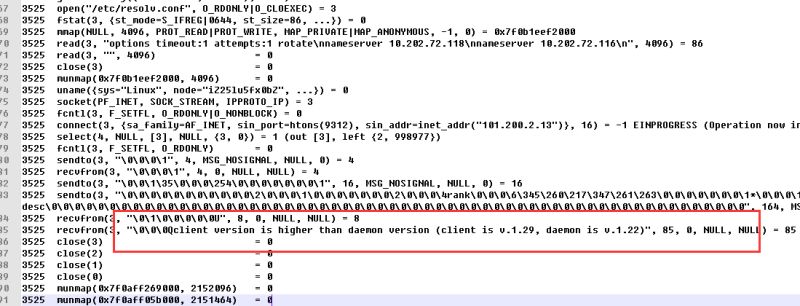
google了一番,通过在A,B 两台执行php --ini ,php -m 发现A机器中有php的sphinx扩展,而B机器中没有,终于找到具体的原因了。将A机器中的sphinx扩展去掉,重启php-fpm,就ok 了。
service php-fpm restart
client version is higher than daemon version (client is v.1.29 daemon is v.1.22)的更多相关文章
- coreseek 提示 client version is higher than daemon version 解决办法
安装好coreseek,开启了服务之后,通过 sphinx php扩展去请求数据,提示:client version is higher than daemon version (client is ...
- docker报Error response from daemon: client is newer than server (client API version: 1.24, server API version: 1.19)
docker version Client: Version: 17.05.0-ce API version: 1.24 (downgraded from 1.29) Go version: go1. ...
- adb server version (31) doesn't match this client (36)
运行adb 命令的时候报错: C:\Users\Administrator>adb devices List of devices attachedadb server version (31) ...
- appium+python自动化45-夜神模拟器连不上(adb server version (36) doesn't match this client (39); killing...)
前言 最新下了个最新版的夜神模拟器,然后adb devices发现连不上模拟器了,报adb server version (36) doesn't match this client (39); ki ...
- appium===报错adb server version (31) doesn’t match this client (39); killing…的解决办法
当使用在cmd窗口调用adb shell命令的时候 提示如下: adb server version (31) doesn't match this client (39); killing...er ...
- adb server version (31) doesn’t match this client (36); killing…
版权声明:蜜蜂采花酿蜂蜜,奶牛吃草产牛奶. https://blog.csdn.net/codehxy/article/details/52175186 案例1 报错信息如下 C:\Users\lin ...
- 关于ADB 执行报错问题-db server version (31) doesn't match this client (40); killing...
D:\ADB>adb devicesList of devices attachedadb server version (31) doesn't match this client (40); ...
- Android Studio - Unable to create Debug Bridge: Unable to start adb server: adb server version (32) doesn't match this client (40)
错误提示:Unable to create Debug Bridge: Unable to start adb server: adb server version (32) doesn't matc ...
- adb shell 运行时报错"adb server version (26) doesn't match this client (39); killing..."的解决方案
adb即 Android Debug Bridge 是一个通用的命令行工具,可用于通过PC端对连接的Android模拟器设备或连接至电脑的真实物理设备进行命令行操作.目前,许多软件均会借助 adb 工 ...
随机推荐
- JQuery EasyUI Combobox的onChange事件
html中的select 的change事件 <select id="consult_province" name="consult_province" ...
- process credentials(二)
一.前言 为什么要写一个关于进程如何创建的文档?其实用do_fork作为关键字进行索引,你会发现网上的相关文档数以万计.作为一个内核工程师,对进程以及进程相关的内容当然是非常感兴趣,但是网上的资料并不 ...
- 【SDOI2014】【BZOJ3529】数表
Description 有一张N×m的数表,其第i行第j列(1 < =i < =礼.1 < =j < =m)的数值为 能同一时候整除i和j的全部自然数之和.给定a,计算数表中不 ...
- Debian本地镜像长时间不更新
一.执行apt-get update 使用一个长期未更新的本地源,得到错误的提示: Release file for ... is expired. Updates for this reposito ...
- IAR for stm8 memory窗口的功能
进入debug模式后点击菜单view-Memory 可以在线查看,RAM,FLASH,OPTION等
- apache Tomcat配置SSL(https)步骤
Tomcat配置https 1 生成Server端安全证书 要实现通信加密,首先要在本地准备一份符合X.509标准的Server端安全证书.如果有条件的话,可以向权威CA申请一份经过认证的安 ...
- 针对MSHFlexGrid的一系列通用方法-项目中实践代码分享
1.给MSHFlexGrid填充数据通用方法 '自定义报表填充程序 fgrid Public Function ShowformfData(Resultset As ADODB.Recordset, ...
- django -- 对模式进行调式(pay with the api)
在django中如果想对models进行调试.不用每次都要runserver 在web界面上点点点.django自己带了字符界面的调试功能 一.完成app的注册.与models的定义: 注册app: ...
- 集群扩容的常规解决:一致性hash算法
写这篇博客是因为之前面试的一个问题:如果memcached集群需要增加机器或者减少机器,那么其他机器上的数据怎么办? 最后了解到使用一致性hash算法可以解决,下面一起来学习下吧. 声明与致谢: 本文 ...
- Chrome封掉不在chrome商店中的插件解决办法
添加chrome的管理模板,chrome.adm文件:下载地址:链接:http://pan.baidu.com/s/1c08st7i 密码: e811 然后进行如下的设置,重启chrome就可以解除封 ...