
javascript动态添加本地文件列表信息
工作需要做了一个动态添加列表页面的小demo.用到了杂七杂八的javascript小知识.
而且并没有涉及到工作中的具体情境.有些通用,所以暂且罗列到这里.以后需要的时候可以直接拿来用.
看源码总是让人 无语.一知半解不知道说的什么.
下面是效果图.功能一看便知.
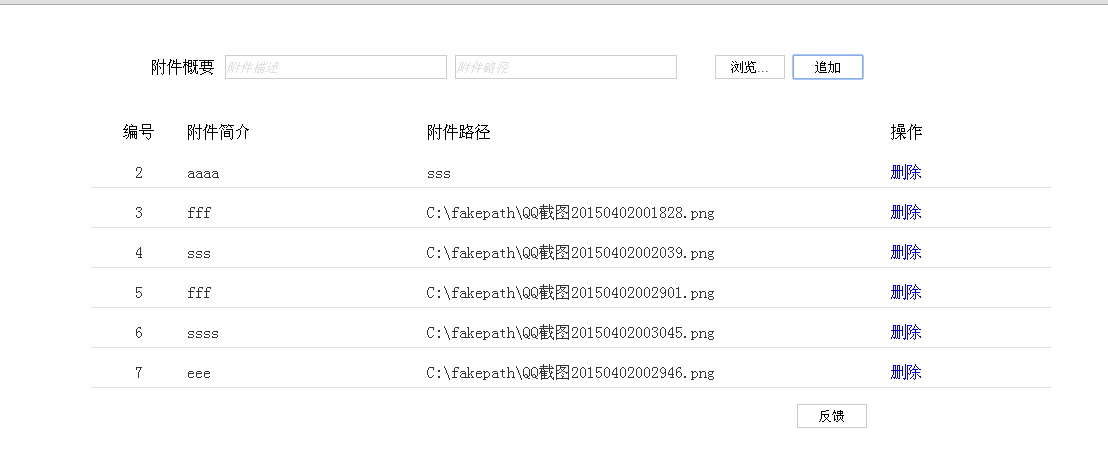
下面是源码
<!DOCTYPE html>

<html >

  <head>

    <meta charset="UTF-8">

    <title>附件添加</title>

    <script type="text/javascript" src="js/jquery-1.8.2.js"></script>

    <style type="text/css">

        input{ vertical-align:middle; margin:0; padding:0}

        .file-box{ position:relative;width:340px}

        .txt{ height:22px; border:1px solid #cdcdcd; width:220px;}

        .btn{ background-color:#FFF; border:1px solid #CDCDCD;height:24px; width:70px;}

        li{list-style-type:none;}

        .div1{

          float:left;

          width:10%;

          text-align: center;

          height:24px;

        }

        .div2{

          float:left;

          width:25%;

          height:24px;

        }

        .div3{

          float:left;

          width:45%;

          height:24px;

        }

        .div4{

          float:left;

          width:10%;

          text-align: center;

          height:24px;

        }

        .divHeader{

              margin-right: 10px;

             float: left;

             vertical-align: middle;

             line-height: 24px;

        }

        .mar{

         margin-left:0px;

        }

        .bor{

              height: 24px;

              border-bottom:1px solid rgb(223,223,223);

              margin-top: 15px;

              color:rgb(51,51,51);

        }

        .cur{

           cursor:auto;

        }

        .def{

            color: rgb(223,223,223);

            font-style: italic;

        }

    </style>

  </head>

  <body>

    <div id="page-wrapper" style="margin:auto;width:1000px;">

        <div style="margin-top: 50px; margin-left: 100px;">

            <div class="divHeader" ><span>附件概要</span></div>

            <div>

            <input  id="description" class='txt mar'  value=""/>

            <input id="path" class='txt mar' value=""/>

            <input id="fileInput" type="file" style="display:none" >

            <input type='button' class='btn mar' style="margin-left:30px;" onclick="$('input[id=fileInput]').click();" value='浏览...' />

            <input id="append" type='button'  class='btn mar'  value='追加' />

            </div>

            <pre id="fileDisplayArea"><pre>

        </div>

       <div style="">

           <ul>

           <li >

               <div class="div1" > <span>编号</span></div>

                <div class="div2" > <span>附件简介</span></div>

               <div class="div3" >  <span>附件路径</span></div>

                <div class="div4"> <span>操作</span></div>

           </li>

            <div style="clear:both;"></div>

           </ul>

           <ul id="data">

                  <li><div class="bor"><div class="div1" dd="22"> <span class="serial cur">1</span> </div><div class="div2"><span class="cur" title="ggg">ggg</span></div><div class="div3"><span class="cur" title="C:\fakepath\业务协同.html">C:\fakepath\业务协同.html</span> </div><div class="div4"><span><a onclick="deleteLi.call(this)" style="text-decoration: none;" href="javascript:void(0);">删除</a></span></div></div>  </li>

                  <div style="clear:both;"></div>

                  <li><div class="bor"><div class="div1" dd="22"> <span class="serial cur">2</span> </div><div class="div2"><span class="cur" title="aaaa">aaaa</span></div><div class="div3"><span class="cur" title="sss">sss</span> </div><div class="div4"><span><a onclick="deleteLi.call(this)" style="text-decoration: none;" href="javascript:void(0);">删除</a></span></div></div>  </li>

                  <div style="clear:both;"></div>

           </ul>

       </div>

    <div> <input style="float: right;margin-right: 184px;" id="apply" type='button'  class='btn mar'  value='反馈' />    </div>

  </script>

  <script type="text/javascript">

  $(function(){

    $("#description").val("附件描述");

    $("#description").addClass("def");

    $("#path").val("附件路径");

    $("#path").addClass("def");

  })

  //手动输入才会除法改变事件

// $("#path").on('input',function(e){

//   alert('Changed!')

// });

  function processInputPath(){

     if($("#path").val()=='附件路径')

      {

          $("#path").val("");

          $("#path").removeClass("def");

      }

     else if($("#path").val()=='')

      {

          $("#path").val("附件路径");

          $("#path").addClass("def");

      }

  }

   function processInputPathDes(){

     if($("#description").val()=='附件描述')

      {

          $("#description").val("");

          $("#description").removeClass("def");

      }

     else if($("#description").val()=='')

     {

          $("#description").val("附件描述");

          $("#description").addClass("def");

     }

  }

  $("#description").focus(function(){

      processInputPathDes();

  });

  $("#description").blur(function(){

    processInputPathDes();

  });

  $("#path").focus(function(){

     processInputPath();

  });

  $("#path").blur(function(){

   processInputPath();

  });

  //保存json的字面量json对象;

  var data=eval('[]');

  $('input[id=fileInput]').change(function() {

      $('#path').val($(this).val());

       $("#path").removeClass("def");

  });

   $("#append").click(function(){

     var descri=$("#description").val();

     var fileInput=$("#path").val();

     if(descri==undefined||descri==""||descri=="附件描述"){

        alert("请输入描述");

        return false;

     }

     if(fileInput==undefined||fileInput==""||fileInput=="附件路径"){

        alert("请选择文件");

        return false;

     }

     var serial=getMaxSerial();

     //封装描述,路径数据到json

     for(var i in data){

        if(fileInput==data[i]){

           alert("不能重复添加附件");

           return false;

        }

     }

     data.push(fileInput);

     createLi(serial,descri,fileInput);

   })

   function createLi(serial,descri,fileInput){

      //拼接添加li

     var  descriSub= descri;

     if(getLength(descri)>28){

        descriSub= getShowStr(descri,26);

     }

     var  fileInputSub= fileInput;

     if(getLength(fileInput)>50){

        fileInputSub= getShowStr(fileInput,48);

     }

     var str="<li ><div class='bor'><div class='div1' dd='22'> <span  class='serial cur'>"+serial+"</span> </div><div class='div2'><span class='cur' title='"+descri+"'>"+descriSub+"</span></div><div  class='div3'><span class='cur' title='"+fileInput+"'>"+fileInputSub+"</span> </div><div  class='div4'><span><a onclick='deleteLi.call(this)' style='text-decoration: none;' href='javascript:void(0);'>删除</a></span></div></div>  </li> <div style='clear:both;'></div>";

     $("#data").append($(str));

     $("#path").val("");

     $("#description").val("");

     processInputPath();

     processInputPathDes();

   }

   function deleteLi(){

    var title= $(this).parent().parent().siblings(".div3").children("span").attr("title");

    $(this).parent().parent().parent().parent().remove();

     for(var i in data){

      if(data[i]==title)

      {data.splice(i,1);}

     }

   }

   function getMaxSerial()

   {

       var serial= Number($(".serial:last").text());

       if(serial==undefined||serial==""||serial==null){

          serial=1;

       }

       else{

         serial=serial+1;

       }

       return serial

   }

   function getLength(str)

   {

        var realLength = 0;

        for (var i = 0; i < str.length; i++)

        {

            charCode = str.charCodeAt(i);

            if (charCode >= 0 && charCode <= 128)

            realLength += 1;

            else

            realLength += 2;

        }

        return realLength;

    }

    //根据长度获取index

    function getIndex(str,len)

    {

        var realLength = 0;

        var charLen=0;

        for (var i = 0; i < str.length; i++)

        {

            charCode = str.charCodeAt(i);

            if (charCode >= 0 && charCode <= 128)

            realLength += 1;

            else

            realLength += 2;

            if(realLength>=len-1){

             charLen=i;

             break;

            }

        }

        return charLen;

    }

    function getShowStr(str,len){

        return str.substring(0,getIndex(str,len))+"..";

    }

  </script>

</body>

</html>
javascript动态添加本地文件列表信息的更多相关文章
- asp.net后台代码动态添加JS文件和css文件的引用
首先添加命名空间 using System.Web.UI.HtmlControls; 代码动态添加css文件的引用 HtmlGenericControl myCss = new HtmlGeneric ...
- 用Javascript动态添加删除HTML元素实例 (转载)
<!DOCTYPE html PUBLIC "-//W3C//DTD XHTML 1.0 Transitional//EN" "http://www.w3.org/ ...
- 【javascript 动态添加数据到 HTML 页面】
今天简单的学习了一下有关对象字面量的定义和 javascript 如何取出对象字面量的值的知识,javascript 动态添加数据到 HTML 页面的问题. [学习目标]有如下的一组数据通过 Ajax ...
- C/C++ 获取目录下的文件列表信息
在C/C++编程时,需要获取目录下面的文件列表信息. 1.数据结构 struct dirent { long d_ino; /* inode number 索引 ...
- JavaScript 动态添加div 绑定点击事件
1.动态添加div function cDiv(num){ var oDiv=document.createElement("div"); oDiv.className='divs ...
- Javascript动态引用CSS文件的2种方法介绍
最近做一个项目,需要javascript动态插入样式,结果以前的方法失效了!查了2个小时的原因竟然是自己手贱,这个最后再说! javascript插入样式在前端开发中应用比较广泛,特别是在修改前端表现 ...
- [Android] 通过GridView仿微信动态添加本地图片
原文:http://blog.csdn.net/eastmount/article/details/41808179 前面文章讲述的都是"随手拍"中图像处理的操作,此篇文章主要讲述 ...
- javascript动态添加form表单元素
2014年11月7日 17:10:40 之前写过几篇类似的文章,现在看来比较初级,弄一个高级的简单的 情景: 后台要上传游戏截图,截图数量不确定,因此使用动态添加input节点的方法去实现这个效果 主 ...
- javaScript动态添加样式
[动态添加css样式] <html> <head> <script type="text/javascript"> window.onload= ...
随机推荐
- excel表格中关于 撤销工作表保护密码
利用宏处理,代码如下: Sub PasswordBreaker() Dim i As Integer, j As Integer, k As Integer Dim l As Integer, m A ...
- CentOS 7 做服务器 CentOS 5 做客服机 搭建Apache+php+mysql网页
1:在CentOS 7搭建yum源和php.Apache 安装 yum install php-mysql -y 文件 重启httpd服务:systemctl restart httpd.ser ...
- C#后台程序重启IIS,发邮件通知
应用场景:IIS网站挂掉,系统自动重启IIS,通知相关联系人: 主要代码: 监控类 public class monitoringiis { EmailSend send = new EmailSen ...
- (C#)算法题
1. Convert string from "AAABBCC" to "A3B2C2". 当面试者提出这个问题的时候,首先需要确认题意:譬如:字符串是不是顺序 ...
- 关于JS中的JSON
早期,一般是使用XML作为互联网上传输结构化数据的,但由于它解析麻烦,字符冗长,因此被轻量级的JSON所逐渐替代.JSON是JavaScript的一个严格子集,利用了JavaScript中一些模式来表 ...
- Android接收系统广播
Android内置了很多系统级别的广播,我们可以在应用程序中通过监听这些广播来得到各种系统的状态信息.比如手机开机完成后会发出一条广播,电池的电量发生变化会发出一条广播,时间或时区发生改变也会发出一条 ...
- HttpWebRequest.GetResponse 方法 转载
GetResponse 方法返回包含来自 Internet 资源的响应的 WebResponse 对象. 实际返回的实例是 HttpWebResponse,并且能够转换为访问 HTTP 特定的属性的类 ...
- 2015年第六届蓝桥杯C/C++程序设计本科B组决赛
1.积分之谜(枚举) 2.完美正方形 3.关联账户(并查集) 4.密文搜索 5.居民集会 6.模型染色 1.积分之迷 小明开了个网上商店,卖风铃.共有3个品牌:A,B,C.为了促销,每件商品都会返固定 ...
- linux DMZ host 允许虚拟机以Host-only的方式上网
linux DMZ host 允许虚拟机以Host-only的方式上网. host ip 192.168.0.17 vboxnet0 ip 192.168.56.1 1.首先打开linux的转发功能: ...
- 配置ActiveX控件在网页中下载安装
先检查客户端浏览器是否安装了ActiveX控件,如果没有安装ActiveX,就需要先给浏览器提示下载并允许安装.否则就直接使用该ActiveX控件.我们可以使用CodeBase来满足我们的要求:下面是 ...