
12.Android之Tabhost组件学习
TabHost是整个Tab的容器,TabHost的实现有两种方式:
第一种继承TabActivity,从TabActivity中用getTabHost()方法获取TabHost。各个Tab中的内容在布局文件中定义就行了。
第二种方式,不继承TabActivity,在布局文件中定义TabHost即可,但是TabWidget的id必须是@android:id/tabs,FrameLayout的id必须是@android:id/tabcontent。
1)继承TabActivity
如果加载该TabHost画面的类继承TabActivity,并且想通过getTabHost()方法来获取TabHost,getTabWidget()方法获取TabWidget,那么TabHost、TabWidget 、FrameLayout 三者的ID必须是android.R.id.tabhost、android.R.id.tabs、android.R.id.tabcontent, 否则会报运行时异常, 比如提示Your content must have a TabHost whose id attribute is 'android.R.id.tabhost'之类错误
修改主布局activity_main文件:
 <?xml version="1.0" encoding="utf-8"?>

 <TabHost

     xmlns:android="http://schemas.android.com/apk/res/android"

     android:id="@android:id/tabhost"

     android:layout_width="fill_parent"

     android:layout_height="fill_parent"

     android:background="@drawable/back">

     <LinearLayout

         android:orientation="vertical"

         android:layout_width="fill_parent"

         android:layout_height="fill_parent">

         <TabWidget

             android:id="@android:id/tabs"

             android:layout_alignParentBottom="true"

             android:layout_width="fill_parent"

             android:layout_height="wrap_content"/>

         <FrameLayout

             android:id="@android:id/tabcontent"

             android:layout_weight="1"

             android:layout_width="fill_parent"

             android:layout_height="fill_parent" />

     </LinearLayout>

 </TabHost>
再增加自己定义的子TabHost页面布局文件tabhost1如下:
 <?xml version="1.0" encoding="utf-8"?>

 <TabHost

     xmlns:android="http://schemas.android.com/apk/res/android"

     android:id="@+id/mytabhost"

     android:layout_width="match_parent"

     android:layout_height="match_parent">

     <LinearLayout

         android:id="@+id/tab01"

         android:layout_width="match_parent"

         android:layout_height="match_parent"

         android:orientation="vertical">

         <TextView

             android:layout_width="wrap_content"

             android:layout_height="wrap_content"

             android:text="小明"/>

         <TextView

             android:layout_width="wrap_content"

             android:layout_height="wrap_content"

             android:text="小东"/>

     </LinearLayout>

     <LinearLayout

         android:id="@+id/tab02"

         android:layout_width="match_parent"

         android:layout_height="match_parent"

         android:orientation="vertical">

         <TextView

             android:layout_width="wrap_content"

             android:layout_height="wrap_content"

             android:text="小红"/>

         <TextView

             android:layout_width="wrap_content"

             android:layout_height="wrap_content"

             android:text="小紫"/>

     </LinearLayout>

     <LinearLayout

         android:id="@+id/tab03"

         android:layout_width="match_parent"

         android:layout_height="match_parent"

         android:orientation="vertical">

         <TextView

             android:layout_width="wrap_content"

             android:layout_height="wrap_content"

             android:text="小李"/>

         <TextView

             android:layout_width="wrap_content"

             android:layout_height="wrap_content"

             android:text="小北"/>

     </LinearLayout>

 </TabHost>
最后修改下MainActivity.java代码:
 package com.example.administrator.dialog1;

 import android.os.Bundle;

 import android.app.TabActivity;

 import android.view.LayoutInflater;

 import android.widget.TabHost;

 public class MainActivity extends TabActivity {

     TabHost mtabHost = null;

     @Override

     protected void onCreate(Bundle savedInstanceState) {

         super.onCreate(savedInstanceState);

         setContentView(R.layout.activity_main);

         //调用TabActivity的getTabHost()方法获取TabHost对象

         mtabHost = this.getTabHost();

         //设置使用TabHost布局

         LayoutInflater.from(this).inflate(R.layout.tabhost1, mtabHost.getTabContentView(),true);

         //添加第一个标签页

         mtabHost.addTab(mtabHost.newTabSpec("tab01").setIndicator("已接电话").setContent(R.id.tab01));

         //添加第二个标签页,并在其标签上添加一个图片

         mtabHost.addTab(mtabHost.newTabSpec("tab02").setIndicator("未接电话",getResources().getDrawable(R.mipmap.ic_launcher)).setContent(R.id.tab02));

         //添加第三个标签页

         mtabHost.addTab(mtabHost.newTabSpec("tab03").setIndicator("已拨电话").setContent(R.id.tab03));

     }

 }
运行效果:

2) 不继承TabActivity
修改MainActivity.java代码:
 package com.example.administrator.dialog1;

 import android.app.Activity;

 import android.os.Bundle;

 import android.widget.TabHost;

 import android.widget.TabWidget;

 public class MainActivity extends Activity {

     TabHost mtabHost = null;

     TabWidget tabWidget = null;

     @Override

     protected void onCreate(Bundle savedInstanceState) {

         super.onCreate(savedInstanceState);

         setContentView(R.layout.tabhost1);

         //以下三句代码,注意顺序

         mtabHost = (TabHost)findViewById(R.id.mytabhost);

         mtabHost.setup();

         tabWidget = mtabHost.getTabWidget();

         //添加第一个标签页

         mtabHost.addTab(mtabHost.newTabSpec("tab01").setIndicator("已接电话").setContent(R.id.tab01));

         //添加第二个标签页,并在其标签上添加一个图片

         mtabHost.addTab(mtabHost.newTabSpec("tab02").setIndicator("未接电话",getResources().getDrawable(R.mipmap.ic_launcher)).setContent(R.id.tab02));

         //添加第三个标签页

         mtabHost.addTab(mtabHost.newTabSpec("tab03").setIndicator("已拨电话").setContent(R.id.tab03));

         mtabHost.setCurrentTab(0);

     }

 }
再修改下tabhost1布局文件:
 <?xml version="1.0" encoding="utf-8"?>

 <TabHost

     xmlns:android="http://schemas.android.com/apk/res/android"

     android:id="@+id/mytabhost"

     android:layout_width="match_parent"

     android:layout_height="match_parent">

     <TabWidget

         android:id="@android:id/tabs"

         android:layout_width="fill_parent"

         android:layout_height="wrap_content"/>

     <FrameLayout

         android:id="@android:id/tabcontent"

         android:layout_weight="1"

         android:layout_width="fill_parent"

         android:layout_height="fill_parent" >

         <LinearLayout

             android:id="@+id/tab01"

             android:layout_width="match_parent"

             android:layout_height="match_parent"

             android:orientation="vertical">

             <TextView

                 android:layout_width="wrap_content"

                 android:layout_height="wrap_content"

                 android:layout_marginTop="60dp"

                 android:text="小明"/>

             <TextView

                 android:layout_width="wrap_content"

                 android:layout_height="wrap_content"

                 android:layout_marginBottom="60dp"

                 android:text="小东"/>

         </LinearLayout>

         <LinearLayout

             android:id="@+id/tab02"

             android:layout_width="match_parent"

             android:layout_height="match_parent"

             android:orientation="vertical">

             <TextView

                 android:layout_width="match_parent"

                 android:layout_height="wrap_content"

                 android:gravity="center"

                 android:layout_marginTop="60dp"

                 android:text="小红"/>

             <TextView

                 android:layout_width="match_parent"

                 android:layout_height="wrap_content"

                 android:gravity="center"

                 android:layout_marginBottom="60dp"

                 android:text="小紫"/>

         </LinearLayout>

         <LinearLayout

             android:id="@+id/tab03"

             android:layout_width="match_parent"

             android:layout_height="match_parent"

             android:orientation="vertical">

             <TextView

                 android:layout_width="match_parent"

                 android:layout_height="wrap_content"

                 android:gravity="right"

                 android:layout_marginTop="60dp"

                 android:text="小李"/>

             <TextView

                 android:layout_width="match_parent"

                 android:layout_height="wrap_content"

                 android:gravity="right"

                 android:layout_marginBottom="60dp"

                 android:text="小北"/>

         </LinearLayout>

     </FrameLayout>

 </TabHost>
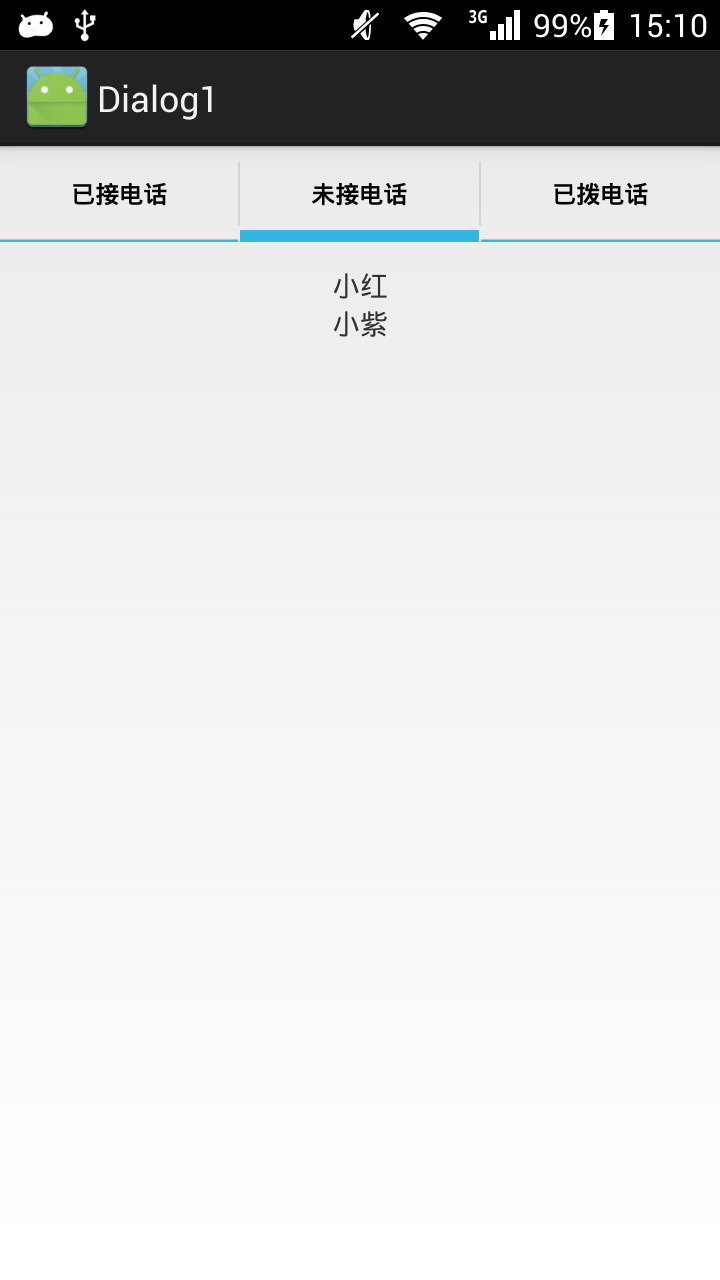
最终运行效果:
12.Android之Tabhost组件学习的更多相关文章
- Android的TabHost组件-android的学习之旅(四十)
TabHost简介 虽然,官方建议用Fagment取代TabHost,但是我们还是大概的介绍一下.TabHost是一种非常简单的组件,TabHost可以很方便的在窗口放置多个标签页,每一个标签页相当于 ...
- Android之EditText组件学习
一.基础学习 1.Button是TextView的一个子类,所以按钮本身是一个特殊的文本,属性和TextView相似 2.EditText类似html里的input type="text&q ...
- Android之TextView组件学习
一.基础学习 1.findViewById返回View类,该类是所有View组件的父类. 2.子类比父类拥有更多的属性和方法,不过子类找不到的话去父类找 3.marquee:华盖,跑马灯效果:orie ...
- Android的四大组件学习
一.Linearlayout : 线性布局 1. android:orientation="vertical" //控件的方向控制,vertical : 垂直布局 , ...
- 从零開始学android<TabHost标签组件.二十九.>
TabHost主要特点是能够在一个窗体中显示多组标签栏的内容,在Android系统之中每一个标签栏就称为一个Tab.而包括这多个标签栏的容器就将其称为TabHost.TabHost类的继承结构例如以下 ...
- Android应用程序组件Content Provider简要介绍和学习计划
文章转载至CSDN社区罗升阳的安卓之旅,原文地址:http://blog.csdn.net/luoshengyang/article/details/6946067 在Android系统中,Conte ...
- Android之TabHost布局(转)
1.概念 盛放Tab的容器就是TabHost.TabHost的实现有两种方式: 第一种继承TabActivity,从TabActivity中用getTabHost()方法获取TabHost.各个Tab ...
- 转-TabHost组件(一)(实现底部菜单导航)
http://www.cnblogs.com/lichenwei/p/3974009.html 什么是TabHost? TabHost组件的主要功能是可以进行应用程序分类管理,例如:在用户使用wind ...
- 转-TabHost组件(二)(实现底部菜单导航)
http://www.cnblogs.com/lichenwei/p/3975095.html 上面文章<安卓开发复习笔记——TabHost组件(一)(实现底部菜单导航)>中提到了利用自定 ...
随机推荐
- centos6.5 redis3 开机自动启动命令设置
修改redis.conf,打开后台运行选项: # By default Redis does not run as a daemon. Use 'yes' if you need it. # Note ...
- IL查看override
查看override的IL Override示例 下面我们看一个Override的Example namespace MyCollection { public class MyBase { publ ...
- Android优化——UI优化(三)使用ViewStub延迟加载
使用ViewStub延迟加载 1.ViewStub延迟加载 ViewStub是一个不可见的,大小为0的View,最佳用途就是实现View的延迟加载,在需要的时候再加载View,可Java中常见的性能优 ...
- 21SpringMvc_异步发送表单数据到Bean,并响应JSON文本返回(这篇可能是最重要的一篇了)
这篇文章实现三个功能:1.在jsp页面点击一个按钮,然后跳转到Action,在Action中把Emp(int id ,String salary,Data data)这个实体变成JSON格式返回到页面 ...
- 【C#】实现按Windows排序方式排序
很多人或许都遇到过类似的问题,C#读取的文件列表默认是按ASCII排序的,这样会出现一个问题就是10会排在2的前面. 那么是否可以解决呢,答案是肯定的.虽然这个是很早之前遇到的问题,这次突然想起来,就 ...
- iframe在ipad safari的显示
今 天要在web中嵌套一个网址或本地HTML,用到了iframe,在电脑上设置scrolling=‘auto’,宽度高度,会有滚动条出现.而在 ipad上会全部显示整个网页的宽度高度.scrollin ...
- ThinkPHP 3.2.3 ----- 验证码
显示验证码 首先在Home/Controller下创建一个公共控制器PublicController 1 <?php 2 namespace Home\Controller; 3 4 use T ...
- JS 之DOM对象(2)
http://www.cnblogs.com/zourong/p/4792394.html 这篇文件介绍了DOM1中的一些属性和方法,下面的内容主要介绍DOM2和DOM3中新增的内容. 框架的变化 框 ...
- LeetCode:Text Justification
题目链接 Given an array of words and a length L, format the text such that each line has exactly L chara ...
- initializer for conditional binding must have optional type not AVAudioPlayer
if let buttonBeep = self.setupAudioPlayerWithFile("ButtonTap", type: "wav") { ...