
ASP.NET Core 1.0开发Web API程序
.NET Core版本:1.0.0-rc2
Visual Studio版本:Microsoft Visual Studio Community 2015 Update 2
开发及运行平台:Windows 7 专业版 Service Pack 1 x64
步骤一、创建ASP.NET Core Web API项目
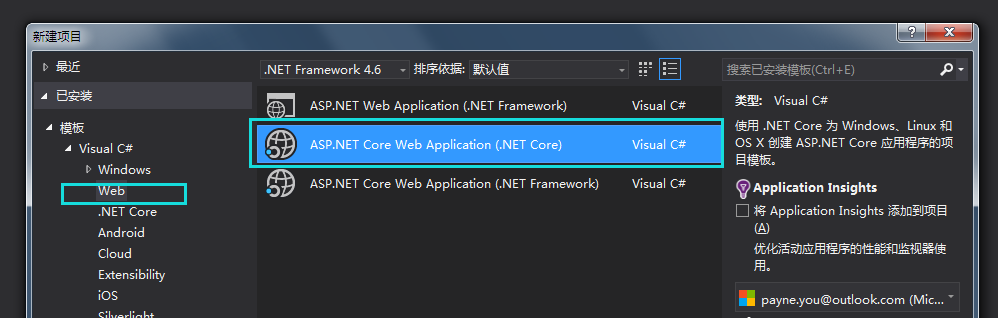
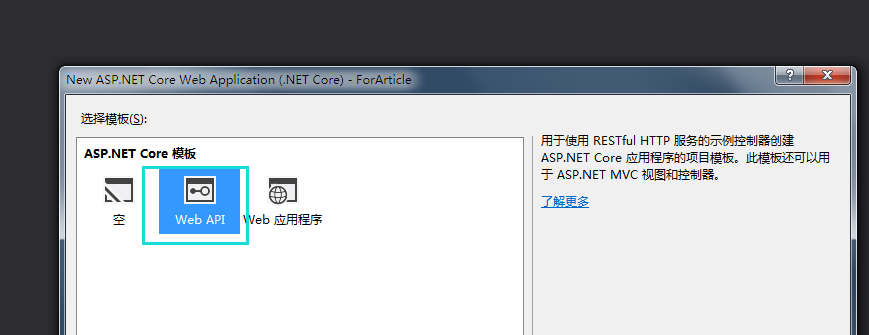
VS里面新建项目,Web-->ASP.NET Core Web Application(.NET Core)-->Web API,比如本例中建立的TodoApi项目。
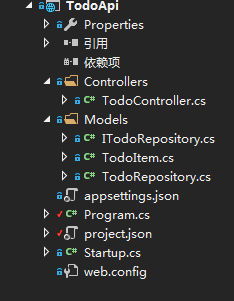
步骤二、在Models文件夹中新建实体、接口及服务仓库
TodoItem.cs(实体类)
 namespace TodoApi.Models

 {

     public class TodoItem

     {

         public string Key { get; set; }

         public string Name { get; set; }

         public bool IsComplete { get; set; }

     }

 }
ITodoRepository.cs(接口类)
 using System.Collections.Generic;

 namespace TodoApi.Models

 {

     public interface ITodoRepository

     {

         void Add(TodoItem item);

         IEnumerable<TodoItem> GetAll();

         TodoItem Find(string key);

         TodoItem Remove(string key);

         void Update(TodoItem item);

     }

 }
TodoRepository.cs(接口实现类,服务的具体实现)
 using System;

 using System.Collections.Concurrent;

 using System.Collections.Generic;

 namespace TodoApi.Models

 {

     public class TodoRepository : ITodoRepository

     {

         static ConcurrentDictionary<string, TodoItem> _todoItems = new ConcurrentDictionary<string, TodoItem>();

         public TodoRepository()

         {

             Add(new TodoItem() {Name = "Item1"});

         }

         public void Add(TodoItem item)

         {

             item.Key = Guid.NewGuid().ToString();

             _todoItems[item.Key] = item;

         }

         public IEnumerable<TodoItem> GetAll()

         {

             return _todoItems.Values;

         }

         public TodoItem Find(string key)

         {

             TodoItem item;

             _todoItems.TryGetValue(key, out item);

             return item;

         }

         public TodoItem Remove(string key)

         {

             TodoItem item;

             _todoItems.TryGetValue(key, out item);

             _todoItems.TryRemove(key, out item);

             return item;

         }

         public void Update(TodoItem item)

         {

             _todoItems[item.Key] = item;

         }

     }

 }
步骤三、在Controllers文件夹中新增Controller类
 using System.Collections.Generic;

 using Microsoft.AspNetCore.Mvc;

 using TodoApi.Models;

 namespace TodoApi.Controllers

 {

     [Route("api/[controller]")]

     public class TodoController : Controller

     {

         private ITodoRepository TodoItems { get; set; }

         public TodoController(ITodoRepository todoRepository)

         {

             TodoItems = todoRepository;

         }

         [HttpGet]

         public IEnumerable<TodoItem> GetAll()

         {

             return TodoItems.GetAll();

         }

         [HttpGet("{id}", Name = "GetTodo")]

         public IActionResult GetById(string id)

         {

             var item = TodoItems.Find(id);

             if (item == null)

             {

                 return NotFound();

             }

             return new ObjectResult(item);

         }

         [HttpPost]

         public IActionResult Create([FromBody] TodoItem todoItem)

         {

             if (null == todoItem)

             {

                 return BadRequest();

             }

             TodoItems.Add(todoItem);

             return CreatedAtRoute("GetTodo", new {controller = "todo", id = todoItem.Key}, todoItem);

         }

         public IActionResult Update(string id, [FromBody] TodoItem item)

         {

             if (item == null || item.Key != id)

             {

                 return BadRequest();

             }

             var todo = TodoItems.Find(id);

             if (todo == null)

             {

                 return NotFound();

             }

             TodoItems.Update(item);

             return new NoContentResult();

         }

         public void Delete(string id)

         {

             TodoItems.Remove(id);

         }

     }

 }
在ASP.NET Core 1.0带来的新特性这篇文章中有提到ASP.NET Core已经把MVC和Web API整合到一起了,所以我们看到Controller类引用的是Microsoft.AspNetCore.Mvc这个NuGet包了,从字面上也可以看出这个整合。
步骤四、编写用于启动应用的主入口程序
progrom.cs
 using System.IO;

 using Microsoft.AspNetCore.Hosting;

 namespace TodoApi

 {

     public class Program

     {

         public static void Main(string[] args)

         {

             var host = new WebHostBuilder()

                 .UseKestrel()  // 使用Kestrel服务器

                 .UseContentRoot(Directory.GetCurrentDirectory())  // 指定Web服务器的对应的程序主目录

                 .UseStartup<Startup>()  // 指定Web服务器启动时执行的类型,这个约定是Startup类

                 .Build(); // 生成Web服务器

             host.Run(); // 运行Web应用程序

         }

     }

 }
步骤五、Startup类型实现
Startup.cs(这个是约定的启动应用时加载执行的类型,约定包括:类型的名称,自动生成的相关类方法)
 using Microsoft.AspNetCore.Builder;

 using Microsoft.AspNetCore.Hosting;

 using Microsoft.Extensions.Configuration;

 using Microsoft.Extensions.DependencyInjection;

 using Microsoft.Extensions.Logging;

 using TodoApi.Models;

 namespace TodoApi

 {

     public class Startup

     {

         public Startup(IHostingEnvironment env)

         {

             var builder = new ConfigurationBuilder()

                 .SetBasePath(env.ContentRootPath)

                 .AddJsonFile("appsettings.json", true, true)

                 .AddJsonFile($"appsettings.{env.EnvironmentName}.json", true)

                 .AddEnvironmentVariables();

             Configuration = builder.Build();

         }

         public IConfigurationRoot Configuration { get; }

         // This method gets called by the runtime. Use this method to add services to the container.

         public void ConfigureServices(IServiceCollection services)

         {

             // Add framework services.

             services.AddMvc();

             // Add our respository type

             services.AddSingleton<ITodoRepository, TodoRepository>();

         }

         // This method gets called by the runtime. Use this method to configure the HTTP request pipeline.

         public void Configure(IApplicationBuilder app, IHostingEnvironment env, ILoggerFactory loggerFactory)

         {

             loggerFactory.AddConsole(Configuration.GetSection("Logging"));

             loggerFactory.AddDebug();

             app.UseMvc();

         }

     }

 }
Startup构造函数里面主要是初始化配置,应用的配置可以是外部自定义的JSON文件,比如本例中的appsettings.json,我们甚至可以根据不同的环境(FAT,UAT,PRD等)生成给自环境使用的配置文件,比如:
appsettings.FAT.json、appsettings.UAT.json等,不同的环境根据环境变量{env.EnvironmentName}配置的值来读取相应的配置文件。这个{env.EnvironmentName}可以通过项目的Properties下的launchSettings.json文件进行配置,如下:
 {

     "TodoApi": {

       "commandName": "Project",

       "launchBrowser": true,

       "launchUrl": "http://localhost:5000/api/todo",

       "environmentVariables": {

         "ASPNETCORE_ENVIRONMENT": "PRD"

       }

     }

   }

 }
ConfigureServices,Configure方法的作用在在ASP.NET Core 1.0带来的新特性这篇文章中已有阐述,这里不再赘述。
步骤六、运行程序
在cmd里面把当前目录切换到项目的根目录,然后依次执行后面的命令:1、dotnet restore 2、dotnet build 3、dotnet run
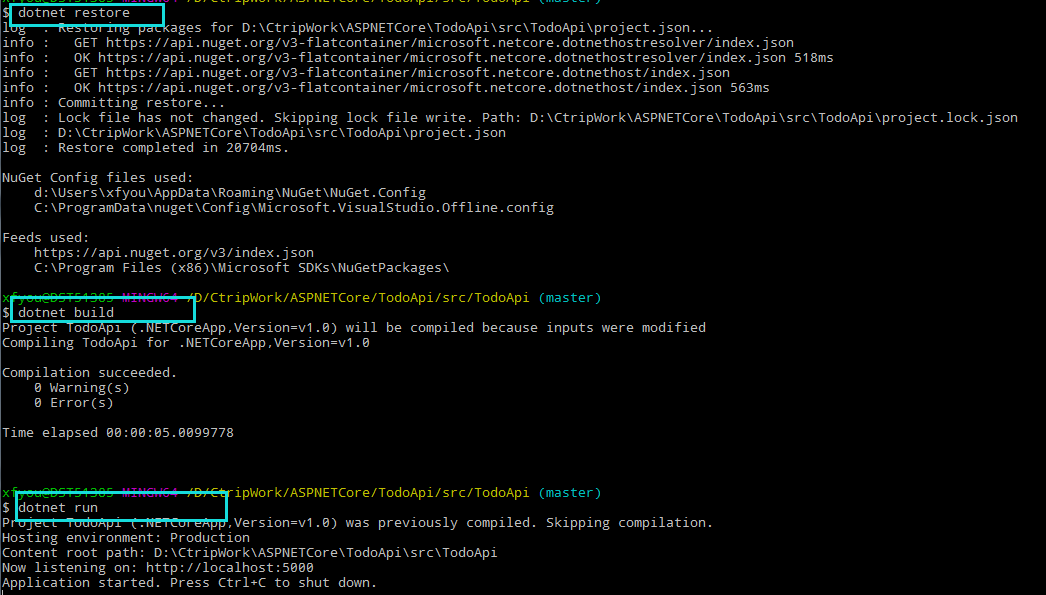
执行完dotnet run后,应用程序已经启动起来了,通过控制台的输出提示可以看出,Web服务器在5000端口侦听请求。
测试一个URL(http://localhost:5000/api/todo):

控制台输出info日志:
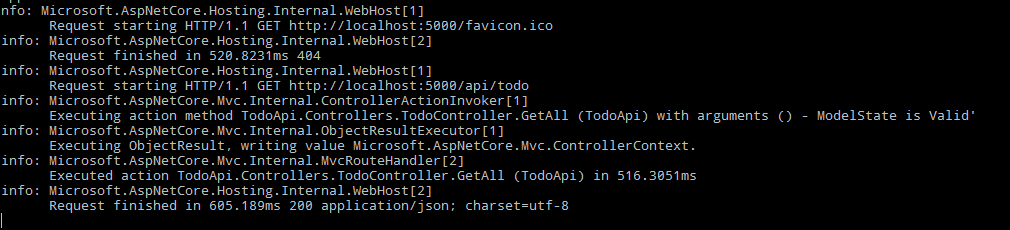
我们也可以改变控制台输出日志的级别,只需要更改我们自定义的appsettings.json配置即可,如下:
 {

   "Logging": {

     "IncludeScopes": false,

     "LogLevel": {

       "Default": "Debug",

       "System": "Debug",

       "Microsoft": "Warning"

     }

   }

 }
把“Microsoft”的值改成:“Warning”,这样上述info级别的日志就不会再输出了(Warning,Error级别的日志才会输出)。
ASP.NET Core 1.0开发Web API程序的更多相关文章
- 002.Create a web API with ASP.NET Core MVC and Visual Studio for Windows -- 【在windows上用vs与asp.net core mvc 创建一个 web api 程序】
Create a web API with ASP.NET Core MVC and Visual Studio for Windows 在windows上用vs与asp.net core mvc 创 ...
- ASP.NET Core 1.0 开发记录
官方资料: https://github.com/dotnet/core https://docs.microsoft.com/en-us/aspnet/core https://docs.micro ...
- 从 MVC 到使用 ASP.NET Core 6.0 的最小 API
从 MVC 到使用 ASP.NET Core 6.0 的最小 API https://benfoster.io/blog/mvc-to-minimal-apis-aspnet-6/ 2007 年,随着 ...
- ASP.NET Core MVC中构建Web API
在ASP.NET CORE MVC中,Web API是其中一个功能子集,可以直接使用MVC的特性及路由等功能. 在成功构建 ASP.NET CORE MVC项目之后,选中解决方案,先填加一个API的文 ...
- asp.net core 3.0获取web应用的根目录
目录 1.需求 2.解决方案 1.需求 asp.net core 3.0的web项目中,在controller中,想要获取wwwroot下的imgs/banners文件夹下的所有文件: 在传统的asp ...
- Do You Kown Asp.Net Core -- Asp.Net Core 2.0 未来web开发新趋势 Razor Page
Razor Page介绍 前言 上周期待已久的Asp.Net Core 2.0提前发布了,一下子Net圈热闹了起来,2.0带来了很多新的特性和新的功能,其中Razor Page引起我的关注,作为web ...
- 【asp.net core】实现动态 Web API
序言: 远程工作已经一个月了,最近也算是比较闲,每天早上起床打个卡,快速弄完当天要做的工作之后就快乐摸鱼去了.之前在用 ABP 框架(旧版)的时候就觉得应用服务层写起来真的爽,为什么实现了个 IApp ...
- 使用VS Code开发.Net Core 2.0 MVC Web应用程序教程之一
好吧,现在我们假设你已经安装好了VS Code开发工具..Net Core 2.0预览版的SDK dotnet-sdk-2.0.0(注意自己的操作系统),并且已经为VS Code安装好了C#扩展(在V ...
- 【ASP.NET Core】从向 Web API 提交纯文本内容谈起
前些时日,老周在升级“华南闲肾回收登记平台”时,为了扩展业务,尤其是允许其他开发人员在其他平台向本系统提交有关肾的介绍资料,于是就为该系统增加了几个 Web API. 其中,有关肾的介绍采用纯文本方式 ...
随机推荐
- dbvis MySQL server version for the right syntax to use near 'OPTION SQL_SELECT_LIMIT=DEFAULT' at line 1
转自:http://www.cnblogs.com/_popc/p/4053593.html 今天使用数据库查询工具DBvis链接mysql数据库时, 发现执行如何sql语句, 都报如下错误: 后来想 ...
- MySql 数据操作类
/// <summary> /// MySqlHelper 的摘要说明. /// </summary> public class MySqlHelper { public st ...
- c++类的 static 和const那些事
1.static成员变量(非const)必须在类外定义,在类中只是作为声明(声明其scope为该类),不能使用类初始化成员列表来初始化,只能在定义的时候初始化. 2.static const的成员变量 ...
- Oracle 物化视图 说明
一. 物化视图概述 Oracle的物化视图是包括一个查询结果的数据库对像,它是远程数据的的本地副本,或者用来生成基于数据表求和的汇总表.物化视图存储基于远程表的数据,也可以称为快照. 物化视图可 ...
- jsp中如何整合CKEditor+CKFinder实现文件上传
最近笔者做了一个新闻发布平台,放弃了之前的FCKEditor编辑器,使用了CKEditor+CKFinder,虽然免费的CKFinder是Demo版本,但是功能完整,而且用户都是比较集中精神发新闻的人 ...
- 【软件分析与挖掘】Multiple kernel ensemble learning for software defect prediction
摘要: 利用软件中的历史缺陷数据来建立分类器,进行软件缺陷的检测. 多核学习(Multiple kernel learning):把历史缺陷数据映射到高维特征空间,使得数据能够更好地表达: 集成学习( ...
- 【cs229-Lecture16】马尔可夫决策过程
之前讲了监督学习和无监督学习,今天主要讲“强化学习”. 马尔科夫决策过程:Markov Decision Process(MDP) 价值函数:value function 值迭代:value iter ...
- 【转载】solr初体验
[1]http://cxshun.iteye.com/blog/1039445 由于工作原因,这段时间接触到solr,一个基于lucene的企业级搜索引擎.不怎么了解它的童鞋可以去GOOGLE一下. ...
- smartjs - DataManager 场景示例分析 - 数据懒加载
发一张policy的参数图设置图: 场景1 - 数据的懒加载/延迟加载 在很多时候,为了提高网页的加载速度,减少不必要的开销,会将页面的数据拆分成几个部分,首先加载呈现可视区域内的数据,然后剩下来的会 ...
- Rendering Path
Rendering Path:渲染路径 设置:1.Player Setting,2.Camera(会覆盖PlayerSetting中的设置) 选择:根据渲染内容和目标平台来选择合适的Rendering ...