
WPF中实现
计算类的封装
using System;

using System.Collections.Generic;

using System.Linq;

using System.Text;

namespace wpfone1

{

        interface operater1

        {

            int calculate(int a, int b);

        }

        class Add : operater1

        {

            public int calculate(int a, int b)

            {

                return a + b;

            }

        }

        class Sub : operater1

        {

            public int calculate(int a, int b)

            {

                return a - b;

            }

        }

        class Mul : operater1

        {

            public int calculate(int a, int b)

            {

                return a * b;

            }

        }

        class Div : operater1

        {

            public int calculate(int a, int b)

            {

                if (b == 0)

                {

                    throw new Exception("除数不能为零!");

                }

                else

                {

                    return a / b;

                }

            }

        }

    }
用策咯模式实现
using System;

using System.Collections.Generic;

using System.Linq;

using System.Text;

namespace wpfone1

{

  public  class Clacuter

    {

        private operater1 oper1;

        public Clacuter(string aSS)

        {

            switch (aSS)

            {

                case "+":

                    oper1 = new Add();

                    break;

                case "-":

                    oper1 = new Sub();

                    break;

                case "*":

                    oper1 = new Mul();

                    break;

                case "/":

                    oper1 = new Div();

                    break;

            }

        }

        public int Calculation(int a, int b)

        {

            return oper1.calculate(a, b);

        }

    }

}
写入类以及清除题库的类
using System;

using System.Collections.Generic;

using System.Linq;

using System.Text;

using System.IO;

namespace wpfone1

{

    class Writes

    {

        public void inscribe(string a, string b)

        {

            StreamWriter aaa = new StreamWriter(a, true);

            aaa.WriteLine(b);

            aaa.Close();

        }

        public void cleanup(string c, string d, string e)

        {

            StreamWriter ddd = new StreamWriter(c);

            ddd.WriteLine(" ");

            ddd.Close();

            StreamWriter aaa = new StreamWriter(d);

            aaa.WriteLine("");

            aaa.Close();

            StreamWriter fff = new StreamWriter(e);

            fff.WriteLine("");

            fff.Close();

        }

    }

}
window1的设计以及代码
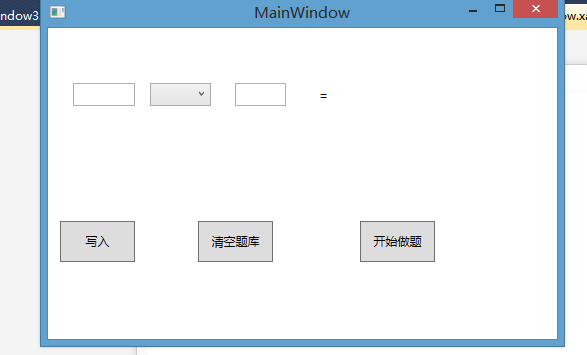
using System;

using System.Collections.Generic;

using System.Linq;

using System.Text;

using System.Windows;

using System.Windows.Controls;

using System.Windows.Data;

using System.Windows.Documents;

using System.Windows.Input;

using System.Windows.Media;

using System.Windows.Media.Imaging;

using System.Windows.Navigation;

using System.Windows.Shapes;

namespace wpfone1

{

    /// <summary>

    /// MainWindow.xaml 的交互逻辑

    /// </summary>

    public partial class MainWindow : Window

    {

        public MainWindow()

        {

            InitializeComponent();

        }

        private void button1_Click(object sender, RoutedEventArgs e)//写入题

        {

            Writes writ = new Writes();

            string fnm = @"one";

            string text1 = this.textBox1.Text;

            writ.inscribe(fnm, text1);

            string fnmm = @"tow";

            string text2 = this.textBox2.Text;

            writ.inscribe(fnmm, text2);

            string fnm1 = @"fuhao";

            string text3 = this.comboBox1.Text;

            writ.inscribe(fnm1, text3);

            textBox1.Clear();

            textBox2.Clear();

        }

        private void button2_Click(object sender, RoutedEventArgs e)

        {

            string a = @"tow";

            string b = @"one";

            string c = @"fuhao";

            Writes clean = new Writes();

            clean.cleanup(a, b, c);

        }

        private void button3_Click(object sender, RoutedEventArgs e)//开始做题

        {

            Window2 wind = new Window2();

            wind.ShowDialog();

        }

    }

}
Window2的设计及代码
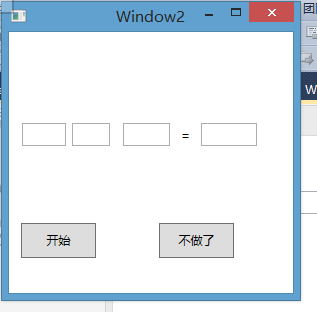
using System;

using System.Collections.Generic;

using System.Linq;

using System.Text;

using System.Windows;

using System.Windows.Controls;

using System.Windows.Data;

using System.Windows.Documents;

using System.Windows.Input;

using System.Windows.Media;

using System.Windows.Media.Imaging;

using System.Windows.Shapes;

using System.IO;

namespace wpfone1

{

    /// <summary>

    /// Window2.xaml 的交互逻辑

    /// </summary>

    public partial class Window2 : Window

    {

        public Window2()

        {

            InitializeComponent();

        }

        private int i = 1;

        public static int count;

        public static int right;

        private void button1_Click(object sender, RoutedEventArgs e)

        {

            duti();

        }

        private void textBox4_KeyDown(object sender, KeyEventArgs e)

        {

            if (e.Key == Key.Enter)

            {

                Clacuter clacuter = new Clacuter(textBox2.Text);

                int B = clacuter.Calculation(int.Parse(textBox1.Text), int.Parse(textBox3.Text));

                if (textBox4.Text == B.ToString())

                {

                    MessageBox.Show("回答正确!");

                    right++;

                }

                else

                {

                    MessageBox.Show("回答错误!");

                }

                count++;

                textBox4.Clear();

                duti();

            }

        }

        public void duti()

        {

            string[] line = File.ReadAllLines("one");

            if (i < line.Length)

            {

                textBox1.Text = line[i];

                string[] lines = File.ReadAllLines("tow");

                textBox3.Text = lines[i];

                string[] lin = File.ReadAllLines("fuhao");

                textBox2.Text = lin[i];

            }

            i++;

            if (i == line.Length + 1)

            {

                MessageBox.Show("你的题做完了,可以去休息一下了!");

                Window3 win3 = new Window3();

                win3.ShowDialog();

            }

        }

        private void button2_Click(object sender, RoutedEventArgs e)

        {

            this.Close();

            Window3 win3 = new Window3();

            win3.ShowDialog();

        }

    }

}
window3的设计及代码

using System;

using System.Collections.Generic;

using System.Linq;

using System.Text;

using System.Windows;

using System.Windows.Controls;

using System.Windows.Data;

using System.Windows.Documents;

using System.Windows.Input;

using System.Windows.Media;

using System.Windows.Media.Imaging;

using System.Windows.Shapes;

namespace wpfone1

{

    /// <summary>

    /// Window3.xaml 的交互逻辑

    /// </summary>

    public partial class Window3 : Window

    {

        public Window3()

        {

            InitializeComponent();

        }

        private void Window_Loaded(object sender, RoutedEventArgs e)

        {

            textBox1.Text = Window2.right.ToString();

            textBox2.Text = (Window2.count - Window2.right).ToString();

            textBox3.Text = ((Window2.right / (double)(Window2.count)) * 100).ToString() + "%";

        }

        private void button1_Click(object sender, RoutedEventArgs e)

        {

            this.Close();

        }

    }

}
测试


总结;
在这里实现感觉跟在windowform中差不太多只有很少的一部分代码有点不一样,用法也有些少许不同!
总的感觉就是在窗体的设计中比较容易操作,感觉比在windowform中更容易些!
WPF中实现的更多相关文章
- 在WPF中使用依赖注入的方式创建视图
在WPF中使用依赖注入的方式创建视图 0x00 问题的产生 互联网时代桌面开发真是越来越少了,很多应用都转到了浏览器端和移动智能终端,相应的软件开发上的新技术应用到桌面开发的文章也很少.我之前主要做W ...
- MVVM模式解析和在WPF中的实现(六) 用依赖注入的方式配置ViewModel并注册消息
MVVM模式解析和在WPF中的实现(六) 用依赖注入的方式配置ViewModel并注册消息 系列目录: MVVM模式解析和在WPF中的实现(一)MVVM模式简介 MVVM模式解析和在WPF中的实现(二 ...
- MVVM模式解析和在WPF中的实现(五)View和ViewModel的通信
MVVM模式解析和在WPF中的实现(五) View和ViewModel的通信 系列目录: MVVM模式解析和在WPF中的实现(一)MVVM模式简介 MVVM模式解析和在WPF中的实现(二)数据绑定 M ...
- MVVM设计模式和WPF中的实现(四)事件绑定
MVVM设计模式和在WPF中的实现(四) 事件绑定 系列目录: MVVM模式解析和在WPF中的实现(一)MVVM模式简介 MVVM模式解析和在WPF中的实现(二)数据绑定 MVVM模式解析和在WPF中 ...
- MVVM模式解析和在WPF中的实现(三)命令绑定
MVVM模式解析和在WPF中的实现(三) 命令绑定 系列目录: MVVM模式解析和在WPF中的实现(一)MVVM模式简介 MVVM模式解析和在WPF中的实现(二)数据绑定 MVVM模式解析和在WPF中 ...
- MVVM模式和在WPF中的实现(二)数据绑定
MVVM模式解析和在WPF中的实现(二) 数据绑定 系列目录: MVVM模式解析和在WPF中的实现(一)MVVM模式简介 MVVM模式解析和在WPF中的实现(二)数据绑定 MVVM模式解析和在WPF中 ...
- MVVM模式和在WPF中的实现(一)MVVM模式简介
MVVM模式解析和在WPF中的实现(一) MVVM模式简介 系列目录: MVVM模式解析和在WPF中的实现(一)MVVM模式简介 MVVM模式解析和在WPF中的实现(二)数据绑定 MVVM模式解析和在 ...
- 【WPF】 Timer与 dispatcherTimer 在wpf中你应该用哪个?
源:Roboby 1.timer或重复生成timer事件,dispatchertimer是集成到队列中的一个时钟.2.dispatchertimer更适合在wpf中访问UI线程上的元素 3.Dispa ...
- 在WPF中使用WinForm控件方法
1. 首先添加对如下两个dll文件的引用:WindowsFormsIntegration.dll,System.Windows.Forms.dll. 2. 在要使用WinForm控 ...
- 【WPF】WPF中的List<T>和ObservableCollection<T>
在WPF中 控件绑定数据源时,数据源建议采用 ObservableCollection<T>集合 ObservableCollection<T> 类:表示一个动态数据集合,在添 ...
随机推荐
- 6 个JavaScript日期处理库
1. Later.js Later.js, a stadalone JavaScript library, offers an advanced usage for triggering recurr ...
- awk统计nginx日志访问前一百的ip
访问ip awk '{print $1}' access.log| sort | uniq -c | sort -n -k 1 -r | head -n 100 访问地址 awk '{print $ ...
- Qt自定义model
前面我们说了Qt提供的几个预定义model.但是,面对变化万千的需求,那几个model是远远不能满足我们的需要的.另外,对于Qt这种框架来说,model的选择首先要能满足绝大多数功能的需要,这就是说, ...
- C++ 字符串操作常见函数
//字符串拷贝,排除指定字符 char *strcpy_exclude_char(char *dst, const int dst_len, const char *src, const char * ...
- Codeforce727B --- Bill Total Value(字符串处理 正则表达式)
先说一下正则表达式 %*[a-z]表示忽略前面的小写字符,%[0-9]表示把紧接着非字符的连续数字存入t字符串中去; 从"abc123de4f"中得到"123" ...
- JSONModel 遇见关键字为id或者description
像id.description这样的,都是系统自带的,要解析它,得特殊处理一下.我用的是JSONModel { "contentList": [ { "id": ...
- js - 驼峰命名
1. // 驼峰命名 console.log(hump('border-bottom-color')) function hump( str) { if (typeof str != 'string' ...
- synchronized锁自旋
http://www.jianshu.com/p/5dbb07c8d5d5 原理 通常说的synchronized在方法或块上加锁,这里的锁就是对象锁(当然也可以在类上面),或者叫重量锁,在JVM中又 ...
- NSOperationQueue 多线程
staticNSOperationQueue * queue; - (void)viewDidLoad { [superviewDidLoad]; queue = [[NSOperationQueue ...
- LeetCode Expression Add Operators
原题链接在这里:https://leetcode.com/problems/expression-add-operators/ 题目: Given a string that contains onl ...