
前端之CSS:属性操作2
css样式之属性操作
一、文本属性
1.text-align:cnter 文本居中
2.line heigth 垂直居中 :行高,和高度对应
3.设置图片与文本的距离:vertical-align
4.text-decoration:none 去掉超链接下划线
5.要是给a标签修改颜色的时候,就定到a标签上,用继承有时候是搞不定的
因为继承的级别是很低的,如果a标签设置了样式,是不会继承父亲的
6.首行缩进:text-indent:30px
7.font-style:oblique 或者italic....(设置字体的样式为斜体)
二、背景属性
">background-image:url('11.jpg'); 背景图片链接
background-repeat:repeat-x; x轴平铺
background-repeat:no-repeat; 不重复
background-position:400px 200px 调整背景的位置(距左。距右)
background-position: center:center; 背景居中
简写:
background: url('11.jpg') no-repeat center;
 1 <!DOCTYPE html>

 2 <html lang="en">

 3 <head>

 4     <meta charset="UTF-8">

 5     <title>背景处理</title>

 6     <style>

 7         .c1{

 8             width: 100px;

 9             height: 100px;

10             border: 1px solid red;

11             background: url("xhr.jpg")  -206px -29px;

12             /*可在那个网页上右击点击检查,调试*/

13             /*background-position: center; */

14             /*定位*/

15         }

16     </style>

17 </head>

18 <body>

19 <div class="c1">

20 </div>

21 </body>

22 </html>
背景调试小黄人的眼睛
三、边框属性
常用属性
简写:border :1px soild red;
deshed:虚线
只加有一个方向的:border-right :1px soild red;
四、列表属性
去掉列表前面的标志:ul li{list-style:none;}
去掉列表前面的空格:ul{padding:0}
上面两行也可写成下面一行
去掉盒子上面的间隙:*{margin:0; padding :0;}

<!DOCTYPE html>

<html lang="en">

<head>

    <meta charset="UTF-8">

    <title>Title</title>

    <style>

        ul li{

            font-family: 华文中宋;

            list-style: none; //去掉点

            /*list-style: circle;//空心圆*/

            /*list-style: disc;//实心圆(默认也是实心圆)*/

        }

        ul{

            padding: 0; //把字体移到前面

        }

    </style>

</head>

<body>

<div>

    <ul>

        <li>第一章</li>

        <li>第二章</li>

        <li>第三章</li>

        <li>第四章</li>

    </ul>

</div>

</body>

</html>
五、display属性
display属性
1.将块级标签设置成内联标签:disply:inline;
2.将内联标签设置成块级标签:disply:block;
3.内联块级标签:像块级一样可设长宽,也可像内联一样在一行显示:display:inline-block;
4.display:none; 吧不想让用户看到的给隐藏了(很重要的一个属性)
5.visibility :hiddon; 也是隐藏
注意与visibility:hidden的区别:
visibility:hidden:可以隐藏某个元素,但隐藏的元素仍需占用与未隐藏之前一样的空间。也就是说,该元素虽然被 隐藏了,但仍然会影响布局。
display:none:可以隐藏某个元素,且隐藏的元素不会占用任何空间。也就是说,该元素不但被隐藏了,而且该元 素原本占用的空间也会从页面布局中消失
 1 <!DOCTYPE html>

 2 <html lang="en">

 3 <head>

 4     <meta charset="UTF-8">

 5     <title>Title</title>

 6     <style>

 7         .c1{

 8             width: 100px;

 9             height:100px;

10             background-color: rebeccapurple;

11         }

12         .c2{

13             width: 100px;

14             height:100px;

15             background-color: burlywood;

16         }

17         .c3{

18             width: 100px;

19             height:100px;

20             background-color: crimson;

21             display: inline;

22         }

23         .c4{

24             width: 100px;

25             height:100px;

26             background-color: gray;

27         }

28         .s1{

29              display: block;

30             width: 200px;

31             height: 200px;

32             background-color: royalblue;

33             /*visibility: hidden;*/  //隐藏了其他的不会顶上去

34             display:none; //隐藏了其他的会顶上去

35

36         }

37     </style>

38 </head>

39 <body>

40 <div class="c4">div</div>

41 <span class="s1">span</span>

42 <div class="c1">年后</div>

43 <div class="c2">年后</div>

44 <div class="c3">年后</div>

45 </body>

46 </html>
举例
六、边距的塌陷问题
1、兄弟div:
上面div的margin-bottom和下面div的margin-top会塌陷,也就是会取上下两者margin里最大值作为显示值
2、父子div:
if 父级div中没有border,padding,inlinecontent,子级div的margin会一直向上找,直到找到某个标签包括border,padding,inline content中的其中一个,然后按此div 进行margin;
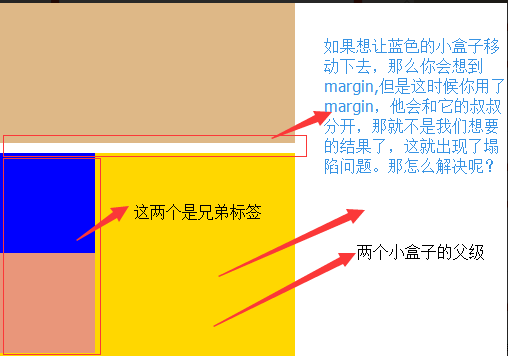
解决方法
解决方法

        这两种会改变结构

            1.加上padding

            2.加上border

        不改变结构

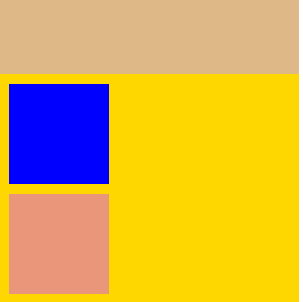
            3.overflow:hidden
 1 <!DOCTYPE html>

 2 <html lang="en">

 3 <head>

 4     <meta charset="UTF-8">

 5     <title>Title</title>

 6     <style>

 7         body{

 8             margin: 0;

 9         }

10         .outer{

11             background-color: gold;

12             width: 300px;

13             height: 300px;

14             /*第一种解决方法:但是改变了结构padding: 10px;*/

15             /*第二种方法:加个border*/ /*border: 1px solid;*/

16            /*第三种方法*/

17             overflow: hidden;

18         }

19         .box1{

20             width: 100px;

21             height: 100px;

22             background-color: blue;

23              /*如果父级标签什么都没有,那么就会找叔叔的*/

24             margin-top:10px;

25

26         }

27         .box2{

28             width: 100px;

29             height: 100px;

30             background-color: darksalmon;

31             /*如果这样的话就合适呢,对着就下去了*/

32             margin-top: 10px;

33         }

34

35     </style>

36 </head>

37 <body>

38 <div style="background-color: burlywood; width:300px; height

39 :300px"></div>

40 <div class="outer">

41     <div class="box1"></div>

42     <div class="box2"></div>

43 </div>

44 </body>

45 </html>
示例
处理后的结果如图:
溢出问题
 1 <!DOCTYPE html>

 2 <html lang="en">

 3 <head>

 4     <meta charset="UTF-8">

 5     <title>css属性操作</title>

 6     <style>

 7         .c1{

 8             border: 1px solid;

 9             background-color: blueviolet;

10             width: 100%;

11             height:200px;

12             /*text-align: center;*/

13             /*设置两端对齐*/

14             text-align: justify;

15             line-height: 200px;

16             /*如果你写的多了,会溢出来*/

17             /*第一种方法:overflow: hidden;*/

18             overflow: scroll;

19         }

20         .btn{

21             width: 45px;

22             height: 70px;

23             background-color: gray;

24              /*设置透明度*/

25             opacity: 0.4;

26             text-align: center;

27             line-height: 70px;

28             /*行高和高度对应*/

29

30         }

31     </style>

32 </head>

33 <body>

34 <div class="c1">啦啦啦啦啦绿绿绿

35     绿绿绿绿 绿绿绿绿绿绿 绿绿绿绿绿绿绿

36     啦啦啦啦啦 绿绿绿绿绿绿绿绿绿绿绿绿绿

37     绿绿绿绿绿 绿绿绿绿绿绿绿绿绿绿绿绿

38     绿绿绿 绿绿绿绿绿绿绿绿 绿绿绿绿绿

39     绿绿绿绿 绿绿绿绿绿绿 绿绿lllllllllllllllllllllll

40     绿绿绿绿绿</div>

41 <div class="btn"> < </div>

42 </body>

43 </html>
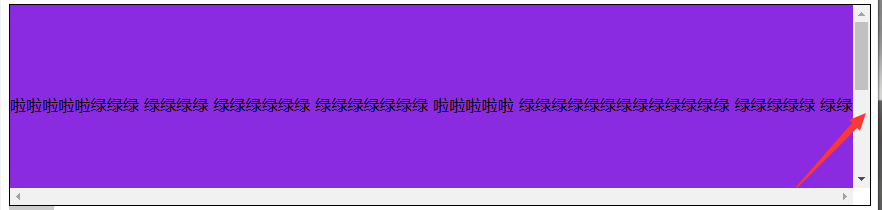
溢出例子

解决溢出的方法
解决溢出的方法

        overflow:auto;

     overflow: hidden;

        overflow:scoll; #加上滚动条
七、清除浮动
clear语法:
clear:none | left | right | both
1.clear:left 清除的是左边的浮动
2.clear:both :保证左右两边都没有浮动
注意:
排序的时候是一个标签一个标签的排
如果上一个是浮动的,就紧贴个上一个
如果上一个不是浮动的,就和上一个保持垂直不变
八、float父级的塌陷问题
float它不是完全脱离,它是半脱离的。像是文字环绕的就是用float实现的。float是不覆盖文字的
半脱离的,吧文字给挤过去了。
1 <!DOCTYPE html>

 2 <html lang="en">

 3 <head>

 4     <meta charset="UTF-8">

 5     <title>Title</title>

 6     <style>

 7         .c1{

 8             width: 100px;

 9             height: 60px;

10             background-color: blue;

11             float: left;

12         }

13         .c2{

14             width: 200px;

15             height: 30px;

16             background-color: aqua;

17             float: left;

18         }

19          .c3{

20             width: 200px;

21             height: 100px;

22             background-color: crimson;

23              float: left;

24         }

25

26     </style>

27 </head>

28 <body>

29 <div class="c1"></div>

30 <div class="c2"></div>

31 <div class="c3"></div>

32

33 <div class="content">

34     content

35 </div>

36 </body>

37 </html>
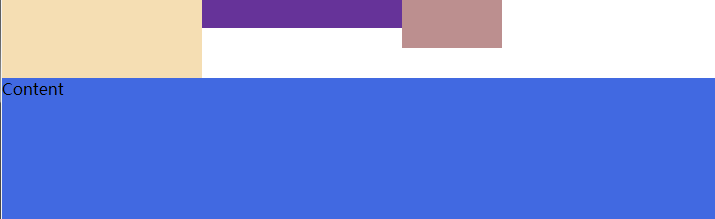
float塌陷
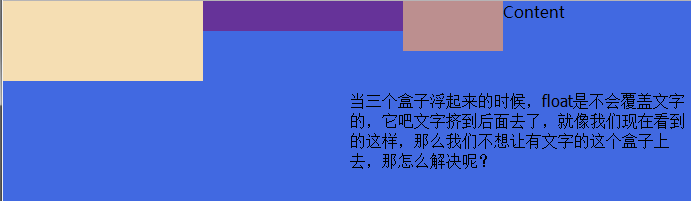
解决方案
解决方案

    1.<div style='clear:both'></div>

    也可以不加div

    2.用after

    .header:after{

        content:""; #内容为空

        display:block; #块级标签

        clear:both; #清楚浮动的功能

    }

    约定的名字:clearfix

    .clearfix:after{

        content:""; #内容为空

        display:block; #块级标签

        clear:both; #清楚浮动的功能(可以做到一个自动切换的功能)

    }
解决问题以后的
<!DOCTYPE html>

<html lang="en">

<head>

    <meta charset="UTF-8">

    <title>Title</title>

    <style>

        *{

            margin: 0;

            padding: 0;

        }

        .header{

            /*height: 30px;*/

        }

        .box1{

            width: 200px;

            height: 80px;

            background-color: wheat;

            float: left;

        }

         .box2{

            width: 200px;

            height: 30px;

            background-color: rebeccapurple;

             float: left;

        }

          .box3{

            width: 100px;

            height: 50px;

            background-color: rosybrown;

              float: left;

        }

        .content{

            width: 100%;

            height: 200px;

            background-color: royalblue;

        }

        .clearfix:after{

            content: "";

            display: block;

            clear: both;

        }

    </style>

</head>

<body>

<div class="header clearfix">

    <div class="box1"></div>

    <div class="box2"></div>

    <div class="box3"></div>

</div>

<div class="content">

    Content

</div>

</body>

</html>
九、position(定位)属性
position的四种属性
1.static:默认位置
2.fixed:完全脱离文档流,固定定位(以可视窗口为参照物)
3.relative:相对定位(参照的是自己本身的位置),没有脱离文档流,没有顶上去,会保持自己的位置不动。可以使用top left 进行定位
4.absolute:绝对定位:脱离了文档流(参照的是按已定位的父级标签定位,如果找不到会按body的去找)
注意:将定位标签设置为absolute,将他的父级标签设置为定位标签 (relative)
field举例(做一个返回顶部的样式。不管你拉不拉滚动条,他都会固定位置不变给它加一个)
1 <!DOCTYPE html>

 2 <html lang="en">

 3 <head>

 4     <meta charset="UTF-8">

 5     <title>固定位置</title>

 6

 7     <style>

 8         .c1{

 9             background-color: limegreen;

10             width:100%;

11             height: 1000px;

12         }

13         .returntop{

14             width: 100px;

15             height: 40px;

16             background-color: gray;

17             /*透明度*/

18             /*opacity: 0.4;*/

19             color: white;

20             text-align: center;

21             line-height: 40px;

22             position: fixed;

23             bottom:50px;

24             right: 20px;

25         }

26     </style>

27 </head>

28 <body>

29 <div class="c1"></div>

30 <div class="returntop">返回顶部>></div>

31

32

33 </body>

34 </html>
固定位置
相对位置,绝对位置例子
 1 ===============

 2 一开始父级没有定位、

 3 <!DOCTYPE html>

 4 <html lang="en">

 5 <head>

 6     <meta charset="UTF-8">

 7     <title>绝对定位</title>

 8     <style>

 9         *{

10             margin: 0;

11         }

12         .box1 ,.box2,.box3{

13             width: 200px;

14             height: 200px;

15         }

16         .box1{

17             background-color: blueviolet;  position: relative;

18

19         }

20         .box2{

21             background-color: darksalmon;

22             position: relative;

23             /*position: absolute;*/

24             left: 200px;

25             /*right: 200px;*/

26             top: 200px;

27         }

28         .box3{

29             background-color: lime;

30         }

31     </style>

32 </head>

33 <body>

34 <div class="box1"></div>

35 <div class="box2"></div>

36 <div class="box3"></div>

37 </body>

38 </html>
一开始父级标签没有定位
1 <!--父级有了定位-->

 2 <!--================-->

 3 <!DOCTYPE html>

 4 <html lang="en">

 5 <head>

 6     <meta charset="UTF-8">

 7     <title>绝对定位</title>

 8     <style>

 9         .father{

10             position: relative;

11         }

12         *{

13             margin: 0;

14         }

15         .box1 ,.box2,.box3{

16             width: 200px;

17             height: 200px;

18         }

19         .box1{

20             background-color: blueviolet;  position: relative;

21

22         }

23         .box2{

24             background-color: darksalmon;

25             /*position: relative;*/

26             position: absolute;

27             left: 200px;

28             /*right: 200px;*/

29             top: 200px;

30         }

31         .box3{

32             background-color: lime;

33             position: absolute;

34         }

35     </style>

36 </head>

37 <body>

38 <div class="box1"></div>

39 <div class="father">

40     <div class="box2"></div>

41 </div>

42 <div class="box3"></div>

43

44

45 </body>

46 </html>
父级标签有了定位
十、float和position的区别
float:半脱离文档流

position:全脱离文档流
前端之CSS:属性操作2的更多相关文章
- 前端基础-CSS属性操作
前端基础-CSS属性操作 css text 文本颜色:color 颜色属性被用来设置文字的颜色. 颜色是通过CSS最经常的指定: 十六进制值 - 如: #FF0000 一个RGB值 - 如: RGB( ...
- 前端基础:CSS属性操作
CSS属性操作 1.文本 文本颜色:color,颜色属性被用来设置文字的颜色,颜色是通过CSS经常指定的,其格式有: 1.十六进制:#FF0000: 2.RGB值:RGB(255,0,0): 3.颜色 ...
- Python web前端 03 CSS属性
Python web前端 03 CSS属性 一.文字.文本属性 1.文字属性 font-family #字体类型浏览器默认的字体是微软雅黑,字体中有多个字体的时候,如果前面的字体没有就使用后面的字体 ...
- CSS属性操作/下
CSS属性操作/下 1.伪类 anchor伪类 跟<a>/</a>有关:专用于控制链接的显示效果 a:link(没有接触过的链接),用于定义了链接的常规状态. a:hover( ...
- CSS属性操作
CSS属性操作 1 属性选择器 Elenment(元素) E[att] 匹配所有具有att属性的E元素,不考虑它的值.(注意:E在此处可以省略)(推荐使用) 例如:[po]{ font-size: 5 ...
- CSS属性操作一
CSS属性操作 一.CSS text 1.文本颜色:color 颜色属性被用来设置文字的颜色.颜色是通过CSS最经常的指定: • 十六进制值 - 如: #FF0000 • 一个RGB值 - 如: RG ...
- 前端 ----jQuery的属性操作
04-jQuery的属性操作 jquery的属性操作模块分为四个部分:html属性操作,dom属性操作,类样式操作和值操作 html属性操作:是对html文档中的属性进行读取,设置和移除操作.比如 ...
- 前端jQuery之属性操作
属性操作主要分为四个部分:html属性操作,dom属性操作,类样式操作和值操作 HTML属性操作:属性的读取,设置,以及移除,如attr().removeAttr() DOM属性操作:属性的读取,设置 ...
- 前端开发--css属性书写顺序
css属性顺序是css良好编码风格的一部分,有助于提高代码可读性,便于发现代码问题,有利于团队合作.(依次排后) example { /*显示属性*/ display: ; visibility: ; ...
- 前端学习 -- Css -- 属性选择器
属性选择器:根据元素的属性选择指定元素 语法:[属性名] 选取含有指定属性的元素 [属性名="属性值"]:选取属性值等于指定值的元素 [属性名^="属性值"]: ...
随机推荐
- Linux_进程管理&计划任务
目录 目录 top打开Linux系统任务管理控制台 ps进程查询指令 kill进程关闭指令 一个小实验 一次性计划任务 周期性计划任务 top打开Linux系统任务管理控制台 快捷键: P M k q ...
- delphi 每英寸相素点取值偏差
在所有资料中,每英寸相素点之比一般是这两个值,即:0.0393700788 25.399999961392 但是在GDI编程中,却遇到LOGPIXELSX LOGPIXELSY 在取值为96DPI ...
- 03Java面试题-------------中科软
1.String是最基本的数据类型吗?String和StringBuffer的区别? 不是.Java中的基本数据类型只有8个:byte,short,int,long,float,double,char ...
- awk结合数组统计
1.统计用户登录类型 #!/bin/bashdeclare -A shells (定义关联数组shells)while read ll (读取/etc/passwd,ll为变量) dotype= ...
- 【Qt开发】【Linux开发】Qt程序在嵌入式设备(arm) 上运行,鼠标擦除界面的解决方案
笔者最近想在arm开发板上,开发一个应用程序,经过网上查询发现qt作为跨平台开发软件很不错,于是便选择了qt开发,笔者的qt版本是4.8.6的.由于arm的主频太低,在arm上进行开发编译,效率会大大 ...
- jenkins自动化测试Email Extension邮件模板 及可用参数TEST_COUNTS ,FAILED_TESTS详细说明
先列出模板内容: <!DOCTYPE html><html> <head> <meta charset="UTF-8"> <t ...
- selenium学习-对当前浏览器窗口截屏
方法:get_screenshot_as_file(filename) # coding=UTF-8 #16.对当前浏览器窗口截屏 import sys reload(sys) sys.setdefa ...
- postfix无法启动问题
open /etc/postfix/main.cf comment out inet_interfaces: all add inet_protocol: ipv4
- strtoul()要优于atoi()函数---C语言
strtoul():将字符串转为长整型整数 atoi():将字符串转为整型整数 在32位STM32中,int是32位的,如果字符串是“3123456789”,大于0x7fff fff,用atoi()函 ...
- OI那些事——AFO
\(OI\)那些事--\(AFO\) 世界上从此少了一个\(Oier\)也不会有人知道,也许只有某个人在某年某月某日翻到了Eternal 风度的博客才会发现:哇,这哥们怎么\(Noip\)就退役了 两 ...