
cucumber+selenium
工程结构
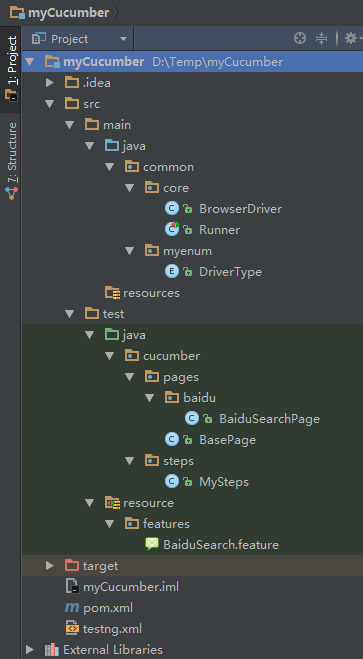
pom
<?xml version="1.0" encoding="UTF-8"?>

<project xmlns="http://maven.apache.org/POM/4.0.0"

         xmlns:xsi="http://www.w3.org/2001/XMLSchema-instance"

         xsi:schemaLocation="http://maven.apache.org/POM/4.0.0 http://maven.apache.org/xsd/maven-4.0.0.xsd">

    <modelVersion>4.0.0</modelVersion>

    <groupId>com.test</groupId>

    <artifactId>mycucumber</artifactId>

    <version>1.0-SNAPSHOT</version>

    <properties>

        <project.build.sourceEncoding>UTF-8</project.build.sourceEncoding>

    </properties>

    <repositories>

        <repository>

            <!-- Maven 自带的中央仓库使用的Id为central 如果其他的仓库声明也是用该Id

            就会覆盖中央仓库的配置 -->

            <id>mvnrepository</id>

            <name>mvnrepository</name>

            <url>http://www.mvnrepository.com/</url>

            <layout>default</layout>

            <releases>

                <enabled>true</enabled>

            </releases>

            <snapshots>

                <enabled>false</enabled>

            </snapshots>

        </repository>

    </repositories>

    <dependencies>

        <dependency>

            <groupId>io.cucumber</groupId>

            <artifactId>cucumber-core</artifactId>

            <version>4.2.3</version>

        </dependency>

        <dependency>

            <groupId>io.cucumber</groupId>

            <artifactId>cucumber-testng</artifactId>

            <version>4.2.3</version>

        </dependency>

        <!-- 加入reportNG依赖,代替testNG测试报告 -->

        <dependency>

            <groupId>org.uncommons</groupId>

            <artifactId>reportng</artifactId>

            <version>1.1.4</version>

            <scope>test</scope>

            <exclusions>

                <exclusion>

                    <groupId>io.cucmber</groupId>

                    <artifactId>cucmber-testng</artifactId>

                </exclusion>

            </exclusions>

        </dependency>

        <!-- 加入selenium做webUI测试,选用selenium2 -->

        <dependency>

            <groupId>org.seleniumhq.selenium</groupId>

            <artifactId>selenium-java</artifactId>

            <version>2.53.1</version>

        </dependency>

        <!-- 依赖Guice -->

        <dependency>

            <groupId>com.google.inject</groupId>

            <artifactId>guice</artifactId>

            <version>3.0</version>

            <scope>test</scope>

        </dependency>

        <dependency>

            <groupId>org.projectlombok</groupId>

            <artifactId>lombok</artifactId>

            <optional>true</optional>

        </dependency>

    </dependencies>

    <build>

        <plugins>

            <!-- 加入maven-surefire-plugin插件用来使用maven执行用例,

            其中suiteXmlFile配置的就是testNG用例执行文件的地址 -->

            <plugin>

                <groupId>org.apache.maven.plugins</groupId>

                <artifactId>maven-surefire-plugin</artifactId>

                <version>2.21.0</version>

                <configuration>

                    <suiteXmlFiles>

                        <suiteXmlFile>src/test/java/cucumber/testng/testng.xml</suiteXmlFile>

                    </suiteXmlFiles>

                    <properties>

                        <property>

                            <name>usedefaultlisteners</name>

                            <value>false</value>

                        </property>

                        <property>

                            <name>listener</name>

                            <value>org.uncommons.reportng.HTMLReporter</value>

                        </property>

                    </properties>

                    <!-- 加入编码设置,否则生成的报告会中文乱码 -->

                    <argLine>-Dfile.encoding=UTF-8</argLine>

                </configuration>

            </plugin>

            <!-- 添加插件,添加ReportNg的监听器,修改最后的TestNg的报告 -->

        </plugins>

    </build>

</project>
testng
<?xml version="1.0" encoding="UTF-8"?>

<!DOCTYPE suite SYSTEM "http://testng.org/testng-1.0.dtd">

<suite name="Baidu Search Demo Suite" verbose="0" parallel="tests" thread-count="2">

    <test name="Web Scenarios Test" enabled="true" thread-count="2">

        <!--<groups>-->

            <!--<run>-->

                <!--<include name="@BaiduSearch"/>-->

            <!--</run>-->

        <!--</groups>-->

        <classes>

            <class name="common.core.Runner"/>

        </classes>

    </test>

</suite>
common.core
package common.core;

import common.myenum.DriverType;

import org.openqa.selenium.WebDriver;

import org.openqa.selenium.chrome.ChromeDriver;

import org.openqa.selenium.firefox.FirefoxDriver;

import org.openqa.selenium.ie.InternetExplorerDriver;

public class BrowserDriver {

    private WebDriver driver;

    public WebDriver getDriver(String browerName) {

        switch (DriverType.getDriverType(browerName)) {

            case chrome:

                System.setProperty("webdriver.chrome.bin", "D:\\Program Files\\ChromeGAE\\Chrome\\chrome.exe");

                System.setProperty("webdriver.chrome.driver", "D:\\Program Files\\ChromeGAE\\Chrome\\chromedriver.exe");

                driver = new ChromeDriver();

                break;

            case firefox:

                driver = new FirefoxDriver();

                break;

            case ie:

                driver = new InternetExplorerDriver();

                break;

        }

        return driver;

    }

}
package common.core;

import cucumber.api.CucumberOptions;

import cucumber.api.testng.AbstractTestNGCucumberTests;

@CucumberOptions(

        features = "src/test/resource/features/BaiduSearch.feature",

        format = {

                "pretty",

                "html:target/site/cucumber-pretty",

                "rerun:target/site/return.text",

                "json:target/cucumberjson.json"

        },

        tags = {"@BaiduSearch"},

        glue = {"cucumber.steps"}

)

public class Runner extends AbstractTestNGCucumberTests {

}
common.myenum
package common.myenum;

public enum DriverType {

    chrome, ie, firefox;

    public static DriverType getDriverType(String driverType) {

        return valueOf(driverType.toLowerCase());

    }

}
cucumber.pages
package cucumber.pages.baidu;

import cucumber.pages.BasePage;

import org.openqa.selenium.WebDriver;

import org.openqa.selenium.WebElement;

import org.openqa.selenium.support.FindBy;

public class BaiduSearchPage extends BasePage {

    //private final String searchBtn = "xpath=//input[@id='su']";

    //private final String searchText = "xpath=//input[@id='kw']";

    @FindBy(xpath = "//*[@id=\"kw\"]")

    private WebElement searchText;

    @FindBy(xpath = "//*[@id=\"su\"]")

    private WebElement searchBtn;

    @FindBy(xpath = "//div[@id=\"1\"]/h3/a")

    private WebElement firstLink;

    @FindBy(xpath = "//div[@id=\"2\"]/h3/a")

    private WebElement secondLink;

    public BaiduSearchPage(WebDriver driver) {

        super(driver);

    }

    public void searchByText(String text) throws InterruptedException {

        this.sendString(searchText, text);

        this.click(searchBtn);

        Thread.sleep(3000);

    }

    public boolean verifyFirstLinkTitle(String title) throws InterruptedException {

        System.out.println(this.driver.getWindowHandle());

        return this.firstLink.getText().contains(title);

    }

    public boolean verifySecondLinkTitle(String title) {

        return this.secondLink.getText().contains(title);

    }

}
package cucumber.pages;

import org.openqa.selenium.WebDriver;

import org.openqa.selenium.WebElement;

import org.openqa.selenium.support.ui.ExpectedConditions;

import org.openqa.selenium.support.ui.WebDriverWait;

public class BasePage {

    protected WebDriver driver;

    private final int timeOut = 10;//等待时间

    public BasePage(WebDriver driver) {

        this.driver = driver;

        this.driver.manage().window().maximize();

    }

    protected void sendString(WebElement element, String s) {

        new WebDriverWait(driver, timeOut).until(ExpectedConditions.visibilityOf(element));// 加入显式等待

        element.clear();// 清空输入框

        element.sendKeys(s);// 输入数据

    }

    protected void click(WebElement element) {

        new WebDriverWait(driver, timeOut).until(ExpectedConditions.visibilityOf(element));

        element.click();

    }

}
cucumber.steps
package cucumber.steps;

import common.core.BrowserDriver;

import cucumber.api.java.en.Given;

import cucumber.api.java.en.Then;

import cucumber.api.java.en.When;

import cucumber.pages.baidu.BaiduSearchPage;

import org.openqa.selenium.WebDriver;

import org.openqa.selenium.support.PageFactory;

public class MySteps {

    private WebDriver driver;

    private BaiduSearchPage baiduSearchPage;

    public MySteps() {

    }

    @Given("^I start \"([^\"]*)\"$")

    public void startBrowser(String browerName) throws Throwable {

        this.driver = new BrowserDriver().getDriver(browerName);

        this.baiduSearchPage = new BaiduSearchPage(this.driver);

    }

    @When("^I search \"([^\"]*)\" at baidu$")

    public void searchText(String text) throws Throwable {

        baiduSearchPage = PageFactory.initElements(driver, BaiduSearchPage.class);

        this.driver.get("http://www.baidu.com");

        this.baiduSearchPage.searchByText(text);

    }

    @Then("^The result should have \"([^\"]*)\" in the title of the \"([^\"]*)\" link$")

    public void theResultShouldHaveInTheTitleOfTheLink(String text, String ordinal) throws Throwable {

        if (ordinal.equalsIgnoreCase("first")) {

            assert this.baiduSearchPage.verifyFirstLinkTitle(text);

        } else if (ordinal.equalsIgnoreCase("second")) {

            assert this.baiduSearchPage.verifySecondLinkTitle(text);

        } else {

            throw new Exception("Error:ordinal is not available.");

        }

        this.driver.close();

    }

}
resource.features
Feature:  Baidu Search

  @BaiduSearch

  Scenario Outline: Search text

    Given I start "<browser>"

    When I search "<text>" at baidu

    Then The result should have "<title>" in the title of the "<ordinal>" link

    Examples:

      | browser | text | title | ordinal |

      | chrome  | xxx1 | CSDN  | first   |

      | chrome  | xxx2 | CSDN  | second  |
cucumber+selenium的更多相关文章
- 行为驱动:Cucumber + Selenium + Java(一) - 环境搭建
1.1 什么是行为驱动测试 说起行为驱动,相信很多人听说过. 行为驱动开发-BDD(Behavior Driven Development)是一个诞生于2003年的软件开发理念.其关键思想在于通过与利 ...
- 行为驱动:Cucumber + Selenium + Java(五) - 使用maven来实现cucumber测试和报告
在上一篇中,我们介绍了Selenium + Cucumber + Java框架下的测试用例参数化/数据驱动,这一篇我们来使用maven去搭建cucumber框架以及实现测试报告. 5.1 为什么要用m ...
- 行为驱动:Cucumber + Selenium + Java(四) - 实现测试用例的参数化
在上一篇中,我们介绍了Selenium + Cucumber + Java框架下的使用Tags对测试用例分组的实现方法,这一篇我们用数据表格来实现测试用例参数化. 4.1 什么是用例参数化 实际测试中 ...
- 行为驱动:Cucumber + Selenium + Java(三) - 使用标签实现测试分组
在上一篇中,我们写出了Selenium + Cucumber + Java环境下的第一个BDD自动化测试用例,这一篇我们说说怎么用标签对用例进行分组. 3.1 Cucumber标签 实际工作中,我们的 ...
- 行为驱动:Cucumber + Selenium + Java(二) - 第一个测试
在上一篇中,我们搭建好了Selenium + Cucumber + Java的自动化测试环境,这一篇我们就赶紧开始编写我们的第一个BDD测试用例. 2.1 创建features 我们在新建的java项 ...
- 行为驱动:Cucumber + Selenium + Java(一) - Cucumber简单操作实例
场景(Scenarios) 场景是Cucumber结构的核心之一.每个场景都以关键字“Scenario:”(或本地化一)开头,后面是可选的场景标题.每个Feature可以有一个或多个场景,每个场景由一 ...
- cucumber & selenium & bddtest
目录 1.Cucumber介绍 refer link: 2.使用步骤 2.1 引入依赖 2.2新建test.future文件 2.3在resource目录下创建cucumber.bat,执行bat,c ...
- 使用cucumber & selenium实现一个简单的bddtest
1.Cucumber介绍 + feature : read requirement +scenario : testing situation,including + Given/ + when/ + ...
- 行为驱动:Cucumber + Selenium + Java(二) - extentreports 测试报告+jenkins持续集成
1.extentreports 测试报告 pom文件 <dependency> <groupId>com.vimalselvam</groupId> <art ...
随机推荐
- Hyperledger Fabric(4)链码ChainCode
智能合约,是一个抽象的概念,智能合约的历史可以追溯到 1990s 年代.它是由尼克萨博(Nick Szabo)提出的理念,几乎与互联网同龄. 我们这里所说的智能合约只狭义的指区块链中.它能够部署和运行 ...
- dedecms织梦副栏目名称和链接调用
https://blog.csdn.net/qq_41805834/article/details/79552859
- busybox介绍
BusyBox 是一个集成了一百多个最常用linux命令和工具的软件.BusyBox 将许多具有共性的小版本的UNIX工具结合到一个单一的可执行文件.这样的集合可以替代大部分常用工具比如的GNU fi ...
- Python之路:进程、线程
目录 一.进程与线程区别 1.1 什么是线程 1.2 什么是进程 1.3 进程与线程的区别 二.Python GIL全局解释器锁 三.线程 3.1 threading模块 3.2 Join & ...
- ubuntu下usb抓包方法步骤--usbmon
开发或者调试USB设备相关的工具或者驱动,一个调试的利器就是usbmon抓包. 在ubuntu下使用步骤如下: 1 运行命令 sudo mount -t debugfs none /sys/ke ...
- ES添加文档 踩坑之 —— The number of object passed must be even but was [1]
读取文件,获取json格式的数据doc, 然后使用 bulkRequestBuilder.add(client.prepareIndex(index, type, id).setSource(doc) ...
- TCP/IP超详细总结
网络的基础知识 一.协议 1.简介: 在计算机网络与信息通信领域里,人们经常提及“协议”一词.互联网中常用的具有代表性的协议有IP.TCP.HTTP等.而LAN(局域网)中常用的协议有IPX/SPX” ...
- nginx upstream和轮询策略
upstream nginx upstream语法配置 upstream 后面跟服务名 其中包含了,域名,端口 以及权重,可以看到他既支持http协议也支持socket协议的类型,backup意味着该 ...
- 【LuoguP4557】[JSOI2018]战争
题目链接 题意 给你两个点集. q次询问 , 每次把其中一个点集往一个方向移动 , 问两个点集的凸包还有没有交. Sol 闵可夫斯基和板子题. 把问题做如下转换: 我们本来两个凸包相交是相当于是对于移 ...
- Python的语句---钱中平
python中的两种语句:1.if条件控制语句 格式: if: a = int(input("请输入第一个数:"))b = int(input("请输入第二个数:&quo ...