
cucumber+selenium
工程结构
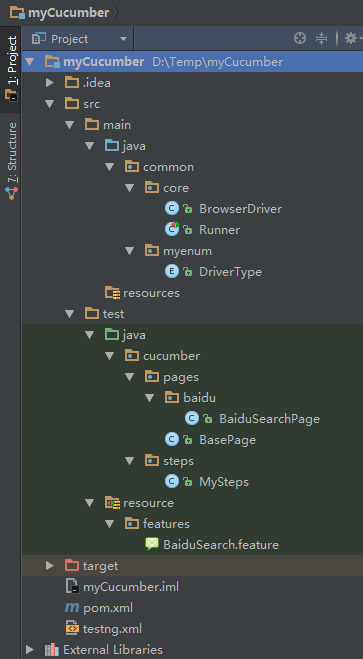
pom
<?xml version="1.0" encoding="UTF-8"?>

<project xmlns="http://maven.apache.org/POM/4.0.0"

         xmlns:xsi="http://www.w3.org/2001/XMLSchema-instance"

         xsi:schemaLocation="http://maven.apache.org/POM/4.0.0 http://maven.apache.org/xsd/maven-4.0.0.xsd">

    <modelVersion>4.0.0</modelVersion>

    <groupId>com.test</groupId>

    <artifactId>mycucumber</artifactId>

    <version>1.0-SNAPSHOT</version>

    <properties>

        <project.build.sourceEncoding>UTF-8</project.build.sourceEncoding>

    </properties>

    <repositories>

        <repository>

            <!-- Maven 自带的中央仓库使用的Id为central 如果其他的仓库声明也是用该Id

            就会覆盖中央仓库的配置 -->

            <id>mvnrepository</id>

            <name>mvnrepository</name>

            <url>http://www.mvnrepository.com/</url>

            <layout>default</layout>

            <releases>

                <enabled>true</enabled>

            </releases>

            <snapshots>

                <enabled>false</enabled>

            </snapshots>

        </repository>

    </repositories>

    <dependencies>

        <dependency>

            <groupId>io.cucumber</groupId>

            <artifactId>cucumber-core</artifactId>

            <version>4.2.3</version>

        </dependency>

        <dependency>

            <groupId>io.cucumber</groupId>

            <artifactId>cucumber-testng</artifactId>

            <version>4.2.3</version>

        </dependency>

        <!-- 加入reportNG依赖,代替testNG测试报告 -->

        <dependency>

            <groupId>org.uncommons</groupId>

            <artifactId>reportng</artifactId>

            <version>1.1.4</version>

            <scope>test</scope>

            <exclusions>

                <exclusion>

                    <groupId>io.cucmber</groupId>

                    <artifactId>cucmber-testng</artifactId>

                </exclusion>

            </exclusions>

        </dependency>

        <!-- 加入selenium做webUI测试,选用selenium2 -->

        <dependency>

            <groupId>org.seleniumhq.selenium</groupId>

            <artifactId>selenium-java</artifactId>

            <version>2.53.1</version>

        </dependency>

        <!-- 依赖Guice -->

        <dependency>

            <groupId>com.google.inject</groupId>

            <artifactId>guice</artifactId>

            <version>3.0</version>

            <scope>test</scope>

        </dependency>

        <dependency>

            <groupId>org.projectlombok</groupId>

            <artifactId>lombok</artifactId>

            <optional>true</optional>

        </dependency>

    </dependencies>

    <build>

        <plugins>

            <!-- 加入maven-surefire-plugin插件用来使用maven执行用例,

            其中suiteXmlFile配置的就是testNG用例执行文件的地址 -->

            <plugin>

                <groupId>org.apache.maven.plugins</groupId>

                <artifactId>maven-surefire-plugin</artifactId>

                <version>2.21.0</version>

                <configuration>

                    <suiteXmlFiles>

                        <suiteXmlFile>src/test/java/cucumber/testng/testng.xml</suiteXmlFile>

                    </suiteXmlFiles>

                    <properties>

                        <property>

                            <name>usedefaultlisteners</name>

                            <value>false</value>

                        </property>

                        <property>

                            <name>listener</name>

                            <value>org.uncommons.reportng.HTMLReporter</value>

                        </property>

                    </properties>

                    <!-- 加入编码设置,否则生成的报告会中文乱码 -->

                    <argLine>-Dfile.encoding=UTF-8</argLine>

                </configuration>

            </plugin>

            <!-- 添加插件,添加ReportNg的监听器,修改最后的TestNg的报告 -->

        </plugins>

    </build>

</project>
testng
<?xml version="1.0" encoding="UTF-8"?>

<!DOCTYPE suite SYSTEM "http://testng.org/testng-1.0.dtd">

<suite name="Baidu Search Demo Suite" verbose="0" parallel="tests" thread-count="2">

    <test name="Web Scenarios Test" enabled="true" thread-count="2">

        <!--<groups>-->

            <!--<run>-->

                <!--<include name="@BaiduSearch"/>-->

            <!--</run>-->

        <!--</groups>-->

        <classes>

            <class name="common.core.Runner"/>

        </classes>

    </test>

</suite>
common.core
package common.core;

import common.myenum.DriverType;

import org.openqa.selenium.WebDriver;

import org.openqa.selenium.chrome.ChromeDriver;

import org.openqa.selenium.firefox.FirefoxDriver;

import org.openqa.selenium.ie.InternetExplorerDriver;

public class BrowserDriver {

    private WebDriver driver;

    public WebDriver getDriver(String browerName) {

        switch (DriverType.getDriverType(browerName)) {

            case chrome:

                System.setProperty("webdriver.chrome.bin", "D:\\Program Files\\ChromeGAE\\Chrome\\chrome.exe");

                System.setProperty("webdriver.chrome.driver", "D:\\Program Files\\ChromeGAE\\Chrome\\chromedriver.exe");

                driver = new ChromeDriver();

                break;

            case firefox:

                driver = new FirefoxDriver();

                break;

            case ie:

                driver = new InternetExplorerDriver();

                break;

        }

        return driver;

    }

}
package common.core;

import cucumber.api.CucumberOptions;

import cucumber.api.testng.AbstractTestNGCucumberTests;

@CucumberOptions(

        features = "src/test/resource/features/BaiduSearch.feature",

        format = {

                "pretty",

                "html:target/site/cucumber-pretty",

                "rerun:target/site/return.text",

                "json:target/cucumberjson.json"

        },

        tags = {"@BaiduSearch"},

        glue = {"cucumber.steps"}

)

public class Runner extends AbstractTestNGCucumberTests {

}
common.myenum
package common.myenum;

public enum DriverType {

    chrome, ie, firefox;

    public static DriverType getDriverType(String driverType) {

        return valueOf(driverType.toLowerCase());

    }

}
cucumber.pages
package cucumber.pages.baidu;

import cucumber.pages.BasePage;

import org.openqa.selenium.WebDriver;

import org.openqa.selenium.WebElement;

import org.openqa.selenium.support.FindBy;

public class BaiduSearchPage extends BasePage {

    //private final String searchBtn = "xpath=//input[@id='su']";

    //private final String searchText = "xpath=//input[@id='kw']";

    @FindBy(xpath = "//*[@id=\"kw\"]")

    private WebElement searchText;

    @FindBy(xpath = "//*[@id=\"su\"]")

    private WebElement searchBtn;

    @FindBy(xpath = "//div[@id=\"1\"]/h3/a")

    private WebElement firstLink;

    @FindBy(xpath = "//div[@id=\"2\"]/h3/a")

    private WebElement secondLink;

    public BaiduSearchPage(WebDriver driver) {

        super(driver);

    }

    public void searchByText(String text) throws InterruptedException {

        this.sendString(searchText, text);

        this.click(searchBtn);

        Thread.sleep(3000);

    }

    public boolean verifyFirstLinkTitle(String title) throws InterruptedException {

        System.out.println(this.driver.getWindowHandle());

        return this.firstLink.getText().contains(title);

    }

    public boolean verifySecondLinkTitle(String title) {

        return this.secondLink.getText().contains(title);

    }

}
package cucumber.pages;

import org.openqa.selenium.WebDriver;

import org.openqa.selenium.WebElement;

import org.openqa.selenium.support.ui.ExpectedConditions;

import org.openqa.selenium.support.ui.WebDriverWait;

public class BasePage {

    protected WebDriver driver;

    private final int timeOut = 10;//等待时间

    public BasePage(WebDriver driver) {

        this.driver = driver;

        this.driver.manage().window().maximize();

    }

    protected void sendString(WebElement element, String s) {

        new WebDriverWait(driver, timeOut).until(ExpectedConditions.visibilityOf(element));// 加入显式等待

        element.clear();// 清空输入框

        element.sendKeys(s);// 输入数据

    }

    protected void click(WebElement element) {

        new WebDriverWait(driver, timeOut).until(ExpectedConditions.visibilityOf(element));

        element.click();

    }

}
cucumber.steps
package cucumber.steps;

import common.core.BrowserDriver;

import cucumber.api.java.en.Given;

import cucumber.api.java.en.Then;

import cucumber.api.java.en.When;

import cucumber.pages.baidu.BaiduSearchPage;

import org.openqa.selenium.WebDriver;

import org.openqa.selenium.support.PageFactory;

public class MySteps {

    private WebDriver driver;

    private BaiduSearchPage baiduSearchPage;

    public MySteps() {

    }

    @Given("^I start \"([^\"]*)\"$")

    public void startBrowser(String browerName) throws Throwable {

        this.driver = new BrowserDriver().getDriver(browerName);

        this.baiduSearchPage = new BaiduSearchPage(this.driver);

    }

    @When("^I search \"([^\"]*)\" at baidu$")

    public void searchText(String text) throws Throwable {

        baiduSearchPage = PageFactory.initElements(driver, BaiduSearchPage.class);

        this.driver.get("http://www.baidu.com");

        this.baiduSearchPage.searchByText(text);

    }

    @Then("^The result should have \"([^\"]*)\" in the title of the \"([^\"]*)\" link$")

    public void theResultShouldHaveInTheTitleOfTheLink(String text, String ordinal) throws Throwable {

        if (ordinal.equalsIgnoreCase("first")) {

            assert this.baiduSearchPage.verifyFirstLinkTitle(text);

        } else if (ordinal.equalsIgnoreCase("second")) {

            assert this.baiduSearchPage.verifySecondLinkTitle(text);

        } else {

            throw new Exception("Error:ordinal is not available.");

        }

        this.driver.close();

    }

}
resource.features
Feature:  Baidu Search

  @BaiduSearch

  Scenario Outline: Search text

    Given I start "<browser>"

    When I search "<text>" at baidu

    Then The result should have "<title>" in the title of the "<ordinal>" link

    Examples:

      | browser | text | title | ordinal |

      | chrome  | xxx1 | CSDN  | first   |

      | chrome  | xxx2 | CSDN  | second  |
cucumber+selenium的更多相关文章
- 行为驱动:Cucumber + Selenium + Java(一) - 环境搭建
1.1 什么是行为驱动测试 说起行为驱动,相信很多人听说过. 行为驱动开发-BDD(Behavior Driven Development)是一个诞生于2003年的软件开发理念.其关键思想在于通过与利 ...
- 行为驱动:Cucumber + Selenium + Java(五) - 使用maven来实现cucumber测试和报告
在上一篇中,我们介绍了Selenium + Cucumber + Java框架下的测试用例参数化/数据驱动,这一篇我们来使用maven去搭建cucumber框架以及实现测试报告. 5.1 为什么要用m ...
- 行为驱动:Cucumber + Selenium + Java(四) - 实现测试用例的参数化
在上一篇中,我们介绍了Selenium + Cucumber + Java框架下的使用Tags对测试用例分组的实现方法,这一篇我们用数据表格来实现测试用例参数化. 4.1 什么是用例参数化 实际测试中 ...
- 行为驱动:Cucumber + Selenium + Java(三) - 使用标签实现测试分组
在上一篇中,我们写出了Selenium + Cucumber + Java环境下的第一个BDD自动化测试用例,这一篇我们说说怎么用标签对用例进行分组. 3.1 Cucumber标签 实际工作中,我们的 ...
- 行为驱动:Cucumber + Selenium + Java(二) - 第一个测试
在上一篇中,我们搭建好了Selenium + Cucumber + Java的自动化测试环境,这一篇我们就赶紧开始编写我们的第一个BDD测试用例. 2.1 创建features 我们在新建的java项 ...
- 行为驱动:Cucumber + Selenium + Java(一) - Cucumber简单操作实例
场景(Scenarios) 场景是Cucumber结构的核心之一.每个场景都以关键字“Scenario:”(或本地化一)开头,后面是可选的场景标题.每个Feature可以有一个或多个场景,每个场景由一 ...
- cucumber & selenium & bddtest
目录 1.Cucumber介绍 refer link: 2.使用步骤 2.1 引入依赖 2.2新建test.future文件 2.3在resource目录下创建cucumber.bat,执行bat,c ...
- 使用cucumber & selenium实现一个简单的bddtest
1.Cucumber介绍 + feature : read requirement +scenario : testing situation,including + Given/ + when/ + ...
- 行为驱动:Cucumber + Selenium + Java(二) - extentreports 测试报告+jenkins持续集成
1.extentreports 测试报告 pom文件 <dependency> <groupId>com.vimalselvam</groupId> <art ...
随机推荐
- kernel module insmod错误
kernel模块配置 Enable loadable module support 打开可加载模块支持,如果打开它则必须通过"make modules_install"把内核模块安 ...
- ERA-interim
数据介绍整理中... https://software.ecmwf.int/wiki/display/UER/Time-integrated+surface+solar+radiation+downw ...
- 微软内部封杀 Slack
就在 Slack 在股市上亮相之际,有一家大公司却不允许员工在日常工作中使用这款企业协作和聊天应用软件. 微软已禁止其 100000 多名员工使用免费版 Slack.IT 外媒 GeekWire 报道 ...
- 一跃进入C大门
相对跳转:b,bl 绝对跳转:直接给PC指针赋值
- TP5 中的redis 队列
首先我们看一下自己的TP5的框架中的 TP5\vendor\topthink ,这个文件中有没有think-queue这个文件夹,如果没有请安装, 安装这个是要用到Composer的如果没有安装co ...
- flask实现文件的上传
文件上传过程中,一定要进行文件大小的校验,如果用户上传文件过大,比如:100GB,所以一直在处理这个请求,别的请求进来就无法处理了,所以要限制上传文件的大小. flask中文件上传大小的校验 flas ...
- php多个数组组合算法 火车头免登录发布接口代码备忘
火车头发布产品的时候,有颜色.尺码.性别等等产品属性,需要进行不重复的组合,变成不重复的数组 <?php function comb($a){ $a = array_filter($a); $o ...
- magento简化url多级分类去掉父目录
在Magento模板开发中,有时候需要将多级分类的url简化,Magento的URL默认是显示多级分类的http://afish.cnblogs.com/分类1/分类2/分类3现在需要简化为:分类2的 ...
- visudo修改编辑器vim
update-alternatives --config editor
- tp6中使用微信支付sdk
一.下载微信支付sdk 二.将lib文件夹下的文件复制到目录:extend->WxPay 将example文件夹下的WxPay.Config.php文件也复制到:extend->WxPay ...