
20160513--js 弹出窗口带有iframe控件 备忘
需要引用JQuery。
/*!

 * 主  题:《页面弹出窗口》

 * 说  明:用于页面弹出的窗口。

 * 功能描述:

 * 1、生成弹出窗口,窗口内包括iframe控件;

 * 2、窗口弹出时,生成背景遮罩;

 */

 function OpenPageBox() {

    new PageBox("标题栏", "test.htm?“, 1000, 435).Open();

}

//title:窗口标题

//url:链接地址

//width:窗口宽度

//height:窗口高度

//new PageBox(title, url, width, height)

function PageBox(title, url, width, height) {

    this.Init(title, url, width, height);

}

//初始化参数

PageBox.prototype.Init = function (title, url, width, height) {

    this.Title = title != null && title != "" ? title : "";

    this.url = url;

    this.Width = width;

    this.Height = height;

    this.WinId = new Date().getTime() + "_" + Math.floor(Math.random() * 1000 + 1);

}

//创建窗口,并打开

PageBox.prototype.Open = function () {

    //判断是否已经存在窗口

    var WinBox = $("#PageBox[winId='" + this.WinId + "']");

    if (WinBox.size() > 0) return;

    PageBox.Close();

    //生成窗口

    this.Mask();

    this.BuildFrame();

    this.BuildIFrame();

}

//生成窗体外框,包括标题

PageBox.prototype.BuildFrame=function()

{

    //屏幕的宽高

    var hg=document.documentElement.clientHeight;

    var wd = document.documentElement.clientWidth;

    $("#body").append("<div id=\"PageBox\" type=\"PageBox\" winId=\"" + this.WinId + "\"></div>");

    var PageBox=$("#PageBox");

    this.WinBox=PageBox;

    //设置窗口的位置

    PageBox.css("top", $(window).scrollTop()+100);

    PageBox.css("left",(wd-this.Width)/2);

    PageBox.css("position", "absolute").css("z-index", "10002");

    PageBox.css("width",this.Width);

    PageBox.css("height", this.Height);

    this.BuildTitle();

}

//生成标题栏

PageBox.prototype.BuildTitle = function () {

    var box = this.WinBox;

    box.append("<div id=\"PageBoxTitle\"></div>");

    var titbox = $("#PageBoxTitle");

    var tm = "<div id=\"PageBoxTitleTxt\">" + this.Title + "</div>";

    tm += "<div id=\"PageBoxClose\">X</div>";

    titbox.append(tm);

    $("#PageBoxClose").click(function () {

        PageBox.Close();

    });

    box.width(this.WinBox.width());

    box.height(this.WinBox.height());

}

//生成页面frame区域

PageBox.prototype.BuildIFrame = function () {

    var box = this.WinBox;

    var width = box.width();

    //标题栏的高度

    var titHg = $("#PageBoxTitle").height();

    var height = this.WinBox.height() - titHg;

    var frame = "";

    frame += "<iframe src=\"" + this.url + "\" name=\"PageBoxIframe\" id=\"PageBoxIframe\" ";

    frame += "width=\"" + width + "\"";

    frame += "height=\"" + height + "\"";

    frame += "marginwidth=\"0\"  marginheight=\"0\" align=\"top\" scrolling=\"auto\"";

    frame += "frameborder=\"0\" >";

    frame += "</iframe>";

    box.append(frame);

}

//关闭窗口

PageBox.Close = function () {

    $("#PageBox").remove();

    $("#screenMask").fadeOut("slow");

}

//生成遮罩层

PageBox.prototype.Mask=function(){

    var mask = $("#screenMask");

    mask.remove();

    mask = null

    delete mask;

    var html = "<div id=\"screenMask\"/>";

    $("body").append(html);

    mask = $("#screenMask");

    mask.css("position", "absolute");

    mask.css("z-index", "10000");

    //屏幕的宽高

    var hg = $("body").height();

    var wd = document.documentElement.clientWidth;

    //设置遮罩的宽高

    mask.css("width", wd);

    mask.css("height", hg);

    mask.css("top", 0);

    mask.css("left", 0);

    var alpha = 60;

    mask.css("background-color", "#ECF7FF");

    mask.css("filter", "Alpha(Opacity=" + alpha + ")");

    mask.css("display", "block");

    mask.css("-moz-opacity", alpha / 100);

    mask.css("opacity", alpha / 100);

    mask.fadeIn("slow");

}
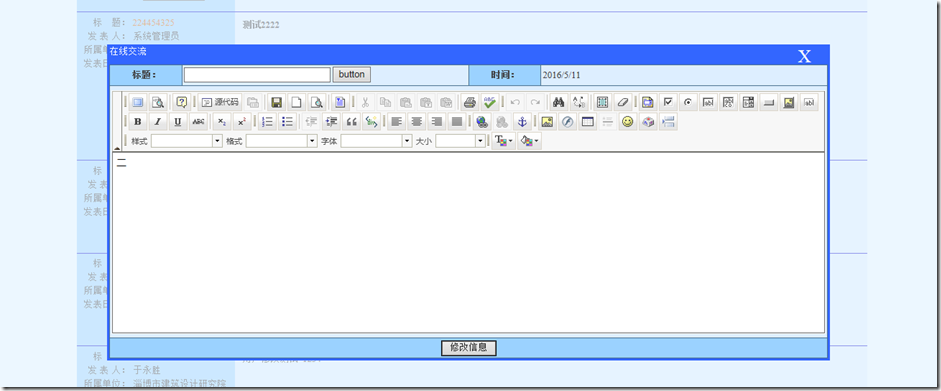
效果预览:
其样式可使用外部样式表控制:
/*窗口标题栏*/

#PageBoxTitle{

    background:#3366FF;

    height:25px;

    color:#fff;

}

/*窗口标题栏字体*/

#PageBoxTitleTxt{

    float:left;

    width:300px;

}

/*窗口样式*/

#PageBox{

    border: 3px solid #3366FF;

}

/*窗口关闭样式*/

#PageBoxClose{

     width:25px;

     height:25px;

     font-size:25px;

     margin-right:20px;

     float:right;

     text-align:center;

     cursor:default;

}
20160513--js 弹出窗口带有iframe控件 备忘的更多相关文章
- winfrom弹出窗口用timer控件控制倒计时20秒后关闭
功能描述: 因为在程序退出时需要确认是否是误操作,所以加了密码输入的子窗体,子窗体在20秒内会自动关闭 代码如下: private int count; private void Form2_Load ...
- JS弹出窗口代码大全(详细整理)
1.弹启一个全屏窗口 复制代码代码如下: <html> <body http://www.jb51.net','脚本之家','fullscreen');">; < ...
- js弹出窗口的学习和使用
Thickbox Thickbox是基于Jquery的,因此使用Thickbox需要下面四个文件: Thickbox.js----Thickbox主文件 CSS文件----Thickbox.css 最 ...
- js弹出窗口总结6种弹窗方法
注: //关闭,父窗口弹出对话框,子窗口直接关闭 this.Response.Write("<script language=javascript>window.close(); ...
- 最完美解决方案:js弹出窗口关闭当前页面,而不弹出提示框
该功能主要用于业务系统中的登录操作,登录后弹出全屏的业务系统主界面,而不需要工具栏.地址栏.菜单等功能. 之前针对不同浏览器找了无数种方法,包括网上能查到的所有方法,弹出的结果都不理想.结果有的IE6 ...
- js 弹出窗口 防止拦截,突破阻止,保存后打开
<script language="javascript"> function orderprint() { var formUrl = "savedata_ ...
- [Flex] IFrame系列 —— IFrame嵌入html后Alert弹出窗口被IFrame遮挡问题
<?xml version="1.0" encoding="utf-8"?> <!--- - - - - - - - - - - - - - ...
- 编写在浏览器中不弹出警告的ActiveX控件
我们在编写ActiveX控件时,如果用在浏览器中,经常都会弹出现在运行的脚本不安全的提示, 如果给客户使用,将会带来极大不便.按照MSDN的介绍通常有两种一种是实现IObjectSafe接口,一种是通 ...
- 使用DIV弹出框的代码示例,备忘。
1.思路 使用DIV模拟弹出框,一共用三个div: divWindow: 原来的界面内容区域 divLogin:要弹出的内容区域 divBackground:给弹出内容区域做个遮罩的区域. 点击 “请 ...
随机推荐
- hdu6468 zyb的面试 (思维)
题目传送门 题意: 将1~n个数按字典序排序后,求第k个数 思路: 代码: #include<stdio.h> #include<iostream> #include<a ...
- C#设计模式:备忘录模式(Memento Pattern)
一,C#设计模式:备忘录模式(Memento Pattern) 1.发起人角色(Originator):记录当前时刻的内部状态,负责创建和恢复备忘录数据.负责创建一个备忘录Memento,用以记录当前 ...
- 02.AutoMapper 之扁平化(Flattening)
https://www.jianshu.com/p/65099590c930 扁平化(Flattening) 对象映射器的常见用法是将一个复杂对象模型扁平化为一个简单模型.例如您有一个以下复杂模型 ...
- css实现缩放自适应网页--手机web
一. 允许网页宽度自动调整: "自适应网页设计"到底是怎么做到的? 其实并不难. 首先,在网页代码的头部,加入一行viewport元标签. <meta name=" ...
- C语言双向链表讲解
一.双向链表的概念 双向链表基于单链表.单链表是单向的,有一个头结点,一个尾结点,要访问任何结点,都必须知道头结点,不能逆着进行.而双链表添加了一个指针域,通过两个指针域,分别指向结点的前结点和后结点 ...
- 前端校招知识体系之HTML5
啥是HTML5?官方说HTML5 是下一代的 HTML... 本文主要介绍HTML5三个方面的知识,继续往下看看吧. 语义化标签 canvas&svg 响应式meta 一.语义化标签 语义化标 ...
- #include <xxx.h>和#include "xxx.h"的区别
<>代表在系统目录下查找该头文件(系统定义头文件) ""代表在用户目录下查找该头文件(自定义头文件)
- OneDrive网盘资源下载教程
目录 1. 本文地址 2. 下载流程 3. 打赏&支持 1. 本文地址 博客园:https://www.cnblogs.com/coco56/p/11161530.html CSDN:http ...
- makeinfo - 翻译 Texinfo 文档
SYNOPSIS 总览 makeinfo [OPTION]... TEXINFO-FILE... DESCRIPTION 描述 将 Texinfo 源文档翻译为各种其他格式,默认是可以用 Emacs ...
- Linux日常之以当前时间命名文件
要求:将当前硬件信息的内容统一以一个文件的形式写入目录date中,且该文件是以“cpu_当前时间.txt”方式命名: 实现该要求主要理解三方面: (1) 显示当前硬件信息的命令:lscpu (2 ...