
初用protobuf-csharp-port
下面这个用法是参照protobuf-csharp-port的官方wiki,参见:
https://code.google.com/p/protobuf-csharp-port/wiki/GettingStarted
官方原文里的用法与代码已经有些不匹配了,需要做一些小的修改。
准备工作
1.首先从https://code.google.com/p/protobuf-csharp-port这个上面把源代码下载下来,我这个版本是protobuf-csharp-port-2.4.1.521-source(r523)
2.下载后是个压缩包,解压目录,如下图:

点开“Build”文件夹:

看见那个BuildAll.bat,点击它会自动执行编译操作,编译完成后将出现build_output和build_temp两个输出文件夹,其中build_output如下图所示例:

生成的Google.ProtocolBuffers.dll将被用作外部链接的DLL使用,这里有个问题,能不能不用做DLL使用呢?因为众所周知的AOT,JIT问题。
- ProtoGen.exe - 源代码生成器
- ProtoMunge.exe - tool to remove sensitive data from binary messages
- ProtoDump.exe - tool to dump a binary message as text
- ProtoBench.exe - tool to run performance benchmarks on binary messages
- protoc.exe - 编译脚本工具
例子: an address book
这块将会用一个程序来演示如何使用这个protocBuffer
The .proto file
看看下面这个proto文件,分析下这个文件都描述了什么信息。此文件在 你下载的源代码文件夹的protos/tutorial。
package tutorial;

import "google/protobuf/csharp_options.proto";

option (google.protobuf.csharp_file_options).namespace = "Google.ProtocolBuffers.Examples.AddressBook";

option (google.protobuf.csharp_file_options).umbrella_classname = "AddressBookProtos";

option optimize_for = SPEED;

message Person {

  required string name = ;

  required int32 id = ;        // Unique ID number for this person.

  optional string email = ;

  enum PhoneType {

    MOBILE = ;

    HOME = ;

    WORK = ;

  }

  message PhoneNumber {

    required string number = ;

    optional PhoneType type =  [default = HOME];

  }

  repeated PhoneNumber phone = ;

}

// Our address book file is just one of these.

message AddressBook {

  repeated Person person = ;

}
这个文件和谷歌官方提供的基本一致,但做了一些调整:
- 为了简单期间去掉了输出Java代码的选项。这里如果需要就把Java选项加上即可,和C#没有冲突。
- 导入项代码: google/protobuf/csharp_options.proto ,目的是使用C#扩展。
- 指定了两项C#特有的选项:
- The name of the class containing the descriptor representing the overall .proto file. (This is called the "umbrella" class.) The generated source file is also named after this class. In this case we're using AddressBookProtos.
- 生成类的命名空间。这里用的是: Google.ProtocolBuffers.Examples.AddressBook.
- 指定了一个优化的选项。会多生成一些代码,但能提高运行效率。
- 还有其他的选项,可以看看code.google上的description里的说明。
生成源代码
转到你的源代码目录,执行以下操作
protogen ..\..\protos\tutorial\addressbook.proto

         ..\..\protos\google\protobuf\csharp_options.proto

         ..\..\protos\google\protobuf\descriptor.proto

         --proto_path=..\..\protos
看看build_temp文件夹,如下图所示:
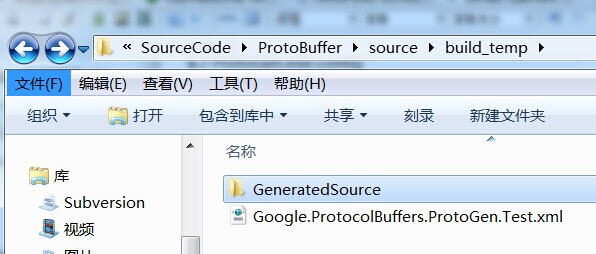
在GeneratedSource文件夹中,就能找到AddressBookProtos.cs文件了:

这个AddressBookProtos.cs文件是我们后边需要用到的,其他文件只是Google用到的,我们不用去管,或者能把这些代码作为源代码引入主工程?不得而知。
注意事项:
- Make sure that you do not use a non-ASCII encoding with your text file. The protoc.exe compiler will complain with the following message:
tutorial/addressbook.proto::: Expected top-level statement (e.g. "message").
The best way to fix this is with Visual Studio. Open the proto file and select "File" -> "Save as...". From the save dialog click the down arrow next to the save button and select "Save with Encoding". Select the "US-ASCII" codepage (near the bottom) and click save.
2. It's often easiest keep all your proto files in a single directory tree. This allows to omit the --proto_path option by running protoc.exe from the top of the this directory tree. Always keep the 'google/protobuf/*.proto' files available so that you can import them to specify options, or use the options through protogen.
3.Unlike a programming language like C# it is usually expected that your proto file will specify numerous messages, not one. Name your proto files based on the namespace, not the message. Create proto files only as often as you would create a new namespace to organize those classes.
使用生成的源代码
为了使用上面生成的cs文件,我们需要执行下面这些操作:
- 创建一个builder,后边将用它来构造Person这个消息体
- 设置builder的属性
- 使用这个builder来创建 Person 消息体
- 将 Person 写入内存流
- 使用上面写好数据的内存流,再创建一个新的Person消息体
- 创建一个AddressBook的builder ,然后把这个刚创建的Person消息体赋值给它
- 使用AddressBook的builder 和上面的数据流创建 AddressBook
将这个AddressBook里的Person和第三步创建的Person进行比较,看数据是否一致。
    static void Sample()

    {

        byte[] bytes;

        //Create a builder to start building a message

        Person.Builder newContact = Person.CreateBuilder();

        //Set the primitive properties

        newContact.SetId()

                  .SetName("Foo")

                  .SetEmail("foo@bar");

        //Now add an item to a list (repeating) field

        newContact.AddPhone(

            //Create the child message inline

            Person.Types.PhoneNumber.CreateBuilder().SetNumber("555-1212").Build()

            );

        //Now build the final message:

        Person person = newContact.Build();

        //The builder is no longer valid (at least not now, scheduled for 2.4):

        newContact = null;

        using(MemoryStream stream = new MemoryStream())

        {

            //Save the person to a stream

            person.WriteTo(stream);

            bytes = stream.ToArray();

        }

        //Create another builder, merge the byte[], and build the message:

        Person copy = Person.CreateBuilder().MergeFrom(bytes).Build();

        //A more streamlined approach might look like this:

        bytes = AddressBook.CreateBuilder().AddPerson(copy).Build().ToByteArray();

        //And read the address book back again

        AddressBook restored = AddressBook.CreateBuilder().MergeFrom(bytes).Build();

        //The message performs a deep-comparison on equality:

        if(restored.PersonCount !=  || !person.Equals(restored.PersonList[]))

            throw new ApplicationException("There is a bad person in here!");

    }
用VS2013,创建一个WinForm程序,拖一个button上去,双击出事件,调用Sample函数即可,这样就通了。里面还有很多细节没说清楚,不过好歹有整块的东西了。那么后边的工作,需要分成几步来执行:
1.将上述流程分析清楚,有一个初步的架构图和UML图。
2.C#客户端的二进制内存流,显示需要铺设一个二进制的内存流管理器,是否需要参考之前的那个二进制管理器呢。
3.如何集成到Unity里,首先要写一份关于Unity的代码规范和内存处理规范。如果集成到Unity里,那么势必两头都要写代码,加油啊。
4.如何搭建一个Java服务器,支持解析数据,并发送和接收。
5.连接Java服务器通信。客户端和服务器两头看看能否顺利工作。
初用protobuf-csharp-port的更多相关文章
- 在UnrealEngine4中使用Google Protobuf
转自:https://blog.csdn.net/or_7r_ccl/article/details/54986393 在UnrealEngine4中使用Google Protobuf ...
- Google Protocol Buffers 快速入门(带生成C#源码的方法)
Google Protocol Buffers是google出品的一个协议生成工具,特点就是跨平台,效率高,速度快,对我们自己的程序定义和使用私有协议很有帮助. Protocol Buffers入门: ...
- [原创]首次SDN比赛的记录-部分
SDN大赛环境搭建和第一大题实现 由于物理设备不足的原因,故用虚拟机实现Floodlight控制器,openvswitch(以下简称:OVS)和mininet各种要用到的SDN环境的搭建.下面将给出它 ...
- MAC 下 STF 的环境搭建和运行
STF --WEB 端批量移动设备管理控制工具 安装各种包 (首先安装Macport,因为后面需要用到port:http://www.ccvita.com/434.html) linux的基本包安装, ...
- protobuf初体验
概念介绍 Protocol buffers 是google公司的与语言无关.与平台无关的.可扩张的为序列化话结构数据,就像xml一样,办事更加的小巧.快速.简单.Protocol buffers 目前 ...
- protobuf(Protocol Buffers)java初体验
因为项目须要所以简单的研究了下protobuf.我也是參照网上的博客,所以大部分内容我也就不反复造轮子了.首先protobuf介绍点击这里,使用介绍点击这里,使用demo看这里. 我个人的第一个样例也 ...
- google protobuf初体验
最近在读别人代码的时候发现一个的东西,名字叫protobuf, 感觉挺好用的,写在这里,留个记录.那么什么是protobuf 呢?假如您在网上搜索,应该会得到类似这样的文字介绍: Google Pro ...
- 使用CSharp编写Google Protobuf插件
什么是 Google Protocol Buffer? Google Protocol Buffer( 简称 Protobuf) 是 Google 公司内部的混合语言数据标准,目前已经正在使用的有超过 ...
- ASP.NET Core 3.0 上的gRPC服务模板初体验(多图)
早就听说ASP.NET Core 3.0中引入了gRPC的服务模板,正好趁着家里电脑刚做了新系统,然后装了VS2019的功夫来体验一把.同时记录体验的过程.如果你也想按照本文的步骤体验的话,那你得先安 ...
- RPC框架基础概念理解以及使用初体验
RPC:Remote Procedure Call(远程服务调用) RPC是做什么的 通过RPC框架机器A某个进程可以通过网络调用机器B上的进程方法,就像在本地上调用一样. RPC可以基于HTTP或者 ...
随机推荐
- C#显示SQL语句格式
--SQL SERVER生成测试环境: Create database Test; go USE [Test] GO if OBJECT_ID('Tab','U') is not null drop ...
- Keil代码中for循环延时问题
- 构建 ARM Linux 4.7.3 嵌入式开发环境 —— BusyBox 构建 RootFS
上一篇我们已经成功将 ARM Linux 4.7.3 的内核利用 U-BOOT 引导了起来.但是细心的你会发现,引导到后面,系统无法启动,出现内核恐慌 (Kernel Panic). 原因是找不到文件 ...
- Unity3d Asset Server启动问题
周末机房停电后asset server无法启动,点击启动出现“asset server could not start server”. 几经周折,找到原来是用户问题,解决办法如下: 1.命令行输入“ ...
- AStar算法的学习
摘自:http://www.cnblogs.com/hxsyl/p/3994730.html A*算法的java实现 import java.util.ArrayList; import java.u ...
- 网络错误定位案例 ICMP host *** unreachable - admin prohibited
1. 环境 一台物理服务器 9.115.251.86,上面创建两个虚机,每个虚机两个网卡: vm1:eth0 - 9.*.*.232 eth1:10.0.0.14 vm2: eth0 - 9.8.*. ...
- 学习OpenStack之 (1):安装devstack
1. 系统准备 ubuntu 12.04 server 虚拟机. 2G内存. 依次运行以下命令来安装git: sudo apt-get update sudo apt-get upgrade sudo ...
- var 0bj = []声明报错的小问题
闲来无事,找了份javascript的习题来作作,结果第一题的答案就难住了,附原题: Javascript中, 以下哪条语句一定会产生运行错误? 答案( B ) A.var _变量=N ...
- Stanford机器学习笔记-2.Logistic Regression
Content: 2 Logistic Regression. 2.1 Classification. 2.2 Hypothesis representation. 2.2.1 Interpretin ...
- NOIP2004合并果子
题目描述 在一个果园里,多多已经将所有的果子打了下来,而且按果子的不同种类分成了不同的堆.多多决定把所有的果子合成一堆. 每一次合并,多多可以把两堆果子合并到一起,消耗的体力等于两堆果子的重量之和.可 ...