
git push上传代码到gitlab上,报错401或403
之前部署的gitlab代码托管平台,采用ssh方式连接gitlab,在客户机上产生公钥上传到gitlab的SSH-Keys里,则git clone下载和git push上传都没问题,这种方式很安全。
后来应开发同事要求采用http方式连接gitlab,那么首先将project工程的“Visibility Level”改为“Public”公开模式,并且要保证gitlab的http端口已对客户机开放。
后面发现了一个问题:
http方式连接gitlab后,git clone下载没有问题,但是git push上传有报错:
error: The requested URL returned error: 401 Unauthorized while accessing http://git.xqshijie.net:8081/weixin/weixin.git/info/refs
fatal: HTTP request failed
或者
The requested URL returned error: 403 Forbidden while accessing
实例如下:
假设git的url为http://git.wangshibo.net
[root@test-huanqiu ~]# mkdir /root/git
[root@test-huanqiu ~]# cd /root/git
[root@test-huanqiu git]# git init .
[root@test-huanqiu git]# git clone http://git.wangshibo.net:8081/weixin/weixin.git
Initialized empty Git repository in /root/git/weixin/.git/
remote: Counting objects: 10, done.
remote: Compressing objects: 100% (6/6), done.
remote: Total 10 (delta 0), reused 0 (delta 0)
Unpacking objects: 100% (10/10), done.
上面可以看出,已经能成功git clone下代码
[root@test-huanqiu git]# ll
total 4
drwxr-xr-x. 3 root root 4096 Nov 30 15:58 weixin
[root@test-huanqiu git]# cd weixin/
[root@test-huanqiu weixin]# ll
total 8
-rw-r--r--. 1 root root 15 Nov 30 15:58 heihei
-rw-r--r--. 1 root root 1 Nov 30 15:38 README.md
现在测试下git push
[root@test-huanqiu weixin]# git rm heihei
[root@test-huanqiu weixin]# touch test.file
[root@test-huanqiu weixin]# echo "123456" > test.file
[root@test-huanqiu weixin]# git add .
[root@test-huanqiu weixin]# git commit -m "this is a test"
[root@test-huanqiu weixin]# git push //或者git push -u origin master
error: The requested URL returned error: 401 Unauthorized while accessing http://git.wangshibo.net:8081/weixin/weixin.git/info/refs
fatal: HTTP request failed
解决办法:
在代码的.git/config文件内[remote "origin"]的url的gitlab域名前添加gitlab注册时的“用户名:密码@”
另外发现这个用户要在对应项目下的角色是Owner或Master才行,如果是Guest、Reporter、Developer,则如下操作后也是不行。
如下,gitlab的用户名是wangshibo,假设密码是HU@wew12378!h8
查看gitlab界面里的登陆用户名:
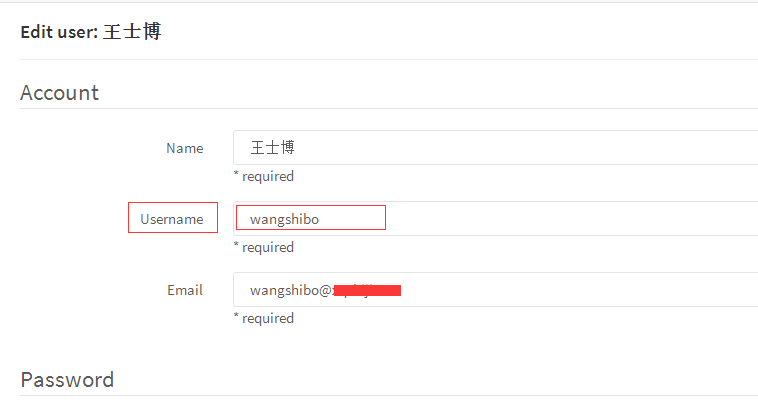
然后修改代码里的.git/config文件
[root@test-huanqiu weixin]# cd .git
[root@test-huanqiu .git]# cat config
[core]
repositoryformatversion = 0
filemode = true
bare = false
logallrefupdates = true
[remote "origin"]
fetch = +refs/heads/*:refs/remotes/origin/*
url = http://git.wangshibo.net:8081/weixin/weixin.git
[branch "master"]
remote = origin
merge = refs/heads/master
修改如下:
[root@test-huanqiu .git]# cat config
[core]
repositoryformatversion = 0
filemode = true
bare = false
logallrefupdates = true
[remote "origin"]
fetch = +refs/heads/*:refs/remotes/origin/*
url = http://wangshibo:HU@wew12378!h8@git.wangshibo.net:8081/weixin/weixin.git
[branch "master"]
remote = origin
merge = refs/heads/master
然后再次git push,发现可以正常提交了!
[root@test-huanqiu weixin]# git push
Counting objects: 4, done.
Delta compression using up to 8 threads.
Compressing objects: 100% (2/2), done.
Writing objects: 100% (3/3), 297 bytes, done.
Total 3 (delta 0), reused 0 (delta 0)
To http://wangshibo:HUIhui1987521@git.xqshijie.net:8081/weixin/weixin.git
8fcb559..6c97b56 master -> master
------------------------------------------------------------------------------------------------------------------------------------
可以创建一个用户名作为admin管理员,然后将这个用户名和密码添加到项目代码的.git/config里面,如上操作!
如果不是管理员,则至少对当前代码具有owner或master权限。
这样,在.git/config文件里添加这个用户名和密码权限,然后其他人在git push的时时候都使用这个文件进行覆盖。
其他人在首次git clone下载代码的时候,需要进行--global全局配置,然后就可以在gitweb控制台里追踪到每个操作者的提交记录了!
git push上传代码到gitlab上,报错401或403的更多相关文章
- git push上传代码到gitlab上,报错401/403(或需要输入用户名和密码)
之前部署的gitlab,采用ssh方式连接gitlab,在客户机上产生公钥上传到gitlab的SSH-Keys里,git clone下载和git push上传都没问题,这种方式很安全. 后来应开发同事 ...
- react-native 在Xcode上传到iTunes Connect里报错
在xcode里面点击“upload to app store”的时候,提示“the session's status is FAILED and the error description is 'C ...
- webstorm 上传代码到gitlab
1. 2. 3.push 4.填写上传url
- MAC使用pycharm上传代码到Github上
本人的电脑已经在GitHub中添加成功了SSH keys! 以下为在pycharm中上传代码到Github的步骤. Step1:打开pycharm,preferences---plugins(插件)选 ...
- 上传代码到github上
初始化 git init 添加远程仓库 git remote add origin[仓库名] 仓库地址 添加文件 git add . 本地提交 git commit -m 'message' 拉去远程 ...
- maven tomcat插件上传项目到tomcat服务器报错SEVERE: One or more listeners failed to start.
以前觉了maven依赖设置很简单,就是将手动导入jar包转化为自动下载导入 但发现的一个问题, 在使用maven插件tomcat打包上传工具时 tomcat-maven-plugin <buil ...
- 批量上传文件或者上传大文件时 gateWay报错DataBufferLimitException: Exceeded limit on max bytes to buffer : 262144
一.描述 最近在批量上传文件时网关出现了异常,后面发现上传大文件也会出现文件超过256发生异常,异常信息如下: org.springframework.core.io.buffer.DataBuffe ...
- springMVC:为MultipartFilte配置了上传文件解析器,报错或不能使用
一.问题描述为支持restful风格请求,并且应对可能上传文件的情况,需要在配置hiddenHttpMethodFilter过滤器之前配置MultipartFilter.目的是让MultipartFi ...
- Vue上传通过“服务端签名后直传”上传文件到阿里云 报错 400 Bad Request
我报错的原因是 formData.append('file', file) 放在签名前面了 解决办法 formData.append('file', file) 一定在最后 /** * 上传文件到 o ...
随机推荐
- 对Xcode菜单选项的详细探索(干货)
本文调研Xcode的版本是 7.1,基本是探索了菜单的每一个按钮.虽然从xcode4一直用到了xcode7,但是一般都只是用了一些基础的功能,说来也惭愧.在一次偶然的机遇突然发现了“显示调用层级”的选 ...
- UIButton的titleEdgeInsets属性和imageEdgeInsets属性实现图片文字按要求排列
button可以设置 titleEdgeInsets属性和 imageEdgeInsets属性来调整其image和label相对位置,具体参考http://stackoverflow.com/ques ...
- 利用Dreamweaver配置PHP服务器的站点
配置的步骤: 1.打开Dreamweaver的站点------->新建站点-------->点击保存 2.点击服务器------>保存 3.配置完成之后就可以看到在Dreamweav ...
- 基于ruby的watir自动化测试 笔记二
基于ruby的watir自动化测试 笔记一的补充版,新增加了些特殊的控件捕获方法.还在更新中.... attribute_value 获取当前控件的属性 Value = ie.link(:id=> ...
- 用户故事地图(User Story Mapping)之初体验
北京这几日的天儿真是好的出奇,白天风和日丽,晚上繁星漫天:在这样一个周六的下午,小编参加了一次北京敏捷社区(微信号:Agile1001)组织的活动:<用户故事地图User Story Mappi ...
- Asp.net MVC使用Filter解除Session, Cookie等依赖
本文,介绍了Filter在MVC请求的生命周期中的作用和角色,以及Filter的一些常用应用场景. 同时针对MVC中的对于Session,Cookie等的依赖,如何使用Filter解依赖. 如果大家有 ...
- Oracle systemstate dump介绍
当数据库出现严重的性能问题或者hang起的时候,那么我们非常需要通过systemstate dump来知道进程在做什么,在等待什么,谁是资源的持有者,谁阻塞了别人.在出现上述问题时,及时收集syste ...
- JavaScript(一)——简介(简单介绍)
1.JavaScript是个什么东西? 它是个脚本语言,需要有宿主文件,它的宿主文件是HTML文件. 2.它与Java什么关系? 没有什么直接的联系,Java是Sun公司(已被Oracle收购了),J ...
- 定义类Human,具有若干属性和功能;定义其子类Man、Woman; 在主类Test中分别创建子类、父类和上转型对象,并测试其特性。
package com.hanqi.test; public class Humen { private String speak; private String read; private Stri ...
- [整]SQL执行顺序
SQL的执行顺序: 第一步:FROM <left_table> <join_type> JOIN <right_table> ON <on_predicate ...